Summary: in this tutorial, you will learn how to use the DB2 COUNT() function to return the number of values in a set or the number of rows from a table.
Introduction to Db2 COUNT() function
The Db2 COUNT() function is an aggregate function that returns the number of values in a set or the number of rows in a table.
The following is the syntax of the COUNT() function:
COUNT( ALL | DISTINCT expression)
Code language: SQL (Structured Query Language) (sql)
The COUNT() function accepts a set of values which can be any built-in data type except for BLOB, CLOB, DBCLOB, and XML.
The COUNT(expression) is the same as COUNT(ALL expression) which returns the number of non-null values in a set, including duplicates.
The COUNT(DISTINCT expression) returns the number of distinct non-null values.
The COUNT(*) returns the number of rows in a set, including rows that contain NULL values.
The COUNT() returns a result of INT type. It never returns NULL.
If the number of values in a set exceeds the maximum value of the INT type, which is 2,147,483,647, you can use the COUNT_BIG() function instead.
The COUNT_BIG() behaves the same as the COUNT() function except for the type of return value that supports a larger range, i.e., BIGINT.
Db2 COUNT() function illustration
First, create a new table named count_demo that contains one integer column:
CREATE TABLE count_demo(c1 INT);
Code language: SQL (Structured Query Language) (sql)
Second, insert five rows into the count_demo table:
INSERT INTO count_demo(c1)
VALUES(1),(2),(3),(NULL),(3);
Code language: SQL (Structured Query Language) (sql)
Third, view the data from the count_demo table by using the following SELECT statement:
SELECT c1 FROM count_demo;
Code language: SQL (Structured Query Language) (sql)
Fourth, this statement uses the COUNT(*) function to return the number of rows from the count_demo table:
SELECT
    COUNT(*) row_count
FROM
    count_demo
Code language: SQL (Structured Query Language) (sql)
Here is the output:
ROW_COUNT
-----------
5
Code language: SQL (Structured Query Language) (sql)
Fifth, this statement uses the COUNT(DISTINCT expression) to get the number of non-null rows from the count_demo table:
SELECT
    COUNT(c1) result
FROM
    count_demo;
Code language: SQL (Structured Query Language) (sql)
The output is the following:
RESULT
-----------
4
Code language: SQL (Structured Query Language) (sql)
Sixth, this statement uses the COUNT(DISTINCT expression) to return distinct non-null values from the count_demo table:
SELECT
    COUNT(DISTINCT c1) result
FROM
    count_demo;
Code language: SQL (Structured Query Language) (sql)
The number of distinct non-null values in the count_demo table is as follows:
RESULT
-----------
3
Code language: SQL (Structured Query Language) (sql)
Db2 COUNT() examples
We’ll use the books table from the sample database to demonstrate the COUNT() function.

1) Using DB2 COUNT(*) function to return the number of rows from a table examples
This example uses the COUNT(*) function to find the number of books from the books table:
SELECT
    COUNT(*)
FROM
    books;
Code language: SQL (Structured Query Language) (sql)
Here is the output:
BOOK_COUNT
-----------
1091
Code language: SQL (Structured Query Language) (sql)
To get the number of books which have ISBN, you add a WHERE clause as the following:
SELECT
    COUNT(*) book_isbn
FROM
    books
WHERE
    isbn IS NOT NULL;
Code language: SQL (Structured Query Language) (sql)
Here is the result:
BOOK_ISBN
-----------
984
Code language: SQL (Structured Query Language) (sql)
2) Using DB2 COUNT() function with the GROUP BY clause example
The COUNT() function is often used with the GROUP BY clause to return the number of values for each group.
This statement uses the COUNT(expression) returns the number of books with ISBN for each publisher:
SELECT
    p.name publisher,
    COUNT(isbn) book_with_isbn
FROM
    books b
    INNER JOIN publishers p
        ON p.publisher_id = b.publisher_id
GROUP BY
    p.name
ORDER BY
    book_with_isbn DESC;
Code language: SQL (Structured Query Language) (sql)
This picture illustrates the partial output:
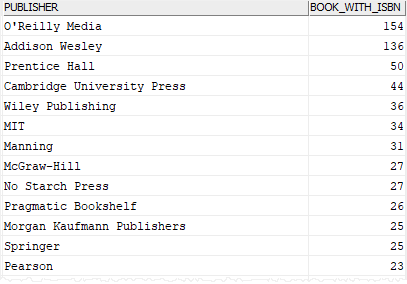
In this example, the GROUP BY clause groups books by publishers and the COUNT(ISBN) function returns the number of books with ISBN for every publisher.
3) Using DB2 COUNT() function with the HAVING clause example
The following statement finds the publishers that have more than 30 books, where all the books have ISBN:
SELECT
    p.name publisher,
    COUNT(isbn) book_with_isbn
FROM
    books b
    INNER JOIN publishers p
        ON p.publisher_id = b.publisher_id
GROUP BY
    p.name
HAVING
    COUNT(isbn) > 30
ORDER BY
    book_with_isbn DESC;
Code language: SQL (Structured Query Language) (sql)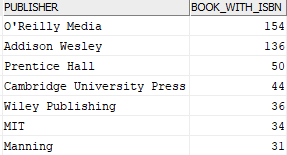
In this tutorial, you have learned how to use the Db2 COUNT() function to get the number of values in a set or the number of rows in a table.

