


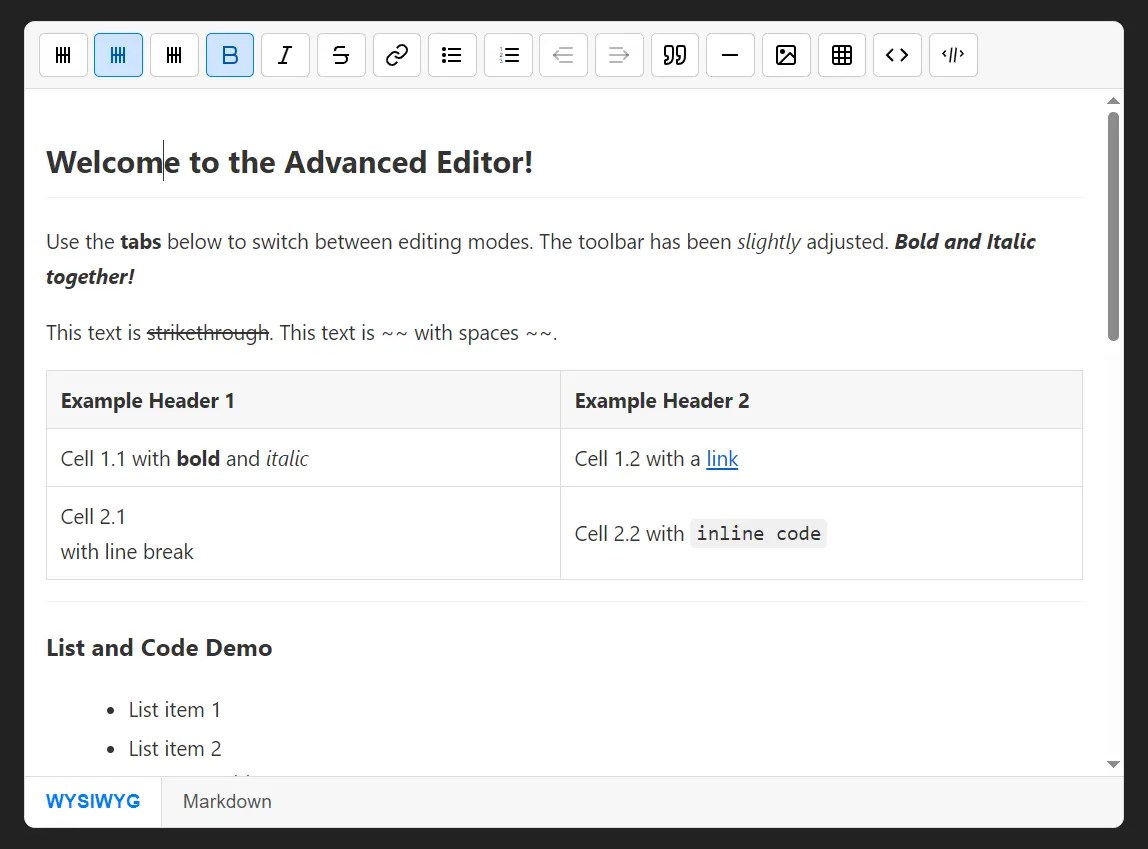
This is a lightweight, user-friendly, dual-mode (rich text & markdown) WYSIWYG editor built with vanilla JavaScript and the marked.js library.
Features:
- Dual editing modes with instant switching between WYSIWYG editor and raw Markdown text editor
- Formatting toolbar with headings, text styling, lists, links, tables, code blocks, and blockquotes
- Keyboard shortcuts for common actions including undo/redo and list indentation
- Table creation tool with interactive grid selector for quick table insertion
- Customizable configuration including toolbar buttons, initial content, and update callbacks
How to use it:
1. Load the needed Marked.js library and the Markdown WYSIWYG Editor’s files in the document.
<!-- Required -->
<script src="https://cdn.jsdelivr.net/npm/marked/marked.min.js"></script>
<!-- Markdown WYSIWYG Editor -->
<link rel="stylesheet" href="/dist/editor.css">
<script src="/dist/editor.js"></script>
2. Create an empty DIV element for the editor.
<div id="myEditor"></div>
3. Create a new instance of MarkdownWYSIWYG and pass the ID of your container element.
const editor = new MarkdownWYSIWYG('myEditor', {
  // options here
});
4. Available options to customize the editor.
- initialValue (string): Sets the starting Markdown content for the editor
- showToolbar (boolean): Controls toolbar visibility, defaults to true
- buttons (array): Customizes which toolbar buttons appear, uses default set if not specified
- onUpdate (function): Callback function triggered whenever content changes, receives current Markdown as parameter
- initialMode (string): Starting editing mode, either ‘wysiwyg’ or ‘markdown’
- tableGridMaxRows (number): Maximum rows in the table insertion grid selector, defaults to 10
- tableGridMaxCols (number): Maximum columns in the table insertion grid selector, defaults to 10
const editor = new MarkdownWYSIWYG('myEditor', {
  initialValue: '',
  showToolbar: true,
  buttons: [
    { id: 'h1', label: ICON_HEADING, title: 'Heading 1', type: 'block', mdPrefix: '# ', execCommand: 'formatBlock', value: 'H1' },
    { id: 'h2', label: ICON_HEADING, title: 'Heading 2', type: 'block', mdPrefix: '## ', execCommand: 'formatBlock', value: 'H2' },
    { id: 'h3', label: ICON_HEADING, title: 'Heading 3', type: 'block', mdPrefix: '### ', execCommand: 'formatBlock', value: 'H3' },
    { id: 'bold', label: ICON_BOLD, title: 'Bold', execCommand: 'bold', type: 'inline', mdPrefix: '**', mdSuffix: '**' },
    { id: 'italic', label: ICON_ITALIC, title: 'Italic', execCommand: 'italic', type: 'inline', mdPrefix: '*', mdSuffix: '*' },
    { id: 'strikethrough', label: ICON_STRIKETHROUGH, title: 'Strikethrough', execCommand: 'strikeThrough', type: 'inline', mdPrefix: '~~', mdSuffix: '~~' },
    { id: 'link', label: ICON_LINK, title: 'Link', action: '_insertLink', type: 'inline' },
    { id: 'ul', label: ICON_UL, title: 'Unordered List', execCommand: 'insertUnorderedList', type: 'block', mdPrefix: '- ' },
    { id: 'ol', label: ICON_OL, title: 'Ordered List', execCommand: 'insertOrderedList', type: 'block', mdPrefix: '1. ' },
    { id: 'outdent', label: ICON_OUTDENT, title: 'Outdent', action: '_handleOutdent', type: 'list-format' },
    { id: 'indent', label: ICON_INDENT, title: 'Indent', action: '_handleIndent', type: 'list-format' },
    { id: 'blockquote', label: ICON_BLOCKQUOTE, title: 'Blockquote', execCommand: 'formatBlock', value: 'BLOCKQUOTE', type: 'block', mdPrefix: '> ' },
    { id: 'hr', label: ICON_HR, title: 'HR', action: '_insertHorizontalRuleAction', type: 'block-insert' },
    { id: 'image', label: ICON_IMAGE, title: 'Insert Image', action: '_insertImageAction', type: 'block-insert' },
    { id: 'table', label: ICON_TABLE, title: 'Insert Table', action: '_insertTableAction', type: 'block-insert' },
    { id: 'codeblock', label: ICON_CODEBLOCK, title: 'Code Block', action: '_insertCodeBlock', type: 'block-wrap', mdPrefix: '```\n', mdSuffix: '\n```' },
    { id: 'inlinecode', label: ICON_INLINECODE, title: 'Inline Code', action: '_insertInlineCode', type: 'inline', mdPrefix: '`', mdSuffix: '`' }
  ],
  onUpdate: null,
  initialMode: 'wysiwyg',
  tableGridMaxRows: 10,
  tableGridMaxCols: 10,
});
5. API methods.
getValue(): Returns the current content as a Markdown string.setValue(markdownString): Programmatically sets the editor’s content.switchToMode(mode): Switches the view to'wysiwyg'or'markdown'.destroy(): Removes the editor and its event listeners from the DOM.
See Also:
 Simple Markdown Editor with Real-Time Preview and Customizable Toolbar
 WYSIWYG Markdown Editor for Mobile & Desktop Apps – OverType
 Minimal WYSIWYG Editor In Pure JavaScript – Suneditor
 Lightweight WYSIWYG Editor for Modern Web Apps – RayEditor
 Medium-like WYSIWYG Rich-text Publishing Editor – Textrix
 Lightweight JavaScript Plugin for Rich Text Editing – HREditor
 Minimal Rich Text Editor In Pure JS – tiny-editor
 Ultra-light WYSIWYG Rich Text Editor – Tex.js