


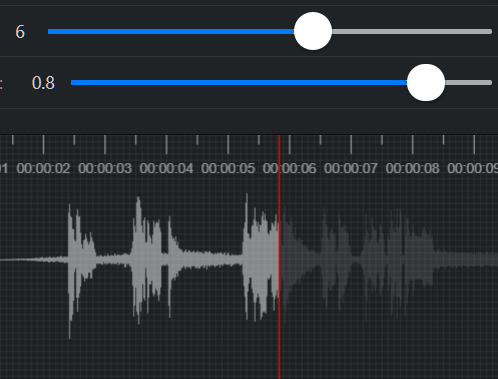
WFPlayer is an online audio waveform generator tool written in JavaScript and Canvas.
The library dynamically generates an animated, interactive, canvas-based waveform image from any Video or Audio files.
How to use it:
1. Install and import the WFPlayer package.
# Yarn
$ yarn add wfplayer
# NPM
$ npm install wfplayer --save
import WFPlayer from 'wfplayer';
2. Or directly load the wfplayer.js in the document.
<script src="path/to/dist/wfplayer.js"></script>
3. Create a container element to hold the generated audio waveform.
<div id="waveform"></div>
4. Embed audio or video into the document.
<video id="video" src="/path/to/video.mp4"></video>
<audio id="audio" src="/path/to/audio.mp3"></audio>
5. Initialize the library with default settings.
var wf = new WFPlayer({
    container: document.querySelector('#waveform'),
});
6. Load the audio or video you’d like to generate the audio waveform.
wf.load(document.querySelector('#video'));
wf.load(document.querySelector('#audio'));
7. All default options to customize the waveform.
var wf = new WFPlayer({
    container: '#waveform',
    mediaElement: null, // e.g.  video or audio tag
    wave: true,
    waveColor: 'rgba(255, 255, 255, 0.1)',
    backgroundColor: 'rgb(28, 32, 34)',
    paddingColor: 'rgba(255, 255, 255, 0.05)',
    cursor: true,
    cursorColor: '#ff0000',
    progress: true,
    progressColor: 'rgba(255, 255, 255, 0.5)',
    grid: true,
    gridColor: 'rgba(255, 255, 255, 0.05)',
    ruler: true,
    rulerColor: 'rgba(255, 255, 255, 0.5)',
    rulerAtTop: true,
    withCredentials: false,
    cors: false, // enable CORS for http fetching
    headers: {}, // http headers
    channel: 0, //  audio channel to render
    duration: 10,
    padding: 5,
    waveScale: 0.8,
    pixelRatio: window.devicePixelRatio,
});
8. API methods.
// load an audio/video file
wf.load(target);
// go to a specific point
wf.seek(second);
// export waveform image
wf.exportImage();
// update options
wf.setOptions({
  // options here
});
// destroy the instance
wf.destroy();
9. Event handlers.
- load: on load
- click: on click
- contextmenu: on right click
- resize: on resize
- playing: on playing
- decodeing: on decoding
- loadStart: start loading
- loadEnd: after loaded
- downloading: on download
- audiobuffer: on buffer
- channelData: channel data
wf.on('load', function() {
  // on file load
});
See Also:
 Custom Media Player Controls Using Web Components – media-chrome
 Innovative Audio Visualizer In Vanilla JavaScript – Power Audio
 Audio Visualization On Canvas – Wave.js
 Circular Audio Visualizer In Vanilla JavaScript – Circular Audio Wave
 Minimal Audio Visualizer With Canvas and Vanilla JavaScript
 Audio Visualizer with Html5 Audio Element
 Custom HTML5 Video/Audio And Youtube/Vimeo Players – vLite.js
 Play/Rewind Video On Scroll – ScrollyVideo.js
It can only display 100 seconds maximum.