


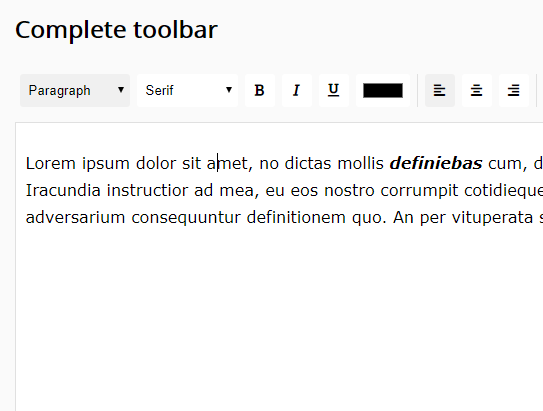
A tiny yet configurable WYSIWYG rich text editor implemented with pure JavaScript and Font Awesome iconic font.
How to use it:
Install the tiny-editor.
# NPM
$ npm install tiny-editor --save
Import the bundled JavaScript into the html document.
<script src="/dist/bundle.js"></script>
Include the latest Font Awesome for the toolbar icons.
<link rel="stylesheet"
      href="https://use.fontawesome.com/releases/v5.3.1/css/all.css"
      integrity="sha384-mzrmE5qonljUremFsqc01SB46JvROS7bZs3IO2EmfFsd15uHvIt+Y8vEf7N7fWAU"
      crossorigin="anonymous">
To create a default editor, just add the data-tiny-editor attribute to a DIV container as follow:
<div data-tiny-editor>
  <p>
    Default Text Here
  </p>
</div>
Config the editor with the following data attributes:
<div data-tiny-editor
     data-bold="no"
     data-formatblock="no"
     data-italic="no"
     data-underline="no"
     data-fontname="no"
     data-forecolor="no"
     data-justifyleft="no"
     data-justifycenter="no"
     data-justifyright="no"
     data-insertorderedlist="no"
     data-insertunorderedlist="no"
     data-outdent="no"
     data-indent="no"
     data-remove-format="no"
     data-autofocus="no">
  <p>
    Default Text Here
  </p>
</div>
Changelog:
v0.50 (05/21/2024)
- Add the autofocus option
v0.4.0 (04/16/2022)
- Replace FontAwesome with SVG icons
v0.3.0 (02/19/2022)
- Export the transformToEditor initialization method
v0.2.5 (02/24/2019)
- Add button type to button component
See Also:
 Minimal WYSIWYG Editor In Pure JavaScript – Suneditor
 Lightweight WYSIWYG Editor for Modern Web Apps – RayEditor
 Dual-Mode WYSIWYG Rich Text & Markdown Editor in JavaScript
 Medium-like WYSIWYG Rich-text Publishing Editor – Textrix
 Lightweight JavaScript Plugin for Rich Text Editing – HREditor
 Ultra-light WYSIWYG Rich Text Editor – Tex.js
 Wordpress Gutenberg Like WYSIWYG Block Editor – Pexego
 Simple Extensible WYSIWYG Editor – ysEditor.js
how to get the values inside the richtext editor in jquery on button click
Add and ID to a div container, then use document.getElementoById(“xxxxx”) and read his innerHTML content with the func .innerHTML(). I think is the way.
just add ID to a div container and read the innerHTML. i tink is the way.
What’s the best way to add undo and redo button? Thanks.