


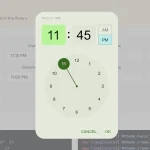
nj-timepicker is a user-friendly, mobile-compatible time picker plugin that allows the user to select hours, minutes, AM/PM from a time selection popup.
How to use it:
1. Load the nj-timepicker’s files from the dist folder.
<link rel="stylesheet" href="/dist/style.css" />
<script src="/dist/scripts.js"></script>
2. Create a container to place the time picker.
<div class="container" id="example">
  --:-- --
</div>
3. Initialize the timer picker and done.
let myElement = document.querySelector('#example');
var myPicker = new NJTimePicker({
    targetID: 'example'
});
4. Set an array of preset minutes. Default: [0, 15, 30, 45].
let myElement = document.querySelector('#example');
var picker = new NJTimePicker({
    targetID: 'example',
    minutes: [0, 15, 30, 45]
});
5. Specify a unique ID for the time picker.
let myElement = document.querySelector('#example');
var picker = new NJTimePicker({
    targetID: 'example',
    id: 1234
});
6. Set the time format: 12-h (default) or 24-h.
let myElement = document.querySelector('#example');
var picker = new NJTimePicker({
    targetID: 'example',
    format: '24'
});
7. Determine whether or not to close the time picker popup when clicking outside. Default: true.
let myElement = document.querySelector('#example');
var picker = new NJTimePicker({
    targetID: 'example',
    clickOutsideToClose: false
});
8. Determine whether or not to close the time picker popup after selection. Default: false.
let myElement = document.querySelector('#example');
var picker = new NJTimePicker({
    targetID: 'example',
    autoSave: true
});
9. Customize the header text.
let myElement = document.querySelector('#example');
var picker = new NJTimePicker({
    headerText: ''
});
10. Open/close the time picker manually.
myPicker.show();
myPicker.hide();
11. Set/get values.
// set
myPicker.setValue('24'); // h-24
myPicker.setValue('12:45');
myPicker.setValue('12:45 am');
myPicker.setValue({
  key: 'hours',
  value: 24
});
myPicker.setValue({
  key: 'minutes',
  value: 30
});
// get
myPicker.getValue('hours');
myPicker.getValue('hours'); // 12 or 24
myPicker.getValue('minutes'); // 30
myPicker.getValue('am'); // am or pm
myPicker.getValue('fullResult');
12. Event handlers.
myPicker.on('ready', function (data) {
  // on init
});
myPicker.on('show', function (data) {
  // on show
});
myPicker.on('hide', function (data) {
  // on hide
});
myPicker.on('cancel', function (data) {
  // on cancel
});
myPicker.on('clear', function (data) {
  // on clear
});
myPicker.on('save', function (data) {
   // data.fullResult
});
Changelog:
v1.3.118 (05/08/2020)
- Added autoSave config to close the picker after selection
- Fixed After changing button text, ie: close: ‘Cerrar’, buttons become non-functional
- Updated event emitter
v1.3.117 (12/21/2019)
- ddded autoSave config to close the picker after selection
v1.3.110 (11/24/2019)
- updated event emitter to NJ-Events
- configure webpack to output umd build
v1.3.100 (11/16/2019)
- Minor fixes and enhancements
- code refactor
v1.3.100 (11/16/2019)
- Minor fixes and enhancements
v1.2.103 (11/11/2019)
- Auto fill value if the target element is an input
v1.2.102 (11/07/2019)
- Minor fixes and enhancements
See Also:
 Accessible Customizable Date/Time/Date Picker for Modern Web App – FDatepicker
 Google Material Inspired Time Picker Component – timepicker-ui
 Vanilla JS Date & Time Picker for Moderb Web Apps – Tuncxys DatePicker
 Versatile Datetime Picker For Bulma – bulma-calendar
 Vanilla DateTime Picker: Zero-Dependency JS Date-Time Input
 Material Design-style Time Picker Web Component – clock-timepicker
 Powerful, Customizable JavaScript Date Picker – Datelite
 Easy Datetime & Date Range Pickers in Vanilla JavaScript