


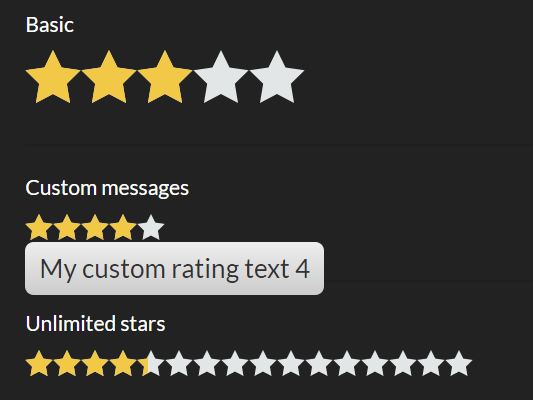
rater-js is a simple yet customizable star rating component written in pure JavaScript.
Easy to use, touch-enabled, and without any dependencies. Supports both browser and node.js.
Installation & download:
# NPM
$ npm install rater-js --save
How to use it:
Import the rater-js.
// ES 6
import rater from 'rater-js';
// CommonJS:
const rater = require('rater-js');
Or directly include the rater-js library on the page.
<script src="/path/to/index.js"></script>
Create a container in which you want to render the star rating control.
<div id="rater"></div>
The JavaScript to create a new star rating instance.
var myRating = raterJs( {
    element:document.querySelector("#rater"),
    rateCallback:function rateCallback(rating, done) {
      this.setRating(rating);
      done();
    }
});
Customize the star rating control with the following optional parameters.
var myRating = raterJs({
    // shows a rating tooltip
    showToolTip: true,
    // the number of stars
    max: 5,
    // star size
    starSize: 16,
    // text to show when disabled.
    disableText: 'Thank you for your vote!',
    // Text to show when hover over stars.
    ratingText: '{rating}/{maxRating}',
    // displayed while user is rating but done not called yet.
    isBusyText: null,
    // between 0 and 1
    step: undefined,
    // reverse the ratings
    reverse: false,
    // is readonly?
    readOnly: false

});
Available methods to control the star rating.
// disable
myRating.disable();
// enable
myRating.enable();
// set the rating value
myRating.setRating(rating:number);
// get the rating value
myRating.getRating();
// clear the rating
myRating.clear();
// removes event handlers
myRating.dispose();
// gets the element
myRating.element();
Override the default CSS rules to customize the star rating controls.
.star-rating {
  width: 0;
  position: relative;
  display:inline-block;
  background-image: url(star_0.svg);
  background-position: 0 0;
  background-repeat: repeat-x;
}
.star-rating[data-title]:hover:after {
  content: attr(data-title);
  padding: 4px 8px;
  color: #333;
  position: absolute;
  left: 0;
  top: 100%;
  z-index: 20;
  white-space: nowrap;
  -moz-border-radius: 5px;
  -webkit-border-radius: 5px;
  border-radius: 5px;
  -moz-box-shadow: 0px 0px 4px #222;
  -webkit-box-shadow: 0px 0px 4px #222;
  box-shadow: 0px 0px 4px #222;
  background-image: -moz-linear-gradient(top, #eeeeee, #cccccc);
  background-image: -webkit-gradient(linear,left top,left bottom,color-stop(0, #eeeeee),color-stop(1, #cccccc));
  background-image: -webkit-linear-gradient(top, #eeeeee, #cccccc);
  background-image: -moz-linear-gradient(top, #eeeeee, #cccccc);
  background-image: -ms-linear-gradient(top, #eeeeee, #cccccc);
  background-image: -o-linear-gradient(top, #eeeeee, #cccccc);
}
.star-rating .star-value {
  height: 100%;
  position: absolute;
}
.star-rating .star-value {
  position: absolute;
  height: 100%;
  width: 100%;
  background: url('./star_1.svg') ;
  background-repeat: repeat-x;
}
Changelog:
v1.0.1 (07/09/2019)
- Code refactor
v1.0 (03/17/2019)
- Added support for touch and right to left languages
02/12/2019
- fix so rating can’t be higher than max
02/07/2019
- make touch work with reverse
01/27/2019
- use title instead of data-title
01/13/2019
- clear method
01/08/2019
- add method for clearing/reset rater value
05/26/2018
- v0.5.7
See Also:
 Five-Star Rating Web Component in JavaScript
 Select Box Based Star Rating JavaScript Library – star-rating.js
 Customizable 5-Star Rating System In Pure CSS/SCSS
 CSS Only Animated Rating Bar
 Tiny Star Rating System In Vanilla JavaScript
 Accessible Star Rating Control Using Radio Buttons
 Simple HTML5 Star Rating System – SimpleStarRating.js
 Pure JavaScript Star Rating Library – JavaScript-Rating
Hello! Thank you for answering my question:
I did all the steps until the customization ones but nothing is rendering. I am wondering if there should be anything typed inside the rater div? if yes, how?
thank you for answering my question!
myRating.element() isn’t a function. The correct use is myRating.element