


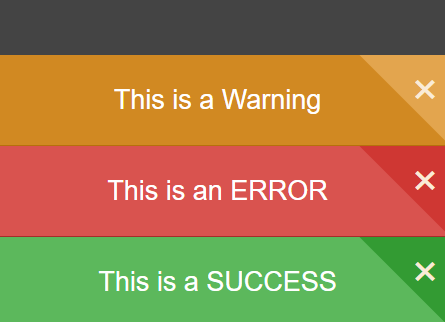
The notify.js JavaScript library lets you create responsive, stackable, dismissable notification bars with sounds support.
How to use it:
Load the style.css file that provides the default CSS styles for the notification bars.
<link href="style.css" rel="stylesheet">
Load the JavaScript file notify.js in the webpage when needed.
<script src="notify.js"></script>
This library provides 3 types of notification bars from which you can choose for your web applications:
// Success message
// Auto dismiss after 2 seconds
Notify.Success('Success Message!', 2000);
// Error message
// Auto dismiss after 5 seconds
Notify.Error('Error Message!', 5000);
// Warning message
// Auto dismiss after 10 seconds
Notify.Warning('Warning Message!', 10000);
Config the notification bars by overriding the default settings as shown below:
Notify.Settings = {
  soundsOff: false,
  sounds: {
    success: 'sounds/success,\ warning/1.mp3',
    warning: 'sounds/success,\ warning/3.mp3',
    error: 'sounds/errors/1.mp3'
  },
  animDuration: {
    success: 4000,
    warning: 4000,
    error: 4000
  }
};
Changelog:
09/26/2018
- Bugfix
See Also:
 Create iOS-Style Popups & Notifications With Popup JS Library
 Minimal Animated Notification Bar Library – Notice.js
 Lightweight Toast-like Notification Bar Library – toastKing
 Create Android-style Toasts And Notification Bars With Pure JavaScript – native-toast
 Atom Style Notification Bar Component – dom-notifications
 Stackable Top Notification Bars In Vanilla JavaScript – js-notify
 Cross-browser Notification Bar Library – jackbox.js
 Dynamic Interactive Tree View With Checkboxes – Treejs