


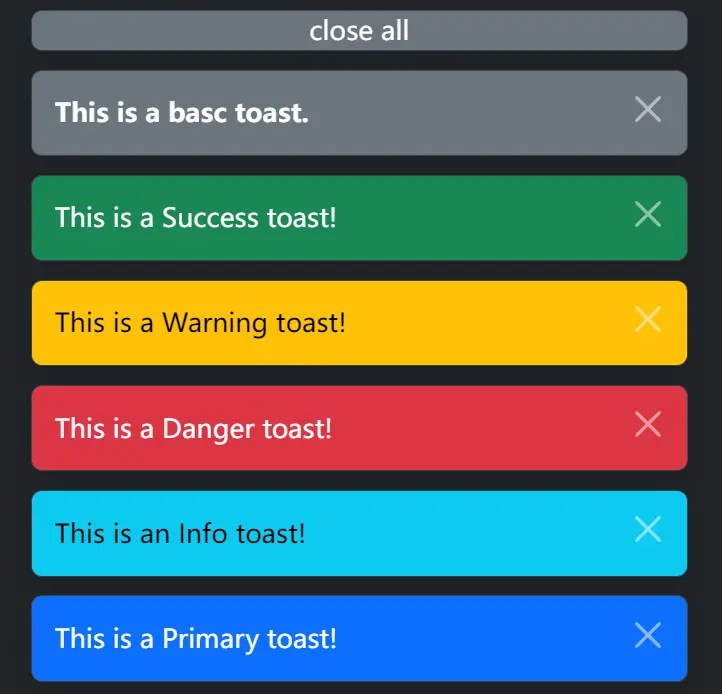
Bootstrap Toaster is a vanilla JavaScript library that creates customizable, stackable alerts that appear and disappear automatically.
It builds on Bootstrap 5’s toast component to provide a clear, temporary feedback experience. Can be useful for confirming actions, showing errors, or giving updates without disrupting the main interface.
How to use it:
1. Make sure you first have Bootstrap 5’s CSS and JavaScript files included in your HTML. You can use a CDN link for a quick setup:
<link rel="stylesheet" href="/path/to/cdn/bootstrap.min.css" />
<script src="/path/to/cdn/bootstrap.min.js"></script>
2. Include the bootstrap-toaster.js script after Bootstrap’s script tag:
<script src="bootstrap-toaster.js"></script>
3. Use the following JavaScript functions to create different types of toasts:
Toast('<b>This is a Basic toast.</b>', {html:true});
ToastSuccess('This is a Success toast!');
ToastWarning('This is a Warning toast!');
ToastDanger('This is a Danger toast!');
ToastInfo('This is an Info toast!');
ToastPrimary('This is a Primary toast!');
4. Adjust the default settings by configuring the toasts as needed:
Toast('Hello World', {
  theme: 'text-bg-secondary',
  animation: true,
  autohide: false, // auto-dismiss after a delay
  delay: 5000,
  html: false, // allows HTML content
});
5. Respond to toast events using event listeners:
document.body.addEventListener('toast.shown', function(event) {
  // event.detail.message
});
document.body.addEventListener('toast.hidden', function(event) {
  // event.detail.message
});
document.body.addEventListener('toast.hidden.all', function(event) {
  // event.detail.message
});
See Also:
 Advanced Alert Notification System For Bootstrap 5 – AvalynxAlert.js
 Customizable Toast Notification Manager For Bootstrap 5 – use-bootstrap-toaster
 Use JavaScript To Dynamically Create Bootstrap 5 Toasts – b5toast.js
 Create Bootstrap 5 Toasts Dynamically – bs-toaster
 Custom Bootstrap 5 Toast Generator In JavaScript – bs5-toast
 Advanced Toast & Snackbar Library Based On Bootstrap 5 – Toaststrap
 Dynamic Bootstrap 5 Form Builder With Vanilla JavaScript
 Build Customizable Modals With AvalynxModal And Bootstrap