


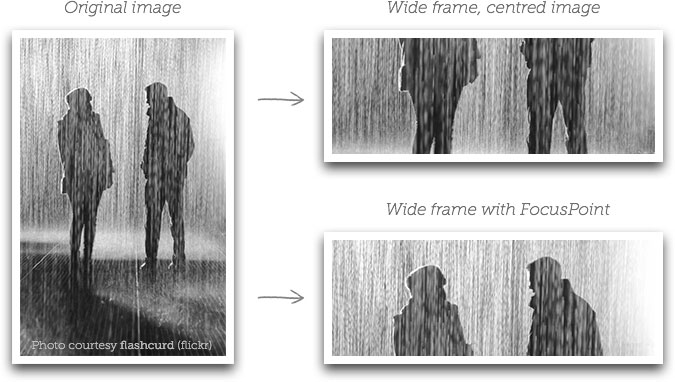
vanillafocus is the vanilla JavaScript version of the jQuery FocusPoint plugin that dynamically crops & resizes your image to fit its container space and makes the focus point (the most important part of the image) always be centered.
How to use it:
1. Add the vanillafocus’ JavaScript and stylesheet to the page.
<link rel="stylesheet" href="css/vanillafocus.css" />
<script src="vanillafocus.js"></script>
2. Add your image to the vanillafocus container and determine the focus point using the following data attribute:
<div class="vf-container"
     data-focus-x="0.55"
     data-focus-y="0.24"
     data-image-w="1200"
     data-image-h="630">
     <img src="1.png" />
</div>
3. Initialize the library on the top container and done.
new vanillafocus({
    selector: ".vf-container"
})
4. Specify the aspect ratio of the image container using the following classes:
- .vf-ratio: Required
- .vf-ratio-1×1
- .vf-ratio-1×2
- .vf-ratio-4×2
- .vf-ratio-4×3
- .vf-ratio-19×9
- .vf-ratio-21×9
- .vf-ratio-{breakpoint}-{ratio}
<div class="vf-ratio vf-ratio-4x2 vf-ratio-sm-21x9 vf-ratio-md-1x1 vf-ratio-xl-1x2 shadow">
  <div class="vf-container"
       data-focus-x="0.55"
       data-focus-y="0.24"
       data-image-w="1200"
       data-image-h="630">
       <img src="1.png" />
  </div>
</div>
5. Determine whether to re-calculate the image size on window resize. Default: true.
new vanillafocus({
    selector: ".vf-container",
    reCalcOnWindowResize: false
})
See Also:
 Feature-rich Image Cropper With Pure JavaScript – Cropper.js
 Vanilla JS Image Cropper with Image Zoom & Pan – PureJsCropper
 Lightweight & Fast Image Cropper In Vanilla JavaScript – Truecropper.js
 Responsive Image/HTML Content Lazy Load JavaScript Library – responsivelyLazy
 Resize Images While Protecting Focus Areas – Responsify.js
 Crop Image By Border Using Vanilla JavaScript
 Easy Client Side Image Cropping Library – Cropper.js
 Crop Image Before Uploading – jsCrop.js