


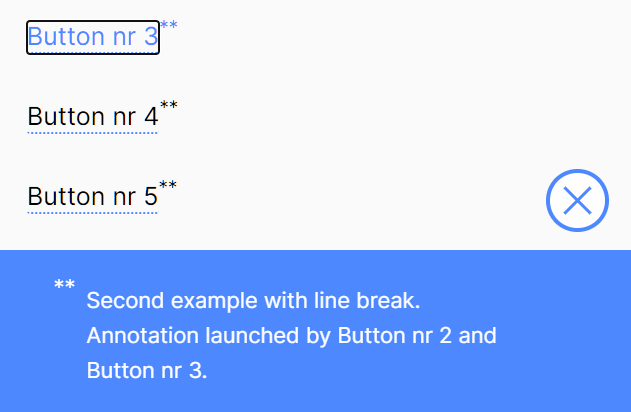
Annotations.js is a zero-dependency JavaScript library for annotating text within your document using the normal button element.
It highlights and underlines the text within a button element and displays the details in a bottom annotation bar when getting clicked.
How to use it:
1. Load the Annotations.js JavaScript library in the document.
<link rel="stylesheet" href="./css/annotations.css" />
<script src="./js/annotations.js" defer></script>
2. Define your annotation text.
const annotationTexts = {
      text1: "Text Annotation Here.",
      text2: "HTML Content </br>Is Supported As Well",
      // ...
}
2. Add the annotation-btn to your button element and define the annotation in the data-text attribute as follows:
<button type="button"
        class="annotation-btn"
        id="annotation-btn-1"
        data-text="text1"
        aria-describedby="">
        Example 1
</button>
<button type="button"
        class="annotation-btn"
        id="annotation-btn-2"
        data-text="text2"
        aria-describedby="">
        Example 2
</button>
3. Create the HTML for the annotation bar. That’s it.
<div class="annotation-wrapper" data-opener="none">
  <button type="button" class="annotation-close-btn" aria-label="close annotation"></button>
  <p class="annotation-text" id="annotation-text"></p>
</div>
See Also:
 Underline/Highlight/Strike Text With The textAnnotator Library
 Text Annotation And Highlighting Library – Annotate.js
 Animated Handdrawn Text Annotation Library – Rough Notation
 Fetch And Display RSS Feeds With Custm Template – vanilla-rss
 Mobile-friendly Image Carousel In Vanilla JavaScript – CrystalSlider.js
 Radial Progress Indicator For Click-and-hold Actions – HoldCircleJS
 Classless Themeable CSS Framework For Modern Web Design – Dev.css
 Performant Image Lazy Load With Custom Events – justlazy.js