


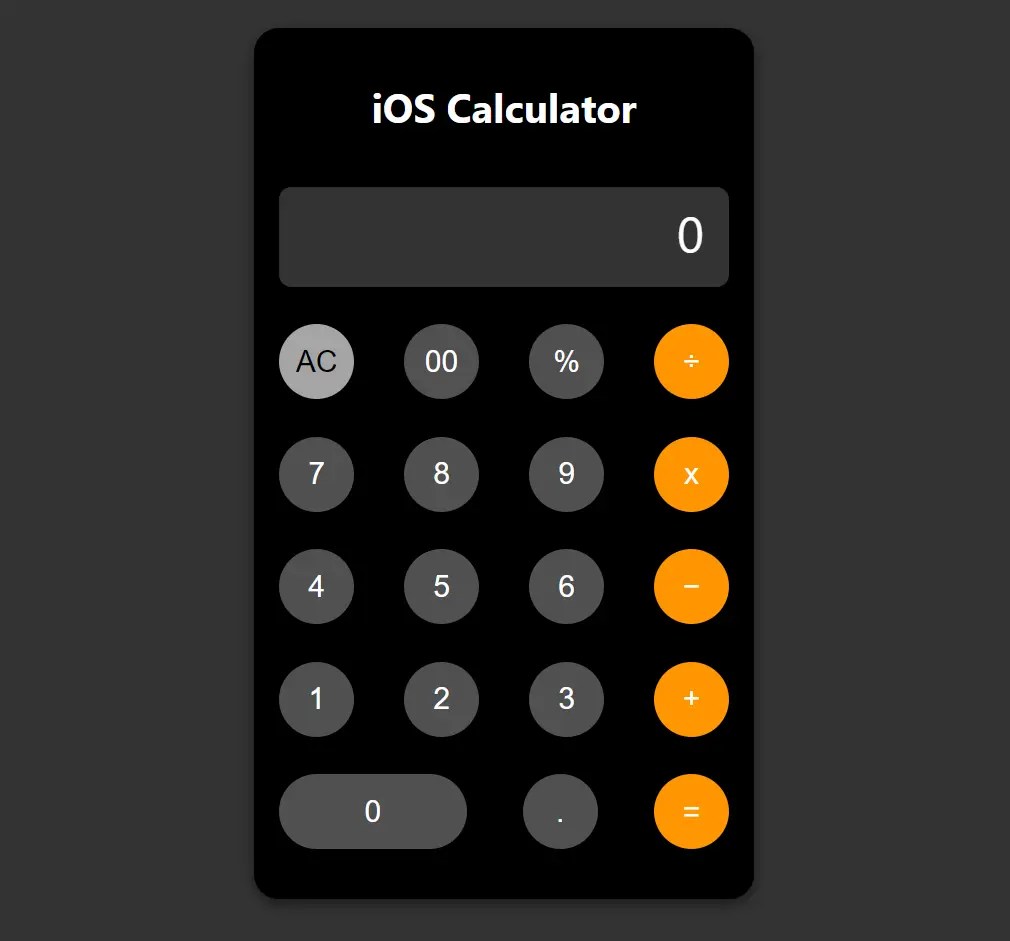
The iPhone Style Calculator project brings the simplicity and sleek look of the Apple iPhone’s calculator to the web. Built with HTML, CSS, and JavaScript.
The calculator mimics the original iOS design with a responsive layout that works well on desktop and mobile devices. It supports basic arithmetic operations and features smooth animations for a consistent user experience.
How to use it:
1. Define the basic layout of the iOS calculator using HTML. We use <div> elements to create the calculator container, display area, and rows for buttons. Each <button> element represents a calculator button and has an onclick attribute that triggers a JavaScript function when clicked.
<div class="calculator">
  <h1 style="text-align: center;">
    iOS Calculator
  </h1><br>
  <div class="display" id="display">
    0
  </div>
  <div class="button-row">
    <button class="clear" onclick="clearDisplay()">AC</button>
    <button class="dark-button" onclick="add('00')">00</button>
    <button class="dark-button" onclick="add('%')">%</button>
    <button class="operation" onclick="add('/')">÷</button>
  </div>
  <div class="button-row">
    <button onclick="add('7')">7</button>
    <button onclick="add('8')">8</button>
    <button onclick="add('9')">9</button>
    <button class="operation" onclick="add('*')">x</button>
  </div>
  <div class="button-row">
    <button onclick="add('4')">4</button>
    <button onclick="add('5')">5</button>
    <button onclick="add('6')">6</button>
    <button class="operation" onclick="add('-')">−</button>
  </div>
  <div class="button-row">
    <button onclick="add('1')">1</button>
    <button onclick="add('2')">2</button>
    <button onclick="add('3')">3</button>
    <button class="operation" onclick="add('+')">+</button>
  </div>
  <div class="button-row">
    <button class="large" onclick="add('0')">0</button>
    <button onclick="add('.')">.</button>
    <button class="equal operator" onclick="calculate()">=</button>
  </div>
</div>
2. Use the following CSS to style the calculator and create a layout similar to the iOS:
.calculator {
  width: 360px;
  padding-top: 40px;
  padding-bottom: 40px;
  padding: 20px;
  border-radius: 20px;
  background-color: #000;
  box-shadow: 0px 4px 10px rgba(0, 0, 0, 0.5);
}
.display {
  width: 100%;
  height: 80px;
  background-color: #333;
  color: white;
  text-align: right;
  padding: 10px;
  padding-right: 20px;;
  border-radius: 10px;
  font-size: 2.5em;
  box-sizing: border-box;
  margin-bottom: 20px;
  overflow-x: hidden;
  overflow-y: hidden;
}
.button-row {
  display: flex;
  justify-content: space-between;
  margin-bottom: 10px;
  padding-top: 10px;
  padding-bottom: 10px;
}
button {
  width: 60px;
  height: 60px;
  border-radius: 50%;
  border: none;
  font-size: 1.5em;
  color: white;
  background-color: #505050;
  cursor: pointer;
  transition: background-color 0.2s;
}
button:active {
  background-color: #787878;
}
.button-row button.large {
  width: 150px;
  border-radius: 30px;
}
.operation {
  background-color: #ff9500;
  color: white;
}
.operation:active {
  background-color: #d77800;
}
.equal {
  background-color: #ff9500;
}
.clear {
  background-color: #a5a5a5;
  color: black;
}
.clear:active {
  background-color: #8c8c8c;
}
.dark-button {
  background-color: #505050;
  color: white;
}
.dark-button:active {
  background-color: #787878;
}
3. Include the JavaScript to enable the calculator’s functionality:
- add(value): Updates the display with the pressed button’s value.
- clearDisplay(): Resets the calculator display to zero.
- calculate(): Computes the result of the current expression on the display.
function add(value) {
    const display = document.getElementById('display');
    if (display.innerText === '0') {
        display.innerText = value;
    } else {
        display.innerText += value;
    }
}
function clearDisplay() {
    document.getElementById('display').innerText = '0';
}
function calculate() {
    const display = document.getElementById('display');
    try {
        display.innerText = eval(display.innerText.replace('×', '*').replace('÷', '/'));
    } catch (error) {
        display.innerText = 'Error';
    }
}
See Also:
 Replicate iOS Calculator With Plain JavaScript
 Create iOS-Style Popups & Notifications With Popup JS Library
 Siri-style Audio Waveform With JavaScript And Canvas – siriwave.js
 iOS Style Wheel Picker For Mobile – Picker.js
 Neumorphic Style Calculator App In JavaScript
 iOS Glyph Icons In A CSS Image Sprite – shortcut-icons.css
 Interactive Multi-layer Parallax Effect With JavaScript
 Make Your Page Elements Dance To The Music – Rythm.js