


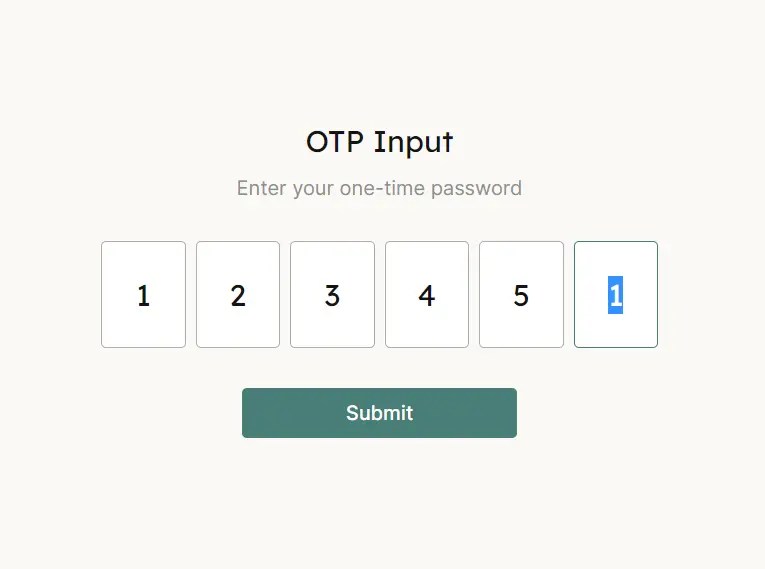
otp-input is a lightweight JavaScript library that makes it easy to create one-time password (OTP) input fields for forms and login flows.
Can be helpful in Two-Factor Authentication where users are required to input an OTP received via email or SMS.
How to use it:
1. To get started, load the otp-input.js library in the document.
<script src="./otp-input.js"></script>
2. Create a set of number fields for the one-time password input.
<div id="otp-input">
  <input placeholder="_" type="number" step="1" min="0" max="9" autocomplete="no" pattern="\d*" />
  <input placeholder="_" type="number" step="1" min="0" max="9" autocomplete="no" pattern="\d*" />
  <input placeholder="_" type="number" step="1" min="0" max="9" autocomplete="no" pattern="\d*" />
  <input placeholder="_" type="number" step="1" min="0" max="9" autocomplete="no" pattern="\d*" />
  <input placeholder="_" type="number" step="1" min="0" max="9" autocomplete="no" pattern="\d*" />
  <input placeholder="_" type="number" step="1" min="0" max="9" autocomplete="no" pattern="\d*" />
  <input id="otp-value" placeholder="_" type="hidden" name="otp" />
</div>
3. Apply your own CSS styles.
#otp-input {
  display: flex;
  column-gap: 8px;
}
#otp-input input {
  text-align: center;
  padding: 10px 8px 10px 8px;
  border: 1px solid #adadad;
  border-radius: 4px;
  outline: none;
  height: 64px;
  width: 50px;
}
#otp-input input:focus {
  border: 1px solid #497e76;
}
#otp-input input:focus::placeholder {
  color: transparent;
}
#otp-input input::-webkit-outer-spin-button,
#otp-input input::-webkit-inner-spin-button {
  -webkit-appearance: none;
  margin: 0;
}
#otp-input input[type="number"] {
  -moz-appearance: textfield; /* Firefox */
}
4. Get the password string you typed.
<button id="submit">Submit</button>
const continueButton = document.querySelector("#submit");
continueButton.addEventListener("click", (e) => {
  updateValue(inputs);
  alert(OTPValueContainer.value);
});
See Also:
 Easy One Time Password Input In JavaScript – vanilla-otp.js
 Unstyled One-time Password Input In JavaScript – OTP Input
 Vanilla JS Password Strength Checker for Better Form Security
 Vanilla JavaScript Password Visibility Toggler For Bootstrap
 Minimal Strong Password Generation for JavaScript – sspg.js
 Enhance Password Fields with Custom Web Components
 Advanced Password Strength Tester In JavaScript
 Check Strength Of Your Passwords – PWStrength