


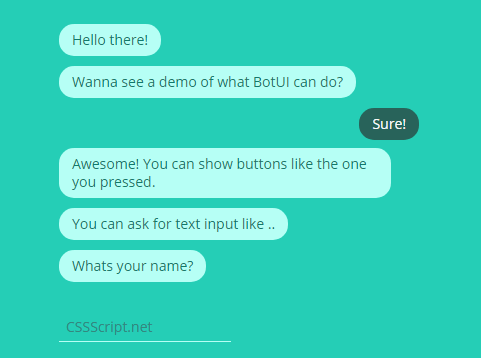
BotUI is a lightweight and easy-to-customize JavaScript chat bot library that helps you create conversation chats using vue.js.
Installation:
$ npm install botui
Basic usage:
Include the basic stylesheet and a theme CSS of your choice on the webpage.
<link rel="stylesheet" href="botui.min.css">
<link rel="stylesheet" href="botui-theme-default.css">
Include the needed Vue.js library and the BotUI’s JavaScript file at the bottom of the webpage.
<script src="vue.min.js"></script>
<script src="botui.min.js"></script>
Create the html for the Botui.
<div class="botui-app-container" id="hello-world">
  <bot-ui></bot-ui>
</div>
The JavaScript to show a ‘Hello World’ message on the screen.
var botui = new BotUI('hello-world');
botui.message.add({
  content: 'Hello World from bot!'
}).then(function () { // wait till previous message has been shown.
  botui.message.add({
    delay: 1000,
    human: true,
    content: 'Hello World from human!'
  });
});
API.
/* Message object:
{
  delay: 0, // wait before showing the message. in milliseconds.
  type: 'text', // either 'text' or 'embed'
  content: '', // Should be a URL if type is 'embed', text otherwise.
  human: false, // should be shown aligned to right side?
  cssClass: '', // a string or array of custom CSS classes you want to be added.
}
/*
// adds a message
botui.message.add(message)
// or
botui.message.bot(message)
// adds a message and sets the human to true
botui.message.human(message)
// accepts an index of message.
botui.message.get(message)
// updates a message
botui.message.update(index, message)
// removes a message from UI.
botui.message.remove(index)
// removes all the messages
botui.message.remove(removeAll)
/* Action object:
{
  type: 'text', // either 'text' or 'button',
  action: [], // array of 'button' objects if type is 'button'. object of 'text' otherwise.
  cssClass: '', // a string or array of custom CSS classes you want to be added.
  autoHide: true, // should the actions sections be hidden when submitted.
  addMessage: true // text from action is added as a message in UI from human side.
}
/*
/* Text object:
{
  size: 30, // size of the input to show. Relies on HTML size attribute for input elements.
  sub_type: '', // Could be any of the valid types for HTML input elements. e.g.: number, tel, time, date, email, etc.
  value: '', // pre-populates the text field. Only for 'text' type.
  placeholder: 'Write here ..', // Sets the placeholder text for the input element.
}
/*
/* Button object:
{
  icon: '', // icon to show in button.
  text: '', // Text to show in the button. be creative!
  value: '', // this is how you will identify the button when result is returned.
  cssClass: '' // a string or array of custom CSS classes you want to be added.
}
/*
/* Result object:
{
  type: '', // 'Text' or 'Button' Type of the action it was returned from.
  value: '', // Text in the input in case type is 'text'. If type is 'button' then its the same as 'value' in button object.
  text: '' // only present if type of message is 'button'. same as the 'text' in button object.
}
/*
// shows the action section
botui.action.show(action)
// hides the action section
botui.action.hide(action)
// shows the action section and sets the action type to text
botui.action.text(action)
// shows the action section and sets the action type to button
botui.action.button(action)
See Also:
 Flash (Toast) Messages In JavaScript – notify.js
 Drag To Move & Mouse Wheel To Zoom Library – wheel-zoom
 View Before And After Images With Mouse And Touch Events – RevealJS
 Minimalist Table Sort Library – sorttable.js
 Tiny Responsive Date Picker Component For JavaScript/TypeScript – monthpicker-lite-js
 Automatic Image Rotator with Pure JavaScript – Circle
 Tiny Text Typing & Deleting Effects Library – Typed.js
 Hierarchical Table Of Contents In JavaScript – Easy-TOC