


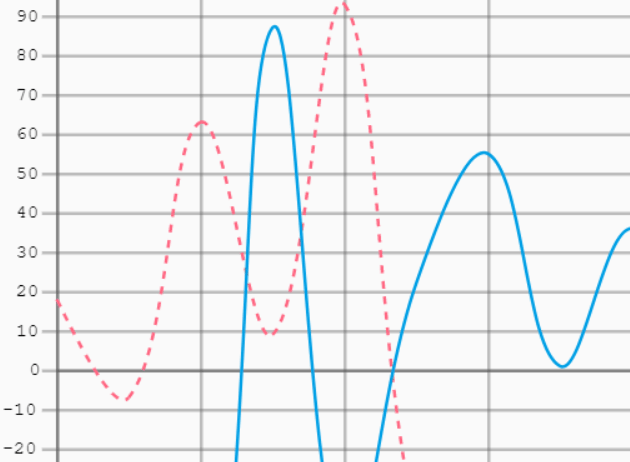
Graphika.js is a JavaScript and HTML5 Canvas based graph & chart JavaScript library for creating line charts with grid lines on your web app.
Installation:
# install
$ npm install
# build
$ npm run-script build
How to use it:
1. Load the minified version of the Graphika.js JavaScript library in the document.
<script src="./dist/graphika.js"></script>
2. Create an HTML5 canvas element on which the line chart will be rendered.
<div id="graph">
  <div class="title"></div>
  <canvas width="800" height="600"></canvas>
</div>
3. Prepare your data to be plotted in the chart.
function getRandomInt(min, max) {
  return Math.floor(Math.random() * (max - min + 1)) + min;
}
function getRandomArray(length, min, max) {
  let array = [];
  for (let x = 0; x < length; x++) {
    array.push(getRandomInt(min, max));
  }
  return array;
}
const dataset = {
  0: getRandomArray(20, -100, 100),
  1: getRandomArray(20, -100, 100),
  2: getRandomArray(20, -50, 50)
};
4. Render a basic line chart on the page.
// Graph(id, config, data)
let graph = new Graph('graph', {
    // present on the x-axis
    x_label: 'X-Label',
    // present on the y-axis
    y_label: 'Y-Label',
    // title of the graph, if 'null' is passed, no tittle is displayed
    title_pos: 'top-center'
  },
  [
    {
      style: "dashed",
      label: 'student_1',
      interpolation: 'cubic',
      data: dataset[0],
      colour: Graph.Colours.FLAMINGO_PINK
    },
    {
      label: 'student_1',
      interpolation: 'cubic',
      data: dataset[1],
      colour: Graph.Colours.ELECTRIC_BLUE
    }
  ]
);
graph.draw();
5. Default configs.
{
  x_label: "",
  y_label: "",
  title: "Graph",
  title_pos: "top-center",
  padding: 14,
  /* This will draw a 'circle' every time a point intersects a grid boundary  */
  annotatePoints: true,
};
6. Customize the grid lines.
gridOptions: {
  gridded: true,
  sharedAxisZero: true
  strict: false,
  optimiseSquareSize: true
},
7. Default data options.
[
  {
    // or "full"
    style: "dashed",
    // custom label
    label: 'sline-0',
    // or "cubic"
    interpolation: 'linear',
    // the data that is represented by this series
    data: [],
    // stroke color
    colour: "#000000",
    area: {
      fill: false,
      colour: "#000000",
    }
  },
  {
    // ...
  }
]
Changelog:
01/25/2026
- v1.0.0
01/18/2026
- graph: implement line animation drawing
03/06/2021
- use nullish coalescing to set defaults for options in scale
See Also:
 Lightweight Responsive SVG Charts with CSS Transitions – Beaned-Charts
 High-Performance WebGPU Charting Library for Large Datasets – ChartGPU
 Financial Data Visualization Library for JavaScript – VisionCharts
 Creating Hand-Drawn Style Line Charts with JavaScript – Handwritten Graph
 Minimal Bar/Line/Pie Chart JavaScript Library – Chartly.js
 Text-based Charting Library For Terminal & Browser Console – text-graph.js
 Create Interactive Charts With Zooming And Panning Features – SenCharts
 Minimal Animated Line Chart Generator – noSvgChart