


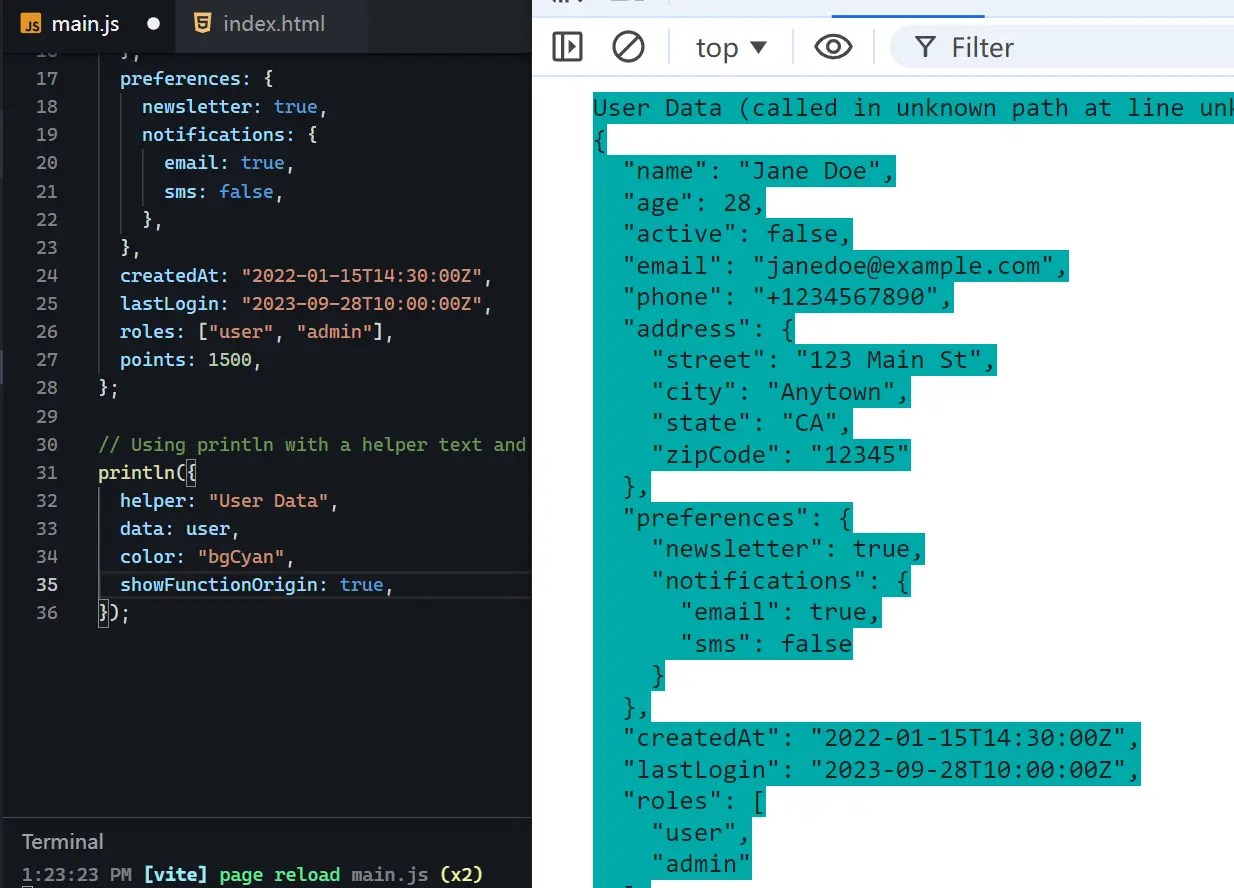
JS Logs Formatter is a lightweight JavaScript library that formats server logs for improved readability. It provides color-coded outputs and contextual information, such as function names and line numbers. In Node.js environments, it accurately captures file names and lines, while in React Native, it adjusts to the unique stack trace formatting.
This library helps developers quickly understand complex data structures within their logs. The formatted output makes it easier to identify specific values and relationships within objects and arrays. This can be helpful in server-side environments like Node.js and Next.js, and also within client-side SPAs.
How to use it:
1. Installing JS Logs Formatter through your preferred package manager:
# Yarn
yarn add js-logs-formatter
# NPM
npm install js-logs-formatter
# Expo
npx expo install js-logs-formatter
2. import println function after installation.
import { println } from "js-logs-formatter";3. This code outputs the user data to the console with a cyan background. The helper parameter provides context, data contains the information to log, color sets the output style, and showFunctionOrigin displays the calling function and line number.
const user = {
  // your user data here
};
println({
  helper: "User Data",
  data: user,
  color: "bgCyan",
  showFunctionOrigin: true,
});
4. You can change the background or foreground color of your log output to match your preferences. Here’s the list of available colors:
Foreground Colors
reset, red, green, yellow, blue, magenta, cyan, white, black
Bright Foreground Colors
brightRed, brightGreen, brightYellow, brightBlue, brightMagenta, brightCyan, brightWhite
Background Colors
bgRed, bgGreen, bgYellow, bgBlue, bgMagenta, bgCyan, bgWhite, bgBlack
Bright Background Colors
bgBrightRed, bgBrightGreen, bgBrightYellow, bgBrightBlue, bgBrightMagenta, bgBrightCyan, bgBrightWhite
See Also:
 Add Custom Colors And Styles To Console Logs With Colorlog.js
 Beautiful Browser Console Output Using Tailwind CSS – twlog
 Add A Colorful Christmas Tree to Your Console – ctree.js
 In-Page Logging for Web Devs – PrettyLogger.js
 Run And Debug JavaScript Code Directly On The Webpage – JavaScript Console
 Output Colorful Logs In The Browser Console – Colorify.js
 Enable & Disable Console Log With The jsconsole Library
 Create Stylized Console Logs – Logger.js