


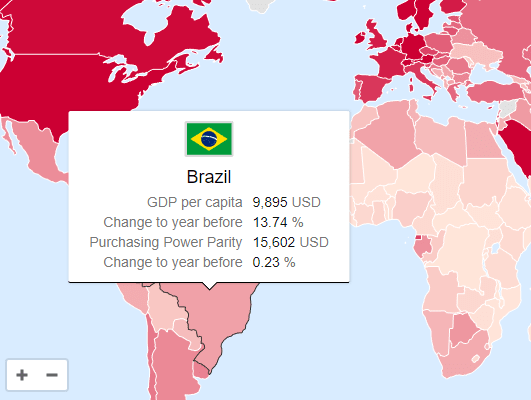
The svgMap.js lets you create an interactive, SVG-powered world map on the webpage, with support for Info Window, which can be used to present any data when the user hovers over a specific country and region.
How to use it:
1. Load the required svgMap.css and svgMap.js files in the document.
<link href="/dist/svgMap.css" rel="stylesheet">
<script src="/dist/svgMap.js"></script>
2. Create a container element to place the world map.
<div id="svgMapExample"></div>
3. Create a new svgMap object to render a world map inside the container.
new svgMap({
    targetElementID: 'svgMapExample',
});
4. Determine whether to allow users to zoom and pan around the map:
new svgMap({
    allowInteraction: true,
});
5. To present data in the world map, following these steps:
// GDP data
var svgMapDataGPD = {
    data: {
      gdp: {
        name: 'GDP per capita',
        format: '{0} USD',
        thousandSeparator: ',',
        thresholdMax: 50000,
        thresholdMin: 1000
      },
      change: {
        name: 'Change to year before',
        format: '{0} %'
      },
      gdpAdjusted: {
        name: 'Purchasing Power Parity',
        format: '{0} USD',
        thousandSeparator: ',',
        thresholdMax: 50000,
        thresholdMin: 1000
      },
      changeAdjusted: {
        name: 'Change to year before',
        format: '{0} %'
      }
    },
    applyData: 'gdpAdjusted',
    values: {
      AF: {gdp: 587, change: 4.73, gdpAdjusted: 1958, changeAdjusted: 0.02},
      link: 'https://cssscript.com',
      linkTarget: '_blank'
    }
}
new svgMap({
targetElementID: 'svgMapExample',
data: svgMapDataGPD
});6. All default options to customize the world map.
// The element to render the map in
targetElementID: '',
// Allow users to zoom and pan around the map
allowInteraction: true,
// Minimum and maximum zoom
minZoom: 1,
maxZoom: 25,
// Initial zoom
initialZoom: 1.06,
// Initial pan
initialPan: {
  x: 0,
  y: 0
},
// Zoom sensitivity
zoomScaleSensitivity: 0.2,
// Show zoom reset button
showZoomReset: false,
// Reset map zoom on resize
resetZoomOnResize: false,
// Zoom with mousewheel
mouseWheelZoomEnabled: true,
// Allow zooming only when one of the following keys is pressed: 'shift', 'control', 'alt' (Windows), 'command' (MacOS), 'option' (MacOS)
mouseWheelZoomWithKey: false,
// The message to show for non MacOS systems
mouseWheelKeyMessage: 'Press the [ALT] key to zoom',
// The message to show for MacOS
mouseWheelKeyMessageMac: 'Press the [COMMAND] key to zoom',
// Data colors
colorMax: '#CC0033',
colorMin: '#FFE5D9',
colorNoData: '#E2E2E2',
// Color attribute for setting a manual color in the data object
manualColorAttribute: 'color',
// Ratio type for the color scale: 'linear', 'log', function
ratioType: 'linear',
// The flag type can be 'image' or 'emoji'
flagType: 'image',
// The URL to the flags when using flag type 'image', {0} will get replaced with the lowercase country id
flagURL:
  'https://cdn.jsdelivr.net/gh/hjnilsson/country-flags@latest/svg/{0}.svg',
// Decide whether to show the flag option or not
hideFlag: false,
// Whether attributes with no data should be displayed
hideMissingData: false,
// The default text to be shown when no data is present
noDataText: 'No data available',
// Set to true to open the link on mobile devices, set to false (default) to show the tooltip
touchLink: false,
// Set to true to show the to show a zoom reset button
showZoomReset: false,
// Called when a tooltip is created to custimize the tooltip content
onGetTooltip: function (tooltipDiv, countryID, countryValues) {
  return null;
},
// Country specific options
countries: {
  // Western Sahara: Set to false to combine Morocco (MA) and Western Sahara (EH)
  EH: true,
  // Crimea: Set to 'RU' to make the Crimea part of Russia, by default it is part of the Ukraine
  Crimea: 'UA'
},
// Set to true to show a drop down menu with the continents
showContinentSelector: false,
Changelog:
v2.18.4 (01/20/2026)
- fix: call svgPanZoom constructor
v2.18.3 (01/18/2026)
- fix: require svg-pan-zoom
v2.18.2 (01/09/2026)
- Updated package
v2.18.1 (12/28/2025)
- Bugfixes
v2.17.1 (12/28/2025)
- Fix: tooltip timeout was a bad UX
- Bugfix: country filling fixed; no black flash, no missing colors
v2.17.0 (12/24/2025)
- Introduces functionality so tooltip is shown on click, too, to make it work on touch devices
- Fixes country border highlighting on hover
v2.16.0 (12/24/2025)
- Feat/optional reset zoom on resize
v2.15.0 (12/22/2025)
- feat: allow positioning zoom controls
v2.14.0 (08/23/2025)
- Add option ratioType to support logarithmic ratios
v2.13.0 (08/16/2025)
- New option allowInteraction
- Allow overriding mapControlsColor
v2.12.2 (01/07/2025)
- New option allowInteraction
- Allow overriding mapControlsColor
v2.12.0 (11/06/2024)
- Added option to use rgb and other color values
- Minor bug fixes
v2.11.1 (08/01/2024)
- Fixed bugs
v2.10.0 (06/27/2022)
- Added option to hide missing data
v2.9.0 (05/31/2022)
- Updated Equatorial Guinea (GQ) added Bioko Island
v2.8.0 (05/24/2022)
- Added option to reset zoom
- Added option to zoom to a specific continent
v2.7.2 (03/08/2022)
- Prevent firing click when dragging.
v2.7.1 (08/29/2021)
- Added flags to EURO demo
v2.7.0 (08/23/2021)
- Added option to allow mouse wheel zooming only with specific keys pressed
- Added option to add Crimea to Russia to solve issue
- Added country Kosovo
- Minor bugfixes and adjustments
v2.6.0 (08/19/2021)
- Manually set country color
v2.5.2 (07/30/2021)
- Added option initialPan
- Fixes a bug that shows the wrong color when value is below the minimal threshold
- Adds new option for custom tooltips
v2.3.0 (07/28/2021)
- Added option to open links on mobile devices
v2.2.2 (07/18/2021)
- Fixes map data maker
v2.2.1 (07/17/2021)
- Fixes wrong color calculation bug when there is no ratio
v2.2.0 (06/22/2021)
- Added option to set the target of links
v2.1.1 (02/27/2021)
- Fixes color bug
v2.1.0 (02/26/2021)
- You can now add links to each country.
v2.0.4 (02/17/2021)
- Refactored to make svgMap working with bundlers
- Fixed umd wrapper
- Added build files
- Fixed es6 compatibility
- Minor fix
v1.6.0 (12/30/2020)
- Added accessibility
v1.5.0 (05/14/2020)
- Added tooltip support for mobile devices
v1.4.2 (03/27/2020)
- Fixed slightly off position of Monaco
- Minor text changes
v1.4.0 (03/27/2020)
- Increased default max zoom to 25, so that smaller countries are selectable
- Added missing countries
- Added option to combine Morocco (MA) with Western Sahara (EH)
- Fixed country Andorra (AD)
- Fixed the path creator asset
v1.3.4 (03/12/2020)
- Add MA and EH combined
v1.3.3 (02/12/2020)
- Fixed: Singapore no longer accessible after hovering over Malaysia
v1.3.2 (01/12/2020)
- Improved z-indexes
v1.3.1 (01/10/2020)
- Fixed minor margin offset when hideFlag is option is set
- Fixed Gulp watch task
- Minor version bump
v1.3.0 (01/08/2020)
- Added option hideFlag
- Added option noDataText
- Fixed vulnerabilities
v1.2.1 (11/01/2019)
- Added main to package file
- Version bump
v1.2.0 (05/16/2019)
- Change default flag type to image
- Minor fixes and improvements
v1.1.0 (05/15/2019)
- Bugfix
See Also:
 JavaScript Library For Interactive Vector Maps – jsvectormap
 3D Globe With Dotted World Map Using WebGL – Cobe
 SVG World Map With All Countries, Provinces, And States
 Fancy Image Slideshow with Delaunay Triangulation Transition Effects
 Infinite Scrolling Date Picker UI With Pure JavaScript
 Lightweight Key Binding JavaScript Library – Keybinder
 Dockable Draggable Modal Dialog – native-window.js
 Simple JS To Table Generator – maketable.js
Instead of hovering over, I would like to apply a mouse click and open a url for the clicked location. How can I do that?
How can i add the marker to my selected countries..?
I like the script. But Is there away to make it responsive on mobile phone?