


The Orama Highlight JavaScript library allows you to mark specific words or phrases in a given input string.
Can be helpful for highlighting search terms in results, drawing attention to keywords in articles, and processing text for analysis.
How to use it:
1. Install and import the Orama Highlight.
# NPM
$ npm i @orama/highlight
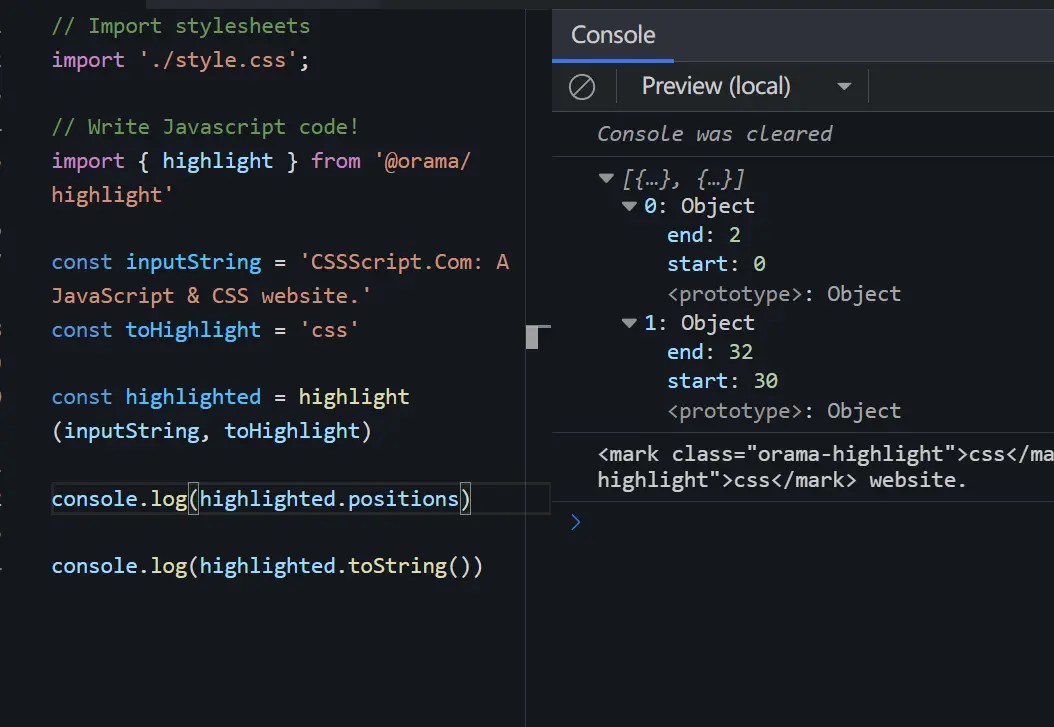
import { highlight } from '@orama/highlight'2. Its main function takes a string and substring to highlight and returns HTML with the matches wrapped in markup. The included toString method outputs this HTML, while positions stores match indexes.
const inputString = 'CSSScript.Com: A JavaScript & CSS website.'
const toHighlight = 'css'
const highlighted = highlight(inputString, toHighlight)
// => <mark class="orama-highlight">css</mark>Script.Com: A JavaScript & <mark class="orama-highlight">css</mark> website.
highlighted.toString()
// [
//    {
//      start: 2,
//      end: 0
//    }, {
//      start: 32,
//      end: 30
//    }
//  ]
highlighted.positions
3. Orama Highlight Highlight offers customization through an optional third parameter, enabling case-sensitive highlighting, whole word emphasis, as well as the ability to choose your HTML tags and CSS classes.
const highlighted = highlight(inputString, toHighlight, {
      caseSensitive: true,
      wholeWords: true,
      HTMLTag: 'div',
      CSSClass: 'my-custom-class'
})
Changelog:
v0.1.0 (10/22/2023)
- Adds infinite loop protection
- Adds trim function
See Also:
 Modern Text Search and Highlight Library Using CSS Custom Highlight API
 Interactive Guided UI Tours with Target-Highlight.js
 Lightweight Text Highlighting JavaScript Library – Highlight Search Term
 Highlight Ranges Within HTML Textareas – Lightweight Textarea Highlighter
 Quickly Search And Highlight Specific Text Within A Paragraph – Search-Text-Highlighter.js
 Highlight Text Within Textarea – texthighlighter.js
 Underline/Highlight/Strike Text With The textAnnotator Library
 JavaScript Library For Search Query Matching and Highlighting – highlight-words