


f-sort is a tiny JavaScript library created to optimize your array sorting operations. Can be used to replace JavaScript’s native Array.prototype.sort() method, providing a roughly 2x performance boost. Designed for handling large arrays, f-sort ensures that numeric arrays are sorted by value in ascending order (or in a custom order).
How to use it:
1. Install and import the f-sort.
# Yarn
$ yarn add f-sort
# NPM
$ npm i f-sort
import { sort, comparators, pivotExtractor } from "f-sort";2. Use the sort method to sort arrays in-place.
const arr = [-1, 1, 100, 200, 10];
const sortedArr = sort(arr);
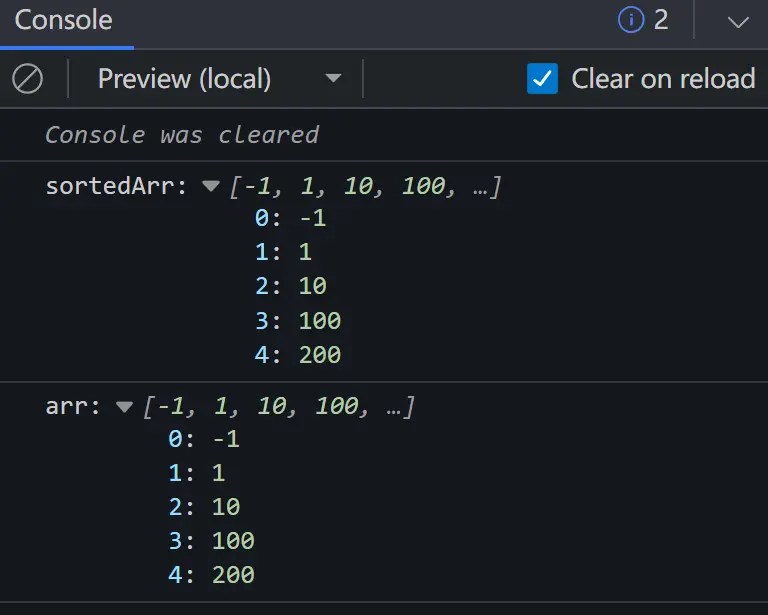
console.log("sortedArr:", sortedArr);
console.log("arr:", arr);
// output arr: [ -1, 1, 10, 100, 200 ] sortedArr: [ -1, 1, 10, 100, 200 ]
3. Sort your JS array in a custom order.
sort(arr, comparators.ascNumberComparator);
sort(arr, comparators.descNumberComparator);
4. The comparators parameter also allows you to compare two elements of the array.
const arr = [
  { x: 100, y: 21 },
  { x: -50, y: 1000 },
  { x: 99, y: 100 },
  { x: 200, y: -100 },
];
sort(arr, (a, b) => a.x - b.x);
console.log("arr:", arr);
// output
arr: [
{ x: -50, y: 1000 },
{ x: 99, y: 100 },
{ x: 100, y: 21 },
{ x: 200, y: -100 }
]5. The third parameter (pivotExtractor) is used to return the pivot to partition the array between left (inclusive) and right (exclusive) indices.
sort(arr, undefined, pivotExtractors.mid);
sort(arr, undefined, pivotExtractors.first);
sort(arr, undefined, pivotExtractors.last);
sort(arr, undefined, pivotExtractors.random);
See Also:
 Fast Array Sorting Utility Library – sort-es
 Text To Image Converter – Alter.js
 Multi-level Drawer Navigation In Pure CSS
 Android-style Scroller With Section Indexing
 SVG Identicon Generator In Vanilla JavaScript – Hexicon
 Localize Your Website Using The Lieu i18n Library
 Modern CSS Reset Under 1KB for Clean Code – defaults.css
 Real-time Input Field Formatting – input-mask.js