


A great tool to make your website comply with the General Data Protection Regulation (GRPD).
Trackless is a small yet useful JavaScript plugin to make your Google Analytics GDPR compliant.
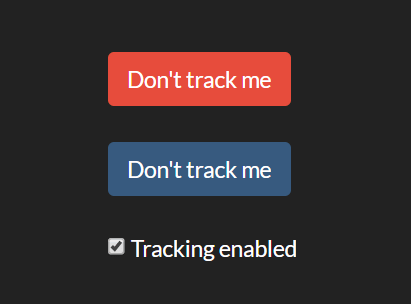
The plugin lets you create Trackless button and checkbox that allows your visitors to opt-in and opt-out of Google Analytics on your website.
More resources about GDPR:
- A GDPR Checklist for Those Who Are Tired of GDPR Checklists
- Ultimate GDPR Compliance jQuery Toolkit
- EU GDPR Information Portal
- GDPR Compliant Cookie Consent Popup Plugin – jQuery ihavecookies.js
- Best GDPR Plugins To Make Your WordPress GDPR Compliant
- GDPR Cookie Compliance Plugin
How to use it:
Install the Trackless with NPM or Yarn.
# Yarn
$ yarn add trackless
# NPM
$ npm install trackless --save
Import the Trackless.
// ES 6
import Trackless from 'trackless';
Or include the compiled file in the head section of the webpage, before your Google Analytics code.
<script async src="https://unpkg.com/trackless@1"></script>
Create a new instance and specify the tracking ID.
const myTrackless = new Trackless({
      trackingID: "TRACKING ID HERE"
});
Bind the Trackless to any element with the class of ‘trackless’.
myTrackless.bindElements();
Create elements to opt-in and opt-out of Google Analytics.
<input class='trackless' type='button'>
<a href='#' class='trackless'></a>
<input class='trackless' type='checkbox'>
<label>Tracking enabled</label>
Available configuration options.
const myTrackless = new Trackless({
      // Prompt text
      optOutText: "Don't track me",
      optInText: "Enable tracking",
      // Initial opt-out value
      initialOptOut: false,
      // Override opt-out value.
      // If true, sets the stored preference to the initialOptOut value.
      // Use this if, for example, you have a logged-in user and want to sync the preference between devices.
      overrideOptOut: false,
      // Invert the behaviour of checkboxes.
      // By default, a checkbox is checked if the user is not opted-out.
      // Set this to true so that it is checked if the user is opted-out.
      invertCheckbox: false,
      // Called when opt-out value is changed.
      // Passed the new opt-out value.
      callback: function(value){}

});
See Also:
 GDPR-Compliant Cookie Consent Banner/Modal in JavaScript
 Stylish Multilingual GDPR & Cookie Consent Popup In Vanilla JavaScript
 Performant & GDPR-friendly Iframe Embed JavaScript Library – iframemanager
 Get GDPR Compliant With Cookieconsent Library
 Advanced Cookie Consent Manager In JavaScript – cookiesConsent.js
 Customizable GDPR Cookie Consent Popup In JavaScript – Cookify
 GDPR Compliant Cookie Consent Banner In JavaScript – GlowCookies
 JavaScript Library For Image Caption Generator – Captionify