


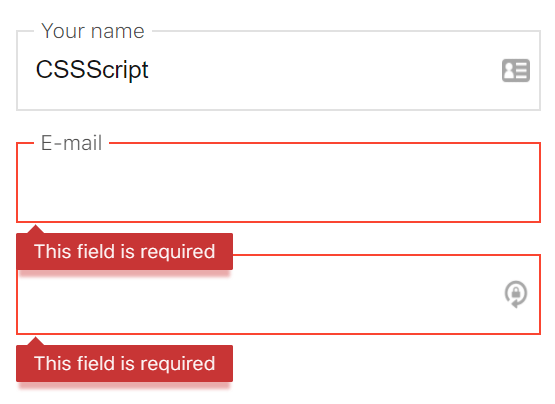
An easy-to-use yet fully customizable form field validator built using native JavaScript with no 3rd JavaScript libraries.
Predefined validation rules:
- notzero
- integer
- float
- name
- lastname
- phone
- min
- max
- between
- length
- minlength
- maxlength
- maxfilesize
- fileextension
How to use it:
Import the main JavaScript file ‘js-form-validator.min.js’ into your html file.
<script src="js-form-validator.min.js"></script>
Apply the validation rules to the target form fields using data-rule attributes. You can apply multiple rules to the same field by separate the rules with ‘|’.
<form name="form" id="myForm">
  <input type="text" name="email" data-rule="required|email">
  <input type="text" name="email" data-rule="required|phone">
  ...
  <input type="submit" value="Submit">
</form>
Initialize the library and done.
new Validator(document.querySelector('#myForm'), function (err, res) {
    return res;
});
Add your own validation rules and error messages:
new Validator(document.querySelector('#myForm'), function (err, res) {
    return res;
},options: {
    rules: {
      custom: function (value) {
        return (value.trim().toLowerCase() === 'custom');
      }
    },
    messages: {
      en: {
        custom: {
          incorrect: 'Error ;-)'
        }
      }
    }
  };
);
More default settings.
// Validation of a current field after the events of "change", "keyup", "blur"
onAir: true,
// Show validation errors
showErrors: true,
// Auto-hide the error messages
autoHideErrors: false,
// Timeout auto-hide error messages
autoHideErrorsTimeout: 2000,
// Language error messages
locale: 'en',
// Object for custom error messages
messages: {},
// Object for custom rules
rules: {},
// classname for error messages
errorClassName: 'error',
// remove spaces from validation field values
removeSpaces: false,
// tracking of new elements
autoTracking: true,
// events list for binding
eventsList: ['keyup', 'change', 'blur']
Changelog:
10/21/2018
- Now, if the field is marked as REQUIRED, the validator looks for the next rule for this field and displays its text in the error class.
See Also:
 Lightweight Form Validation and Input Masking/Formatting – Masker.js
 Client-Side Declarative Form Validation using Strictly.js
 Fast Clientside Form Validation with Zephyr Form Validator
 Enhance Password Fields with Custom Web Components
 Validating and Formatting Credit Card Inputs with Payment.js
 Precise Checkbox Validation With Required Checkboxes Web Component
 Beginner-Friendly JavaScript Form Validation Library – Trivule
 Custom HTML5 Form Validator In Vanilla JavaScript – Just-validate