


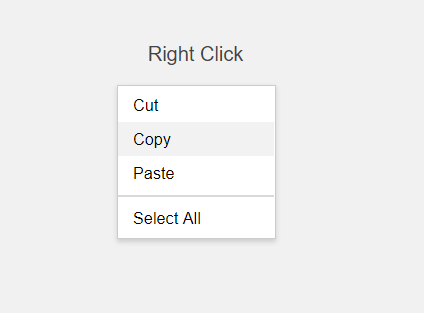
context-menu.js is a JavaScript/LESS plugin that helps you create custom, dynamic, native-looking context menus inside any container element you specify.
How to use it:
Install and import the context-menu.js into your project.
# NPM
$ npm install context-menu --save
// ES 6
import ContextMenu from 'ContextMenu';
// CommonJS:
const ContextMenu = require('ContextMenu');
Include the UMD version of context-menu.js on the web page.
<script src="context-menu.js"></script>
Define the menu items in the JavaScript:
var items = [
    { name: 'Cut', fn: function(target) { console.log('Cut', target); }},
    { name: 'Copy', fn: function(target) { console.log('Copy', target); }},
    { name: 'Paste', fn: function(target) { console.log('Paste', target); }},
    {},
    { name: 'Select All', fn: function(target) { console.log('Select All', target); }},
];
Attach the context menu to an element.
<div class="default" tabindex="0">Default theme</div>
var myMenu = new ContextMenu('.default', items);Add an additional CSS class to the context menu. Useful for custom menu styles.
var myMenu = new ContextMenu('.default', items,{
    className: 'custom-theme',
    minimalStyling: true
});
Event listeners.
// events: created, shown, hidden, itemselected
instance.on('shown', function);
instance.off('shown', function);
Changelog:
v2.0.0 (05/20/2021)
- Update
v1.0.3 (08/07/2019)
- Bugfix
See Also:
 Multi-level Custom Context Menu Made Easy – ctxmenu.js
 Custom Context Menus for Touch & Desktop – ContextMenu
 Create Contextual Right-Click Menus with Vanilla JavaScript
 Customizable Context Menus and Dropdowns With Vanilla JS – Tiny Popup Menu
 Mobile-friendly Custom Context Menu Component In JavaScript
 Themeable Context Menu Library – Contextify
 Custom Right-click Menu (Context Menu) In Vanilla JavaScript – CtxMenu
 Add Custom Context Menus To Any HTML Element – vanilla-context-menu