


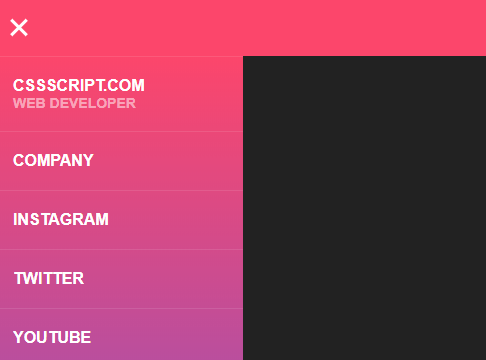
A fancy CSS/CSS3 hamburger toggle navigation that allows the user to toggle an off-canvas side menu by clicking on the hamburger toggle button in the header.
How to use it:
Create the header toggle button.
<div class="header"></div>
<input type="checkbox" class="openSidebarMenu" id="openSidebarMenu">
<label for="openSidebarMenu" class="sidebarIconToggle">
  <div class="spinner diagonal part-1"></div>
  <div class="spinner horizontal"></div>
  <div class="spinner diagonal part-2"></div>
</label>
Create the off-canvas navigation menu.
<div id="sidebarMenu">
  <ul class="sidebarMenuInner">
    <li>Jelena Jovanovic <span>Web Developer</span></li>
    <li><a href="https://vanila.io" target="_blank">Company</a></li>
    <li><a href="https://instagram.com/plavookac" target="_blank">Instagram</a></li>
    <li><a href="https://twitter.com/plavookac" target="_blank">Twitter</a></li>
    <li><a href="https://www.youtube.com/channel/UCDfZM0IK6RBgud8HYGFXAJg" target="_blank">YouTube</a></li>
    <li><a href="https://www.linkedin.com/in/plavookac/" target="_blank">Linkedin</a></li>
  </ul>
</div>
The necessary CSS styles for the navigation.
#sidebarMenu {
  height: 100%;
  position: fixed;
  left: 0;
  width: 250px;
  margin-top: 60px;
  transform: translateX(-250px);
  transition: transform 250ms ease-in-out;
  background: linear-gradient(180deg, #FC466B 0%, #3F5EFB 100%);
}
.sidebarMenuInner {
  margin: 0;
  padding: 0;
  border-top: 1px solid rgba(255, 255, 255, 0.10);
}
.sidebarMenuInner li {
  list-style: none;
  color: #fff;
  text-transform: uppercase;
  font-weight: bold;
  padding: 20px;
  cursor: pointer;
  border-bottom: 1px solid rgba(255, 255, 255, 0.10);
}
.sidebarMenuInner li span {
  display: block;
  font-size: 14px;
  color: rgba(255, 255, 255, 0.50);
}
.sidebarMenuInner li a {
  color: #fff;
  text-transform: uppercase;
  font-weight: bold;
  cursor: pointer;
  text-decoration: none;
}
Style & animate the hamburger toggle button.
input[type="checkbox"]:checked ~ #sidebarMenu { transform: translateX(0); }
input[type=checkbox] {
  transition: all 0.3s;
  box-sizing: border-box;
  display: none;
}
.sidebarIconToggle {
  transition: all 0.3s;
  box-sizing: border-box;
  cursor: pointer;
  position: absolute;
  z-index: 99;
  height: 100%;
  width: 100%;
  top: 22px;
  left: 15px;
  height: 22px;
  width: 22px;
}
.spinner {
  transition: all 0.3s;
  box-sizing: border-box;
  position: absolute;
  height: 3px;
  width: 100%;
  background-color: #fff;
}
.horizontal {
  transition: all 0.3s;
  box-sizing: border-box;
  position: relative;
  float: left;
  margin-top: 3px;
}
.diagonal.part-1 {
  position: relative;
  transition: all 0.3s;
  box-sizing: border-box;
  float: left;
}
.diagonal.part-2 {
  transition: all 0.3s;
  box-sizing: border-box;
  position: relative;
  float: left;
  margin-top: 3px;
}
input[type=checkbox]:checked ~ .sidebarIconToggle > .horizontal {
  transition: all 0.3s;
  box-sizing: border-box;
  opacity: 0;
}
input[type=checkbox]:checked ~ .sidebarIconToggle > .diagonal.part-1 {
  transition: all 0.3s;
  box-sizing: border-box;
  transform: rotate(135deg);
  margin-top: 8px;
}
input[type=checkbox]:checked ~ .sidebarIconToggle > .diagonal.part-2 {
  transition: all 0.3s;
  box-sizing: border-box;
  transform: rotate(-135deg);
  margin-top: -9px;
}
See Also:
 Simple Sidebar Hamburger Menu In CSS
 Responsive Sidebar Navigation With Hamburger Toggle Button
 Create Mobile-First Side Menus with SlideReveal.js Library
 Responsive Multi-level Dropdown Menu With JavaScript And CSS – ozmenu.js
 Off-canvas Accordion Menu With Bootstrap 5
 Hamburger Site Navigation With Menu Rotation
 Mobile-friendly Hamburger Navigation With Submenus
 Beautiful Dashboard Sidebar Menu Template
Thank you very much I used your toggle menu very easily as I am new and I found it great.
I made it a bit different according to my work.
It is the best I ever found. 100% grateful.
I can’t find where did you set the class and id “openSidebarMenu”? I’m really confused.
bruh, did you get the “openSidebarMenu” I wonder where is the properties for that or is that a function of javascript or jquery.