


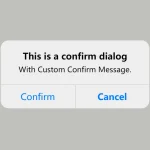
Just another confirmation dialog popup library used to confirm user intentions on the web app.
How to use it:
1. Add the stylesheet ConfirmDialogue.css and JavaScript ConfirmDialogue.js to the webpage.
<link rel="stylesheet" href="ConfirmDialogue.css" />
<script src="ConfirmDialogue.js"></script>
2. Create a new confirmation dialog with the following parameters:
- trueButtonText: Confirm button text
- falseButtonText: Refuse button text
- cancelButtonText: Cancel button text
- messageText: Confirm messages
- titleText: Confirm title
const dialogue = new ConfirmDialogue({
      trueButtonText: "Yes",
      falseButtonText: "No",
      cancelButtonText: 'Cancel',
      messageText: "This one has another option, the cancel option for when you dont want to do anything",
      titleText: "More Buttons"
});
3. Do something if confirmed.
if (await dialogue.respond()) {
  alert('You pressed yes');
} else {
  alert('You pressed no');
};
Changelog:
01/13/2022
- JS & CSS updated
See Also:
 Create Dynamic Draggable Alert/Confirm Popups – webcimes-modal
 Customizable Alert/Confirm Modal Library – modal-alert.js
 Simple Confirmation Dialogs on Click – Bootstrap 5 Confirm Popover
 Minimal Alert & Confirmation Modals in JavaScript – PopupJs.js
 Modern Customizable Confirm Popup JavaScript Library – Confirmly.js
 Create Custom Stylish Dialogs with SnapDialog JavaScript Library
 Easily Build Confirmation Popups with the confirmDialog.js Library
 Create iOS-Style Popups & Notifications With Popup JS Library