


System.css is a CSS library for creating classic Apple Mac OS style interfaces through HTML and CSS markup.
It will aid you in designing retro websites that resemble Apple’s old OS systems from 1984 through 1991.
See Also:
- Windows 98 CSS Framework – 98.css
- Windows XP CSS Framework – XP.css
- Windows 7 CSS Framework – 7.css
- Windows 95 Theme For Bootstrap 4 – Win95.css
- Retro 8-bit CSS Front-end Framework – NES.css
- Playstation Style 16-bit CSS Framework – PSone.css
How to use it:
1. Download and insert the System.css into the document.
<link rel=”stylesheet” href=”https://unpkg.com/@sakun/system.css” />
2. Happy coding.
More Previews:

Buttons

Dropdown Menu

Title Bar
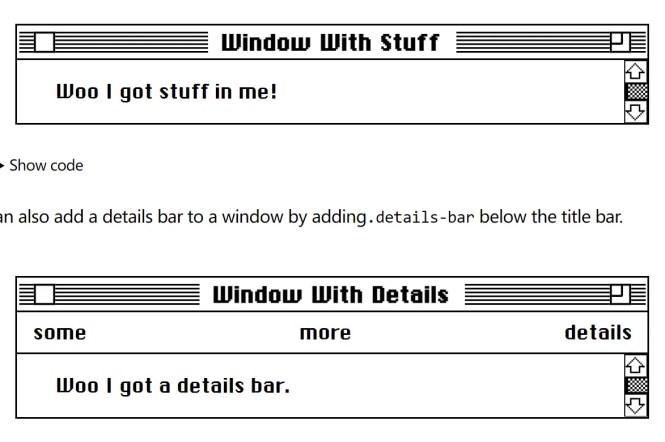
Windows
Changelog:
v0.1.9 (11/03/2022)
- Update btn-default.svg
See Also:
 Material Design Ripple Click Effect With Pure CSS
 Powerful Color Picker Component With Pure JavaScript – color-picker.js
 Create Custom Terminals With Pure JavaScript And CSS – shell.js
 Highlight Active Menu Item On Page Scroll – MenuSpy.js
 Enhanced Keyboard Navigation in JavaScript – FocusManager
 Stackable Modal Popup With Blur Effect – Popbox.js
 Show/Hide Navbar On Scroll Down Or Up
 Implement Native Sharing Buttons With Ease – share-button