


User retention relies heavily on perceived performance. A static, blank screen often signals a broken application to the end user, leading to higher bounce rates. A well-implemented loading spinner or indicator solves this by providing immediate visual feedback during data fetches.
This list curates the 10 best Pure CSS and Vanilla JavaScript loading indicator libraries designed to manage these wait times. The selection covers diverse implementation styles, including modern skeleton screens, lightweight CSS animations, and scalable SVG graphics. Each item addresses specific project needs, from minimal bundle sizes to high-fidelity visual effects.
Let’s get started.
Originally Published Jan 3 2018, updated Dec 18 2025
1. Animated Skeleton Loading Screens In Pure CSS
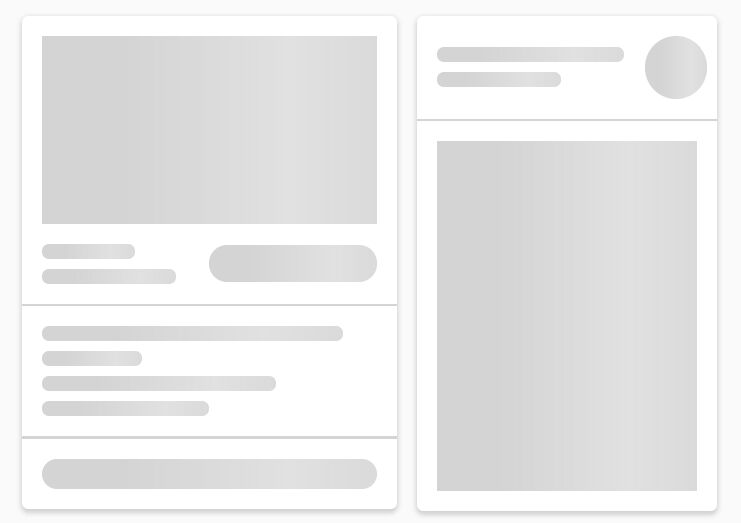
This CSS library creates animated skeleton previews of block content during data load. You can use it to show placeholder layouts for text, cards, and images before real content arrives.
Key Features:
- Pure CSS implementation with no JavaScript required
- Animated shimmer effect across placeholder blocks
- Customizable via CSS variables for colors and timing
- Works with standard HTML structure
- Lightweight footprint under 5KB
2. 100+ Open-source Animated SVG Loading Spinners
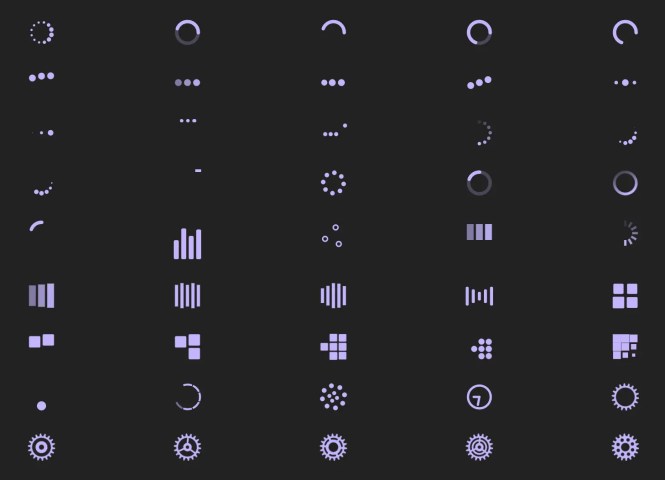
SVG Spinners offers a large collection of over 100 vector-based indicators. You can implement these as inline code or image tags.
Key Features:
- 100+ distinct variations.
- Scalable Vector Graphics (SVG) format.
- Supports inline embedding.
- High-resolution rendering.
Best For:
- Modern web applications.
- Retina/High-DPI displays.
3. Three Dots
Three Dots utilizes CSS3 to create twenty distinct animations based on a three-dot pattern. The library focuses specifically on horizontal dot interactions.
Key Features:
- 20 preset animations.
- Single-element CSS usage.
- Small file size.
- Customizable colors.
Best For:
- Button loading states.
- Minimalist user interfaces.

4. Facebook Inspired Skeleton Loader In Pure CSS – Placeholder Loading
This solution replicates the skeleton loading effect found on Facebook. It uses pure CSS to create the shimmering placeholder animation.
Key Features:
- Replicates Facebook design language.
- Pure CSS construction.
- Customizable geometry.
- Smooth shimmer animation.
Best For:
- Social media feeds.
- Complex card layouts.

5. iOS Style Loading Spinner with Pure CSS – ispinner
ispinner helps you generate an iOS-style activity indicator using standard CSS. It targets developers who need a native mobile look on the web.
Key Features:
- Native iOS aesthetic.
- Adjustable size and speed.
- Lightweight CSS.
- No images required.
Best For:
- Mobile web applications (PWAs).
- Mimicking native system UI.

6. iOS & OS X Style Pure CSS Loading Spinner
This library creates a full-screen overlay with a spinner resembling Apple system indicators. It blocks user interaction while the page processes data.
Key Features:
- Full-screen modal overlay.
- Apple OS X/iOS visual style.
- Blocks user input during loads.
- Pure CSS3 animations.
Best For:
- Page transitions.
- Preventing double-submissions.

7. Minimal SVG Loading Spinner In Pure JS – LoadingSpinner.js
LoadingSpinner.js uses vanilla JavaScript to inject a basic SVG spinner. It functions without external dependencies like jQuery.
Key Features:
- Vanilla JavaScript (No jQuery).
- Dynamic SVG injection.
- Zero CSS dependencies.
- Simple configuration API.
Best For:
- Projects requiring JavaScript control.
- Legacy browser support.

8. Beautiful Loading Spinners & Progress Bars – Loading-Visualization
This library visualizes loading status through both circular spinners and linear progress bars. It combines JavaScript and CSS for the rendering logic.
Key Features:
- Includes circular spinners.
- Includes linear progress bars.
- Hybrid JS/CSS implementation.
- Customizable animation speeds.
Best For:
- File upload interfaces.
- Long-running processes.

9. Animated SVG Loading Spinner – loader.js
loader.js constructs an animated spinner using SVG elements and CSS animations. It provides a sharp visual result on all screen sizes.
Key Features:
- SVG architecture.
- CSS-driven animation.
- Scales without pixelation.
- Smooth frame rates.
Best For:
- Vector-heavy designs.
- Responsive layouts.

10. Google Inspired 4-Dot Loading Indicators In Pure CSS
This collection recreates the Google 4-dot animation style using pure CSS. It includes multiple variations like bounce, growth, and wave effects.
Key Features:
- Google Material Design aesthetic.
- 8 specific animation types (Bounce, Wave, etc.).
- Pure CSS implementation.
- Source code available on GitHub.
Best For:
- Android-themed web apps.
- Material Design systems.
Animations Included:
- Bounce (Demo)
- Disappear (Demo)
- Growth (Demo)
- Shrink (Demo)
- Waves (Demo)
- Square Rotate (Demo)
- Square (Demo)
- Switch (Demo)

Choosing the Right Loading Spinner Library
The ideal solution depends on your specific technical constraints and design goals.
Skeleton screens (Items 1 and 4) generally offer the best user experience for content-heavy applications by reducing perceived wait times.
Conversely, SVG-based solutions (Items 2 and 9) provide the sharpest visuals for high-resolution displays without pixelation.
Projects requiring strict performance budgets should prioritize pure CSS libraries (Items 3 and 10) to avoid adding JavaScript overhead to the critical rendering path.
Evaluate your target audience’s device capabilities and your application’s design system before making a final selection.
FAQ
What is a loading spinner?
A loading spinner is an animated visual indicator that shows users a process is in progress. Developers add loading spinners during asynchronous operations like API calls, image loads, or data processing. These indicators reduce user frustration by confirming the application is working and has not frozen.
Should I use a loading spinner or skeleton screen?
Use skeleton screens when you know the structure of incoming content. Skeleton screens show placeholder layouts that match the shape of text, images, and cards. Use generic spinners when content structure is unpredictable or when the wait time is very short (under 1 second).
Do loading spinners affect website performance?
CSS-based loading spinners have minimal performance impact. They use CSS animations that run on the GPU in modern browsers.
How do I show a loading spinner during AJAX requests?
Display the spinner before your fetch or XMLHttpRequest call. Hide it in the promise’s then or catch blocks. For libraries with JavaScript APIs, call the show method before the request and the hide method after the response arrives. CSS-only spinners require manual class toggling on container elements.
What’s the difference between SVG and CSS loading spinners?
SVG spinners use vector graphics that scale without quality loss. CSS spinners use borders, transforms, and keyframe animations. SVG offers more complex shapes and paths. CSS animations often perform better on low-end devices. Both approaches work across modern browsers. Your choice depends on desired visual complexity and performance requirements.
More Resources:
Looking for more JavaScript & CSS solutions to create loading & progress indicates on your ap?. Here are a few resources we found on the web: