


Masked inputs are easy to add and easy to get wrong.
A phone number, currency amount, date, ID, or card-style field may look correct on screen while still sending punctuation, partial values, or the wrong numeric format to your app.
The libraries below take different approaches to that problem, from tiny single-field masks to vanilla JavaScript libraries with raw-value handling, dynamic patterns, currency formatting, and validation helpers.
Originally Published June 12 2024, updated May 20 2026
Table of contents:
Comparison Table
| Library | Best For | Live Demo |
|---|---|---|
| phone-mask | Basic phone masks. | Live Demo |
| Maska | Vanilla JS and framework masks. | Live Demo |
| SimpleMaskMoney | Currency and money fields. | Live Demo |
| phonemask | Telephone inputs. | Live Demo |
| imaskjs | Advanced masks and frameworks. | Live Demo |
| Masky.js | Attribute-based masks. | Live Demo |
| Masker.js | Masking plus validation. | Live Demo |
| smask | Formatting and unmasking values. | Live Demo |
| Lightweight Pure JavaScript Input Mask | Small legacy form masks. | Live Demo |
| Text Mask | Older multi-framework projects. | Live Demo |
Input Mask JavaScript Libraries
1. Basic Phone Input Mask With Pure JavaScript – phone-mask
Best For: Simple telephone masks on plain HTML forms.

phone-mask is a small JavaScript plugin for formatting phone input values with a custom mask pattern. The implementation stays narrow: one pattern in the markup and a small script on the page. That narrow scope works for static contact pages, but it runs out quickly on forms that need cleaned values, multiple field types, or framework components.
Key Features:
- Applies custom phone masks to input fields.
- Uses the
data-phonemaskattribute for the mask pattern. - Runs through a plain script file with no framework dependency.
Recommended Use Case: A static contact page with one fixed telephone pattern.
2. Easy Input Mask Component In Vanilla JavaScript & Vue.js – Maska
Best For: Modern projects that need one masking library across vanilla JavaScript and component frameworks.
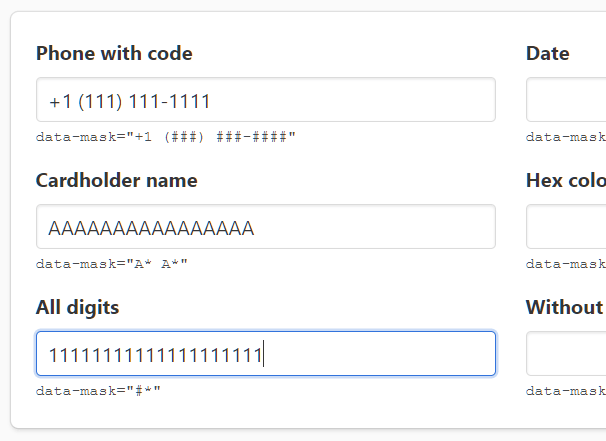
Maska is a zero-dependency input mask library for vanilla JavaScript, Vue, Alpine.js, and Svelte. Its main advantage is portability: the same masking package can support plain inputs and component-driven UI. Maska makes sense when your form needs token-based masks today and may later need Vue, Alpine.js, or Svelte integration.
Key Features:
- Supports vanilla JavaScript, Vue 2/3, Alpine.js, and Svelte integrations.
- Uses custom tokens with modifiers, transform functions, and hooks.
- Handles dynamic, reversed, and eager masks.
- Includes number mask mode for money-style formatting.
- Works with native and custom input components.
- Installs through npm or a browser script build.
Recommended Use Case: A product form that starts in vanilla JavaScript and may move into Vue, Alpine.js, or Svelte components.
3. Money(Currency) Mask Library In Vanilla JavaScript – SimpleMaskMoney
Best For: Money and currency inputs that need separators, precision, prefixes, or suffixes.

SimpleMaskMoney is a vanilla JavaScript library focused on money input masking. The API centers on currency display details such as separators, precision, prefixes, and suffixes. That focus helps commerce and admin forms, but a general mask library is a better fit when the same screen has many non-money patterns.
Key Features:
- Formats currency-style values in input fields.
- Supports prefixes, suffixes, decimal separators, and thousand separators.
- Configures fraction digits and negative values.
- Can allow empty values when the field should not default to zero.
- Has hooks that run before and after formatting.
- Works through a plain script file and can be used in framework projects.
Recommended Use Case: A checkout, invoice, or donation amount field that needs currency symbols and separators.
4. Easy Telephone Number Input Mask JavaScript Library – phonemask
Best For: Telephone fields that should read their format from an HTML attribute.
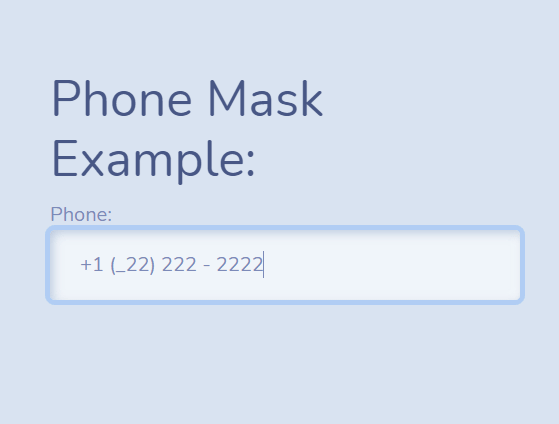
phonemask is a JavaScript library for formatting telephone numbers inside tel input fields. The mask pattern lives in a mask attribute, so the setup stays close to the HTML field. That markup-first approach fits small websites and CMS templates better than application forms with several masked data types.
Key Features:
- Targets telephone inputs through a selector.
- Reads the phone format from a
maskattribute. - Supports placeholder text that matches the expected phone pattern.
- Runs as a standalone JavaScript file.
Recommended Use Case: A CMS form where editors can keep the phone pattern close to the input markup.
5. Feature-rich Input Mask Plugin With Vanilla JavaScript – imaskjs
Best For: Complex masks, typed values, and apps that need framework adapters.

imaskjs is a mature JavaScript input mask library for pattern, number, date, regex, function, and dynamic masks. It is the safest starting point when mask behavior becomes part of application logic, not just field decoration. Smaller scripts are easier for one field, but imaskjs pays off when a form mixes dates, numbers, custom patterns, typed values, and framework adapters.
Key Features:
- Supports pattern, number, date, regex, function, and dynamic masks.
- Installs through npm or a CDN script.
- Works with Angular, React, React Native, and Vue adapters.
- Supports overwrite mode, skip-invalid behavior, autofix mode, and repeat blocks.
- Can format and parse values through pipe utilities.
- Handles unmasked values for data storage and validation workflows.
Recommended Use Case: A production app form that needs date, number, custom pattern, and raw-value handling from one API.
6. Lightweight Input Masking for Web Devs – Masky.js
Best For: Markup-driven masks with mobile keyboard hints and length attributes.

Masky.js is a small JavaScript input masking library that uses data attributes for phone, date, credit card, and custom patterns. The data-attribute API keeps setup in HTML and still controls mobile keyboard hints and length attributes. The CPF and CNPJ validation options make it more relevant for Brazilian document fields than for generic global forms.
Key Features:
- Uses
data-maskpatterns with numeric, alphabetic, and alphanumeric tokens. - Supports prefixes and suffixes through data attributes.
- Sets
inputmodebased on the mask. - Calculates
minlengthandmaxlengthattributes from the mask. - Includes CPF and CNPJ validation options.
- Runs from a minified browser script.
Recommended Use Case: A markup-driven form with phone, date, card, CPF, or CNPJ fields.
7. Lightweight Form Validation and Input Masking/Formatting – Masker.js
Best For: Forms that need input masking and validation rules from the same markup layer.

Masker.js is a dependency-free JavaScript library for declarative input masking and form validation. Masker.js behaves more like a form helper than a pure mask script: it handles required fields, date ranges, email checks, character counters, and custom error messages. That makes Masker.js a better match for forms where validation rules should stay near the markup.
Key Features:
- Formats phone numbers across 12 international formats.
- Supports civilian and military date formats.
- Handles character counters for inputs and textareas.
- Validates email, required fields, dates, and date ranges.
- Filters number-only input.
- Supports custom error messages through data attributes.
- Includes programmatic validation methods through
Validator.
Recommended Use Case: A registration or booking form with masked fields, required checks, and date range validation.
8. Developer-friendly Input Mask & Validation Library – smask
Best For: Brazilian-style fields that need masks plus raw values.
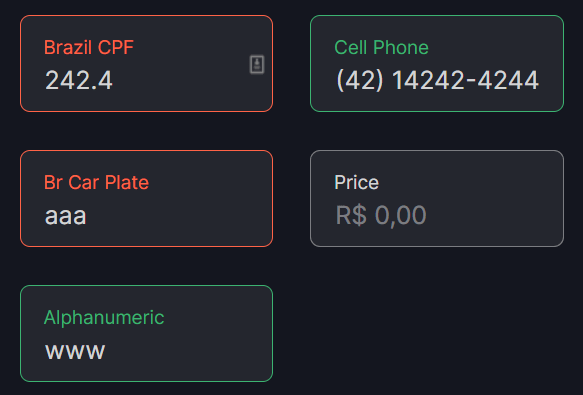
smask is a JavaScript library for form input masks, validation, raw value handling, and value formatting. Its main value is switching between the formatted value a user sees and the cleaned value your app stores. The examples lean toward Brazilian field patterns, so check the defaults against your target locale before adoption.
Key Features:
- Masks input fields with single or multiple patterns.
- Unmasks formatted values back to raw values.
- Formats and unformats numbers and currency values by locale.
- Supports digits, letters, uppercase letters, alphanumeric input, dates, and prices.
- Includes examples for CPF, cell phone, birthdate, car plate, price, quantity, and alphanumeric fields.
- Uses module imports for JavaScript projects.
Recommended Use Case: A Brazilian-style account form that needs CPF, phone, date, price, and raw-value submission.
9. Lightweight Pure JavaScript Input Mask
Best For: Older pages that need a compact pure JavaScript mask for numeric patterns.

Lightweight Pure JavaScript Input Mask is a small input masking script for fields such as phone numbers, SSNs, dates, and times. The plugin reflects an older standalone script style: attach a mask to a plain input and keep the rest of the form unchanged. For a new project, compare Maska or imaskjs first for a more current setup path and a larger API.
Key Features:
- Applies masks to plain input fields.
- Supports common numeric patterns such as phone numbers, SSNs, dates, and times.
- Runs in pure JavaScript with no jQuery requirement.
Recommended Use Case: A legacy page that needs a small script for phone, SSN, date, or time formatting.
10. Multifunctional Input Mask Library – Text Mask
Best For: Multifunctional masks across vanilla JavaScript and older framework stacks.

Text Mask is an input mask library for vanilla JavaScript, React, AngularJS, Vue, and Ember usage paths. It uses mask arrays, guide mode, placeholder control, and pipe functions to shape user input as it is typed. Text Mask is most relevant when a project needs one masking model across several older stacks or when you need to maintain an existing Text Mask setup.
Key Features:
- Supports vanilla JavaScript and older framework integrations.
- Uses mask arrays that mix fixed characters and regular expressions.
- Supports guide mode and custom placeholder characters.
- Can keep character positions during edits.
- Supports a visible mask when the field value is empty.
- Can modify conformed values through pipe functions.
Recommended Use Case: A vanilla JavaScript or older framework form that already follows the Text Mask masking model.
How to Choose
Start with the field type. For one fixed phone field, phone-mask or phonemask can cover the job with little setup. For money fields, SimpleMaskMoney has a more focused API than a general pattern mask.
For mixed forms, compare the multi-field libraries first. imaskjs makes sense when a project needs date, number, regex, function, and dynamic masks from one package. Maska is a better match when a small zero-dependency library must work across vanilla JavaScript and Vue, Alpine.js, or Svelte.
For markup-heavy forms, Masky.js and Masker.js keep much of the setup in attributes. Masky.js focuses on mask patterns, prefixes, suffixes, mobile input hints, and CPF/CNPJ validation. Masker.js goes further into form validation with required checks, date ranges, email checks, character counters, and custom error messages.
Match the library to the form’s complexity before you choose. A small phone or money formatter is easier to drop into a static page, while Maska, imaskjs, Masker.js, and smask make more sense when the same form needs several masks, raw values, validation rules, or a reusable setup.
FAQ
Q: What is an input mask in JavaScript?
A: An input mask formats a field as the user enters a value, such as a phone number, date, currency amount, or ID. The mask helps the visible value match the pattern your app expects.
Q: Is an input mask the same as validation?
A: No. A mask shapes the input format, and validation checks whether the submitted value is acceptable. Masker.js combines both behaviors for several form patterns.
Q: Which input mask library works best with vanilla JavaScript?
A: Maska, imaskjs, Masky.js, and SimpleMaskMoney all support vanilla JavaScript. Match the library to the field type: general masks, currency formatting, or attribute-based setup.
Q: Which library should I use for a no-framework form?
A: Start with Maska, imaskjs, Masky.js, or SimpleMaskMoney, depending on the field type. For one small phone field, phone-mask or phonemask can be enough.
Q: Why does a masked input submit the formatted value instead of the raw value?
A: Many mask libraries keep the visible value in the input element, punctuation included. Use a library with unmasking support, such as smask or imaskjs, when your backend needs digits or raw numeric values.
Q: Which input mask library is best for mobile forms?
A: Start with Masky.js when mobile keyboard behavior matters since Masky.js can set inputmode from the mask. For complex mobile forms, test cursor behavior, deletion behavior, and paste behavior on real devices before publishing.