


Choosing a JavaScript data table library gets harder once a project needs search, pagination, editable cells, JSON loading, or server-side data handling.
Some libraries only enhance an existing HTML table, and others behave more like full data grid components for internal tools and dashboards.
The options below help you match the right data table or data grid library to your UI, data source, and setup path.
Originally Published June 6 2024, updated May 16 2026
Table of contents:
Comparison Table
| Library | Best For | Live Demo |
|---|---|---|
| handsontable | Spreadsheet-like grids with editing. | Live Demo |
| Tabulator | JSON tables with remote data workflows. | Live Demo |
| JSTable | Existing tables with search and paging. | Live Demo |
| Active Table | Editable web-component data grids. | Live Demo |
| js-datatable | Static HTML tables with basic controls. | Live Demo |
| Grid.js | Compact tables with client/server modes. | Live Demo |
| simple-datatables | No-jQuery DataTables-style UI. | Live Demo |
| simple-datatable.js | Array-driven tables with row rendering. | Live Demo |
| Nano Sheets | Small spreadsheet-like editable grids. | Live Demo |
| VanillaGrid | Hierarchical and server-backed grids. | Live Demo |
Data Table And Data Grid Libraries
1. handsontable
Best For: Spreadsheet-like data grids for apps that need cell editing, validation, copy and paste, and framework setup paths.

handsontable is a JavaScript data grid component that brings spreadsheet-style editing and table management to web apps. It’s best for internal tools, data-entry screens, planning dashboards, and apps where users edit cells rather than only view rows.
Key Features:
- Edits, validates, formats, and copies table data in cells.
- Supports plain JavaScript, TypeScript, React, Angular, and Vue setup paths.
- Adds column sorting, filtering, and data formatting.
- Inserts, removes, edits, freezes, and resizes rows or columns.
- Includes fixed headers, fixed columns, collapsible columns, and nested headers.
- Provides context menus, dropdown menus, keyboard navigation, and clipboard support.
- Exports table data to CSV.
- Supports formulas and calculations in spreadsheet-style workflows.
Recommended Use Case: Use handsontable for spreadsheet-style CRUD screens, inventory editors, resource planning tools, and data-entry dashboards.
2. Tabulator
Best For: JSON-backed data tables that need local or remote sorting, filtering, pagination, formatting, and layout control.

Tabulator is a JavaScript table and data grid library that builds interactive tables from arrays, JSON, AJAX data, local files, or existing HTML tables. It works well for admin panels, reporting tools, and data-heavy screens that pull rows from an endpoint. Choose it when you need table behavior that can grow from client-side data to server-backed data.
Key Features:
- Loads rows from arrays, JSON, AJAX, local files, or an existing HTML table.
- Supports local and remote sorting, filtering, and pagination.
- Uses a virtual DOM rendering model for larger tables.
- Includes column formatting, calculations, validation, and editable cells.
- Supports resizable columns, responsive layouts, frozen columns, and grouped columns.
- Provides row selection, row grouping, tree data, and movable rows or columns.
- Includes callbacks and events for table lifecycle and user interaction.
- Supports themes, download/export workflows, and print-friendly output.
Recommended Use Case: Use Tabulator for dashboards and CRUD admin screens where table data comes from an API and needs rich client-side controls.
3. JSTable
Best For: Existing HTML tables that need sorting, search, filtering, and pagination in a pure JavaScript setup.

JSTable is a pure JavaScript data table library that makes an HTML table or dynamic tabular dataset interactive. It’s designed for projects that already render table markup and only need a cleaner browsing layer on top. Pick it for documentation pages, directories, simple admin lists, and server-rendered tables.
Key Features:
- Adds sorting, filtering, search, and pagination to tables.
- Works with static HTML tables and dynamic tabular data sources.
- Supports server-side data loaded from JSON, PHP, or similar endpoints.
- Uses standalone JavaScript and CSS files.
- Provides page length controls for longer tables.
- Fits projects that need DataTables-style behavior without jQuery.
Recommended Use Case: Use JSTable when a server-rendered table needs interactive controls without a large grid package.
4. Active Table
Best For: Editable data grids built as a framework-agnostic web component.

Active Table is an editable data table and data grid web component for browser-based row and column management. It packages table editing, validation, file import, and column typing inside a custom element. Pick it when the web-component format fits your stack and you want grid behavior from markup or npm.
Key Features:
- Adds, removes, moves, and edits rows and columns.
- Includes text validation, sorting, filtering, and pagination.
- Supports text, number, currency, select, label, date, and checkbox columns.
- Imports and exports table data through Excel, CSV, and related file workflows.
- Handles row and column drag-and-drop.
- Provides resizing and overflow behavior for changing table dimensions.
- Uses a framework-agnostic web component architecture.
- Exposes an API for custom behavior and data operations.
Recommended Use Case: Use Active Table for editable admin grids, configuration tables, small finance tools, and web-component based dashboards.
5. js-datatable
Best For: Static HTML tables that need basic sorting, searching, pagination, and localization.

js-datatable is a small JavaScript library that converts a regular static HTML table into a searchable and paginated data table. Choose it when the page already contains complete table markup and does not need API-driven rendering.
Key Features:
- Converts regular HTML tables into interactive data tables.
- Adds sorting, searching, and pagination controls.
- Uses separate CSS, JavaScript, and locale files.
- Initializes from a table element through a data attribute.
- Fits pages that already render the final table rows on the server.
- Keeps the setup small for static lists and comparison tables.
Recommended Use Case: Use js-datatable for static comparison tables, small directories, event lists, and server-rendered admin tables.
6. Grid.js
Best For: Compact JavaScript data tables that need client-side or server-side search, sort, and pagination.

Grid.js is a JavaScript table plugin for rendering searchable and paginated data tables from local data, remote data, or existing table markup. It sits between a small table enhancer and a larger application grid. Pick it for product lists, searchable reports, and admin screens that need a clean API with room for server-side data handling.
Key Features:
- Works as a standalone JavaScript table library.
- Loads tabular data from arrays, async sources, or existing HTML tables.
- Supports client-side or server-side search, pagination, sorting, and cell formatting.
- Supports fixed headers and resizable columns.
- Provides language configuration for labels and table messages.
- Works with npm or direct browser setup.
- Can render custom cell content through formatter functions.
- Fits plain JavaScript projects and framework-based apps that can mount an independent table.
Recommended Use Case: Use Grid.js for searchable app tables where you want a compact grid API and may move sorting or pagination to the server later.
7. simple-datatables
Best For: A no-jQuery DataTables-style library for searchable, sortable, exportable HTML tables.
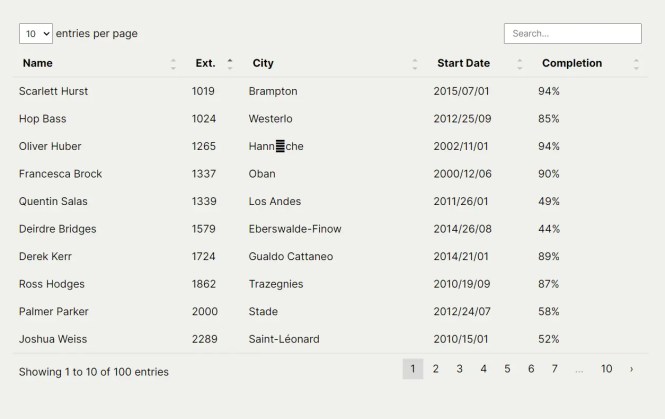
simple-datatables is a dependency-free JavaScript table plugin that enhances HTML tables with DataTables-style interaction. It works well when a project needs search, pagination, column control, and export tools but does not need row virtualization or spreadsheet editing.
Key Features:
- Adds searchable, sortable, filterable, and paginated table controls.
- Exports CSV, TXT, JSON, and SQL, and imports CSV or JSON data.
- Supports custom column rendering, column visibility, and column reordering.
- Lets you customize layout, labels, and per-page menu options.
- Supports table refresh and update workflows through its API.
- Provides row and column selection helpers.
- Works from existing table markup in no-jQuery projects.
Recommended Use Case: Use simple-datatables for content-heavy tables, CMS lists, documentation tables, and admin screens that need export options.
8. simple-datatable.js
Best For: JavaScript-array tables that need pagination, search, custom row output, and a small setup path.

simple-datatable.js is a vanilla JavaScript data table library that creates an interactive table from JavaScript arrays. It’s great for small app widgets where the data already exists in memory and custom cell markup matters. Choose it for compact directories, demo datasets, profile lists, and small dashboard panels.
Key Features:
- Creates table rows from JavaScript arrays.
- Configures page size, page-size choices, height, and searchable columns.
- Uses an
onRowRendercallback for custom cell markup. - Adds sorting, filtering, and pagination to generated tables.
- Supports custom table headers and row data mapping.
- Works with plain JavaScript and a container element.
- Fits small in-memory datasets and simple dashboard widgets.
Recommended Use Case: Use simple-datatable.js when you already have array data and need a fast way to render a searchable table.
9. Nano Sheets
Best For: Small spreadsheet-like data grids with editable cells, copy and paste, and virtualized rendering.

Nano Sheets is a small JavaScript library for creating editable spreadsheet-like data grids in the browser. It turns a container into an editable data grid and supports direct cell editing. Pick it when you need Excel-like behavior in a compact project area rather than a full data management system.
Key Features:
- Edits grid cells directly in the browser.
- Supports copy and paste from Excel.
- Uses virtualization, infinite-grid behavior, and basic mobile editing.
- Creates a spreadsheet-like grid from JavaScript configuration.
- Handles large editable datasets through virtual rendering.
- Supports keyboard-oriented spreadsheet interaction.
- Fits compact tools that need cell editing more than full table reporting.
Recommended Use Case: Use Nano Sheets for compact spreadsheet widgets, quick data-entry tools, and editable grids inside internal utilities.
10. VanillaGrid
Best For: Vanilla JavaScript data grids that need tree rows, server-side data hooks, grouping, export, and custom cell types.

VanillaGrid is a no-dependency vanilla JavaScript data grid library for interactive tables built from tabular data arrays. It includes hierarchical rows, remote pagination, sorting, filtering, export, and richer cell output. Choose it for modern vanilla JavaScript apps where you want advanced grid behavior without a framework wrapper.
Key Features:
- Sorts, filters, paginates, groups, and aggregates rows.
- Supports tree tables with lazy-loaded children and server-backed page loading.
- Exports CSV or Markdown and renders image, link, HTML, button, progress, rating, and color cells.
- Includes column visibility controls, checkbox selection, resizable columns, and custom context menus.
- Supports hierarchical rows with expandable and collapsible states.
- Handles remote pagination, remote sorting, and remote filtering.
- Provides a pivot table builder with drag-and-drop interaction.
- Includes keyboard navigation and ARIA-oriented table behavior.
Recommended Use Case: Use VanillaGrid for API-backed data grids, tree tables, admin reports, and vanilla JavaScript dashboards with richer cell output.
How to Choose
For spreadsheet-style editing, start with handsontable, Active Table, or Nano Sheets. handsontable fits complex data-entry apps, Active Table fits web-component projects, and Nano Sheets fits smaller editable grid widgets.
For JSON or API-backed data, compare Tabulator, Grid.js, and VanillaGrid. Tabulator provides a versatile data-grid API, Grid.js works well for compact app tables, and VanillaGrid fits vanilla JavaScript projects that need tree rows or server-backed pagination.
For existing HTML tables, choose JSTable, js-datatable, or simple-datatables. These options work best when your backend or CMS already prints the table markup and JavaScript only needs to add search, sort, pagination, or export controls.
For no-framework pages, start with JSTable, Grid.js, simple-datatables, simple-datatable.js, or VanillaGrid. For React, Angular, or Vue work, handsontable has the clearest framework-specific documentation path. Grid.js can fit framework apps when the table can live inside its own grid configuration.
For large datasets, avoid rendering every record at page load. Prefer a library with remote sorting, filtering, and pagination, then let the server return only the current page of rows. Tabulator, Grid.js, and VanillaGrid are the strongest picks in this list for that pattern.
FAQ
Q: What is the difference between a data table and a data grid?
A: A data table usually displays structured rows and columns with features such as sorting, search, filtering, and pagination. A data grid usually adds application-style behavior such as editable cells, keyboard navigation, column resizing, virtualization, tree rows, or server-side data handling.
Q: What is a data table in JavaScript?
A: A JavaScript data table is a table UI enhanced with features such as sorting, filtering, search, pagination, formatting, or remote data loading. It is most useful when a plain HTML table no longer gives users enough control over the data.
Q: What is the best JavaScript data table library for an existing HTML table?
A: JSTable and js-datatable are the safest first checks for an existing static table. Choose simple-datatables when you need export, import, or column control.
Q: Which data grid library should I use for spreadsheet-like editing?
A: Use handsontable for full spreadsheet-style app screens. Active Table and Nano Sheets work better for smaller editable grids.
Q: Can I install these data table libraries with npm?
A: Tabulator, Grid.js, simple-datatables, Active Table, and handsontable provide npm setup. Smaller libraries rely on direct CSS and JavaScript file imports.
Q: Which option works best with React, Angular, or Vue?
A: handsontable has documented setup paths for React, Angular, and Vue. Grid.js is another great choice when you need a compact table inside a framework app.
Q: Why does sorting or pagination break after loading rows with AJAX?
A: Many table enhancers read the table only during initialization. Load the data first, reinitialize the table, or choose a grid such as Tabulator or VanillaGrid that has a remote-data workflow.
Q: Which libraries support data export?
A: handsontable, Tabulator, simple-datatables, and VanillaGrid include export-oriented features.
Related Resources:
- JavaScript & CSS Data Table Resources
- JavaScript & CSS Data Grid Resources
- JavaScript & CSS Table Sort Resources
- High Performance Table Data Presentation Library – regular-table
- Lightweight Vanilla JS Data Grid for Modern Web Apps – BWDataTable
- Dynamic Data Table In Vanilla JavaScript
- Minimal Table Sorter In JavaScript – table-sort.js
- 10 Best jQuery Data Table Plugins