


This article lists the top 10 JavaScript countdown libraries for modern web development projects. We selected these libraries based on page views on our website over the past year, GitHub stars, and community adoption.
A JavaScript countdown displays a clock that decrements from a specific date or time to zero. You can use these components for “coming soon” pages, product launches, event promotions, and limited-time offers.
Browse the collection below to find the correct library for your specific UI requirements.
Originally Published Jan 2019, updated Dec 10, 2025
1. Classic Flip Clock Style Countdown & Counter Library – flip.js

flip.js is an open-source, fully customizable, pretty nice, classic flip clock style countdown & counter component in vanilla JavaScript and CSS.
Ideal for stopwatch, clock, visitor counter, event countdown, billboard & airport-style text flip animation and much more.
Features:
- 24 different easing modes.
- 34 transform functions to build complex counters easily.
- Configurable flip animation.
- Multiple languages.
- Fully responsive and mobile-friendly.
- Auto syncs the client and server time.
- Quickly implements it in your project with the 12 presets.
Best For:
- Airport-style text displays.
- Event countdowns requiring high visual impact.
2. CountUp.js: Customizable Count Up/Down Animations In Pure JavaScript

CountUp.js is a lightweight, simple-to-use JavaScript library that allows you to animate countups and countdowns with custom easings, separators, decimals, suffixes, and prefixes.
Key Features:
- Triggers animations via scroll spy when elements enter the viewport.
- Configures custom easing functions.
- Handles large numbers with customizable formatting.
- operates as a lightweight, dependency-free script.
Best For:
- Financial dashboards displaying statistics.
- Animated visitor counters.
3. Retro Flipping Countdown Timer In JavaScript – flipdown.js

flipdown.js generates a retro-style flipping clock. The plugin calculates days, hours, minutes, and seconds until a specific event.
Key Features:
- Prioritizes high performance and low overhead.
- Removes dependencies on external frameworks.
- Responsive design adjusts to screen size.
- Includes a specific “retro” visual theme.
Best For:
- Vintage or retro-themed landing pages.
- “Coming Soon” pages.
4. Easy Datetime Countdown Timer – Countdown.js

Countdown.js implements a basic timer using pure JavaScript. The script replaces the timer with an “EXPIRED” message upon completion.
Key Features:
- Styles easily with standard CSS.
- Displays text-based output.
- Requires zero dependencies.
- Handles simple date-time logic.
Best For:
- Minimalist text layouts.
- Projects requiring a small file size.
5. Circular Countdown Timer In JavaScript And CSS3

This library renders a minimal countdown with a circular indicator. The code utilizes SVG, JavaScript, and CSS3 to draw the progress ring.
Key Features:
- Uses SVG for resolution-independent graphics.
- Animates the circle stroke as time decreases.
- Excludes heavy JavaScript frameworks.
- Maintains a minimal visual footprint.
Best For:
- Modern, flat-design interfaces.
- Progress indicators.
6. Countdown Timer Plugin With Pure JavaScript – TimezZ
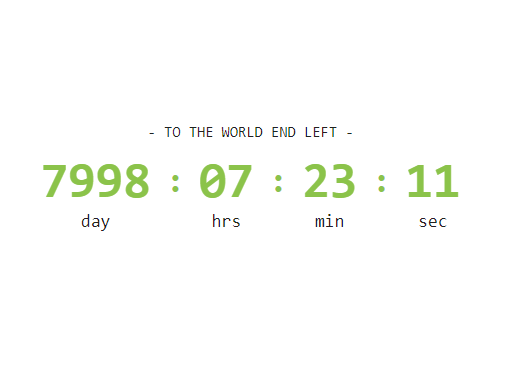
This is the standalone version of the jQuery TimezZ plugin that lets you create a customizable countdown timer in days:hours:minutes:seconds format.
Key Features:
- Configures output format easily.
- operates without jQuery dependencies.
- Supports custom styling via CSS.
- Automates date calculations.
Best For:
- Standard e-commerce product timers.
- Basic event tracking.
7. Digital Clock With Countdown Circle – rounded-clock

rounded-clock combines a digital clock with a circular second-counter. The component visualizes the seconds remaining in the current minute.
Key Features:
- Displays current time digitally.
- Animates a circular progress bar for seconds.
- Uses modern JavaScript syntax.
- Updates the UI in real-time.
Best For:
- Dashboards requiring current time display.
- Clock widgets.
8. Simple Countdown Timer In Vanilla JavaScript – ysCountDown.js

A simple JavaScript countdown timer plugin for counting time down in DAYS, HOURS, MINUTES, SECONDS.
Key Features:
- Tracks Days, Hours, Minutes, and Seconds.
- Implements easily via vanilla JavaScript.
- Allows CSS customization for text.
- Accepts a target date input.
Best For:
- Simple maintenance mode pages.
- Text-only headers.
9. Count Down To A Date With Custom Until/End Messages – sv-countdown

sv-countdown counts down to a specific date. The library displays custom messages while the timer runs and after it concludes.
Key Features:
- Defines custom “until” messages.
- Defines custom “end” messages.
- Applies custom styles to the output.
- Runs on vanilla JavaScript.
Best For:
- Marketing campaigns with specific slogans.
- Timed announcements.
10. Modern Countdown Timer In Vanilla JavaScript – Ls Countdown

Ls Countdown creates a configurable timer for placeholder pages. The library targets “under construction” or maintenance scenarios.
Key Features:
- Configures easily via JavaScript options.
- Uses modern coding standards.
- Supports standard time units.
- Operates without external dependencies.
Best For:
- Maintenance mode screens.
- Website launch placeholders.
More Resources:
Looking for more JavaScript solutions to create countdown timers on modern web applications? Here are some resources you might find useful:
- CSSScript Countdown Section
- 10 Best Countdown Plugins In JavaScript
- Best Flip Clock Style Countdown Plugins In JavaScript
- Best Countup Timer Plugins In JavaScript
FAQs
Q: What is a JavaScript countdown?
A: A JavaScript countdown is a script that calculates the time difference between the current time and a future target date. The script updates the DOM (Document Object Model) every second to display the remaining days, hours, minutes, and seconds.
Q: Do these libraries require jQuery?
A: No. All libraries listed in this article use “Vanilla” (Pure) JavaScript. You do not need to load jQuery or other heavy frameworks to use them.
Q: Can I style these countdowns with my own CSS?
A: Yes. Most of these libraries generate standard HTML elements. You apply your own CSS classes or IDs to match the timer to your website’s design theme.
Q: How do I handle timezones?
A: Most basic libraries use the client’s (browser’s) local time. For strict synchronization (e.g., a global product launch), use a library like flip.js that supports server-time synchronization, or calculate the UTC offset in your initialization code.