


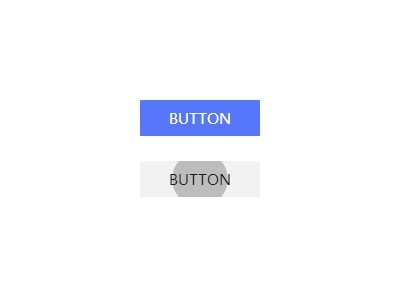
With a little Javascript and CSS3 magic, we can create an Android L Style UI button with a ‘ripple’ animation when clicked or tapped on. Inspired by Google’s new material design concept. Built by timkendall.
How to use it:
Create the Html for an UI button.
<div id="button" class="android-btn"></div>
The CSS to style the UI button.
.android-btn {
  display: inline-block;
  font-family: "Roboto";
  font-weight: 300;
  font-size: 0.9vw;
  background: #5677FC;
  color: #fff;
  height: 36px;
  text-align: center;
  line-height: 36px;
  text-transform: uppercase;
  padding: 0 60px;
  border-radius: 1px;
  position: relative;
  top: 0;
  left: 0;
  overflow: hidden;
  cursor: pointer;
  transition: all 0.2s ease-in;
  -webkit-transition: all 0.2s ease-in;
  ;
}
.android-btn.active { background: #455EDE; }
.android-btn:after {
  content: "Button";
  position: absolute;
  top: 0;
  left: 0;
  width: 100%;
  text-align: center;
}
.active:before {
  content: "";
  position: absolute;
  top: -32px; /* (button height - height) / 2 */
  left: calc(50% - 50px);
  width: 100px;
  height: 100px;
  background-color: #3B50CE;
  border-radius: 100%;
  -webkit-animation: scaleout 0.3s 1 ease-out;
  animation: scaleout 0.3s 1 ease-out;
  opacity: 0;
}
The CSS3 rules to animate the UI button when clicked on.
@-webkit-keyframes
scaleout {  0% {
 opacity: 1;
 -webkit-transform: scale(0.0)
}
 50% {
 opacity: 1;
}
 100% {
 -webkit-transform: scale(1.0);
 opacity: 0;
}
}
 @keyframes
scaleout {  0% {
 opacity: 1;
 transform: scale(0.0);
 -webkit-transform: scale(0.0);
}
100% {
 transform: scale(1.0);
 -webkit-transform: scale(1.0);
 opacity: 0;
}
}
The Javascript to enable the animation.
var button = document.getElementById('button'),
button.addEventListener('click', function () {
  this.setAttribute('class', 'android-btn active');
  var self = this;
  setTimeout(function () {
    self.removeAttribute('class', 'active');
    self.setAttribute('class', 'android-btn');
  }, 300)
});
See Also:
 High-performance Ripple Click Effect – chaocore-ripple
 Highly Customizable Ripple Effect In JavaScript – Ripple.js
 Button Ripple Effect On Click
 Material Ripple Effect In Vanilla JavaScript – Ripplet.js
 Google Material Design Ripple Effects with Wave.js
 Material Design Ripple Effects In Vanilla JavaScript – rippleJS
 Material Design Ripple Effect In Pure JavaScript
 Material Design Click Ripple Effect In Vanilla Javascript – Material Touch
This button doesn’t work on IE 10 correctly.
In the end of animation, dissapear for a moment.
Instead of this.setAttribute(‘class’, ‘android-btn active’); , we should add or remove active class only. I’ve done it in jquery, by replacing this for addClass/removeClass(‘active’).
But thank you very much for this animation.
Only works a few times, tried to fix it. Didnt work at all.