


Search for a WordPress image optimization plugin and you will find both ShortPixel and Imagify near the top of almost every list. Both are cloud-based, both compress images, both support WebP and AVIF, and both have active install counts in the hundreds of thousands. On the surface, they sound nearly identical.
The differences only become clear when you look at what each one does beyond basic compression.
One has expanded aggressively into AI-powered image tools. The other has stayed focused on clean, minimal optimization with a tight integration to the most popular WordPress caching plugin around. Neither is a wrong choice, so the right one depends on what your site actually needs.
By the end of this article, you will know how each plugin works, where they genuinely differ, and which one makes more sense for your setup.
Comparing ShortPixel and Imagify
Before we get started, I’ve put together a comparison table that covers the main differences between the two plugins. Keep reading to get more detail about each comparison.
| Feature | ShortPixel | Imagify |
|---|---|---|
| Compression modes | Lossy, Glossy, Lossless | Smart Compression, Lossless |
| WebP support | Yes | Yes |
| AVIF support | Yes | Yes |
| Bulk optimization | Yes | Yes |
| All size variants compressed | Yes | Yes |
| CDN delivery | Yes* | No |
| PDF optimization | Yes | No |
| EXIF data handling | Kept by default | Stripped by default |
| AI alt text and image SEO | Yes (100+ languages) | No |
| AI image upscaling | Yes (2x, 3x, 4x) | No |
| AI background removal | Yes | No |
| Free tier | 100 credits/month | 20MB/month (~200 images) |
| One-time purchase option | Yes | No |
| Pricing (Unlimited) | $9.99/month | $9.99/month |
| WordPress.org rating | 4.5/5 (800+ reviews) | 4.3/5 (1,400+ reviews) |
| Active installs | 300,000+ | 1,000,000+ |
*The CDN is built into the main plugin, with the separate Adaptive Images plugin adding dynamic device-aware sizing.
ShortPixel Overview

ShortPixel Image Optimizer is a cloud-based plugin that sends your images to ShortPixel’s servers, optimizes them, and returns the compressed versions to your media library. Your originals are backed up locally so they’re always safe.
At 300,000+ active installs, it is one of the most widely-used image optimization plugins in the WordPress ecosystem.
Compression and Format Support
ShortPixel gives you three compression modes to choose from.
- Lossy delivers the largest file size reductions and is the right default for most sites, like blogs, marketing pages, news publications, general portfolios. The quality loss at typical web display sizes is imperceptible.
- Glossy applies a milder algorithm that preserves more visual detail, which makes it worth considering for photography portfolios or WooCommerce stores where product image quality has a direct commercial impact.
- Lossless produces no quality change at all and is suited to logos, icons, and diagrams where pixel accuracy matters.

One thing that often gets overlooked is that ShortPixel compresses every size variant WordPress generates from a single upload, not just the original. A typical upload can create five or six additional files, all stored at full quality by default, so this makes a real difference to your overall library size.
ShortPixel supports both WebP and AVIF at every plan tier, including the free one, and it also optimises PDF documents alongside images. This is worth knowing if you regularly publish downloadable assets on your site.
It keeps images’ EXIF data by default, with the option to strip it if you prefer lighter files. It’s good to be aware of this if you’re optimising images for a site where metadata is not needed.
AI Features
Beyond compression, ShortPixel has built out a set of AI-powered tools that sit inside the same plugin with no separate installation required.
Starting off, the AI alt text feature generates alt text, captions, titles, and descriptions in over 100 languages, with bulk processing across your existing library and a preview mode so you can check results before committing. For sites publishing in multiple languages or managing large image libraries with missing metadata, this saves a significant amount of manual work.
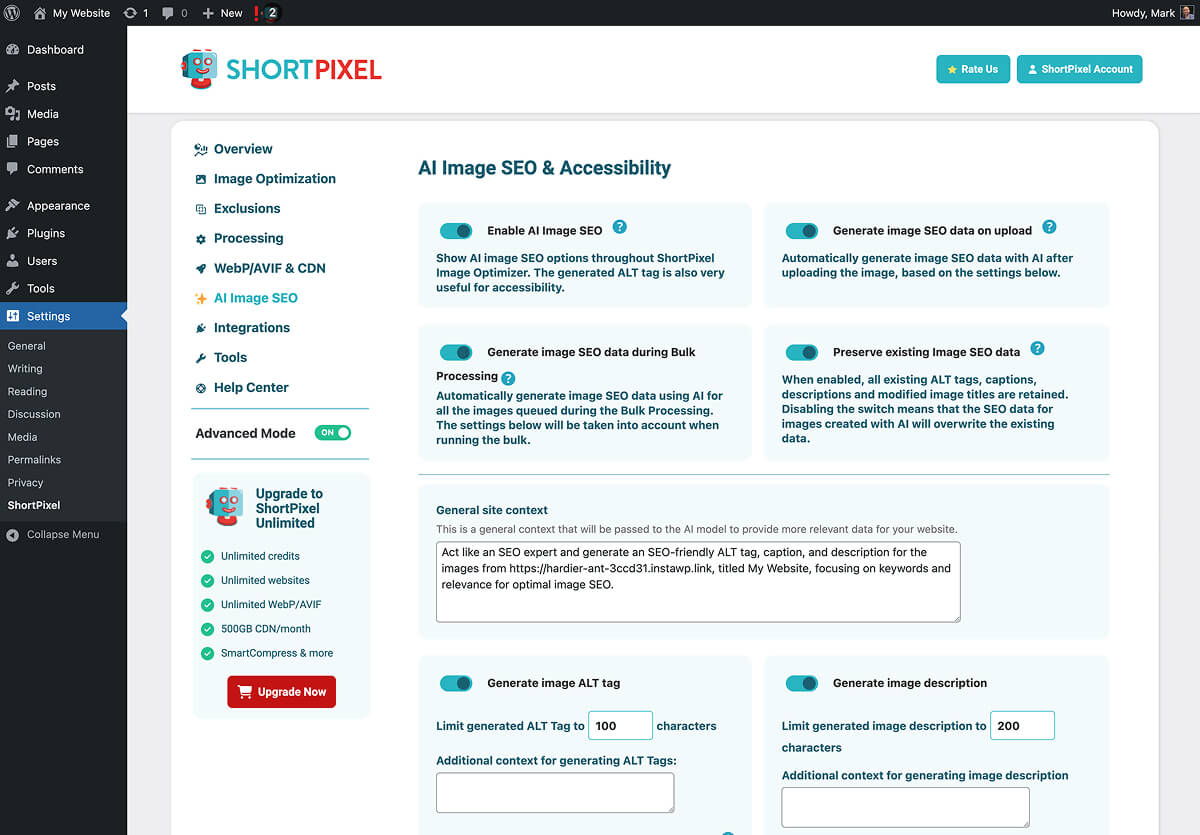
Our WordPress Image SEO Checklist covers how automated alt text fits into a broader image SEO workflow, if you want the full picture.
Beyond image SEO, the AI upscaling tool produces 2x, 3x, and 4x versions of images for retina displays without needing a high-resolution source to start from. Meanwhile, the AI background removal tool is one-click, which makes it a practical addition for anyone managing product photography.
ShortPixel Adaptive Images
ShortPixel actually offers CDN delivery at two levels, and the distinction matters depending on what you need. The main Image Optimizer plugin has CDN built in, serving your optimised images, CSS, JS, and font files from bunny.net’s global network, which removes the need for a separate CDN for most sites.
ShortPixel Adaptive Images goes a step further as a separate plugin. Rather than serving pre-compressed files from your server via CDN, it generates images on-the-fly at exactly the container width the visitor’s device requests, stores them on the CDN, and never touches your original files on disk. The result is precisely-sized images for every device without any srcset guesswork.
Our responsive images guide explains why that distinction matters in practice.

Pricing
ShortPixel’s free tier gives you 100 credits per month, which requires an API key to activate. Each WordPress upload typically uses four to five credits when you account for size variants, so 100 credits covers around 20 to 25 actual image uploads per month.
For heavier usage, one-time credit packs start at $19.99 and never expire, which makes them well-suited to a large one-off bulk job. The ShortPixel Unlimited plan is $9.99 per month (with discounts for yearly billing) and covers unlimited images across unlimited sites, which is incredible value.

Keep in mind that ShortPixel backs up your original images before optimising, which takes up additional disk space. Their recently introduced Smart Backups option helps here. It backs up only the main image rather than every generated thumbnail, with thumbnails regenerated automatically if you ever restore.
Before making a decision on which plan to opt for, the credit model is worth understanding clearly. For sites with steady ongoing upload volumes, the Unlimited plan is straightforward. For a one-time cleanup of a large existing library, the credit packs are often better value than committing to a monthly subscription.
Imagify Overview

Imagify is developed by WP Media, the same company behind WP Rocket. That relationship is the single most important piece of context for understanding who Imagify is for.
With over 1,000,000 active installs and a reputation for being one of the easiest image optimization plugins to set up, it’s a worthy competitor to ShortPixel in most cases.
Compression and Format Support
Imagify’s current interface offers two compression modes.
- Smart Compression is the default, where it applies automatic lossy compression, finding a balance between file size reduction and visual quality without requiring the user to choose a level manually.
- Lossless is the alternative for images where quality cannot be compromised. Both WebP and AVIF are supported, EXIF data is stripped on compression by default, and original files can be backed up via an opt-in setting.
The interface is deliberately minimal. There are no decisions to make beyond compression mode and format settings, which is the point of Imagify’s simplicity.

WP Rocket Integration
If you are running WP Rocket, Imagify is the natural pairing. Both plugins are built by WP Media and are designed to work together.
There is no configuration needed to get them to play nicely, so for site owners who want to keep their performance stack within one ecosystem, it’s a meaningful advantage.
Pricing
Imagify’s free tier gives you 20MB per month, which works out to around 200 images depending on file sizes. It supports unlimited websites and requires no account beyond a basic signup.
The Growth plan is then $5.99 per month (discounted if billed annually) and covers 500MB per month, which Imagify estimates at approximately 5,000 images. The Infinite plan is $11.99 per month and removes limits entirely. All Imagify paid plans include usage on unlimited websites.
One thing worth noting is that Imagify does not offer a one-time purchase option. Everything is subscription-based, which suits sites with a steady ongoing upload volume but is worth factoring in if you are primarily looking to run a one-time cleanup of a large existing library.

Head-to-Head Comparison
Compression Quality
Both plugins produce strong results for compression quality.
ShortPixel’s Glossy mode in particular tends to hit a good balance between file size and visual quality across a range of image types, and is a reliable starting point for sites that want more than basic lossy but do not need lossless.
Imagify’s Smart Compression is effective and requires no manual decision-making, which suits users who prefer a set-and-forget approach.
If compression quality is the deciding factor, the honest recommendation is to test a sample of your actual images in both before committing to either plugin.
WebP and AVIF Delivery
Both plugins support WebP and AVIF conversion. AVIF delivers meaningfully smaller files than WebP in browsers that support it, and browser support has grown to the point where enabling it is low-risk. Either way, unsupported browsers fall back to WebP automatically.
The practical difference between the two plugins here is negligible. Our image optimization tips guide covers format choice in more depth if you want the full picture on when each format makes sense.
AI Features
There is no head-to-head to run here. ShortPixel has AI alt text generation in 100+ languages, AI upscaling, and AI background removal. Imagify has none of these. For site owners who want image SEO metadata handled alongside compression without adding another plugin, ShortPixel is the only option of the two.
Bulk Optimization
Both handle bulk processing well from a technical standpoint. The difference is in the pricing model during a large job.
ShortPixel’s one-time credit packs are designed for exactly this scenario. You can buy what you need, use it, and you’re done.

With Imagify, a large library processed in a single month counts against that month’s MB allowance, which may require upgrading to the Infinite plan temporarily.
For a one-off cleanup of a site with years of uncompressed images, ShortPixel’s credit packs are likely the more practical option.
Ease of Use
Imagify is the simpler plugin by design. Install, activate, choose Smart Compression, and you’re practically done.
ShortPixel has a broader settings selection, but it’s nothing that requires technical knowledge. The additional options are there because the feature set is larger, not because the plugin is harder to use.
One small practical difference is that Imagify strips EXIF data automatically on compression, while ShortPixel keeps it by default. For photographers managing images where metadata matters, ShortPixel’s approach requires less manual intervention.
User Reviews
ShortPixel holds a 4.5 out of 5 rating on WordPress.org across 806 reviews. Imagify sits at 4.3 out of 5 across 1,475 reviews. Both scores reflect strong overall satisfaction.

ShortPixel’s reviews frequently highlight compression quality and support responsiveness, while Imagify’s reviews tend to emphasise simplicity and its natural fit with WP Rocket.

Neither plugin has a meaningful complaint pattern around core compression reliability, so you can rest assured that both plugins will deliver great results.
Which One Fits Your Site?
ShortPixel is a strong fit for your website if you meet any of the following criteria:
- You want AI-generated alt text, image metadata, or automatic background removal alongside compression.
- You have a large existing media library to clean up in one go and want to pay once rather than subscribe.
- You want CDN-based adaptive image delivery as a current or future option.
- You publish in multiple languages and want image SEO handled automatically.
Imagify is a strong alternative if you meet these other criteria:
- You are already running WP Rocket and want everything under one roof from a single company.
- You want the most minimal setup possible with almost no decisions to make.
- You upload consistently every month and a subscription model suits your workflow better than credits.
Two Strong Plugins, Different Strengths
ShortPixel and Imagify are both well-maintained, cloud-based plugins that will reliably handle the core compression workflow for your images and media library in general. The decision between them is not really about which compresses better, it’s more about what you need beyond compression.
ShortPixel makes sense for sites that want a broader feature set, including AI tools, adaptive CDN delivery, AVIF support at every tier, and a credit model that works well for large one-time jobs. Imagify makes sense for sites already in the WP Rocket ecosystem, or for anyone who wants the simplest possible setup with nothing to configure.
If you have decided on ShortPixel and want to get started, this bulk image optimization guide walks through the full workflow, from compression settings, to WebP and AVIF setup, and how to verify the results in PageSpeed Insights.
Are you currently running either of these plugins? It would be interesting to hear how the results have compared for different types of sites.


