How to Use Graticules in Interactive Globes
Graticules are the network of latitude and longitude lines that help users visualize geographic coordinates on a globe. In the Interactive Globes plugin, graticules can be enabled to enhance the clarity and educational value of your maps. This article explains what graticules are, why they’re useful, and how you can use them in your own globes.

What Are Graticules?
Graticules are the grid lines that represent the Earth’s coordinate system. Latitude lines run horizontally, while longitude lines run vertically. Together, they form a mesh that helps users pinpoint locations and understand spatial relationships on the globe.
How to Enable Graticules in Interactive Globes
- Open Your Globe Settings:
In your WordPress dashboard, navigate to the globe you want to edit. - Find the Graticules Option:
Look for the “Graticules” section in the globe’s settings panel. - Enable Graticules:
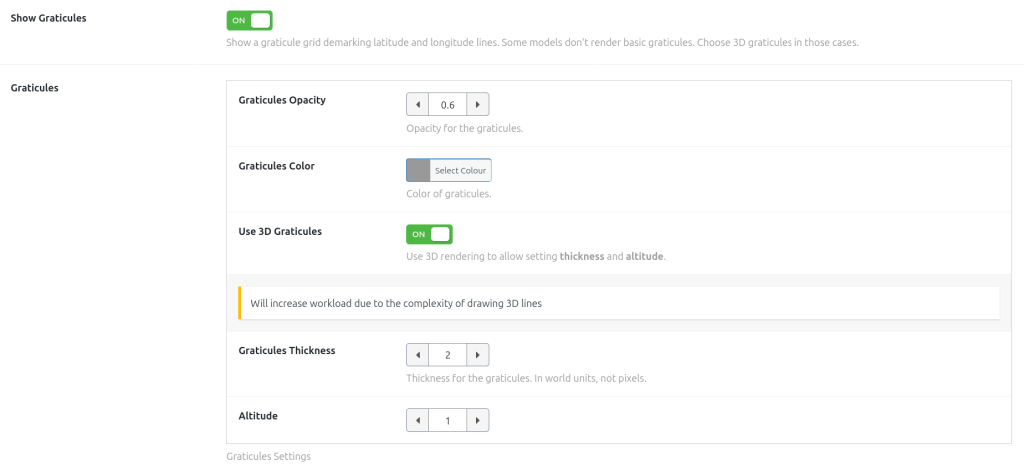
Toggle the graticules option to “On.” This will display latitude and longitude lines on your globe. - Customize Appearance:
You can adjust the color and opacity of the graticules. For example, choose a subtle grey for a professional look, or a bright color for educational purposes.
For thickness and altitude, there’s a setting to enable 3D graticules that can be customized. See the Advanced Customization section below. - Save and Preview:
Save your changes and preview the globe to see the graticules in action.
Why Use Graticules?
- Educational Value: Graticules make it easier to teach and learn about geography, navigation, and global positioning.
- Visual Clarity: They provide reference points for users, making it easier to interpret the map.
- Customization: You can adjust the altitude, color, opacity and thickness of graticules to match your design and audience needs.
Advanced Customization
For more control, graticules can be customized further.
- Adjust line thickness and altitude using advanced Three.js features.

Troubleshooting
- Graticules Not Showing?
Make sure the option is enabled. Some globes modes ( the hollow globe, for example ) don’t render the globe itself, so it won’t render the simple graticules. Activate the 3D graticules. - Performance Issues?
Use the simple graticule lines intead of the 3D Graticules for smoother performance on older devices.
Conclusion
Graticules are a powerful feature in Interactive Globes that add clarity and educational value to your maps. With easy customization options, you can tailor them to fit any use case—from classrooms to professional presentations. Try enabling graticules on your next globe and see the difference!

Need help?
Contact our support team or visit our documentation for more tips on customizing your interactive globes.