


AI Summary
Looking for DocuSign alternatives, including free options? DocuSign is one of the most recognized names in electronic signature software, but it’s not always the best fit for every business.
The entry-level plan can feel expensive if you only need basic e-signature functionality, and some users find the interface more complex than necessary for simple signing workflows.
In this guide, I’ll walk you through 11 proven DocuSign alternatives, including free, open-source, and budget-friendly picks, with honest assessments based on real-world testing.
Why People Are Switching from DocuSign
DocuSign is still the household name in electronic signatures. But over the past couple of years, I’ve watched more clients ask the same question before renewing. Are we actually getting our money’s worth here?
Three reasons keep coming up. The first is cost, as DocuSign’s entry-level plan starts at $10 per user per month, and that compounds quickly as your team grows.
The second is customer support, which a lot of users have flagged as slow or unhelpful. The third is interface complexity. Most teams just want to sign documents. They don’t need a full contract management suite to do it.
There’s room for cheaper, simpler alternatives that get the signature job done. The 11 picks below cover that full range, from free open-source tools to paid platforms that match DocuSign’s features at a fraction of the cost.
Best DocuSign Alternatives Compared
Before we get into detailed reviews, here’s a side-by-side comparison so you can see how these DocuSign alternatives stack up:
| Signature Tool | Best For | Free Version? | Pricing |
|---|---|---|---|
| WPForms Signatures | Collecting signatures in WordPress forms and contracts | No | $199.50/year |
| Acrobat Sign | Signing PDF files and documents with Adobe integration | No | $12.99/month |
| DropBox Sign | Comprehensive e-signature for sales and financial agreements | Yes (limited) | Free or $15/month |
| signNow | Affordable e-signature with document management | No | $8/month |
| ShareFile | Document signing with client portal automation | No | $10/month |
| PandaDoc | Electronic signatures with payment integration | 14-day trial | $19/month |
| Signaturely | Simple e-signatures with guided signing | 7-day trial | $20/month (annual) |
| Xodo Sign | Essential e-signature features with PDF conversion | Yes (5 docs/mo) | Free or $9.99/month |
| SignRequest | Basic document signing for businesses on a budget | Yes (10 docs/mo) | Free or €9/month |
| BoldSign | Feature parity with DocuSign Business at lower cost | Yes (limited) | Free or $15/month |
| DocuSeal | Open-source self-hosted e-signature with full data ownership | Yes (10 docs/mo + free self-host) | Free or $20/month |
| Google Docs (Bonus) | Quick workaround for digital signatures | Yes (free) | Free |
Note: The free versions listed above come with limitations. I’ve noted which tools offer truly unlimited free plans vs. limited free trials.
Best DocuSign Alternatives
Now let’s look at each DocuSign alternative in detail, starting with the best options for specific use cases.
1. WPForms Signatures

If you run a WordPress site and need to collect signatures through forms, WPForms is the best DocuSign alternative for your situation. It’s also the only WordPress-native option on this list. Every other tool here is a standalone platform that lives outside your site.
The Signature feature works directly inside WordPress, which means you can publish contracts, service agreements, non-disclosure agreements, and other signable documents without sending users to a third-party platform.
My Experience
I’ve been using WPForms Signatures on client sites for the past two years, and what stands out most is how simple it makes the signing process for users.
They don’t need to create accounts, download apps, or navigate unfamiliar interfaces. They just fill out the form and sign with their mouse or finger.
Setting up a signature form takes minutes. WPForms includes 2,100+ templates, and many already have signature fields configured for contracts, registrations, and service orders.
If you want a step-by-step walkthrough for a specific use case, here’s how to create service agreements in WordPress with digital signatures.
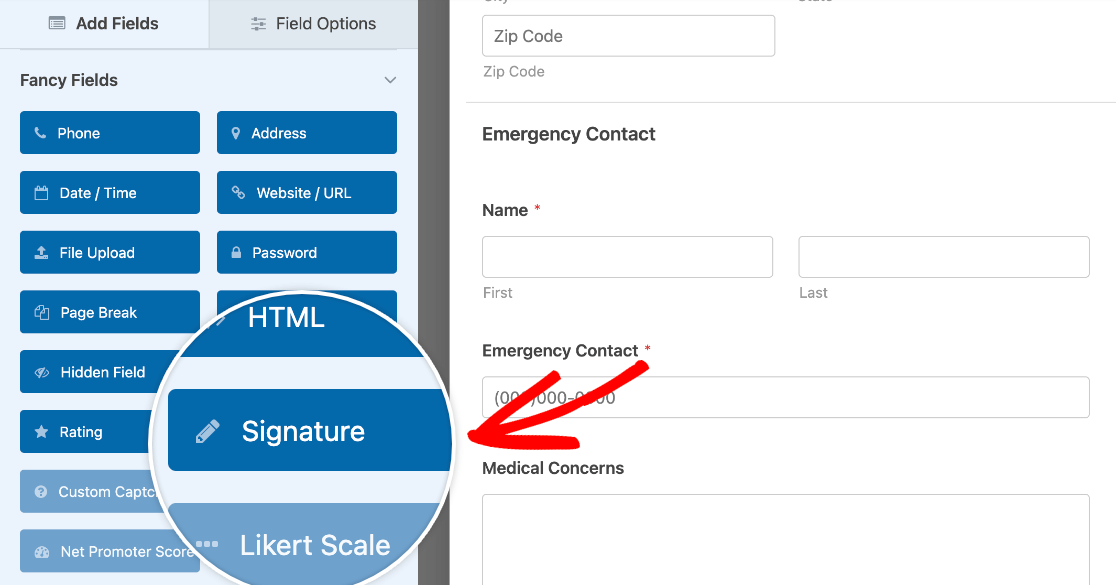
Adding a signature field is straightforward. You scroll to Signature in the form builder, drag it onto your form, and position it wherever it makes sense. The field works on desktop and mobile without any additional configuration.
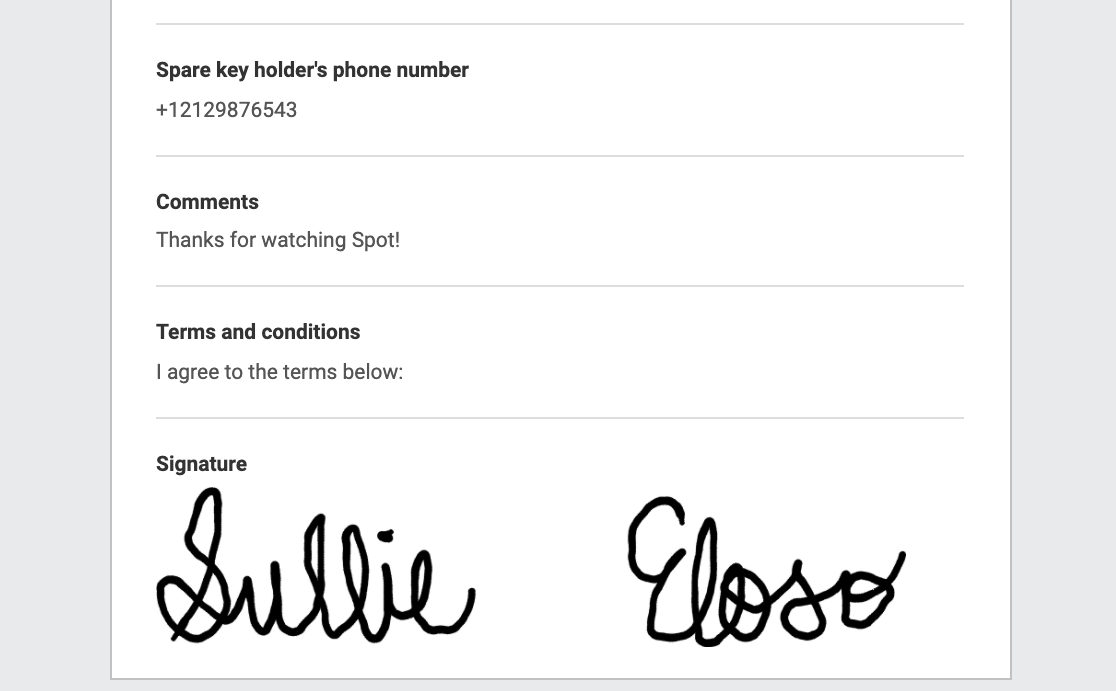
When someone signs your form, WPForms saves the signature as an image file and sends you an email notification with a link to view it.
You don’t get massive image attachments clogging your inbox, just a clean notification with access to the signed document.
If you need to limit who can access certain forms, WPForms lets you password-protect forms or restrict them to logged-in users. This is useful for client portals or internal documents that shouldn’t be publicly accessible.
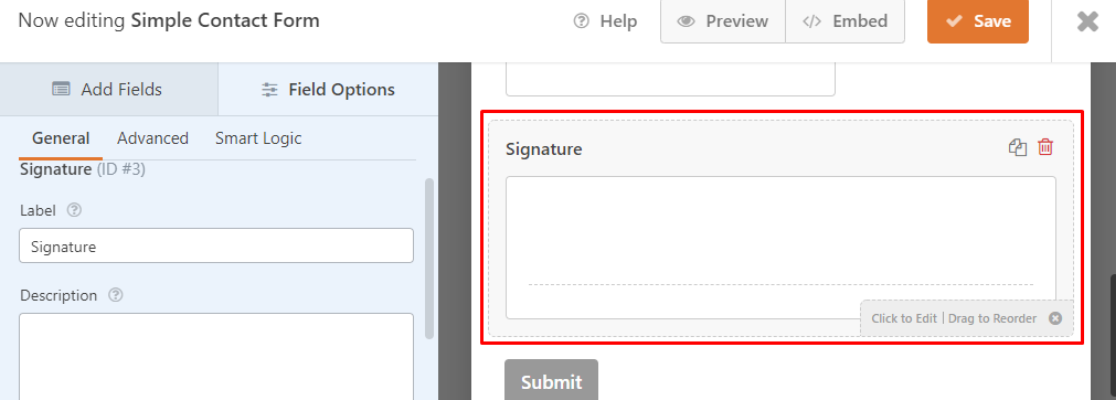
One feature I use constantly is conditional logic. You can show or hide the signature field based on previous form responses.
For example, if someone selects “I agree to the terms,” the signature field appears. If they select “I do not agree,” it stays hidden. This keeps forms clean and prevents confusion.
WPForms also makes it easy to go paperless by sending documents electronically instead of printing, signing, and scanning. For service-based businesses, this speeds up the contract process significantly.
What I Liked
WPForms Signatures offers features that matter for WordPress users:
- WordPress integration – Works directly inside your site, no third-party redirects
- Pre-built templates – Start with contracts, NDAs, or service agreements already configured
- Conditional logic – Show or hide signature fields based on user responses
- Customizable signature field – Control the size, label, and required status
- Mobile-friendly – Signers can use their finger on phones and tablets
- Entry management – Review all signatures from your WordPress dashboard without losing context
Unlike standalone e-signature tools, WPForms keeps everything in WordPress. You’re not managing signatures in one platform and form data in another.
Pricing
WPForms Signature Addon is available with the WPForms Pro license, starting at $199.50/year. That license also unlocks the full form builder, 2,100+ templates, and 30+ other addons, all unlimited use, on up to 5 sites.
To compare, DocuSign’s entry-level plan runs $10 per user per month, which works out to $120 per year for signatures alone, no form builder included. If you need both signatures and forms, WPForms Pro covers both for a lower total cost.
For a complete walkthrough on the signature workflow, check out this guide on adding electronic signatures to forms.
Get WordPress Signature Plugin
2. Acrobat Sign

Acrobat Sign is Adobe’s electronic signature solution, and it’s built specifically for people who work with PDFs regularly.
If your workflow involves creating, editing, and signing PDF documents, Acrobat Sign integrates directly with Adobe’s PDF tools. You can edit a PDF and send it for signature without switching apps.
My Experience
I tested Acrobat Sign on a project where the client needed to send contracts in multiple languages. One feature that worked well was the 36-language support, signers could view instructions and prompts in their preferred language.
The integration with Microsoft Office was smoother than expected. I could create a contract in Word, convert it to PDF, and send it for signature without leaving the Adobe ecosystem.
For teams already using Adobe Creative Cloud or Acrobat Pro, this feels natural. Acrobat Sign also handles paper-to-digital conversion well.
If you have paper documents that need to become fillable forms, Acrobat Sign can scan and transform them into interactive PDFs. This saved time for clients transitioning from paper-based processes.
The reusable template feature is useful if you send the same contracts repeatedly. Create the template once, and you can reuse it without rebuilding the document each time.
What I Liked
- PDF editing – Edit documents before sending them for signature
- Mobile apps – Sign documents from iOS or Android devices
- Microsoft Office integration – Send Word, Excel, or PowerPoint files for signature
- 36 languages – Support for international teams and clients
- Paper conversion – Transform paper forms into fillable PDFs
The main drawback is that Acrobat Sign works best if you’re already using Adobe products. If you don’t need PDF editing or work primarily in Google Docs or other formats, you’re paying for features you won’t use.
Pricing
Acrobat Standard DC costs $12.99/month (annual billing). Acrobat Pro DC costs $14.99/month (annual billing).
3. DropBox Sign

Dropbox Sign (formerly HelloSign) is a solid DocuSign alternative for businesses that need legally binding signatures with audit trails.
The tool works as an in-browser app or through an API that integrates with your website. If you need occasional signatures without a monthly commitment, Dropbox Sign offers a limited free plan that might cover your needs.
My Experience
I used Dropbox Sign for a client who needed to collect signatures on financial agreements. The audit trail feature was important because they needed to verify who signed what and when for compliance purposes.
Setting up documents was straightforward. I uploaded a PDF, dragged signature fields into position, and sent the document to signers. The interface is clean and doesn’t overwhelm you with options you don’t need.
What impressed me was the 22-language support. For clients working with international contractors, this meant signers could complete the process in their native language, which reduced confusion and back-and-forth emails.
Dropbox Sign also encrypts documents with high-grade encryption, which gave clients confidence when handling sensitive financial information.
The mobile app worked well during testing. Signers could review and sign documents from their phones without formatting issues or awkward zooming.
What I Liked
- Audit trail – Track every action taken on a document for legal compliance
- 22 languages – Support for international signers
- Mobile app – Sign documents from any device
- High-grade encryption – Secure document handling
- API integration – Embed signatures into your own website or app
The free plan is genuinely useful if you only need a few signatures per month. Unlike many “free” plans that are basically trials, Dropbox Sign’s free tier keeps working indefinitely.
Pricing
Free plan available with limitations. Paid plans start at $15/month (annual billing).
4. signNow

signNow positions itself as an affordable DocuSign alternative with solid document management features at a lower price point.
There’s no free plan, but the entry-level paid plan costs significantly less than DocuSign while still offering features like unlimited templates, bulk invites, and mobile access.
My Experience
I tested signNow on a project where the client needed to send the same contract to multiple people at once. I could upload one document and send it to 20 recipients simultaneously instead of creating 20 separate signature requests.
The unlimited templates on even the basic plan made sense for repetitive workflows. I created templates for NDAs, service agreements, and onboarding documents, then reused them whenever needed.
One thing to note: signNow requires two-factor authentication for users. This adds a security layer, but it also means there’s an extra step every time you log in.
For teams that prioritize security over convenience, this is a benefit. For users who want the fastest possible workflow, it might feel like friction.
The mobile app worked reliably during testing. I could review documents, send signature requests, and check the status of pending signatures from my phone.
What I Liked
signNow offers practical features at a competitive price:
- Bulk invites – Send one document to multiple signers at once
- Unlimited templates – Create reusable document templates even on the basic plan
- Collaboration support – Multiple team members can work on documents
- Import Word documents – Upload .docx files directly without converting to PDF first
- Mobile access – Full functionality on iOS and Android
The interface isn’t as polished as some competitors, but it’s functional. If you care more about features and price than aesthetics, signNow delivers.
Pricing
Business plan starts at $8/month per user (annual billing).
5. ShareFile
ShareFile (formerly RightSignature) started as a standalone e-signature service but has evolved into a full document management platform with client portal functionality.
If you need more than just signatures, like automated workflows that handle client onboarding or contract approvals, ShareFile gives you that flexibility.
My Experience
I tested ShareFile for a client who manages dozens of freelance contractors. The automated workflow feature made a real difference.
They set up a process where new contractors couldn’t start work until all required documents were signed and submitted. Once everything was complete, the system automatically sent welcome emails and access credentials.
This kind of automation is overkill if you just need occasional signatures. But for businesses managing high volumes of contracts, it removes a lot of manual checking and follow-up.
ShareFile works on any device, and I didn’t run into any formatting issues when testing on mobile. The step-by-step instructions for signers are clear enough that even non-technical users completed the process without help.
The multi-party signing feature worked smoothly. I tested a document that needed three separate signatures in a specific order. ShareFile handled the routing automatically, sending each person the document only after the previous person signed.
One standout feature is the ability to send multiple documents at once. Instead of creating separate signature requests for an NDA, service agreement, and W-9, I could bundle them into one package.
What I Liked
- Custom fields – Add your own data fields beyond standard signature boxes
- Audit trail – Track document history for compliance
- Device flexibility – Works consistently across desktop, tablet, and mobile
- High-grade encryption – Secure document transmission and storage
- Client portal – Create branded portals where clients can access and sign documents
- Workflow automation – Set up multi-step processes that run automatically
The main limitation is that ShareFile’s strength, advanced document management and automation, is also what makes it more complex than simpler e-signature tools.
Pricing
Standard plan costs $10/user/month.
6. PandaDoc

PandaDoc is a comprehensive document management platform where electronic signatures are just one piece of what it offers.
The full PandaDoc suite might be more than you need if signatures are your only requirement. But if you collect deposits or payments alongside signed contracts, PandaDoc’s payment gateway integration could streamline your process significantly.
My Experience
I tested PandaDoc for a client who runs a photography business. They needed clients to sign contracts and pay deposits at the same time.
With PandaDoc, we set up documents that included both signature fields and a payment button. Clients signed and paid in one session instead of two separate steps.
This integration worked with Stripe and PayPal, which covered the payment methods most clients preferred. For service businesses that require deposits before starting work, this feature eliminates a lot of back-and-forth.
The document analytics were more detailed than I expected. I could see not just who signed, but how long they spent reviewing each page, which sections they returned to, and where they hesitated.
PandaDoc’s template library is extensive. I found ready-made templates for proposals, quotes, contracts, and onboarding documents. Each template was customizable, so I could adjust them to match specific business needs.
The Zapier and HubSpot integrations worked well during testing. I connected PandaDoc to a CRM, and signed contracts automatically created new customer records without manual data entry.
What I Liked
- Payment integration – Collect deposits and full payments directly in documents
- Mobile app – Full functionality on iOS and Android
- Templates – Extensive library of pre-built document templates
- Document analytics – Track how recipients interact with your documents
- CRM integrations – Connect to HubSpot, Salesforce, and other business tools
- Zapier support – Automate workflows with thousands of apps
The 14-day free trial gives you enough time to test whether PandaDoc’s features justify the price for your specific situation.
Pricing
14-day free trial available. Essentials plan starts at $19/month.
7. Signaturely

Signaturely focuses on simplicity. It doesn’t try to be a full document management platform or include dozens of features you might never use.
If you want straightforward electronic signatures without complexity, Signaturely delivers exactly that.
My Experience
I tested Signaturely for a client who found other e-signature tools confusing. The interface is clean and minimal, which meant less time explaining how to use it.
The guided signing feature stood out during testing. When I sent documents to signers, they saw clear visual cues showing where to sign, initial, or fill in information.
Signaturely integrates with Google Drive, Dropbox, and OneDrive, which made document management easier. I could pull contracts directly from cloud storage instead of downloading and re-uploading them.
The audit trail and log history provided basic compliance documentation. For each signed document, I could see who signed, when they signed, and what IP address they used. This level of detail satisfied most clients’ legal requirements.
Multi-party collaboration worked as expected. When a document needed signatures from multiple people, Signaturely handled the routing and sent reminders to anyone who hadn’t signed yet.
What I Liked
- Templates – Create reusable document templates
- Multi-party collaboration – Collect signatures from multiple signers
- Cloud storage integrations – Connect to Google Drive, OneDrive, and Dropbox
- Audit trail – Track signing history for compliance
- Guided signing – Visual cues help signers complete documents correctly
The simplicity that makes Signaturely easy to use also means it lacks advanced features like payment integration or complex workflow automation.
Pricing
7-day free trial available. Personal plan starts at $25/month (or $20/month billed annually). Business plan costs $40/month.
8. Xodo Sign

Xodo Sign (formerly EverSign) is one of the few DocuSign alternatives with a legitimately free plan that works indefinitely.
Most “free” plans are actually limited trials. Xodo Sign’s free tier genuinely lets you send documents for signature every month without requiring a credit card or converting to paid after a trial period.
My Experience
I tested Xodo Sign’s free plan first to see what you actually get without paying. The 5-documents-per-month limit is tight, but for very occasional use, it works. If you only need to send a contract or two each month, this could cover you completely free.
The PDF-to-doc conversion feature was useful when I needed to edit a signed PDF. Most e-signature tools lock documents after signing, but Xodo Sign let me convert the PDF to a Word document for editing.
When I upgraded to the paid plan for testing, the templates and integrations became available. The template feature saved time for repetitive documents, and the integrations with Google Drive and Dropbox made file management smoother.
The Xodo Sign API worked well during testing. For clients who wanted signature functionality embedded in their own websites, the API provided that capability without requiring users to leave the site.
What I Liked
- Free plan available – 5 documents per month at no cost, indefinitely
- Templates – Create reusable documents (paid plans only)
- Cloud storage integrations – Connect to major document storage services
- API access – Embed signatures into your own website or app
- PDF conversion – Convert PDFs to Word and back
- Collaboration support – Multiple team members can manage documents
The free plan limitations (no templates, integrations, or API access) mean you’re testing the core signing functionality without the efficiency features.
Pricing
Free plan available (5 documents/month). Paid plans start at $9.99/month.
9. SignRequest

SignRequest offers the most generous free plan among DocuSign alternatives. You get 10 documents per month free forever, plus audit trails and Google integrations.
For small businesses or freelancers who only need occasional signatures, this free tier might be all you ever need.
My Experience
I tested SignRequest’s free plan over a full month to see if the 10-document limit felt restrictive. For a solo consultant or small business, this covered most signature needs without hitting the cap.
The audit trail on the free plan was a pleasant surprise. Many competitors lock audit trails behind paid plans, but SignRequest includes them even for free users. This gave me the documentation needed to verify who signed what and when.
Adding signatures to documents was straightforward. I uploaded PDFs, Word docs, and Excel files without any conversion issues. The drag-and-drop signature field placement worked smoothly.
The email notification system sent automatic copies of signed documents to all parties, which eliminated manual follow-up. The signing log went out automatically as well, providing a paper trail without extra steps.
The Zapier integration (available on paid plans) worked during my paid plan testing. I connected SignRequest to Google Drive and Slack, so signed documents automatically saved to specific folders and triggered team notifications.
SignRequest doesn’t include features like client portals or workflow automation. That’s fine for basic signature needs, but teams managing complex document workflows will hit limitations.
What I Liked
- Free plan – 10 documents per month, free forever
- Audit trail – Track signing history even on the free plan
- Templates – Create reusable documents
- 17 languages – Support for international signers
- Custom branding – Add your logo and colors (paid plans)
- Zapier integration – Connect to popular business apps (paid plans)
The interface is clean and functional. It won’t win design awards, but it doesn’t get in your way either.
Pricing
Free plan available (10 documents/month). Professional plan costs €9/month. Business plan costs €15/month.
10. BoldSign

BoldSign is built by Syncfusion, a software company that’s been making developer tools for over two decades. It markets itself directly against DocuSign, with pricing that comes in at roughly a third of DocuSign Business Pro for a comparable feature set.
My Experience
I tested BoldSign for a client who was on DocuSign Business Pro and looking for a way to cut costs without losing features. What they wanted was unlimited envelopes, custom branding, templates, and audit trails, basically everything they were already paying $40 per user per month for.
BoldSign’s $15 per month Business plan covered all of that. The interface felt cleaner than DocuSign’s, and setup was quick. I uploaded a contract, dragged signature and date fields onto it, and sent the document for signature in under five minutes.
One thing that stood out was BoldSign’s pricing model. Most e-signature tools charge per seat, which means costs scale with the number of people sending documents. BoldSign charges per sender for unlimited envelopes, so a small team can stay on a low tier even when sending high volumes of documents.
The audit trail and template features were on par with DocuSign. I also liked the AI-powered field detection, which automatically placed signature, date, and name fields where they belonged on a contract, saving manual setup time.
What I Liked
BoldSign offers features that compete directly with DocuSign at a much lower price point:
- Unlimited envelopes – Send as many documents as you need on the Business plan
- Custom branding – Add your logo, colors, and email customization
- Reusable templates – Save commonly used contracts and reuse them
- API access – Integrate signatures into your own apps without a separate enterprise plan
- AI-powered field detection – Automatically place signature and date fields on uploaded documents
- Audit trails – Full compliance documentation for legally binding signatures
The free plan is genuinely useful for testing the platform. You get 1 sender and limited envelopes, but it’s enough to evaluate whether BoldSign fits your workflow before paying.
Pricing
Free plan available. Paid plans start at $15 per month for the Business plan with 1 sender. Premium plan is $99 per month for unlimited senders. Add-ons like bulk send and ID verification are available for separate fees.
11. DocuSeal

DocuSeal is the open-source DocuSign alternative for teams that want full control over their data. It’s released under the AGPLv3 license, which means you can self-host it on your own servers for free, or use the managed cloud version if you’d rather skip the infrastructure work.
My Experience
I tested DocuSeal for a client in the legal services space who didn’t want client contracts living on third-party servers. The self-hosted option was the main draw. They could run DocuSeal on their own infrastructure, keep all signed documents under their direct control, and meet their compliance team’s data residency requirements.
Setup on a self-hosted instance took an afternoon for someone comfortable with Docker. The interface, once running, was clean and surprisingly polished for an open-source tool. Uploading a PDF, dragging fields onto it, and sending it for signature worked the same way it does in DocuSign or Dropbox Sign.
For testing the cloud version, the free tier gave me 10 documents per month, which was enough to evaluate the workflow without any commitment. The Pro plan at $20 per user per month unlocked unlimited documents, custom branding, and the API.
One thing worth knowing about, the AGPLv3 license has a copyleft provision. If you embed DocuSeal into a proprietary commercial product, you may be required to release that product’s source code under the same license. For most use cases, this isn’t an issue. But if you’re building a SaaS that relies on DocuSeal, talk to a lawyer first.
What I Liked
DocuSeal stands out for technical teams that prioritize data ownership:
- Open-source AGPLv3 license – Full source code available, transparent and auditable
- Self-hosting option – Run it on your own servers for free, no per-user license costs
- Free cloud tier – 10 documents per month at no cost, no credit card required
- Audit trails – Compliance documentation for legally binding signatures
- API access – Embed signatures into your own apps (paid tiers)
- High user ratings – 4.9 out of 5 on G2 across 260+ reviews as of 2026
The user interface is genuinely usable, which isn’t always true of open-source tools. The community is active, and the project is under continuous development.
Pricing
Free cloud plan available with 10 documents per month. Pro cloud plan starts at $20 per user per month. Self-hosted Community edition is free under AGPLv3. Self-hosted Pro license is $20 per user per month for teams that want commercial features without the AGPLv3 obligations.
Bonus FREE DocuSign Alternative: Google Docs
Want a completely free DocuSign workaround using tools you already have? There’s a method using Google Docs that works for simple situations.

My Experience
I tested this workaround when a client needed a signature on a document immediately and didn’t have time to set up an e-signature account.
Here’s how it works: Create a new Google Docs document in Google Drive. Click Insert » Drawing » New. This opens a drawing window where you can use your mouse or trackpad to draw your signature.
Insert the drawing into the document, and you have a signed file. This method has obvious limitations. It doesn’t work with PDFs, there’s no audit trail, and it’s not legally binding in the same way proper e-signature tools are.
But for internal documents or situations where you just need a quick signature on a Google Doc, it does the job. I wouldn’t recommend this for client contracts, NDAs, or any situation where you might need to verify the signature legally.
What Is the Best Alternative to DocuSign?
After testing more than 12 DocuSign alternatives, here’s how I’d match each option to specific needs:
- If you run a WordPress site, WPForms Signatures is the clear winner. It offers full form builder functionality, keeps all your form data and signatures in one place, and costs less than most standalone e-signature tools.
- If you need a free solution, SignRequest offers the most generous free plan with 10 documents per month and audit trails included. Xodo Sign is another solid free option with 5 documents per month.
- If you want full data ownership, DocuSeal lets you self-host the platform under an open-source license, so signed documents never leave your infrastructure.
- If you work primarily with PDFs, Acrobat Sign makes sense, especially if you’re already using Adobe products.
- If you need payment collection alongside signatures, PandaDoc’s integration with Stripe and PayPal streamlines the process significantly.
- If you want feature parity with DocuSign Business at lower cost, BoldSign covers unlimited envelopes, branding, templates, and API access for around a third of DocuSign’s price.
- If you want the most affordable paid option, signNow starts at $8/month and includes unlimited templates and bulk sending.
The WPForms Signature Addon stands out because it offers:
- Direct WordPress integration without third-party redirects
- Pre-built templates for contracts and agreements
- Conditional logic to show or hide signature fields
- Mobile-friendly signing with mouse or touch
- Entry management inside your WordPress dashboard
- Password protection for sensitive documents
For small business owners and WordPress site managers, WPForms eliminates the need for a separate e-signature service while costing less than most alternatives.
FAQs About DocuSign Alternatives
Here are answers to some commonly asked questions we receive regarding DocuSign alternatives.
What are the best free DocuSign alternatives?
The best free DocuSign alternatives are:
- SignRequest – 10 documents per month free forever, includes audit trails
- Xodo Sign – 5 documents per month free, includes basic e-signature features
- DocuSeal – Open-source with 10 documents per month free on cloud, plus unlimited free self-hosting
- Dropbox Sign – Limited free plan for occasional use
SignRequest offers the most generous free tier. You get 10 signatures per month indefinitely, which covers most small business needs. The free plan includes audit trails, which many competitors lock behind paid tiers.
Xodo Sign’s free plan gives you 5 documents per month but doesn’t include templates or integrations. If you only need very occasional signatures, this works fine.
DocuSeal’s free cloud tier matches SignRequest’s 10-document limit and adds the option to self-host the platform under an AGPLv3 open-source license, which is unique on this list.
Dropbox Sign technically has a free option, but it’s quite limited. The paid plans start at $15/month.
Is there a free version of DocuSign?
DocuSign offers a 30-day free trial, but there’s no permanently free plan. After the trial ends, you need to subscribe to a paid plan starting at $10/month per user.
If you need free e-signature software long-term, SignRequest, Xodo Sign, and DocuSeal all offer free plans that work indefinitely without requiring a credit card.
What are DocuSign competitors?
The main DocuSign competitors are:
- Adobe Acrobat Sign – Best for PDF-focused workflows
- Dropbox Sign (formerly HelloSign) – Good for sales and financial agreements
- PandaDoc – Strong for payment collection alongside signatures
- signNow – Affordable alternative with document management
- BoldSign – Direct DocuSign competitor at roughly a third of the price
- WPForms Signatures – Best for WordPress sites
Each competitor has different strengths. Adobe focuses on PDF workflows, PandaDoc integrates payments, BoldSign offers DocuSign feature parity at lower cost, and WPForms works specifically for WordPress users who want signatures embedded in their site.
How do I sign documents for free without DocuSign?
You have several options to sign documents free:
- Use SignRequest’s free plan – Sign up for free, upload your document, and send it for signature. You get 10 documents per month at no cost.
- Try Xodo Sign’s free tier – Create a free account and send up to 5 documents per month for signature.
- Use WPForms if you have WordPress – If you already have WPForms Pro for forms, the Signature addon lets you collect signatures through your site.
- Google Docs workaround – For informal documents, use Google Docs’ drawing feature to add a signature. This isn’t legally binding like proper e-signature tools, but it works for internal documents.
For legally binding signatures with audit trails, stick with SignRequest or Xodo Sign’s free plans rather than workarounds.
Can I use electronic signatures legally instead of DocuSign?
Yes, electronic signatures from DocuSign alternatives are legally binding in most situations.
In the United States, the ESIGN Act (Electronic Signatures in Global and National Commerce Act) and UETA (Uniform Electronic Transactions Act) give electronic signatures the same legal weight as handwritten signatures.
Most DocuSign alternatives provide:
- Audit trails showing who signed and when
- Signer authentication through email verification
- Secure document storage
- Tamper-evident seals
These features meet legal requirements for electronic signatures. Dropbox Sign, SignRequest, signNow, and WPForms all provide audit trails and documentation needed for legal validity.
For specialized situations like real estate closings or wills, check local regulations. Some documents still require notarization
What’s better for WordPress, DocuSign or WPForms Signatures?
For WordPress sites, WPForms Signatures is better than DocuSign because:
- Direct integration – WPForms works inside WordPress. Visitors sign documents on your site without being redirected to DocuSign’s platform.
- Unified data management – Form responses and signatures stay together in your WordPress dashboard. With DocuSign, you manage forms in WordPress and signatures in a separate system.
- Lower cost – WPForms Pro costs $199.50/year and includes the form builder plus signatures. DocuSign costs $120/year just for signatures without form functionality.
- Conditional logic – Show or hide signature fields based on form responses, which DocuSign doesn’t support in WordPress forms.
- Password protection – Restrict access to sensitive signature forms to logged-in users or password holders.
DocuSign makes sense if you need e-signatures across multiple platforms, not just WordPress. But for WordPress-specific needs, WPForms keeps everything simpler and costs less.
Next, Check Out These Related Guides
- How to Add Electronic Signatures to Forms
- Can You Sign Forms Online?
- How to Go Paperless
- Electronic vs Handwritten Signatures
Get Signatures in WordPress Now
Ready to build your form? Get started today with the easiest WordPress form builder plugin. WPForms Pro includes lots of free templates and offers a 14-day money-back guarantee.
If this article helped you out, please follow us on Facebook and Twitter for more free WordPress tutorials and guides.


