wpDataTables

Forum Replies Created
-
Hello,
Firstly, I would like to sincerely apologize for the delayed response as we have been experiencing an unusually high number of tickets. I am sorry that it has taken longer than usual to respond to your concern and your patience is highly appreciated.
In regards to this use case, our String column type can render custom HTML, so you should be able to render this as an image wrapped inside a link.
Here is an example of adding social media icons as clickable images. In our Lite/free wpDataTables, you first need to create your source file. We made an Excel spreadsheet and wrote something like this in a cell :<a href="https://facebook.com/yourprofile" target="_blank"> <img src="https://example.com/path-to-facebook-icon.png" alt="Facebook" style="width:20px;height:20px;"> </a>Replace the ‘href’ with your desired link and ‘
src‘ with the URL of the icon image.
You can also modify the desired width and height and add any other in-line CSS styles you need.
Here are a couple of screenshots of how the Excel cell looks and how the icon image renders as a clickable link in our table’s String cell :

Let us know if you have any additional questions on this topic.
Thank you.Hello,
Firstly, I would like to sincerely apologize for the delayed response as we have been experiencing an unusually high number of tickets. I am sorry that it has taken longer than usual to respond to your concern and your patience is highly appreciated.
Yes. If this is set to a date-type column – you can set it to sort the table on load and the order as descending.
Here are the detailed steps. Please go into this column’s settings, first make sure the Data type is set to “date”.
Then, go into the sorting settings – Check the option “Use as default sorting column”.
And lastly, set the order as “descending”, that’s it.
Now it should be sorting the table on load from the newest date to the oldest.
The same principle can be applied to both free and premium versions.
Let us know if you encounter any issues with this method.- This reply was modified 1 year, 1 month ago by wpDataTables.
Hello,
Firstly, I would like to sincerely apologize for the delayed response as we have been experiencing an unusually high number of tickets. I am sorry that it has taken longer than usual to respond to your concern and your patience is highly appreciated.
As we can see from the report, it states that vulnerability was found in the premium version of wpDataTables version 6.3.1, so that premium version and the ones before that can be affected.The Lite version of our Plugin does not have these functionalities (such as SQL based tables), so Lite version was never affected.
Those reports are not related to the Lite version, but they can be reported in the lite version because the resources where this information about themes or plugins vulnerabilities are stored are generated by the theme or the plugin slug. Those slugs are the same in both lite and the full version, and because of that, you get those notifications.The important thing is that there’s nothing to worry about. Newer versions of the wpDataTable premium don’t have these issues, ( the latest one at the time of this reply is 7.1) and our Lite plugin versions never did.
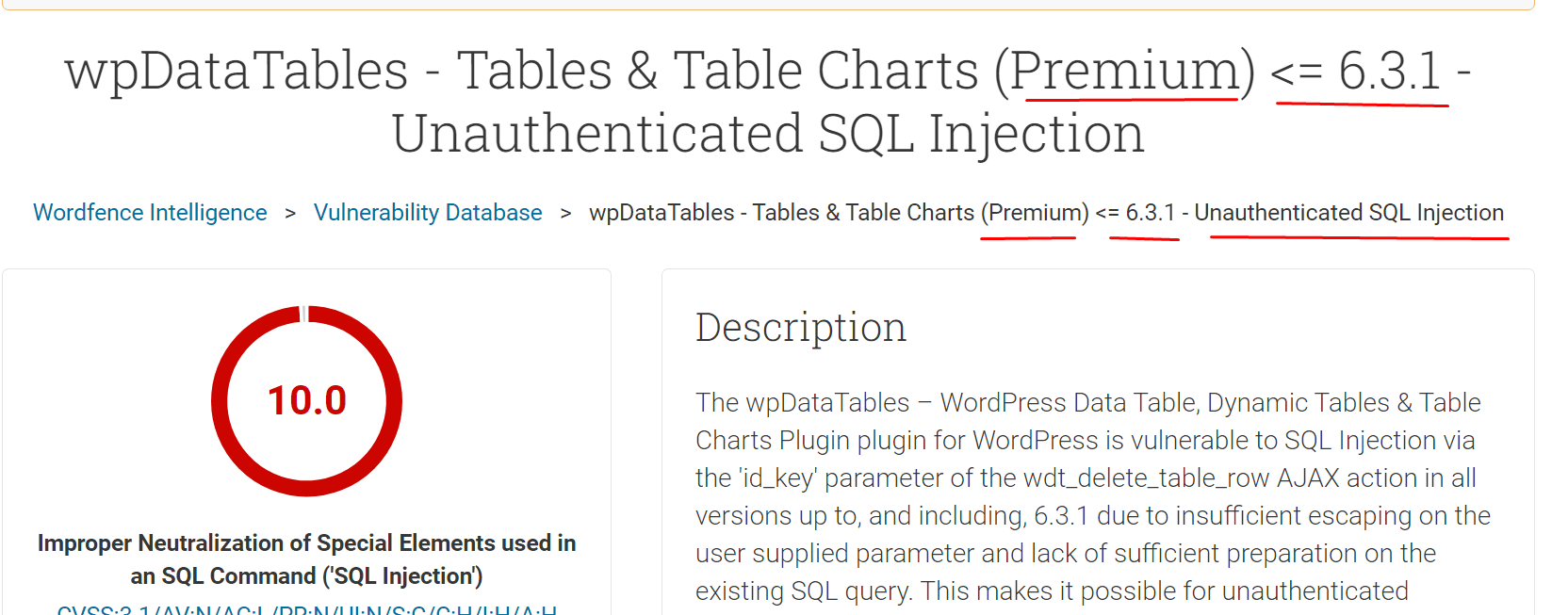
Unfortunately, until wpDataTables Lite goes above version 6.3.1 these reports will indicate a false positive. The lite and the full version have the same slug (wpdatatables), and that’s why the security plugins can’t differentiate between the versions.
I hope this helps, let us know if anything is unclear.
Thank you.
- This reply was modified 1 year, 1 month ago by wpDataTables.
- This reply was modified 1 year, 1 month ago by wpDataTables.
Hello,
First, I would like to sincerely apologize for the delayed response. We have been experiencing an unusually high number of tickets, and it has taken longer than usual to respond to your concern. Your patience is highly appreciated.
Can you please confirm what is the table type in question?
Looking at the error text, this could be a table linked from a JSON file – and it seems you can’t pull a specific root from the source. We will advise on this subject :1. For example, if you link the table to a JSON file, this file has to have structure as we pointed out on this documentation. I will copy the important part here :
Currently, wpDataTables accepts this, and only this format of JSON (see example on the docs page):
a one-level array of same-structured objects where each object will be parsed as a row, and each field inside of the object as a cell.
If your software does not return this format, you would need to prepare, for example, some PHP adapter to return one of the formats that wpDataTables would accept.
2. Or, if your JSON file has multiple levels, then you will have to try our NESTED JSON method.
If you’re trying to access a ‘one level deeper’ from a nested ‘root’ :As our developers pointed out in the example from the documentation hyperlinked above, if we only choose up to the first level deep in the JSON roots, such as “root>results“, then it works without any additional step needed.
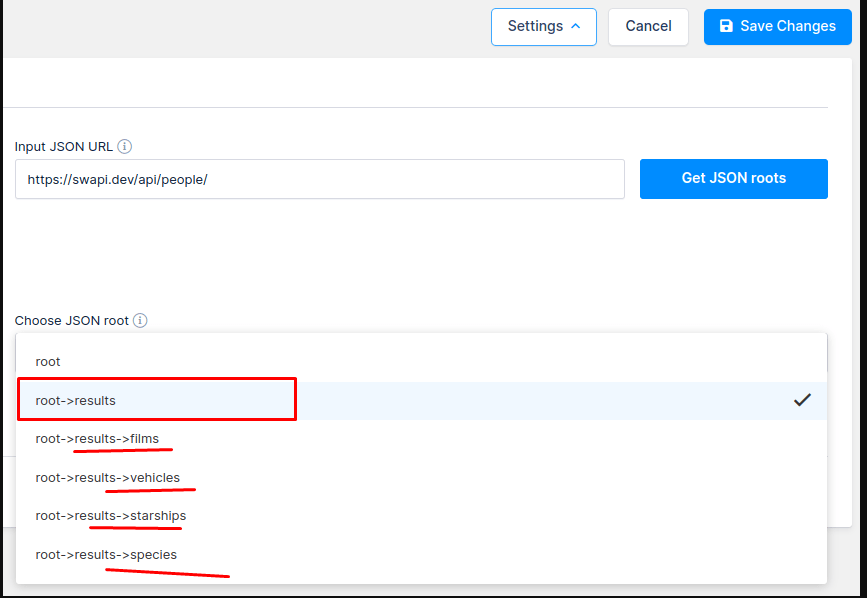
There is this part of the Documentation beneath the example, where our devs stated :
Please note: The root path that is chosen, needs to have the same object with the same keys and values as you can see for chosen path “root->results”.
If values are not a string, then those values will be skipped by default.
In this case keys “films”, “vehicles”, “starships”, and “species” have values as arrays (in some cases they can be objects) and they will not be shown.
If you need to show data from those arrays as well, there is an option with a hook.
So, when one of the chosen root path objects contains keys that have an array or objects as values
and you need to include them in a table as cell values, then you can choose these two hooks:
- wpdatatables_get_one_level_deep_json_data_from_array_as_string and
- wpdatatables_set_one_level_deep_json_data_separator
Please check more details explained about this on this Documentation Page,
find the title as “Use hooks to parse one more level deep in root path”.
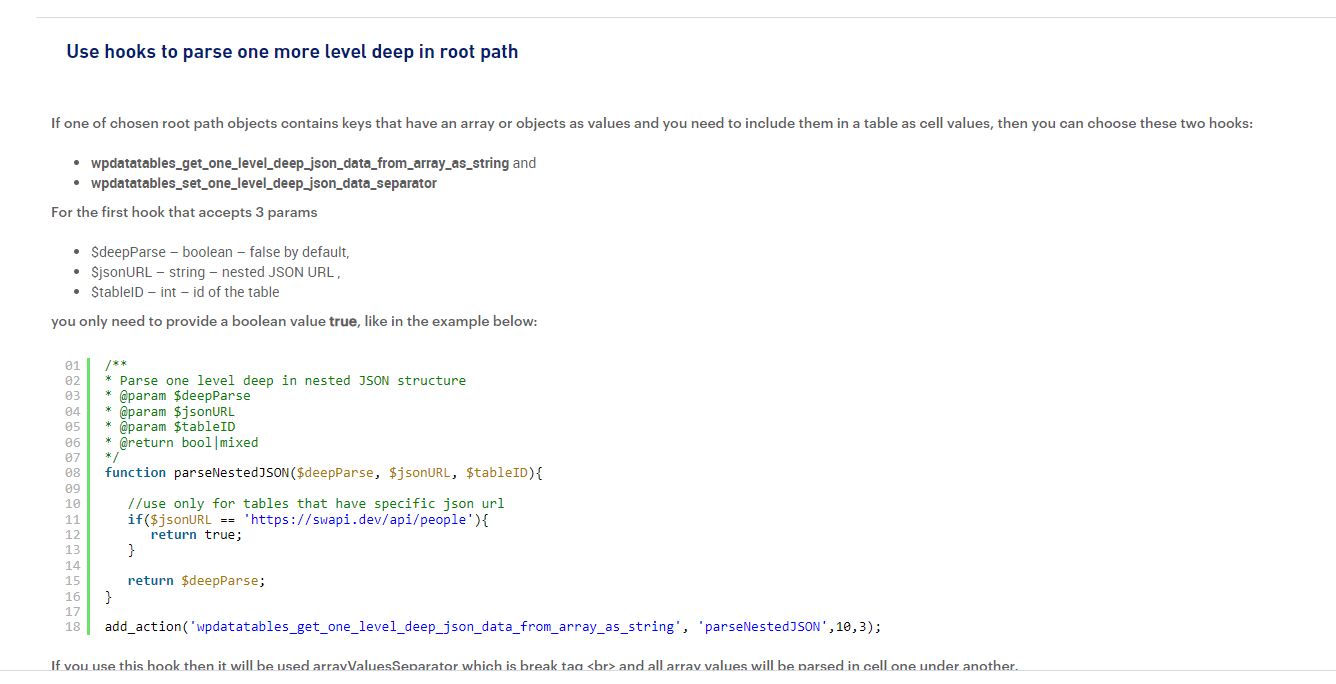
There you will find the detailed explanation how you can use this hook to access one more leel deep in your JSON root path.
Please note that using hooks requires certain level of programming skills and included support refers only to advice.
I hope this helps.
3. And finally, if you wish to use API and pull data from it, then you will have to adapt it to PHP Array, and make a table linked to PHP Array.
Please note, as we pointed out in that Documentation from the last hyperlink, when using a PHP Array as source data :
The format of the serialized array should be the following: 2D-array, where the parent level is an indexed array, and the second level is an associative array.
Parent array entries will be parsed as rows, child array keys will be parsed as column headers, and child array values as cell values.
If you can’t make any new tables, and you tried different table types, did you recently update our Plugin?
If so, it perhaps happened that some files on your FTP or WP Database did not ‘pick up’ some new file/functionality we might have added in an update. It is very rare to happen, though, but if that’s the case, you can try this :
Deactivate our Plugin in WP-Admin.
– Purge all cache of your Site
– Re-activate our Plugin
– Purge cache again
– Try to make a new table, and see if it works.
If that does not help, please provide us with more details about the issue, such as what type of table you’re trying to create;
If the source file for the linked table does not contain sensitive data, you can upload it to WeTransfer and send a download link.
If it has any sensitive data, it is best if you can open a pre-purchase ticket on our Main Support platform which doesn’t require a purchase code. You can just refer to this Post and one of our Agents can help you in more details there.
Kind regards.- This reply was modified 1 year, 2 months ago by wpDataTables.
- This reply was modified 1 year, 2 months ago by wpDataTables.
- This reply was modified 1 year, 2 months ago by wpDataTables.
- This reply was modified 1 year, 2 months ago by wpDataTables.
Hello @sklarwebhost,
Thank you for your feedback.
Our developers attempted to rename the slug for the Lite version to help these security plugins differentiate it. However, this caused issues during implementation, so this solution is not feasible at the moment. Rest assured, our developers are working hard to find an alternative.Unfortunately, we cannot provide an ETA or specific details about the solution at this time.
We apologize for the inconvenience.
Hello again,
Just following up.
Thank you for the update, my sincere apologies for responding after so much time.
I can understand what you mean and the reason for that decision.
You can check out our other Form integrations, but I presume you have already done this.
We have a native integration with Formidable Forms and the Gravity Forms.
Just note, that these integrations are not possible with our Lite/free wpDataTables, you can only use them with the premium wpDataTables.
If anything else comes up, please don’t hesitate to reach out to us.Hello,
You’re welcome, we are happy to advise.
Thank you for the kind words. 🙂
If anything else comes up, please don’t hesitate to reach out to us.
Kind regards.Hello,
Thank you for reporting this.
Our QA Team is able to reproduce it, so our developers isolated it and they added a task to build a fix as soon as possible.
It should be finished for the next update, but we can’t promise an exact ETA.
You can certainly follow our changeLog if you’d like(https://wordpress.org/plugins/wpdatatables/#developers), where we state any changes/new features/bug fixes during updates and our newsletter(https://wpdatatables.com/newsletter/), so you’re informed about new features, bug fixes, freebies, etc.
Thanks again.
Kind regards.Hello,
Firstly, I would like to sincerely apologize for the delayed response as we have been experiencing an unusually high number of tickets. I am sorry that it has taken longer than usual to respond to your concern and your patience is highly appreciated.
If the table which is linked from a PHP array is not correctly updating via our Auto Update Cache feature, when you manually perform this function via your browser;
In that case, we should investigate why that happens on your Site.
We are not able to reproduce this issue – any table we make, such as linked from PHP array or CSV/Excel, etc. – they are all updating correctly either via Cron Job or via the manual URL command through the browser, so it seems to be isolated on your Site at the moment.
If you can please open a pre-purchase ticket on our Main Support site and one of our Agents will ask you some additional details about your setup, etc, to go into more detailed troubleshooting steps.
The pre-purchase ticket category doesn’t require a purchase code, so you can just refer to our correspondence here. They will help isolate the issue on your Site.
Thank you.
Kind regards.- This reply was modified 1 year, 3 months ago by wpDataTables.
Hello,
Firstly, I would like to sincerely apologize for the delayed response as we have been experiencing an unusually high number of tickets. I am sorry that it has taken longer than usual to respond to your concern and your patience is highly appreciated.
We are not able to see any wpDataTable on your Page. We can see one table, but it is not made by our Plugin. We are not 100% sure, but it seems this is a table block made by the Gutenberg Page builder, or something similar.
When we inspect the HTML of this Table on your page, the classes are “.wp-block-table” and if they were made by our Plugin, the class of the table’s main container would have, for example, “.wpdatatable” and similar classes.
Can you confirm if you removed our table from this page in the meantime?
If you can still see our wpDataTable, for example, when logged as an Administrator User, but can’t see it as a non-logged visitor, that means there is some sort of a security issue on your Site – something is preventing our table from loading to non-logged users, etc.
Or there could be a conflict if you try combining our Table with another table Plugin on the same WP Page.
We haven’t tested all the combinations like that, but a known conflict we have is with the TablePress Plugin’s tables, for example ( we can’t post our table with theirs on the same page, because they use some scripts which are the same as we use, thus they clash, etc).
The best will be if you can send us a Video which shows how the table loads for you on desktop – and check if you’re logged as an Admin.
Then also record a Video where you reproduce the issue and how it does not load on mobile.
If the Video doesn’t show any sensitive details, you can send it here – upload it anywhere like weTransfer and send us a download link.
Or, if it shows sensitive details – please open a private pre-purchase ticket on our Main support which doesn’t require a purchase code., send us the video there and one of our Agents will respond as quickly as possible.Kind regards.
- This reply was modified 1 year, 3 months ago by wpDataTables.
Hello,
You’re welcome, we are happy to advise.
If you notice anything else we should take a look at, please don’t hesitate to create new posts.
Kind regards.Hello,
Firstly, I would like to sincerely apologize for the delayed response as we have been experiencing an unusually high number of tickets. I am sorry that it has taken longer than usual to respond to your concern and your patience is highly appreciated.
In regards to this issue, we can’t seem to reproduce it, when we try inserting tel: links in our tables, but perhaps we are not trying all the steps exactly as you did on your table.
Would it be possible if you could please record a Video to show us the exact steps, so we can see in which way you are adding these tel: links to your table cells when the issue happens?
You could upload the Video anywhere online, such as weTransfer and send us a download link; but only if it does not show any sensitive data.
If it shows any sensitive data, please open a PRIVATE ticket on our main Support platform here, and you can attach the link to the Video – one of our Agents will respond as quickly as possible.Since you are a Lite user and don’t have a premium licence, you can open a pre-purchase ticket which doesn’t require a purchase code.
Kind regardsHello,
We are aware of this report, it has been sent to us by other users.
As we can see from the report, it states that vulnerability was found in the premium version of wpDataTables version 6.3.1, so that premium version and the ones before that can be affected.The Lite version of our Plugin does not have these functionalities (such as SQL based tables), so Lite version was never affected.
Those reports are not related to the Lite version, but they can be reported in the lite version because the resources where this information about themes or plugins vulnerabilities are stored are generated by the theme or the plugin slug. Those slugs are the same in both lite and the full version, and because of that, you get those notifications.The important thing is that there’s nothing to worry about. Newer versions of the wpDataTable premium don’t have these issues, ( the latest one at the time of this reply is 7.0.1) and our Lite plugin versions never did.
Unfortunately, until wpDataTables Lite goes above version 6.3.1 these reports will indicate a false positive. The lite and the full version have the same slug (wpdatatables), and that’s why the security plugins can’t differentiate between the versions.
I hope this helps, let us know if anything is unclear.
Thank you.
Hello,
We are aware of this bug with the Elementor and our premium Plugin’s latest version.
Our developers will include a final version of the fix in our upcoming update.
Meanwhile, we are sending a temporary working version of the fix to all our premium users who opened a ticket to report it.
If you can’t open a ticket for any reason, you can search on our public tickets with keywords like “wpdatatables elementor” and most probably the first public ticket that comes up will show the JS fix as an attachment there, along with instructions on how to apply it via FTP on your Hosting server.
When it comes to the details needed to open a ticket on our premium Support platform, you only need to paste your licence code (which is found on your Store account with us) and write a brief description of the issue;
So, since you’re using the Premium version of the plugin, please open a ticket on our main Support platform here, and one of our Agents will respond as quickly as possible.If you don’t have a licence (or if it expired), please open a pre-purchase ticket which doesn’t require a purchase code.
Premium products are not supported in these forums, as per this comment by WordPress.org moderators.
Thank you for understanding.
Kind regards.
- This reply was modified 1 year, 3 months ago by wpDataTables.
Hello,
Our sincere apologies for taking so long to reply. Thank you very much for your patience.
If we understand, the source data will be coming from an API, right?
You can create a table as the “Linked from Nested JSON” method, as explained in this Guide.
If you try this method – the table will auto-update any time you edit the data on that source API, but we don’t have the ‘auto refresh’ option for these kinds of tables.
We only have the ‘auto refresh’ option for our server-side-processing tables – but they are not available in the Lite/Free Plugin version.
Even if you take our Premium version, the tables linked from a live data source such as API can not be server-side, so you can’t have the auto-refresh feature on this kind of table.
So, these other, advanced points which you described, such as using your own custom AJAX call in order to send the data to the table, and to have the table ‘auto refresh’ without the need to refresh the Page to show the updated data from the source;
For these points, we currently don’t have any built-in solution.
You can ask our premium support if they can point you in the right direction for any custom workaround idea for that use-case, please open a ticket on our main Support platform here.
If you don’t have a licence (or if it expired), please open a pre-purchase ticket which doesn’t require a purchase code.
Premium products are not supported in these forums, as per this comment by WordPress.org moderators.
Thank you for understanding.