• Resolved stevieboy23

    (@stevieboy23)


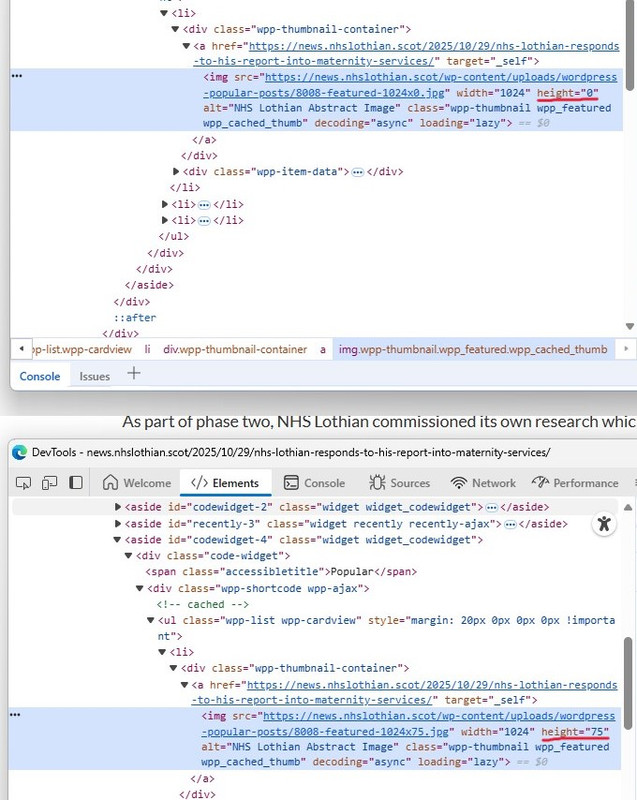
    Hi, I’ve been using your plugin a for a few years now, always had a good experience, however after upgrading from 7.3.5 to 7.3.6 my thumbnails which show in the widget sidebar have shrunken to little “strips”. You can compare before and after on this combined screenshot: https://news.nhslothian.scot/popposts.jpg

    This the shortcut I use:

    [wpp limit=3 range=’custom’ time_quantity=90 time_unit=’day’ order_by=’views’ post_type=’post’ thumbnail_width=1024 stats_date=1 stats_date_format=’F j, Y’ header=’Popular’ header_start=” header_end=” wpp_start=” wpp_end=” post_html='{thumb} {title} {date}’]

    (span & styling in the above has been removed)

    For the moment I have reverted back to 7.3.5

    Best Wishes

    The page I need help with: [log in to see the link]

Viewing 3 replies - 1 through 3 (of 3 total)
  • Plugin Author Hector Cabrera

    (@hcabrera)

    Hi @stevieboy23,

    Had a look at those screenshots and unfortunately they’re not very helpful. Please update again and leave a comment here so I can have another look.

    Plugin Author Hector Cabrera

    (@hcabrera)

    Ah, I see what the problem is @stevieboy23: you forgot to set the height of the thumbnail.

    In your shortcode you have:

    [wpp limit=3 ... thumbnail_width=1024 ...]

    You need to set the height via thumbnail_height, too. Otherwise the plugin, starting version 7.3.6, will use 75px as the fallback value for the height property if thumbnail_height is not defined / not a number / a negative number.

    From your own screenshot:

    Thumbnails rendered “correctly” by mere chance, your browser decided to not enforce that height=”0″ property and that’s why it “worked.”

    Please set the height of the thumbnail via the thumbnail_height property and it’ll work as expected.

    As an aside, your sidebar is roughly 415px wide and you’re using thumbnails that are 1024px wide.

    Your thumbnails that are larger than they need to be. That’s a waste of bandwidth and only increases page load times.

    Thread Starter stevieboy23

    (@stevieboy23)

    Hi Hector,

    Thanks for the solution, I’ve set a height and everything okay now

    Best Wishes

Viewing 3 replies - 1 through 3 (of 3 total)

You must be logged in to reply to this topic.