SCF repeater usage in function to create shortcode
-
Hello guys. I switched from ACF to SCF because I wanted to use the repeater field. I’ve never used it before so I don’t know how to access the fields and sub-fields in a function to create a short code.
I want if someone have already experienced it, and made it work, please consider sharing the code with us. I’ve been struggling with it for a long time now. Please I need help.

-
Hey! If I understood you correctly you want to output the sub fields. Here would be the function to do so.
Example: outputting navigation menu links.
<?php
if (have_rows('site_menu')) :
    while (have_rows('site_menu')) :
        the_row(); ?>
        <li>
            <a href="<?= esc_url(get_sub_field('site_menu_url')) ?>">
                <?= esc_html(get_sub_field('site_menu_title')) ?>
            </a>
        </li>
    <?php endwhile;
endif;
?>-
This reply was modified 5 months ago by
beegoodb.
Hi!
Example Repeater Field
Let’s assume that we have created a Repeater field with the name
people, which contains two text and number fields:nameandage.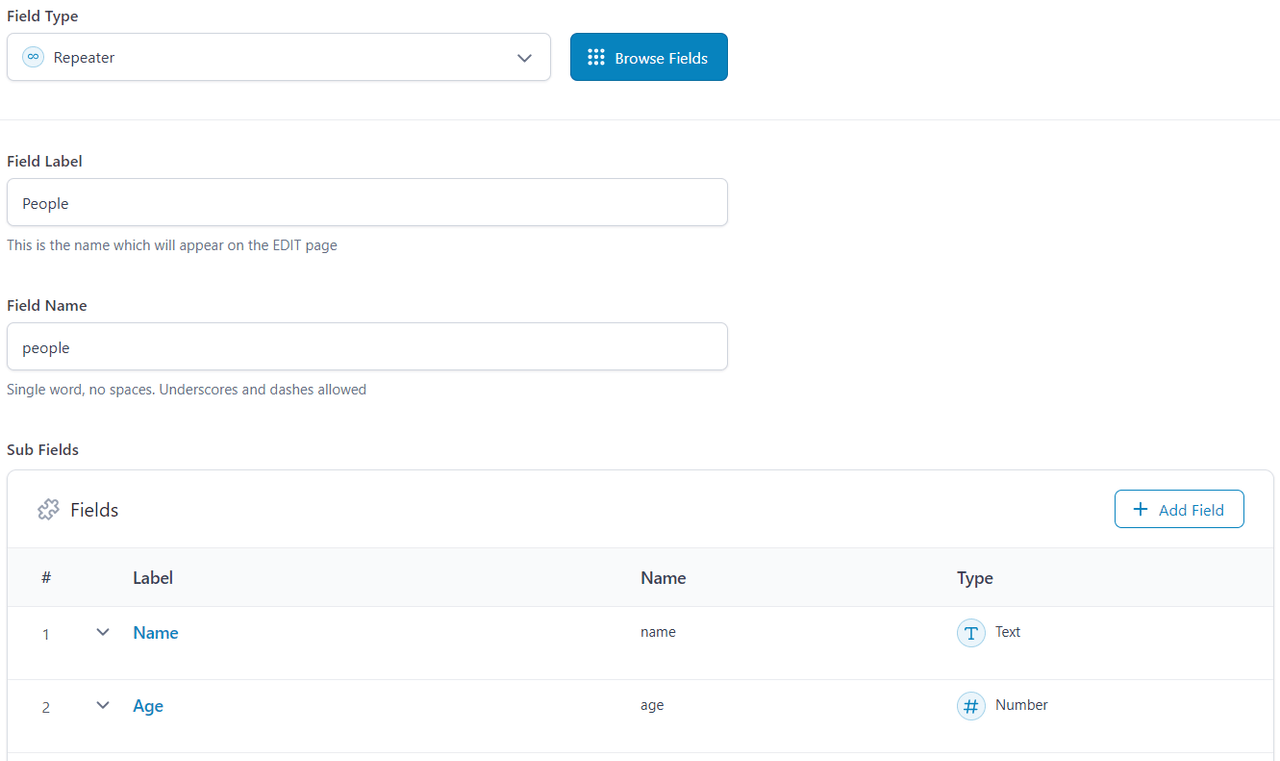
Because the Repeater field returns an array of data in the format:
[
	0 => [
		'name' => '...',
		'age'  => ...,
	],
	1 => [
		'name' => '...',
		'age'  => ...,
	],
	...
]
it will not be possible to use the regular ACF shortcode, so you will have to create a custom shortcode.
Universal Repeater Shortcode
Open your
functions.phpfile and use this code snippet:add_shortcode( 'acf_repeater', function ( $atts, $content = '' ) {
$atts = shortcode_atts([
'field' => '',
'sub_fields' => '',
'post_id' => null,
], $atts );
if ( empty( $atts['field'] ) || empty( $atts['sub_fields'] ) ) return '';
$sub_fields = array_map( 'trim', explode( ',', $atts['sub_fields'] ) );
$output = '';
if ( have_rows( $atts['field'], $atts['post_id'] ) ) {
while ( have_rows( $atts['field'], $atts['post_id'] ) ) {
the_row();
$row = $content;
foreach ( $sub_fields as $sub ) {
$value = get_sub_field( $sub );
$row = str_replace( "%{$sub}%", $value, $row );
}
$output .= do_shortcode( $row );
}
}
return $output;
});In my examples I didn’t use escape functions (
esc_html(),esc_url(), etc.) to save space, but following beegoodb‘s example, be sure to use them!This function creates a universal shortcode for use in your theme:
[acf_repeater field="people" sub_fields="name,age"]
	<div class="person">
		<strong>%name%</strong><br>
		<em>%age% yo</em>
	</div>
[/acf_repeater]
Specialized Shortcode
You can also create a shortcode specifically for displaying data about people in this case:
add_shortcode( 'acf_people', function ( $atts, $content = '' ) {
	$atts = shortcode_atts([
		'post_id' => null,
	], $atts );

	$output = '';

	if ( have_rows( 'people', $atts['post_id'] ) ) {
		while ( have_rows( 'people', $atts['post_id'] ) ) {
			the_row();

			$output = 'Name: ' . get_sub_field( 'name' ) . ', age: ' . get_sub_field('age');
		}
	}

	return $output;
});
In this case, just use:
[acf_people]PHP Usage
But I recommend working with the Repeater field directly through the PHP:
foreach ( get_field( 'people' ) as $people ) {
	echo 'Name: ' . $people['name'] . ', age:' . $people['age'];
}This is how I made it work:
function past_montante_shortcode() {
ob_start(); // Start output buffering// Query all the prono posts $args = array( 'post_type' => 'pronostic', 'posts_per_page' => 1, // Fixed typo (was post_per_page) 'post_status' => 'publish' // Fixed (was published) ); $prono_query = new WP_Query($args); if($prono_query->have_posts()) : while($prono_query->have_posts()) : $prono_query->the_post(); $montantes_precedentes = get_field('montantes_precedentes', get_the_ID()); if(!empty($montantes_precedentes)) : ?> <section id="past-montantes-splide-section" class="splide" aria-label="Past Montantes Slider"> <div class="splide__track"> <ul class="splide__list"> <?php foreach($montantes_precedentes as $montante) : if(!empty($montante['image_montante'])) : ?> <li class="splide__slide"> <img src="<?php echo esc_url($montante['image_montante']); ?>" alt="Montante précédente" class="splide-slide-image" loading="lazy"> </li> <?php endif; endforeach; ?> </ul> </div> </section> <script> document.addEventListener('DOMContentLoaded', function() { if(typeof Splide !== 'undefined') { const pastMontanteDesktopSlider = new Splide('.splide', { type: 'loop', perPage: 1, perMove: 1, gap: '1rem', pagination: true, arrows: true, lazyLoad: 'nearby', breakpoints: { 768: { perPage: 1 } } }).mount(); } }); </script> <?php else : ?> <p class="no-montantes">No montantes précédentes found.</p> <?php endif; endwhile; endif; wp_reset_postdata(); return ob_get_clean();}
add_shortcode(‘past_montantes’, ‘past_montante_shortcode’);it works just fine
Thank you all for your responses and your help.
-
This reply was modified 5 months ago by


You must be logged in to reply to this topic.
