• Resolved recretos321

    (@recretos321)


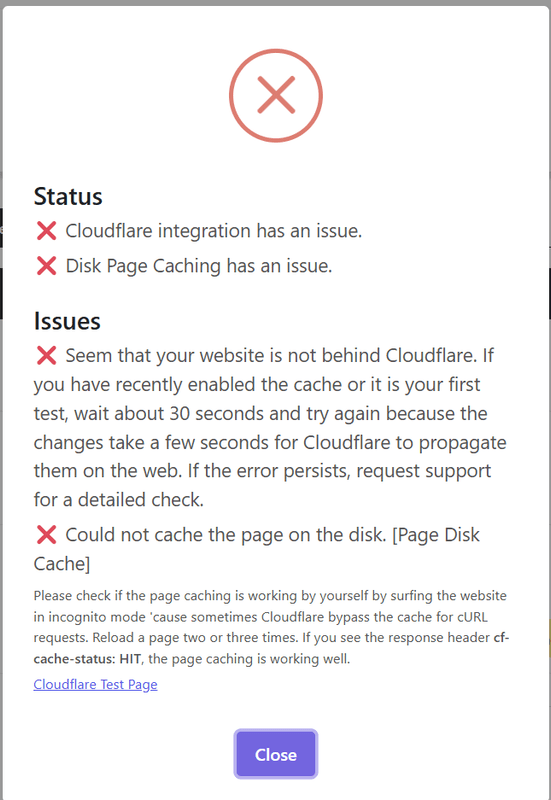
    Hello, I have updated to the WP 6.8 version, and doing some testing, I cant have a successful test of cache test. I have disconnected the Cloudflare connection, and re-connected to Cloudflare via API key. The connection worked fine, and I can see the plugin has its own rule in the Cache rules section on Cloudflare. But for some reason, when I press the test cache, I get the error that the website is not using cloudflare or somehow caching does not work. If I click at the test page link, I can see the “HIT” in the cache headers.

    Kind Regards

    The page I need help with: [log in to see the link]

Viewing 4 replies - 1 through 4 (of 4 total)
  • Thread Starter recretos321

    (@recretos321)

    After a plugin reinstall via rollback/update and reconnect to Cloudflare, this is the latest result of the test cache button. The cache rule is enabled and is visible. But I do not see any worker rule on our site. Not sure if the plugin needs just the cache rules, or a worker too, as there is no worker currently in cloudflare for the site.

    • This reply was modified 1 year ago by recretos321. Reason: Additional information about cloudflare workers
    Thread Starter recretos321

    (@recretos321)

    As I can also see in the actual headers, the disk page caching and Cloudflare caching works normally, so I guess it could be something wrong in the way the testing works, after I updated to WordPress 6.8?

    Thread Starter recretos321

    (@recretos321)

    I do have to add, that while the cache rule from the plugin is visible, there are no workers active on our site in Cloudflare overall. I am not sure if the plugin needs any workers in cloudflare to work, but I do not see any. We are using the PRO version of the plugin.

    Plugin Support Kush

    (@kushnamdev)

    Hi @recretos321,

    Thank you for your message.

    The Worker functionality has been removed from the plugin to streamline the setup process for users. Please note that the “Test Cache” button may not always reflect the correct status since it relies on a cURL request, which can be inconsistent.

    To accurately verify caching, we recommend checking the response headers in an incognito window. If the header shows “Hit”, it confirms that the page is being cached correctly.

    In your case, I’ve checked your site and can confirm that caching is working as expected—the response header indicates a cache “Hit” status. So there’s no need for concern; your site is indeed being cached properly.

    You also mentioned you’re using the Pro version. If that’s the case, I recommend reaching out to us through our priority support channel here: https://store.themeisle.com/contact

    Best regards,

Viewing 4 replies - 1 through 4 (of 4 total)

The topic ‘Cannot test Cloudflare cache’ is closed to new replies.