
Description
ShopLentor (formerly WooLentor) is a powerful WooCommerce builder for Elementor and Gutenberg. Build custom shop pages, product pages, cart, checkout, and my account pages — all with drag-and-drop. Includes wishlist, compare, quick view, and 36+ built-in modules.
🎬 Live Demo – See ShopLentor in action
📚 Documentation – Complete setup guides & tutorials
🎥 Video Tutorials – Step-by-step video guides
💎 Get Pro Version – Unlock all premium features
💬 Support – Get help from our team
Join 100,000+ store owners who’ve chosen ShopLentor to build professional WooCommerce stores that convert. With active installations across 120+ countries, ShopLentor is backed by a thriving community and loved by users worldwide.
🎯 Why Your Store Needs ShopLentor
🔥 Handle 80% of your WooCommerce needs with one plugin — no need to install separate plugins for wishlist, compare, variation swatches, quick view, ajax search, and more!
Default WooCommerce stores all look the same. Stand out from the competition with ShopLentor:
120+ Widgets/Elements for Elementor
85+ Gutenberg Blocks for Block Editor
36+ Essential Modules for enhanced functionality
110+ Premium Templates ready to import
Transform Your Store Today:
Without ShopLentor:
❌ Stuck with default product layouts
❌ Can’t customize checkout fields
❌ No wishlist or compare features
❌ Limited design flexibility
❌ Generic product displays
❌ High cart abandonment rates
With ShopLentor:
✅ Drag-and-drop page customization with 120+ widgets
✅ Add/remove checkout fields instantly with field manager
✅ Built-in sales notifications, popup builder, flash sale countdown
✅ 110+ templates ready to import
✅ Product Grid Modern with list/grid toggle
✅ Recover abandoned carts automatically
✅ Multi-currency support for global sales
✅ Conversion-focused features proven to increase sales
🚀 36+ Powerful Modules
One plugin. All-in-one WooCommerce solution. Get abandoned cart recovery, multi-currency support, checkout field manager, email customizer, variation swatches, wishlist, compare, and more — all built-in and working seamlessly together without conflicts.
Free Modules:
🔥Abandoned Cart🛍️ [New] – Recover lost sales with automated cart recovery emails and analytics
Rename Label – Rename Add to Cart, Place Order buttons and product tab labels (Description, Reviews, Additional Info)
Sales Notification – Show real-time purchase popups for social proof
Shopify Style Checkout – Modern, clean checkout page design
Flash Sale Countdown – Add urgency with sale countdown timers
Backorder Management – Accept orders for out-of-stock products
Variation Swatches – Replace dropdowns with visual color/image swatches
Wishlist – Allow customers to save favorite items
Product Compare – Enable side-by-side product comparisons
Ajax Search – Instant search results without page reload
Single Product Ajax Cart – Add to cart without page refresh
Currency Switcher – Multi-currency support with automatic geolocation detection and country-currency mapping
Post Duplicator – Duplicate products, pages, posts, templates & notification bars instantly
Popup Builder – Create custom popups easily
Product Stock Progress Bar – Display inventory levels visually
Redirect to Checkout – Skip cart page for faster purchase
Grid/List View Toggle – Let customers choose grid or list view
Pro Modules:
🔥Google Address Autocomplete📍 [New] – Speed up checkout with instant address suggestions powered by Google Places API
Checkout Field Manager – Add, edit, and remove checkout fields easily
Partial Payment – Accept deposits and installment payments
Pre-Orders – Take orders before products are available
Size Chart – Add sizing guides to reduce returns
Order Bump – Increase AOV (Average Order Value) with checkout upsells
Product Filter – Advanced Ajax-powered product filtering
Email Customizer – Design beautiful transactional emails
Email Automation – Automated email marketing campaigns
GTM Conversion Tracking – Google Tag Manager eCommerce tracking
Sticky Add to Cart – Floating buy button increases conversions
Side Mini Cart – Slide-out cart drawer for quick checkout
Multi-Step Checkout – Break checkout into easy steps to reduce abandonment
Quick Checkout – One-click checkout for returning customers
Store Vacation – Set vacation mode with a custom message
Sales Report Email – Automated daily/weekly sales reports
Smart Cross-Sell Popup – Intelligent product recommendations popup
Product Badges – Add custom badges and labels
Advanced Coupon – Create smart coupon rules and restrictions
Cart Reserve Timer – Reserve cart items for a limited time to create urgency
Quick View – Preview products in a modal popup
Social Share – Social media sharing buttons for products
📦 120+ Widgets/Elements for Elementor
Product Display Widgets:
Product Grid – Display products in customizable grid layouts
Product Grid Modern 🆕 – List/Grid toggle with stock indicators, quantity selector & infinite scroll
Product Grid Editorial 🆕 – Premium displays with “View Details” overlay, animated stock bars & 8 image ratios
Product Grid Magazine 🆕 – Fashion-style asymmetric layouts with product numbering (01, 02, 03…)
Product Grid Luxury 🆕 – Elegant high-end styling with sophisticated hover effects
Product Slider/Carousel – Showcase products in a sliding carousel format
Product Tab – Organize products in interactive tabbed sections
Universal Product – Flexible product display with 20+ styles
Product Accordion – Space-saving expandable product listings
Product Image Accordion – Interactive image-based product showcase
Product Curvy – Modern curved design product layouts
Recently Viewed Products – Display customers’ browsing history dynamically
Product List – List view layouts with detailed information
Category Grid/List – Display categories in various layouts
Brand Logo Display – Showcase brand logos in grid/carousel
Testimonial Widget – Customer reviews showcase
Store Features – Highlight shipping, returns, guarantees
FAQ Widget – Collapsible frequently asked questions
Promo Banner – Promotional content areas
Shopping Features:
Ajax Product Search – Instant live search with product preview
Quick View – Preview products without leaving the current page
Wishlist – Let customers save favorite products
Product Compare – Side-by-side product comparison
Variation Swatches – Visual product variations with colors/images
Sales & Marketing:
Sales Notification – Display real-time purchase alerts popup
Flash Sale Countdown – Create urgency with countdown timers
Special Day Offer – Promote holiday and seasonal deals
Call for Price – Hide prices for quote-based products
Suggest Price – Let customers propose their price
QR Code Generator – Auto-generate QR codes for products
Product Badges – Add custom badges and labels
Store Functionality:
Product Filter (Horizontal) – Advanced filtering with multiple options
Product Filter (Vertical) – Sidebar filtering for better UX
Customer Reviews – Display product reviews attractively
Image Marker/Hotspot – Interactive product images
Single Product Page Widgets:
Product Image Gallery with zoom and lightbox
Product Video Gallery (embed videos in gallery)
Add to Cart Button (4+ customizable styles)
Product Price (with sale price display)
Product Title (customizable typography)
Product Rating & Reviews (star ratings and customer reviews)
Product Description & Short Description
Product Meta Information (SKU, categories, tags)
Related Products (automatic related items)
Upsell Products (upsell recommendations)
Cross-sell Products (cross-sell suggestions)
Social Share Buttons (share on social media)
Product Additional Information (specifications table)
Product Categories (category links)
Cart Page Widgets:
Product Cart Table (cart items display)
Cart Total (order summary)
Cross-sell Products (cart upsells)
Empty Cart Message (customizable empty cart display)
Cart Reserve Timer (urgency countdown)
Checkout Page Widgets [Pro]:
Checkout Billing Form
Checkout Shipping Form
Checkout Payment Method
Checkout Order Review
Checkout Coupon Form
Checkout Login Form
My Account Page Widgets [Pro]:
My Account Dashboard
My Account Orders
My Account Downloads
My Account Addresses
Login Form
Registration Form
Thank You Page Widgets [Pro]:
Order Details
Order Products
Billing Address
Shipping Address
Thank You Message
🧱 85+ Gutenberg Blocks
ShopLentor delivers full Gutenberg block support, making it the ideal choice for users who appreciate the seamless experience of WordPress’s native block editor.
Popular Block Categories:
General Blocks (16):
Product Tab – Organize products in tabbed layouts for better navigation
Product Grid – Display products in a responsive grid format
Product Grid Modern 🆕 – Dual view modes (Grid/List) with real-time stock status & AJAX pagination
Product Grid Editorial 🆕 – Playfair typography with editorial aesthetics & professional image aspect ratios
Product Grid Magazine 🆕 – 12-column asymmetric grid with alternating 3:4 and 4:3 image ratios
Product Grid Luxury 🆕 – Premium minimal design for luxury & boutique stores
Recently Viewed Products – Show customers’ browsing history dynamically
Category Grid – Show product categories in attractive grids
FAQ – Add collapsible frequently asked questions sections
Brand Logo – Display brand partnerships and certifications
Special Day Offer – Highlight seasonal deals and holiday promotions
Promo Banner – Create eye-catching promotional banners
Customer Review – Display testimonials and reviews beautifully
Store Features – Highlight store benefits and services
Image Marker – Interactive hotspots on product images
Testimonial – Customer testimonials display
Product Curvy – Unique curved product layouts
Shop/Archive Blocks (5):
Product Filter – Add advanced filtering options to shop page
Horizontal Filter – Space-saving horizontal filter layout
Archive Sorting – Product sorting dropdown for users
Result Count – Display number of products found
Product Archive – Complete shop page layout control
Product Page Blocks (30):
Add to Cart – Conversion-optimized cart buttons with custom styles
Product Gallery – Beautiful image galleries with zoom functionality
Product Video Gallery – Embed product videos in gallery
Product Price – Show prices with sale indicators
Product Reviews – Customer reviews and ratings section
QR Code – Generate QR codes automatically for products
Product Meta – Display SKU, categories, and tags
Product Stock – Display availability and stock status
Product Stock Progress Bar – Visual inventory display
Call for Price – Hide prices for quote-based B2B products
Suggest Price – Let customers propose their own price
Product Title – Product title with custom typography
Product Description – Full product description
Product Short Description – Brief product summary
Product Rating – Star ratings display
Product Additional Info – Specifications table
Product Categories – Product category links
Product Tags – Product tag links
Product Data Tabs – Description, Reviews, Additional Info tabs
Related Products – Automatic related items
Upsell Products – Upsell recommendations
Social Share – Social media sharing buttons
Breadcrumbs – Navigation breadcrumb trail
Product SKU – Display product SKU
And 6 more blocks…
Cart/Checkout Blocks [Pro] (13):
Cart Table – Customizable shopping cart table with product details
Cart Total – Order summary display
Checkout Billing Form – Professional billing information fields
Checkout Shipping Form – Shipping address fields
Checkout Payment Method – Multiple payment options selection
Checkout Order Review – Order summary before purchase
Checkout Coupon Form – Coupon code entry
Checkout Login Form – Customer login at checkout
Cross-Sell – Suggest complementary products in cart
Empty Cart Message – Custom message for empty carts
Return to Shop Button – Navigate back to shopping
Cart Reserve Timer – Countdown timer for cart items
Cart Table List – Alternative list-style cart display
My Account Blocks [Pro] (12):
My Account Dashboard – Welcome and overview section
Login Form – Customer login interface with custom styling
Registration Form – New customer signup with validation
Order History – Complete order tracking and management
My Account Orders – Customer order list
Download – Digital product downloads section
My Account Downloads – Downloadable products list
My Account Addresses – Billing and shipping addresses
My Account Navigation – Account section menu
My Account Details – Edit account information
Logout – Customer logout
Lost Password – Password recovery form
🏗️ Build WooCommerce Pages with Elementor & Gutenberg
✅ Shop/Archive Page Builder: Custom shop layouts with filters, sorting & grid options
✅ Single Product Page Builder: Add size charts, QR codes, swatches & more
✅ Cart Page Builder [Pro]: Cross-sells, countdown timers & trust badges
✅ Checkout Page Builder [Pro]: Multi-step checkout with order bumps
✅ My Account Page Builder [Pro]: Professional customer dashboards
✅ Thank You Page Builder [Pro]: Cross-sell opportunities & social sharing
✅ Email Customizer [Pro]: Beautiful branded transactional emails
✅ Quick View Templates [Pro]: Product preview popups
🎨 110+ Professional Templates
Why start from scratch? Import professionally designed layouts and customize to match your brand in minutes — no design skills needed.
👉27+ Home Page Templates (10 Free, 17 Pro)
👉26+ Product Page Templates (4 Free, 22 Pro)
👉16+ Cart Page Templates (All Pro)
👉11+ Checkout Templates (All Pro)
👉10+ Shop Page Templates (1 Free, 9 Pro)
👉7+ My Account Templates (All Pro)
👉5+ Popup Templates
👉4+ Sale Notification Templates
👉4+ Thank You Page Templates (All Pro)
💡 What Makes ShopLentor Different
⚡ Performance Optimized: Clean, lightweight code ensures your store loads fast and ranks well in search engines.
📱 Mobile-First Design: Every feature is optimized for mobile commerce with responsive controls and touch-friendly interfaces.
🌍 Translation Ready: Full compatibility with WPML, Polylang, and other multilingual plugins. RTL language support included.
🔒 Regular Updates: Frequent updates with new features, security patches, and compatibility improvements.
👥 Dedicated Support: Get help from our expert team through forums, documentation, and priority support (Pro).
👥 Who Should Use ShopLentor?
🎯 Store Owners – Build professional stores without developers
🎯 Freelancers – Deliver projects faster
🎯 Agencies – Standardize client builds with agency license
🎯 Designers – Full creative control without coding
🎯 Developers – Speed up WooCommerce development
🌐 Social Media
Stay connected with the ShopLentor community:
👥 Facebook Community – Join our active community
🎥 Video Channel – Watch tutorials and demos
💼 LinkedIn – Follow for updates
📸 Instagram – See latest features
⭐ Rate us on WordPress.org – Share your experience
🔧 Our Other Plugins
Check out our other powerful WordPress plugins:
SupportGenix – Advanced support ticket system
HT Mega – Absolute Addons for Elementor
Whols – WooCommerce wholesale solution
Pixelavo – Image & video editing toolkit
Swatchly – WooCommerce variation swatches
HT Easy GA4 – Google Analytics 4 integration
JustTables – WordPress table builder
Screenshots

Custom Product Page Builder 
Custom Cart Page Builder 
Custom Checkout Page Builder 
Checkout Page Field Editor 
Custom My Account Page 
Woo Wishlist 
Product Compare Table 
Product Quick View 
Horizontal Product Filter 
Vertical Product Filter 
Sales Notification 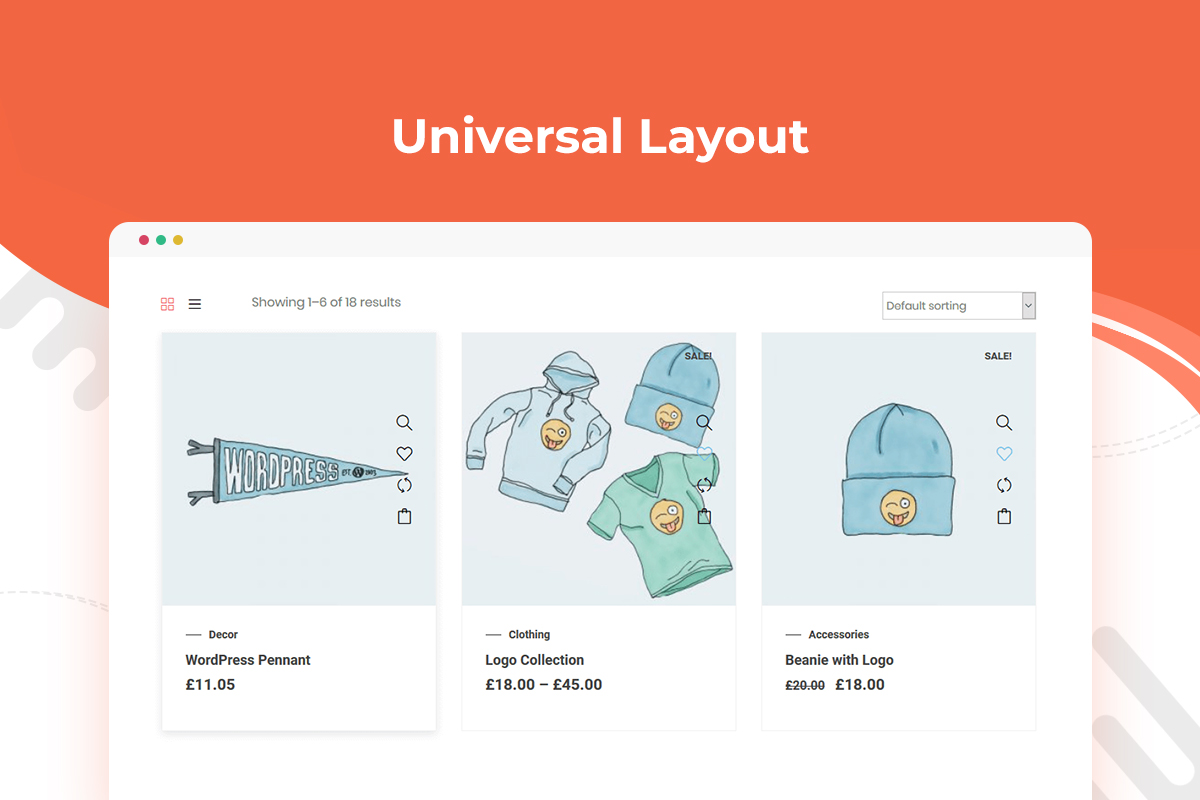
Universal Product Layout 
Product Slider – Style 1 
Product Slider – Style 2 
Product Slider – Style 3 
Product Tab – Style 1 
Product Tab – Style 2 
Product Tab – Style 3 
Template Library 
Widgets Control Panel 
WC Template Settings 
Module Settings
Blocks
This plugin provides 43 blocks.
- WL: Product SKU Display the product SKU (Stock Keeping Unit) on product detail pages.
- WL: Archive Title Show dynamic archive page title.
- WL: Product Archive Layout (Default) Display products in a default grid layout for shop or archive pages
- WL: Product Tab Display product tab or product slider.
- WL: Product Grid Magazine Display Product Grid Magazine with grid and list layouts.
- WL: Add To Cart Display product add to cart button.
- WL: Product Reviews Display product customer reviews and ratings.
- WL: Horizontal Product Filter Display horizontal product filter for archive and shop page.
- WL: Rating Show product ratings and star reviews.
- WL: Product Price Display product price for single product page.
- WL: Store Feature Highlight essential store features like shipping info, return policies, and more.
- WL: Product Tabs Display product information tabs.
- WL: Product Title Display the product title prominently on the product page.
- WL: Brand Logo Display brand logos carousel, slider & grid-wise.
- WL: Promo Banner Display promotional banner.
- WL: Product Grid Editorial Display products in Editorial grid and list layout.
- WL: Suggest Price Display suggest price form for single product page.
- WL: Product Additional Info Display product additional information.
- WL: Image Marker Display image marker / product hotspots.
- WL: Product Grid Luxury Display Product Grid Luxury.
- WL: Description Display detailed descriptions for product.
- WL: Call For Price Display custom pricing inquiry button for single product page.
- WL: Popup Close Trigger Button Display close button for popup builder template
- WL: Product Stock Product availability and stock level on single product page.
- WL: Short Description Display product short description.
- WL: FAQ Display frequently asked questions.
- WL: Breadcrumbs Display breadcrumb navigation/menu.
- WL: Special Day Offer Display special promotional banners for holidays, sales events, or limited-time offers.
- WL: Product Meta Display essential product details like meta info.
- WL: Testimonial Display customer testimonials or reviews.
- WL: Product Filter Display product filter for archive and shop page.
- WL: Archive Result Count Show the number of products available in your archive or shop page.
- WL: Product Categories Display product categories in product details page.
- WL: Product Image Display product image for single product page.
- WL: Related Product Display related products grid.
- WL: Product Curvy Showcase products grid curvy style.
- WL: Product Grid Modern Display Product Grid Modern.
- WL: Category Grid Display product category grid.
- WL: Product Upsell Display the upsell product on the product page.
- WL: Archive Catalog Ordering Display sorting options menu for shop and archive page.
- WL: QR Code Generate and display QR code for product.
- Recently Viewed Products Display list of recently viewed Products.
- WL: Currency Switcher Display currency list added from Module.
Installation
This section describes how to install the ShopLentor – WooCommerce Addons for Elementor Page Builder plugin and get it working.
1) Install
- Go to the WordPress Dashboard “Add New Plugin” section.
- Search For “ShopLentor”.
- Install, then Activate it.
OR:
- Unzip (if it is zipped) and Upload
woolentor-addonsfolder to the/wp-content/plugins/directory - Activate the plugin through the ‘Plugins’ menu in WordPress
2) Configure
- After install and activate the plugin you will get a notice to install Elementor Plugin ( If allready install it then do not show notice. ).
- To install the plugin click on the “Button” Install Elementor.
- ‘SHOPLENTOR’ Category will be appear in Elementor page Editor
- Create new Product slider or product tab and relax!
FAQ
-
Can I use ShopLentor without WooCommerce?
-
No, ShopLentor is a plugin for WooCommerce and cannot be used without it. You need to use WooCommerce with ShopLentor for your online store.
-
What are the minimum requirements for using ShopLentor?
-
ShopLentor has been tested with the most up-to-date versions of both WordPress and WooCommerce.
-
How can I redirect to checkout page in WooCommerce?
-
Yes, you can set up a redirect to the checkout page in WooCommerce to skip the cart page. To do this, please follow these steps:
-
Go to Dashboard > ShopLentor > Modules.
-
Enable Redirect to Checkout on Add to Cart.
-
Visit the Shop/Store and click the add to cart button.
You can follow this doc.
-
-
How do I create a multi-step checkout in WooCommerce?
-
ShopLentor Pro provides an easy way to create a multi-step checkout. You can follow this online documentation to create a multi-step checkout in WooCommerce.
-
Go to Dashboard > ShopLentor > Modules.
-
Enable Multi-Step Checkout.
-
From ShopLentor Template Builder > Add New Template
-
Select the template type “Checkout”
-
Drag WL: Multi-Step Checkout widget and Edit the template
-
-
How do I add a wishlist in WooCommerce?
-
ShopLentor provides a module for Wishlist, using that module you can easily add a wishlist to the WooCommerce product and archive page. You can follow the documentation here:
-
Go to Dashboard > ShopLentor > Modules.
-
Enable Wishlist.
-
ShopLentor > Wishlist
-
Make necessary setting
-
-
How do I compare products in WooCommerce?
-
Yes, you can use the WooCommerce Product Compare plugin to compare products in WooCommerce. You can follow the steps below:
-
Install and activate the ShopLentor plugin.
-
Go to Dashboard > ShopLentor > Modules and enable the Product Compare module.
-
Enable the Compare module
-
Go to ShopLentor > Compare
-
Compare Settings
You can check full docs here
-
-
How do I add a flash sale countdown timer in WooCommerce?
-
Yes, you can use the WooCommerce Product Flash sale Countdown module to add pre schedule or on schedule sale discount countdown timer in WooCommerce. You can follow the steps below:
-
Install and activate the ShopLentor plugin.
-
Go to Dashboard > ShopLentor > Modules.
-
Enable the Countdown module.
WooCommerce Sales countdown can boost your sales. If you are looking for a countdown plugin for WooCommerce, then you can use ShopLentor for your online store. ShopLentor has an Elementor countdown addon or sales countdown WooCommerce addon which helps to display sale countdown timer WooCommerce for any special days offers like Christmas countdown, Black Friday countdown, etc.
-
-
How to enable backorder in WooCommerce?
-
You can enable backorder in WooCommerce using ShopLentor’s backorder module. Follow the following steps:
Step 1: Enable the Backorder module
Step 2: Go to Product Edit Page
Step 3: Setup Backorder for the product
You can check the full online documentation about “How to enable backorder in WooCommerce?” from this link.
-
How to make WooCommerce checkout look like Shopify?
-
ShopLentor provides a module to customize the default WooCommerce checkout design to look like Shopify. You can follow these steps:
-
Install and activate the ShopLentor plugin
-
Go to Dashboard > ShopLentor > Modules
-
Enable the Shopify Style Checkout
-
-
What is AJAX search for WooCommerce?
-
WooCommerce Ajax Search makes it quick and easy to search for items in your online store without having to reload the page. WooCommerce search content or results are displayed in real-time, allowing users to see them immediately.
-
How do I add AJAX search in WooCommerce?
-
ShopLentor comes with the Ajax Live Product search, WooCommerce search products, or WooCommerce search form module. It helps your customers to find their desired products quickly and easily from your WooCommerce store without full-text searching through an advanced search widget. ShopLentor’s ajax search form enables category wise search widget or WooCommerce search taxonomy search bar. The benefits of using this WooCommerce fast search/Woo ajax search module are – Ajax shopping experience, visual product search/product image search, ajax search suggestion, etc.
You can follow these steps:
-
Install and activate the ShopLentor plugin
-
Go to Dashboard > ShopLentor > Modules.
-
Enable Ajax Search Widget.
-
Edit the page template from the ShopLentor > Template Builder.
-
Drag and drop the ajax product search widget.
-
-
How to add Ajax Add to cart on WooCommerce product Page?
-
ShopLentor has a module for ajax based cart or quick add to cart. You can use the ShopLentor Ajax add to cart module for adding ajax add to cart functionality on WooCommerce product page. You can follow these steps:
-
Install and activate the ShopLentor plugin.
-
Go to Dashboard > ShopLentor > Modules.
-
Enable Ajax Add To Cart Module.
-
-
How to add a custom field in WooCommerce checkout?
-
ShopLentor Pro has a module for WooCommerce checkout field editor. You can use the WooCommerce checkout fields manager module to add custom fields/WooCommerce additional fields/WooCommerce extra checkout fields, hide checkout fields, and remove billing fields on the WooCommerce checkout page or Elementor WooCommerce checkout template. You can follow these steps:
-
Install and activate the ShopLentor plugin.
-
Go to Dashboard > ShopLentor > Modules.
-
Enable Checkout Field Manager Module.
-
Modify Checkout fields.
-
Add new fields if required.
-
Save changes.
-
-
How do I add a Product size chart in WooCommerce?
-
ShopLentor pro has the size chart WooCommerce module. You can use the WooCommerce size guide module to add a size chart on the product page. You can follow these steps:
-
Install and activate the ShopLentor plugin.
-
Go to Dashboard > ShopLentor > Modules.
-
Enable WooCommerce Size Chart Module.
-
Go to ShopLentor > Size Charts
-
Add a New Size chart.
-
Choose Product and Save.
-
-
How to edit labels in WooCommerce?
-
ShopLentor has a module for WooCommerce label customization. You can use the WooCommerce custom product label module to edit/change labels on product label, WooCommerce add to cart button label, out of stock label, categories/Archive page labels, and tags pages of the WooCommerce store. You can follow these steps:
-
Install and activate the ShopLentor plugin.
-
Go to Dashboard > ShopLentor > Modules.
-
Enable WooCommerce rename Label Module.
-
Edit the labels.
-
Save changes.
-
-
How to show best selling products by category?
-
You can show best selling products using the Universal Widget of ShopLentor. This widget can be used as a WooCommerce best selling product widget WooCommerce. Where you can show best selling products by category. To do this, follow these steps
- Edit a page where you want to add the best selling products.
- Drag the Universal Widget.
- Choose options to show the best sell products.
-
How to show featured products in WooCommerce?
-
ShopLentor comes with the Universal Layout widget to show WooCommerce featured products. you can use the WooCommerce featured product query to show featured products in different ways on your store. You can follow these steps:
-
Install and activate the ShopLentor plugin.
-
Edit a Page where you want to add the featured WooCommerce Products.
-
Drag the Universal Layout Widget.
-
Filter By > Featured Products
-
To Show Featured product by category name, add categories.
-
-
How does ShopLentor compare with other WooCommerce Elementor Addons?
-
Although ShopLentor and other WooCommerce Elementor Addons like ShopEngine or JetWidgets are also focused on making the entire WooCommerce website building experience easier with the Elementor page builder, ShopLentor WooCommerce addon offers some remarkable features while some of its competitors don’t. To name a few, Shopify Style Checkout, MultiStep Checkout for WooCommerce, custom WooCommerce Checkout Fields Editor, Email Customizer, Email Automation, GTM Conversion Tracking, and several others.
-
Can I use ShopLentor along with any other plugins that are powered by Elementor & WooCommerce?
-
ShopLentor is meticulously crafted with all the standards and best practices of both Elementor and WooCommerce. So, it is not likely to create any conflicts with other Elementor and WooCommerce plugins. On top of that, we have tested the ShopLentor plugin with several popular Elementor plugins or Elementor Addons and WooCommerce-based plugins. While doing so, we made sure that they worked perfectly with ShopLentor. Some of them are Master Addons, PowerPack Addons, Exclusive Addons, ElementsKit, Livemesh Addons, WooCommerce Shipping, WooCommerce PDF Invoices, YITH WooCommerce Wishlist, YITH WooCommerce Compare, Product Labels For Woocommerce (Sale Badges), Mailchimp for WooCommerce Integration, YayMail – WooCommerce Email Customizer, Wholesale Suite, Booster for WooCommerce, ShopReady, JetWidgets, CoDesigner and so on.
-
Is it possible to add WooCommerce extra checkout fields with ShopLentor?
-
Yes, of course. ShopLentor’s Checkout Field Manager or Checkout Field Editor module allows users to add or remove WooCommerce custom fields checkout or WooCommerce checkout fields. Besides, users can also customize existing WooCommerce checkout fields as per their needs.
-
As you may already know, ShopLentor is designed by following all the best practices and standards of WooCommerce, so we can assure you that it will be compatible with a third-party WooCommerce advanced newsletter plugin, WooCommerce newsletter subscription plugin, or WooCommerce Mailchimp integration plugin.
If you run into any issues, feel free to contact us through our support website.
-
Does ShopLentor support WooCommerce digital product sales and deliver digital files to customers?
-
Yes, ShopLentor can handle WooCommerce digital products or WooCommerd downloadable products (e.g. sell digital print, Ebook, etc.) without any issues. In case you want to integrate any specific functionality on your digital products store that WooCommerce doesn’t offer by default, you may need to use third-party plugins.
-
How much does ShopLentor impact WooCommerce speed or page speed?
-
With great pleasure, we’d like to inform you that our team runs several tests before releasing any major ShopLentor update to ensure that it doesn’t affect a website’s performance in terms of WooCommerce speed or page speed 🚀
Aside from that, ShopLentor allows users to enable or disable specific Elementor WooCommerce widgets and modules as per their needs to speed up Elementor WooCommerce widgets’ performance 💪
Another noteworthy fact is that no heavy PHP rendering is required to render any of ShopLentor’s widgets and modules from the server side. Therefore, it is unlikely that the plugin will have a detrimental impact on the speed of a website.
Reviews


Contributors & Developers
“ShopLentor – All-in-One WooCommerce Growth & Store Enhancement Plugin” is open source software. The following people have contributed to this plugin.
Contributors


“ShopLentor – All-in-One WooCommerce Growth & Store Enhancement Plugin” has been translated into 4 locales. Thank you to the translators for their contributions.
Interested in development?
Browse the code, check out the SVN repository, or subscribe to the development log by RSS.
Changelog
Version: 3.4.1 – Date: 07-06-2026
- Added: Shortcode for free shipping bar module. Usage: [woolentor_free_shipping_bar]
- Solved: Analytics data fetching API error in Free Shipping Bar module.
- Solved: Free Shipping Bar Module CSS Issue with grid view.
- Solved: Sales Report To Email Module report generate issue with HOP feature.
- Compatibility: Latest WordPress and WooCommerce version.
Version: 3.4.0 – Date: 24-05-2026
- Added: Free Shipping Bar Module
- Fixed: Minor Issues
Version: 3.3.9 – Date: 03-05-2026
- Added: Animation control and box-shadow control option in Modern, Editorial and Luxury Elementor addon.
- Added: Overlay control and overlay color option added in Special day offer banner Elementor addon.
- Added: Typography option has been added in WL: Breadcrumbs Elementor widget.
- Added: Typography option in Gutenberg all Block.
- Added: Minimum and Maximum price range calculate dynamically base on category archive page value.
- Solved: Wishlist icon render issue with cart table list style addon.
- Solved: Elementor widget product expanding grid spacing issue.
- Compatibility: Latest WordPress and WooCommerce version.
Version: 3.3.8 – Date: 12-04-2026
- Added: Show Currency Name and Show Currency Symbol option added in currency Switcher Elementor addon and Gutenberg block.
- Added: Dropdown and currency selected area width control option in Elementor addon and Gutenberg block.
- Added: Link Share button style option added in Compare table elementor addon.
- Added: Shopify like Checkout module Theme Header and Footer enable/disable option and logo area enable/disable option if theme header footer enable.
- Improved: Template library design for batter UI.
- Improved: Currency Switcher field with search input.
- Solved: Wishlist table setting heading saving issue if column is empty.
- Solved: Compare table setting heading saving issue if column is empty.
- Solved: Lighthouse accessibility audit failures issue with slick slider.
- Compatibility: Latest WordPress and WooCommerce version.
Version: 3.3.6 – Date: 29-03-2026
- Added: Countdown Style option in Flash Sale module.
- Added: Template library for Elementor editor mode.
- Solved: Product review form showing issue in Elementor editor mode.
- Solved: TaxDomain early register notice issue with Abandon cart module.
- Solved: Template 0 selected issue in ShopLentor > Settings > Others Settings select field if template list not found.
- Compatibility: Latest WordPress and WooCommerce version.
Version: 3.3.5 – Date: 11-03-2026
- Added: Product AJAX search Elementor addon.
- Added: AJAX Search product field added and converted all setting with AJAX.
- Added: Elementor Custom control added for product search field.
- Improved: Template library improvement with popup Redesign.
- Solved: Enable all and disable all button not working issue in setup wizard module step.
- Compatibility: Latest WordPress and WooCommerce version.
Version: 3.3.4 – Date: 24-02-2026
- Added: Setup Wizard.
- Solved: Dashboard layout improvement in laptop screen.
- Compatibility: Latest WordPress and WooCommerce version.
Version: 3.3.3 – Date: 15-02-2026
- Solved: Permalink flash issue.
- Compatibility : Latest WordPress and WooCommerce version.
Version: 3.3.2 – Date: 01-02-2026
- Solved: Elementor promotional widget list rendering issue.
- Solved: Add noflow attribute in product filter link.
- Solved: Infinite scroll and load more product current query issue.
- Compatibility : Latest WordPress and WooCommerce version.
Version: 3.3.1 – Date: 14-01-2026
- Solved: Variation Swatch image tooltip typo issue
- Compatibility : Latest WordPress and WooCommerce version.
Version: 3.3.0 – Date: 15-12-2025
- Solved: Global Selection issue with Editorial Product Grid Widget.
- Solved: Focus outline issue in (WL: Product Grid – Modern, WL: Product Grid – Luxury/, WL: Product Grid – Editorial, WL: Product Grid – Editorial, WL: Product Grid – Magazine) widget
- Improved: Template library caching.
- Compatibility : Latest WordPress and WooCommerce version.
Version: 3.2.9 – Date: 01-12-2025
- Added: Product Grid – Editorial Gutenberg Block
- Added: Product Grid – Magazine Gutenberg Block
- Solved: Add to button styling issue for grouped and external products in the Product Grid – Modern widget.
- Compatibility : Latest WordPress and WooCommerce version.
Version: 3.2.8 – Date: 23-11-2025
- Added: Product Grid – Luxury Gutenberg Block
- Added: Product Grid – Editorial Elementor Widget
- Added: Product Grid – Magazine Elementor Widget
- Solved: Two column responsive issue in Product Grid – Luxury widget
- Compatibility : Latest WordPress and WooCommerce version.
Version: 3.2.7 – Date: 11-11-2025
- Added: Product Grid – Modern Gutenberg Block.
- Added: Product Grid – Luxury Elementor Widget.
- Solved: Product Grid – Modern compatibility with product Horizontal and Vertical filter widget.
- Compatibility : Latest WordPress and WooCommerce version.
Version: 3.2.6 – Date: 02-11-2025
- Added: Category, review, badge, and pagination style options in the Product Grid – Modern widget.
- Added: Option to show or hide badges in the Product Grid – Modern widget.
- Added: Support for current taxonomy page queries in the Product Grid – Modern widget.
- Added: Custom preloader option for the Quick View module.
- Fixed: Add to Cart button styling issue for grouped and external products in the Product Grid – Modern widget.
- Fixed: Add to Cart button loader display issue with block-supported themes in the Product Grid – Modern widget.
- Fixed: WooCommerce deprecated script warning.
- Fixed: Responsive column layout issue.
- Fixed: Compare icon color change issue in the Add to Cart widget.
- Compatibility: Verified with the latest versions of WordPress and WooCommerce.
Version: 3.2.5 – Date: 16-10-2025
- Solved: Missing stylesheet issue with product grid modern widget.
Version: 3.2.3 – Date: 15-10-2025
- Added: Product Grid – Modern Widget
- Solved: Wishlist table data fetching issue with block theme.
- Solved: Compare table render issue in footer.
- Compatibility : Latest WordPress and WooCommerce version.
Version: 3.2.2 – Date: 23-09-2025
- Solved: Sample demo image loading issue.
- Compatibility: Latest WordPress and WooCommerce version.
Version: 3.2.1 – Date: 07-09-2025
- Added : Badge support in other page.
- Solved : Post CSS Saving for contributor rule.
- Compatibility : Latest WordPress and WooCommerce version.
Version: 3.2.0 – Date: 26-08-2025
- Added : Pagination in template list for abandoned cart module.
- Added : Refresh button for abandon cart list and Analytics data.
- Solved: Shopify like checkout Field height issue.
- Compatibility : Latest WordPress and WooCommerce version.
Version: 3.1.9 – Date: 18-08-2025
- Solved : Template library showing issue.
Version: 3.1.8 – Date: 17-08-2025
- Added : Abandoned Cart Module.
- Compatibility : Latest WordPress and WooCommerce version.
Version: 3.1.7 – Date: 04-08-2025
- Added : Order By Item remove option in Product Filter and Horizotal Product filter addon.
- Solved : Recent View Counter data save issue.
- Solved : Category Spacing issue in Universal Product layout addon.
- Solved : Product Badge render issue with Advanced Product Filter module.
- Solved : Shopify Like Checkout Module Login Form Error message display issue.
- Solved : Orderby warning issue in result Count Addon.
- Compatibility : Latest WordPress and WooCommerce version.
Version: 3.1.6 – Date: 20-07-2025
- Added : Dimension option added for image type badge.
- Solved : Flash Sale Key showing issue in Mini Cart.
- Compatibility : Latest WordPress and WooCommerce version.
Version: 3.1.5 – Date: 13-07-2025
- Improved : Brand wise product filter support in Horizontal and Vertical Filter addon.
- Solved : Compare module button showing issue if module is off.
- Solved : Template Library load issue.
- Compatibility : With YITH Wishlist latest Version.
- Compatibility : Latest WordPress and WooCommerce version.
Version: 3.1.4 – Date: 04-05-2025
- Solved : Filter Product issue with Horizontal Product Filter addon.
- Solved : Product render issue with current query.
- Solved : Wishlist icon render issue.
- Solved : Recently view product query issue.
- Compatibility : Latest WordPress and WooCommerce version.
Version: 3.1.3 – Date: 20-04-2025
- Remove : Unnecessary ajax action.
Version: 3.1.2 – Date: 16-04-2025
- Improved : Template Library Design and import process.
- Improved : Wishlist and Compare Module Setting option layout.
- Solved : Variation Swatch Color Picker showing issue.
- Solved : Variation Swatch showing issue in Product Archive page.
- Solved : Empty Product bases render issue.
- Compatibility : Latest WordPress and WooCommerce version.
Version: 3.1.1 – Date: 11-03-2025
- Solved : HTML Tag rendering issue in flash sale module.
- Solved : Dimensions field value saving issue.
- Compatibility : Latest WordPress and WooCommerce version.
Version: 3.1.0 – Date: 18-02-2025
- Improvements : Enhanced dashboard performance
- Improvements : Better UI/UX
- Solved : Wishlist icon position issue with add to cart addon.
- Solved : Dynamic Text showing issue in Available Stock Progress-bar fixed.
- Solved : Wishlist table product remove issue fixed.
- Solved : Description, Price and ratting hide show issue fixed in Product Accordion addon
- Solved : Description, Price, Title and ratting hide show issue fixed in Product Curvy addon.
- Solved : Warnings Undefined Array Keys in Product Stock Progress Bar Block
- Solved: Warnings Undefined Array Keys in Checkout Page
- Compatibility : Latest WordPress and WooCommerce version.
Version: 3.0.3 – Date: 07-01-2025
- Added : Sales Report Email Module.
- Added : Smart Cross Sell Popup Module.
- Added : Store Vacation Module.
- Added : filter hook for Manage category list showing limit in universal product layout.
- Solved : PHP Warning with shopify like checkout module.
- Compatibility : Latest WordPress and WooCommerce version.
Version: 3.0.2 – Date: 9-12-2024
- Added : Cart Reserved Timer Module.
- Added : Slider option in recently view product widget.
- Solved : Tax-domain Load Issue.
- Solved : Product team fetching issue in Ajax Search Module.
- Solved : Min and Max Price fetching warning issue.
- Solved : Product filter issue with price range filter widget.
- Compatibility : Latest WordPress and WooCommerce version.
Version: 3.0.1 – Date: 14-11-2024
- Solved : SVG Icon Showing issue with Popup Builder module in MAC.
- Solved : Universal Product Layout Tooltip Showing issue with Sydney Theme.
- Solved : Checkout field validation issue with Shopify like checkout module.
- Compatibility : Latest WordPress and WooCommerce version.
Version: 3.0.0 – Date: 24-10-2024
- Added : Advanced Coupon Module.
- Solved : Specific country validation issue with Shopify Style Checkout Module.
- Solved : Ajax Search widget search page redirect issue and product fetching issue.
- Solved : Selected category showing issue in option box with Ajax Search Module.
- Solved : Border radius style issue on the “WL: Add To cart”.
- Solved : Variation swatch taxonomy metabox showing issue.
- Solved : Product badge showing issue in All archive page.
- Compatibility : Latest WordPress and WooCommerce version.
Version: 2.9.9 – Date: 07-10-2024
- Added : Product Badge Module.
- Solved : Conditional Field Submit issue with Shopify Style Checkout Module.
- Compatibility : Latest WordPress and WooCommerce version.
Version: 2.9.8 – Date: 22-09-2024
- Solved : Variation image change issue with Video gallery Elementor widget.
- Solved : Quantity icon hover color issue in Add to Cart addon.
- Solved : Escaping function has been added in Slider activation JS.
- Compatibility : Latest WordPress and WooCommerce version.
Version: 2.9.7 – Date: 15-09-2024
- Solved : Quick View By default option for Mobile.
- Solved : Variation Swatch with Astra Quick View and Barn2 WCF Product Filter.
- Solved : Backorder Name key display in Mini Cart.
- Compatibility : Latest WordPress and WooCommerce version.
Version: 2.9.6 – Date: 1-09-2024
- Added : Quick View Module.
- Added : Suggest Price Form submission handle from Ajax for better user experience.
- Solved : Shipping Method cost calculate issue in Shopify Style checkout Module.
- Solved : Order overview table width issue with Shopify Style checkout Module.
- Solved : Single Product Ajax Add to cart data passing issue.
- Solved : Backorder Meta key showing issue.
- Solved : Empty data fetching issue.
- Solved : Variation Swatch module product fetching issue with Gutenberg block theme.
- Compatibility : Latest WordPress and WooCommerce version.
Version: 2.9.5 – Date: 12-08-2024
- Solved : WooCommerce Deprecated notice issue with Sales Notification Module.
- Solved : Template Library data showing issue.
- Compatibility : Latest WordPress and WooCommerce version.
Version: 2.9.4 – Date: 29-07-2024
- Added : Product title added in suggest Price Email Header.
- Added : Product Flash Sale Gutenberg block.
- Solved : Compare Table empty string undefined issue.
- Solved : Popup Builder Setting menu Support for Elementor Top bar Pannel.
- Compatibility : Latest WordPress and WooCommerce version.
Version: 2.9.3 – Date: 08-07-2024
- Added : Enabling option to show the stock status of variable product in Add to cart Addon.
- Added : Variable product stock status showing support to WL: Product Stock addon.
- Added : Wishlist counter Gutenberg Block.
- Added : Ever Compare Table Gutenberg Block.
- Added : Ajax Pagination for WishSuite table.
- Compatibility : Latest WordPress and WooCommerce version.
Version: 2.9.2 – Date: 24-06-2024
- Added : WishList Table Gutenberg Block.
- Solved : Number field data validation in horizontal product filter.
- Compatibility : Latest WordPress and WooCommerce version.
Version: 2.9.1 – Date: 10-06-2024
- Solved : Horizontal Product filter Price range rendering issue.
- Compatibility : Latest WordPress and WooCommerce version.
Version: 2.9.0 – Date: 02-06-2024
- Added : Product Tags Gutenberg Block.
- Added : Product Video Gallery Gutenberg Block.
- Added : Tab Menu alignment, Border radius, Title style, Price style, Action Button Border radius, Slider Control Style and Badge Customise option in Product tab Block.
- Added : Pagination Style option in product grid Block.
- Added : Increase style option for content and single item option in Recently View Product Block.
- Added : Style option for Action button and content in Special Day Offer Block.
- Added : Style option for Header and content in FAQ Block.
- Added : Image, Button and Content style option in Promo Banner Block.
- Added : Image Marker style option and Data real time update in Image Marker Block.
- Added : Slider Control Style option for Brand Logo Block.
- Added : Increase Style option for Product Curvy Block.
- Added : Increase Style option for Archive Title Block.
- Added Content Style, Image Style and Real Time data update option in Customer Review Block.
- Solved : Ajax add to cart button doesn’t work when variations selected by default.
- Compatibility : Latest WordPress and WooCommerce version.
Version: 2.8.9 – Date: 19-05-2024
- Added : Product Horizontal Filter Gutenberg Block.
- Added : Product Categories Gutenberg Block.
- Added : Product SKU Gutenberg Block.
- Added : Product Suggest Price Gutenberg Block.
- Added : Product call for price Gutenberg Block.
- Fixes: Minor Issues.
- Compatibility : Latest WordPress and WooCommerce version.
Version: 2.8.8 – Date: 02-05-2024
- Added : Option To Hide or Show Buyer Name in Sale Notification Module.
- Added : Product Fiter Gutenberg Block.
- Added : Archive Catalog Ordering Gutenberg Block.
- Added : Archive Result Count.
- Solved : Ajax Search Widget style issue.
- Solved : Product price color issue in Product curvy widget.
- Compatibility : Latest WordPress and WooCommerce version.
Version: 2.8.6 – Date: 17-04-2024
- Solved : Product class conflict issue with WoodMart theme.
- Solved : QR Code Height and Width issue in product QR code addon.
- Solved : Swatchly variation image change issue in Universal product layout addon.
- Compatibility : Latest WordPress and WooCommerce version.
Version: 2.8.5 – Date: 04-04-2024
- Solved : Product QR Code Size rending issue.
Version: 2.8.4 – Date: 01-04-2024
- Solved : Tag selection issue in recently view product addon.
- Solved : Currency list showing issue in module setting.
- Solved : Minor Issues.
- Compatibility : Latest WordPress and WooCommerce version.
Version: 2.8.3 – Date: 19-03-2024
- Solved : PHP 8.2 Version Compatibility in Variation swatch module.
- Solved : Image change issue with Variation swatch module.
- Solved : Spacing issue with archive default layout in Mobile device.
- Solved : Promotional Widget showing issue in Elementor Editor mode.
- Compatibility : Latest WordPress and WooCommerce version.
Version: 2.8.2 – Date: 04-03-2024
- Solved : Wishlist button class rendering issue.
- Solved : Product id fetching issue in compare button shortcode.
- Soled : Single Product default image show with FSE Theme.
- Compatibility : Latest WordPress and WooCommerce version.
Version: 2.8.1 – Date: 18-02-2024
- Added : Currency Switcher Block for Gutenberg.
- Solved : Editor mode background image showing issue in Image marker block.
- Solved : Null value passing warning issue in variation swatch module.
- Compatibility : Latest WordPress and WooCommerce version.
Version: 2.7.9 – Date: 04-02-2024
- Added : Support to all block in Full Site editing screen.
- Added : Same Hight grid option in Recently view product addon.
- Solved : Required field validation issue with Shopify like checkout module.
- Solved : Default currency set issue in Multi Currency Switcher module.
- Solved : Hidden product display issue with Ajax search Module.
- Compatibility : Latest WordPress and WooCommerce version.
Version: 2.7.8 – Date: 21-01-2024
- Added : Multi Currency Module.
- Added : Elementor Widget for Multi Currency Switcher.
- Added : Exclude Out Of Stock product option in Product tab addon.
- Solved : Single product template render issue with Dokan.
- Solved : Minor Issues.
- Compatibility : Latest WordPress and WooCommerce version.
Version: 2.7.7 – Date: 31-12-2023
- Solved : Header and Footer showing issue with Full site editing.
- Solved : Product image showing issue in single product template.
- Solved : Minor issue.
- Compatibility : Latest WordPress and WooCommerce version.
Version: 2.7.6 – Date: 18-12-2023
- Solved : Template content render issue with default template.
- Solved : The Multi-Select field style in the Option Panel conflicts with a third-party plugin.
- Compatibility : Latest WordPress and WooCommerce version.
Version: 2.7.5 – Date: 04-12-2023
- Solved : Template Build issue with default template.
- Solved : Product title render issue in shopify like checkout page module.
- Solved : Sales notification showing verification issue.
- Solved : Minor issues.
- Compatibility : Latest WordPress and WooCommerce version.
Version: 2.7.4 – Date: 27-11-2023
- Added : Option for slider infinite loop control in universal product widget.
- Added : Variation product showing issue in Flash sale countdown widget.
- Solved : Dynamic variable creation issue.
- Improve : Template Building functionality.
- Compatibility : Latest WordPress and WooCommerce version.
Version: 2.7.3 – Date: 11-11-2023
- Added : Popup Close Gutenberg block for Popup Builder module.
- Added : Testimonial Gutenberg block.
- Compatibility : Latest WordPress and WooCommerce version.
Version: 2.7.2 – Date: 30-10-2023
- Added : Background color option add in all Gutenberg block.
- Added : Tab Menu style option in Gutenberg Product Tab block.
- Added: Option to set popup close button position
- Tweak: Dependency for the redirect url
- Fixed Popup settings were working for the free version if pro version is deactivated
- Improved : Admin notice UI.
- Compatibility : Latest WordPress Version.
Version: 2.7.1 – Date: 11-10-2023
- Added: Compatibility with HPOS.
- Added : Align option has been added in shop archive layout default block.
- Solved : Conditions repeater field generation issue in Popup builder module.
- Solved : Close button trigger doesn’t work issue in Popup builder module.
- Compatibility : Sale Notification and display first order data in editor mode compatible with high performance order storage.
Version: 2.7.0 – Date: 25-09-2023
- Added: Popup builder template import option and template display in template library and Gutenberg editor mode.
- Added: Option to add in category grid widget show category > subcategory for shop page.
- Added: Min width option for filter item in horizontal Filter addon.
- Added: Close popup trigger button addon for Elementor in popup builder module.
- Added : Cookie support with the Close button trigger addon in popup builder module.
- Added : Option to disable close button in popup builder module.
- Solved: Border radius issue in WL : Product image addon.
- Tweak : wlpb_module_popup_open and wlpb_popup_closed JS trigger added in popup builder module.
- Tweak : reflect the Popup width / height / and positions changes support for elementor editor in popup builder module.
Version: 2.6.9 – Date: 09-09-2023
- Added: Introduced a link to the Popup Builder module for easy access when creating popups in popup builder Module.
- Added: Options for Open/Close Animation in popup builder Module.
- Option to set the frequency of popup display by specifying the number of days and close count in popup builder Module.
- Added: The Entire Site condition option by default in popup builder Module.
- Solved : Elementor deprecated warning issue.
- Solved : Inactivity Time option is now functioning properly in popup builder Module.
- Solved : Resolved a popup query issue related to the setup_postdata function in popup builder Module.
- Solved : Demo template data showing issue in elementor mode.
- Solved: Increment and decrement button showing issue if product quantity is less then 1 or equal.
Version: 2.6.8 – Date: 27-08-2023
- Added : Popup template import functionality has been added.
- Solved : Demo template showing issue in template add screen with popup builder module.
- Solved : Product current query issue for shop page.
- Solved : Gutenbarge block editor some field style issue.
Version: 2.6.7 – Date: 21-08-2023
- Added : Product Meta Data show in Shopify like checkout module.
- Added : Sort By product filter label change option in product Vertical and Horizontal product filter addon.
- Added : QuickView close if click on outside and cross icon.
- Added : Popup Builder Module.
- Solved : Product ordering issue in default archive addon.
- Compatibility : Compatibility with latest WooCommerce and Elementor Version.
Version: 2.6.6 – Date: 31-07-2023
- Solved : HTML Tag name spelling issue in shopify like module.
- Solved : Sample template showing issue has been solved.
- Solved : External product redirect issue from QuickView popup.
- Solved : External product add to cart button issue with single product ajax add to cart module.
- Solved : Dimension field style issue for Gutenberg.
- Compatibility : With latest WooComemrce and Latest WordPress version.
Version: 2.6.5 – Date: 08-07-2023
- Compatibility : Wishlist button Compatibility with WC FSE blocks.
- Compatibility : With latest WooComemrce and Latest Elelementor version.
Version: 2.6.4 – Date: 25-06-2023
- Solved : Product show issue with product filter addon.
- Solved: Footer menu doesn’t showing issue with shopify like checkout page.
- Solved : Variation Swatch render issue with QuickCart.
- Compatibility : With latest WooComemrce and Latest Elelementor version.
Version: 2.6.3 – Date: 28-05-2023
- Added : Option to show back order product available date and send it to client email address after order completion.
- Solved : Backorder field hide and showing issue in product edit screen.
Version: 2.6.2 – Date: 14-05-2023
- Solved : Post duplicate issue has been solved in post duplicator module.
- Compatibility : With latest WooComemrce and Latest Elelementor version.
Version: 2.6.1 – Date: 30-04-2023
- Added : Two filter for third party Wishlist plugin compatibility.
- Solved : Add to cart button style issue in QuickView template.
- Compatibility : With latest WooComemrce and Latest Elelementor version.
Version: 2.6.0 – Date: 18-04-2023
- Added : Gutenberg template list show in template manager popup.
- Improved : Template sample data store process.
- Solved : Added to cart button showing issue in cart page.
- Solved : Gutenbarge block tab menu icon overlapping issue.
- Solved : Quantity increase / decrease issue with multiple add to cart button.
Version: 2.5.9 – Date: 12-04-2023
- Added : Option to add existing page selection or custom url for Shopify like checkout page module logo.
- Solved : PHP warning issue in Wishlist Module.
- Solved : Prepare query placeholder issue in Wishlist Module.
Version: 2.5.8 – Date: 28-03-2023
- Added : Gutenberg Template library
- Added : Pagination option in Wishlist table.
- Added : Product Limit Option in Wishlist Module.
- Solved : Wishlist Product counter item showing issue.
- Solved : Compare Button Text showing issue in add to cart addon.
- Solved : Widget Script Dependency issue.
Version: 2.5.7 – Date: 13-03-2023
- Added : Background color option in promo banner block.
- Added : Title, Subtitle banner area Dimension control option in promo banner block.
- Solved : Product adding issue with Compare table listing mode.
- Compatibility : With latest WooComemrce and Latest Elelementor version.
Version: 2.5.6 – Date: 26-02-2023
- Added : Content Alignment option in Product rating block.
- Added : Price Alignment option in Product Price block.
- Added : Alignment option in Product stock block.
- Added : Alignment option in Product Meta block.
- Solved : Border CSS generate issue in product add to cart block.
- Solved : CSS Generate issue in editor mode for product tabs block.
- Solved : Toggle control component style issue in Related product addon.
- Solved : Cart and Shipping step navigation hide issue for mobile device in Shopify like checkout module.
Version: 2.5.5 – Date: 04-02-2023
- Added : 4 Style has been added in single product add to cart block.
- Added : WishList and Compare Button control option added in single product add to cart block.
- Solved : Template Container Width issue in Elementor Editor.
- Solved : Template Container width Metabox render issue.
- Solved : Has been solved missed return value from add to cart filter in backorder module.
- Solved : PHP Undefined Function issue if WooCommerce is Deactivate.
- Compatibility : Universal Product Layout compatibility with kadence theme.
Version: 2.5.4 – Date: 23-01-2023
- Added : Category description showing option has been added in WL Category Grid
- Added : Show city, Show state, Show Country option has been added in sales notification module.
- Added : Purchased by and price label change option has been added in sales notification module.
- Added : Cross Icon color option in Product Filter addon.
- Tweak : HTML tags allow in Archive Title Addon and Block.
- Tweak : Template builder Custom Meta box move to Gutenberg Meta Box Control.
- Compatibility : Polylag and WPML Support in wishlist and compare Module.
- Solved : Class Attribute adding issue form advance settings of the block “Additional CSS class(es)”
- Solved : Tab Alignment Issue in WL Product Tab addon.
- Solved : Wishlist Product Limit issue in wishlist table.
- Solved : Compare Product Limit issue in compare table.