

Description
WeatherWrite brings your local weather coverage to the cloud. It automatically captures real conditions and generates posts that highlight yesterday’s recap, today’s forecast, and tomorrow’s outlook — all written in the style you choose. Schedule posts to publish exactly when you want, with automated images matched to the weather. Customize as much as you like, or let WeatherWrite handle the heavy lifting. Your readers get weather that feels personal, and you stay in control while the work gets done for you.
Video walkthrough: https://youtu.be/4ZUW77WvSCc
Features:
– Generates a dedicated post for each weather report created, on demand or on a schedule.
– Scheduled auto-posting (up to 6 times per day and you control the schedule)
– Admin settings for API key, schedule, images, weather alerts, writing style, and defaults
External Services
This plugin connects to several external services to generate weather-aware content and visualizations. Details for each service are below.
-
ReIntent API (text generation)
- Endpoints: https://xwkwzbjifh.execute-api.us-east-2.amazonaws.com/v1 and https://1xt5le1gn6.execute-api.us-east-2.amazonaws.com/v1
- What it’s used for: Generates the narrative text given prompts and options from the plugin settings.
- What data is sent and when: On-demand (when you click generate or scheduled runs), the prompt text and selected options (e.g., location string, tone, length) are sent. Requires your API key; the plugin does not store API responses beyond creating the post. To obtain your key, email [email protected].
-
Open‑Meteo Forecast API
- Endpoint: https://api.open-meteo.com
- What it’s used for: Retrieves forecast and hourly data used in summaries, charts, and thresholds.
- What data is sent and when: Latitude/longitude, desired variables, unit and language parameters on fetch.
- Privacy: https://open-meteo.com/en/privacy
-
Open‑Meteo Geocoding API
- Endpoint: https://geocoding-api.open-meteo.com
- What it’s used for: Resolves user-entered place names to coordinates.
- What data is sent and when: Query string (place name), country hint, language.
-
Nominatim (fallback geocoding)
- Endpoint: https://nominatim.openstreetmap.org
- What it’s used for: Fallback geocoding if Open‑Meteo geocoder cannot resolve.
- What data is sent and when: Query string in the request URL. A User‑Agent header identifying the site is included.
- Policy: https://operations.osmfoundation.org/policies/nominatim/
-
GeoNames
- Endpoint: http://api.geonames.org
- What it’s used for: Looks up GeoNameID and region metadata for map embeds.
- What data is sent and when: GeoNameID queries and/or name lookups; includes the configured username.
-
OpenWeather (official alerts)
- Endpoint: https://api.openweathermap.org
- What it’s used for: When enabled in settings, retrieves official weather alerts via One Call 3.0 for the configured location.
- What data is sent and when: Latitude/longitude when checking for alerts.
-
Meteoblue (map embed)
- Website: https://www.meteoblue.com
- What it’s used for: Optional iframe map shown in posts if enabled.
- What data is sent and when: Parameters are included in the iframe URL (e.g., geonameId and/or lat/lon). No plugin-side requests are made; it is a browser iframe embed.
Screenshots
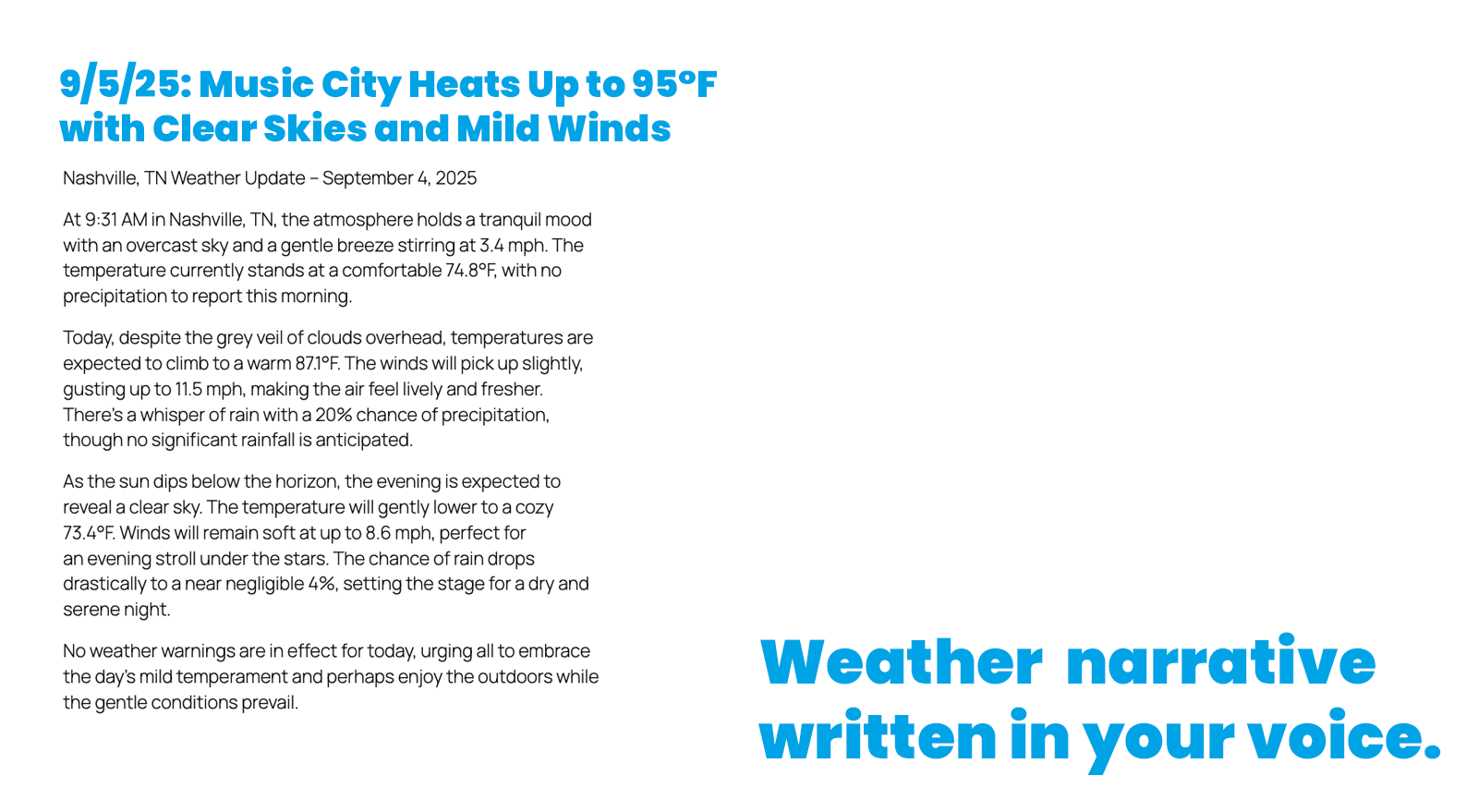
WeatherWrite automatically writes the weather report for your market. 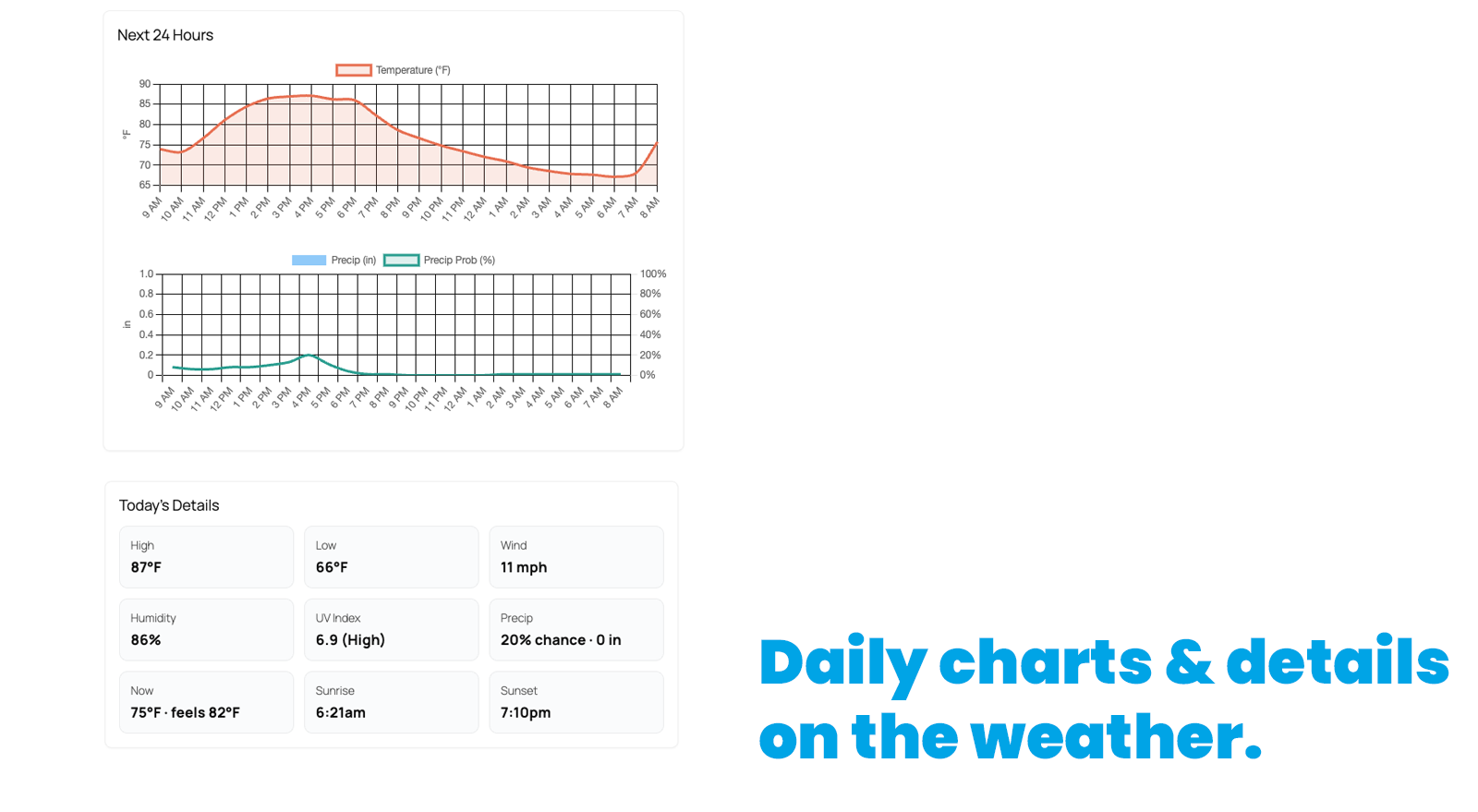
Each post includes daily charts, hourly charts, and a summary of the weather. 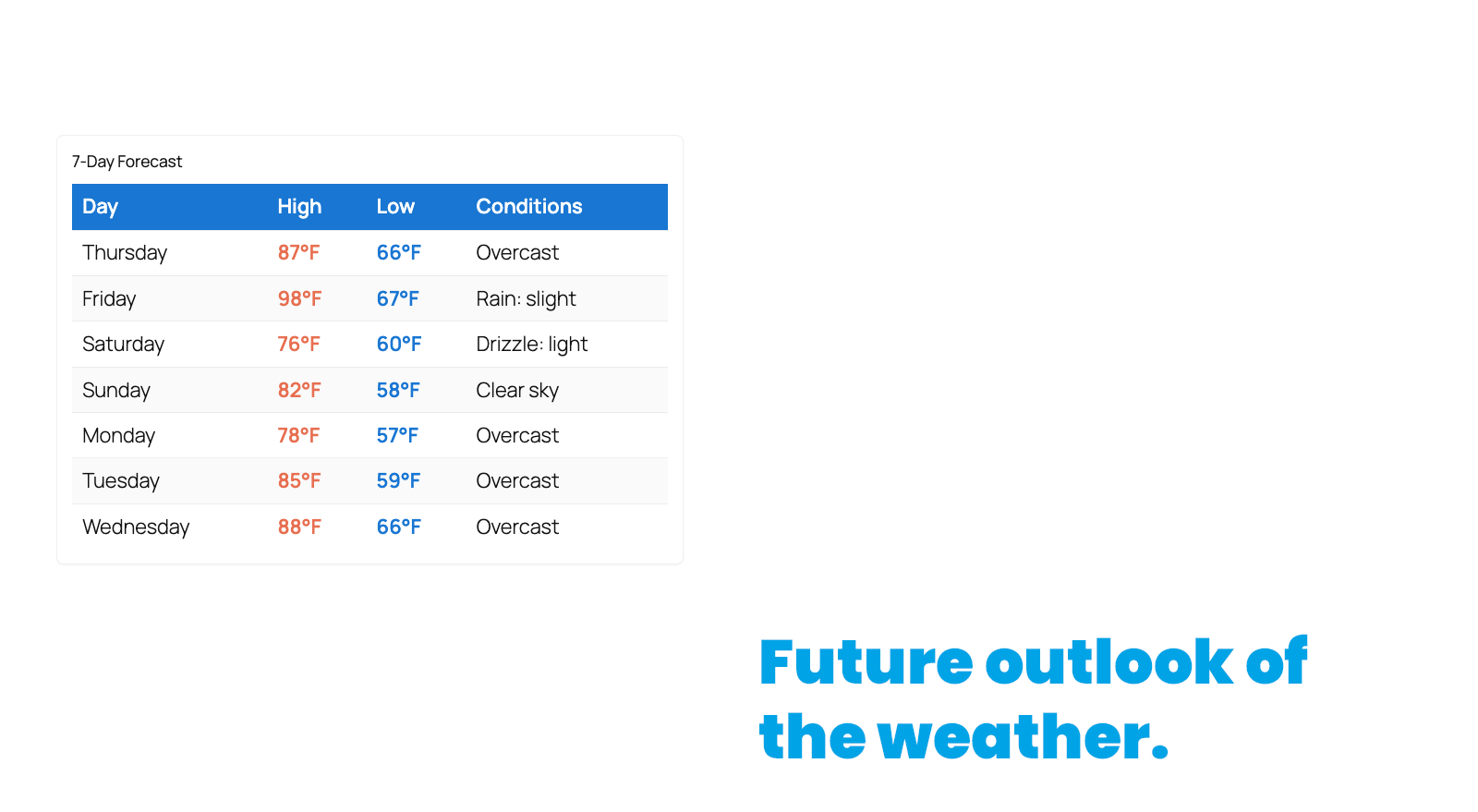
Along with today’s weather, we provide a future outlook for the next 7 days. 
You can upload images your own images from your market and our system will automatically match them to the weather conditions. 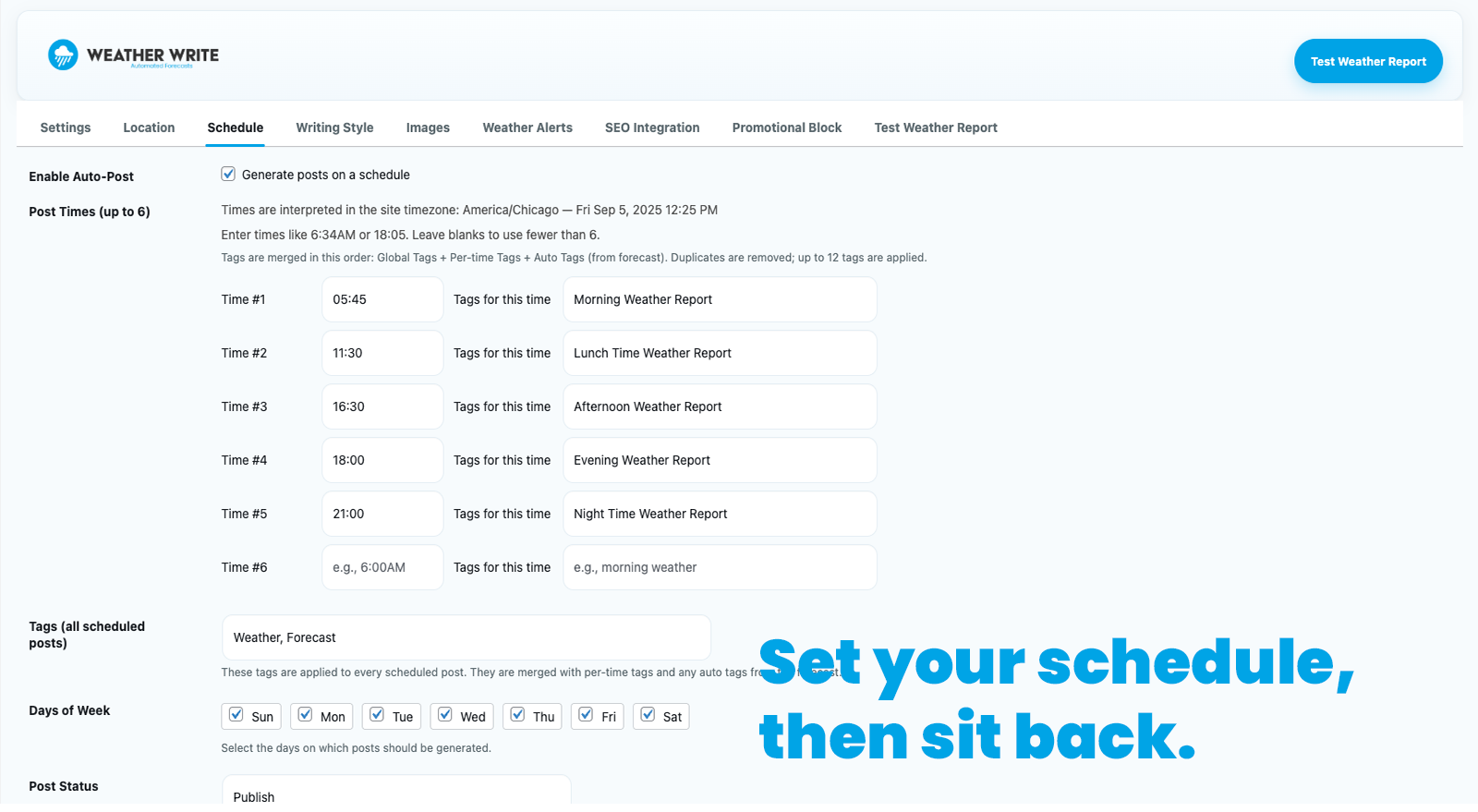
You control when the weather reports are generated. You can run them manually or on a schedule. 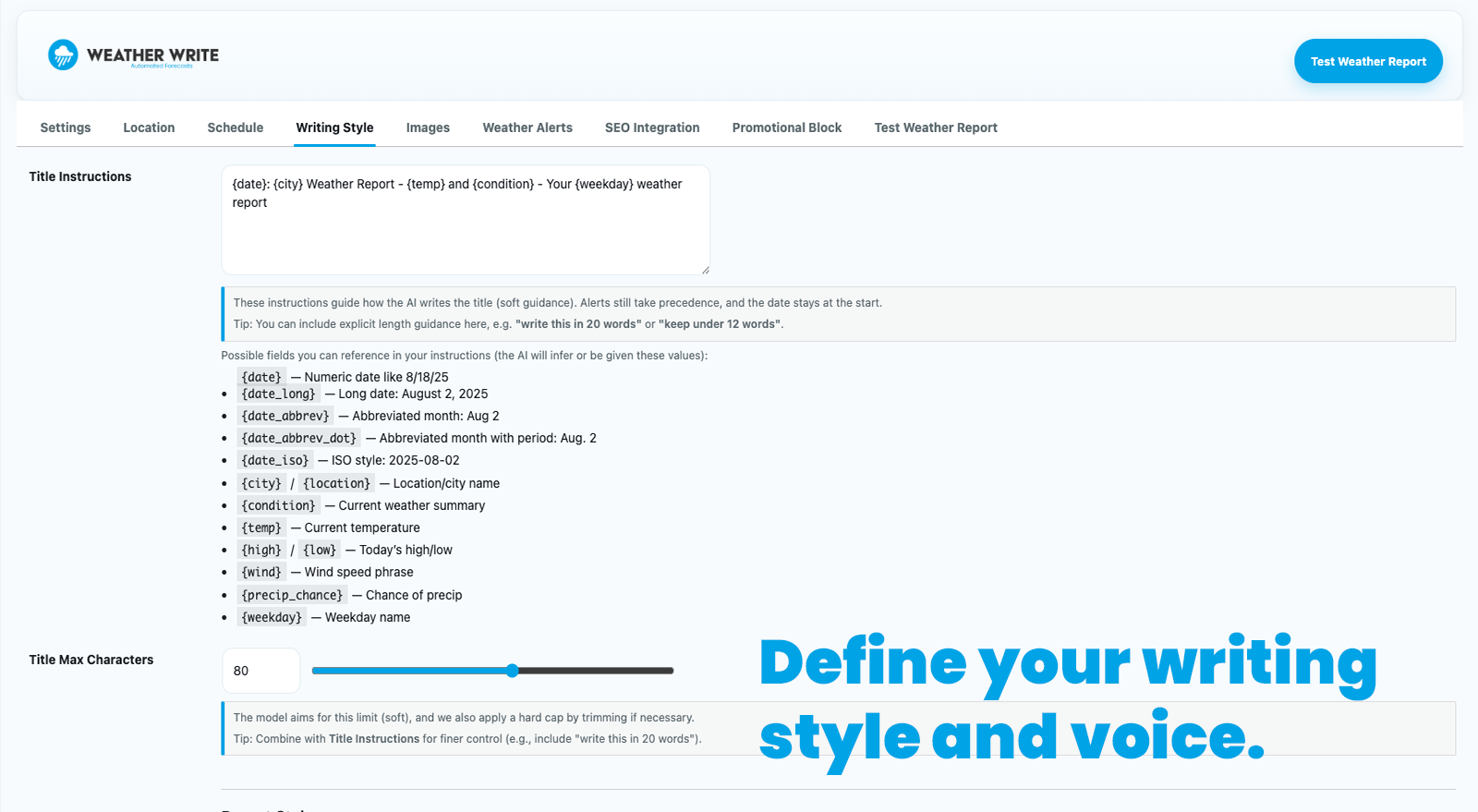
You have full control over the voice, tone, and length of the weather reports. Along with how the title is constructed. 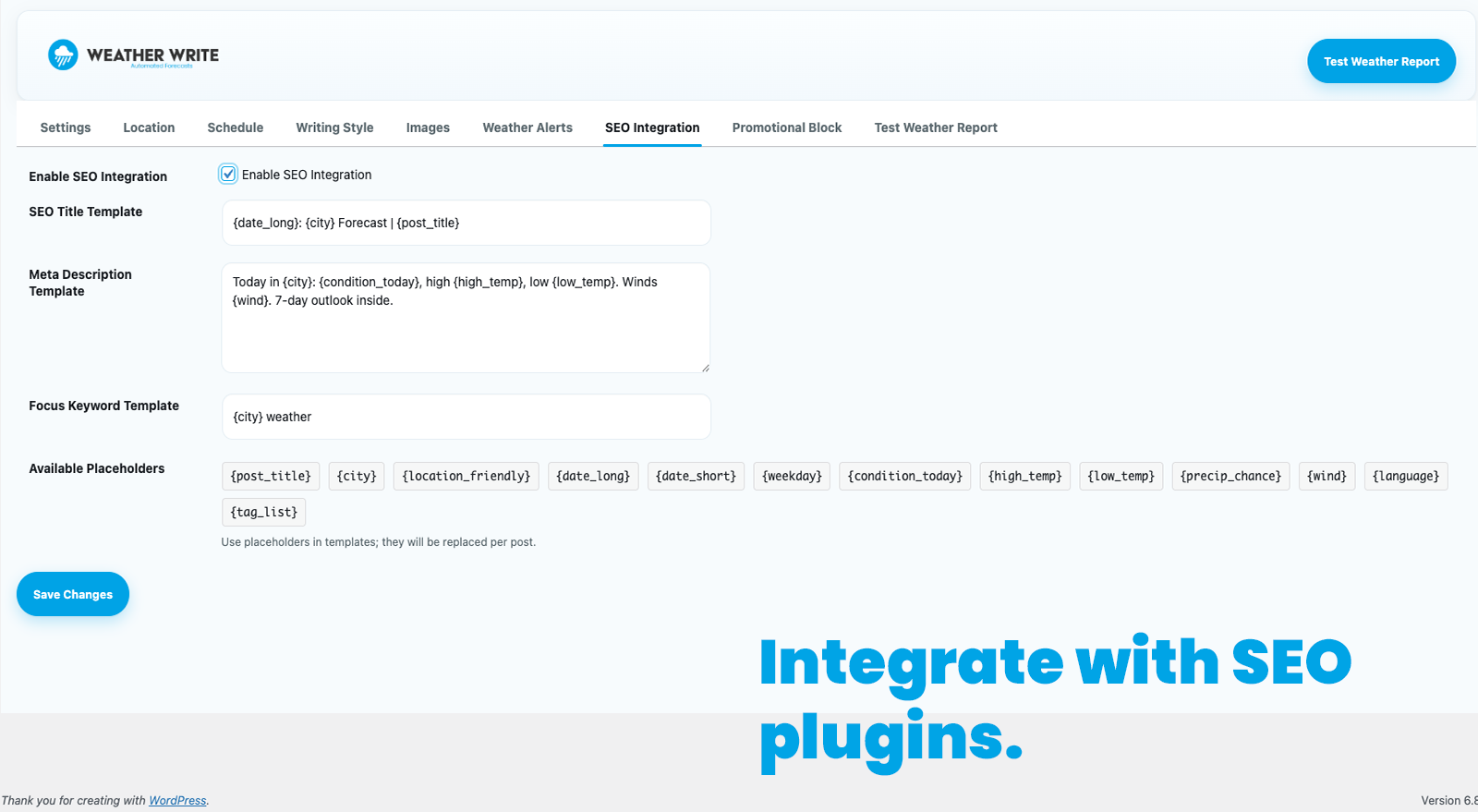
SEO metadata is automatically generated for each post. 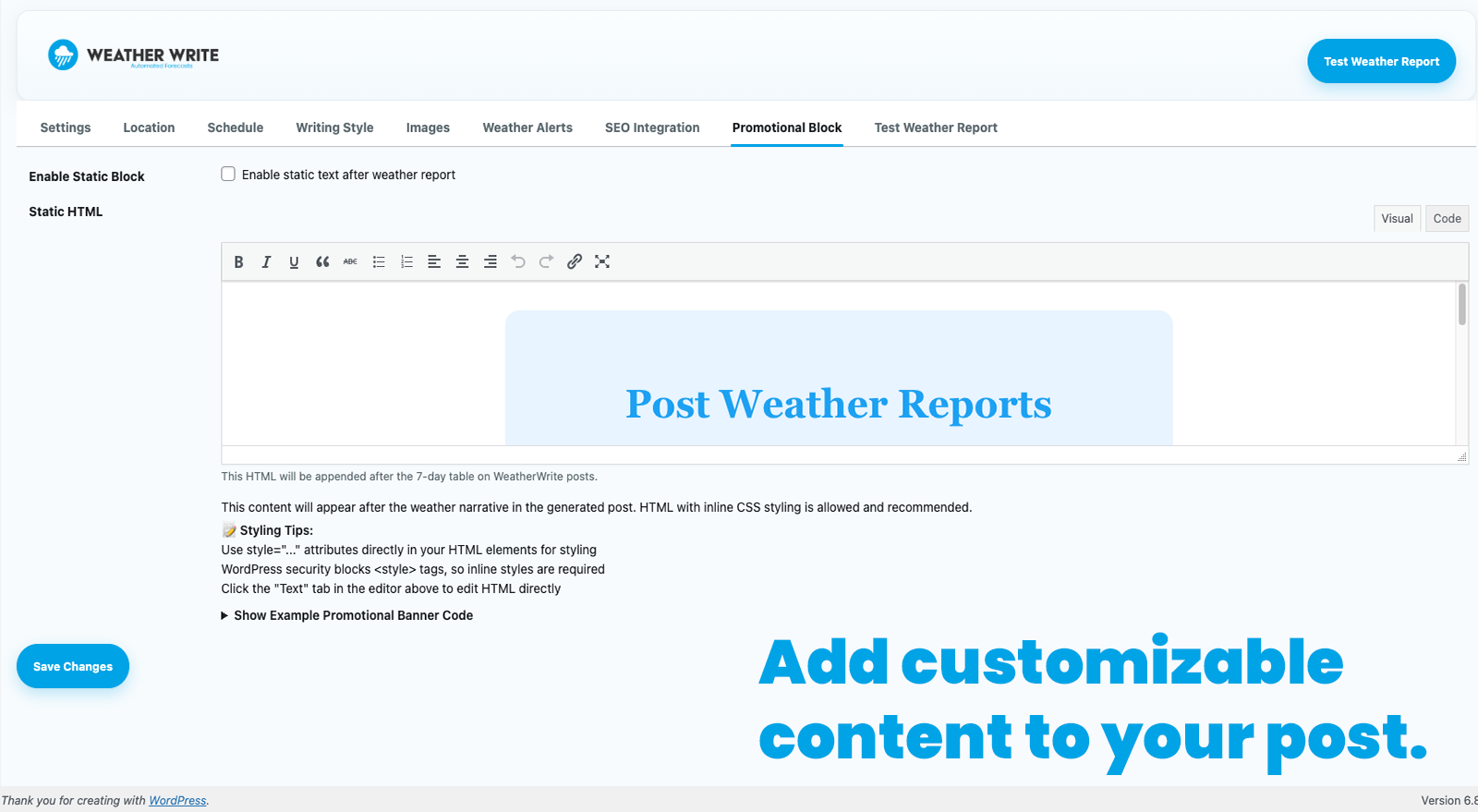
Add a promotional block to the end of each post, full HTML support. 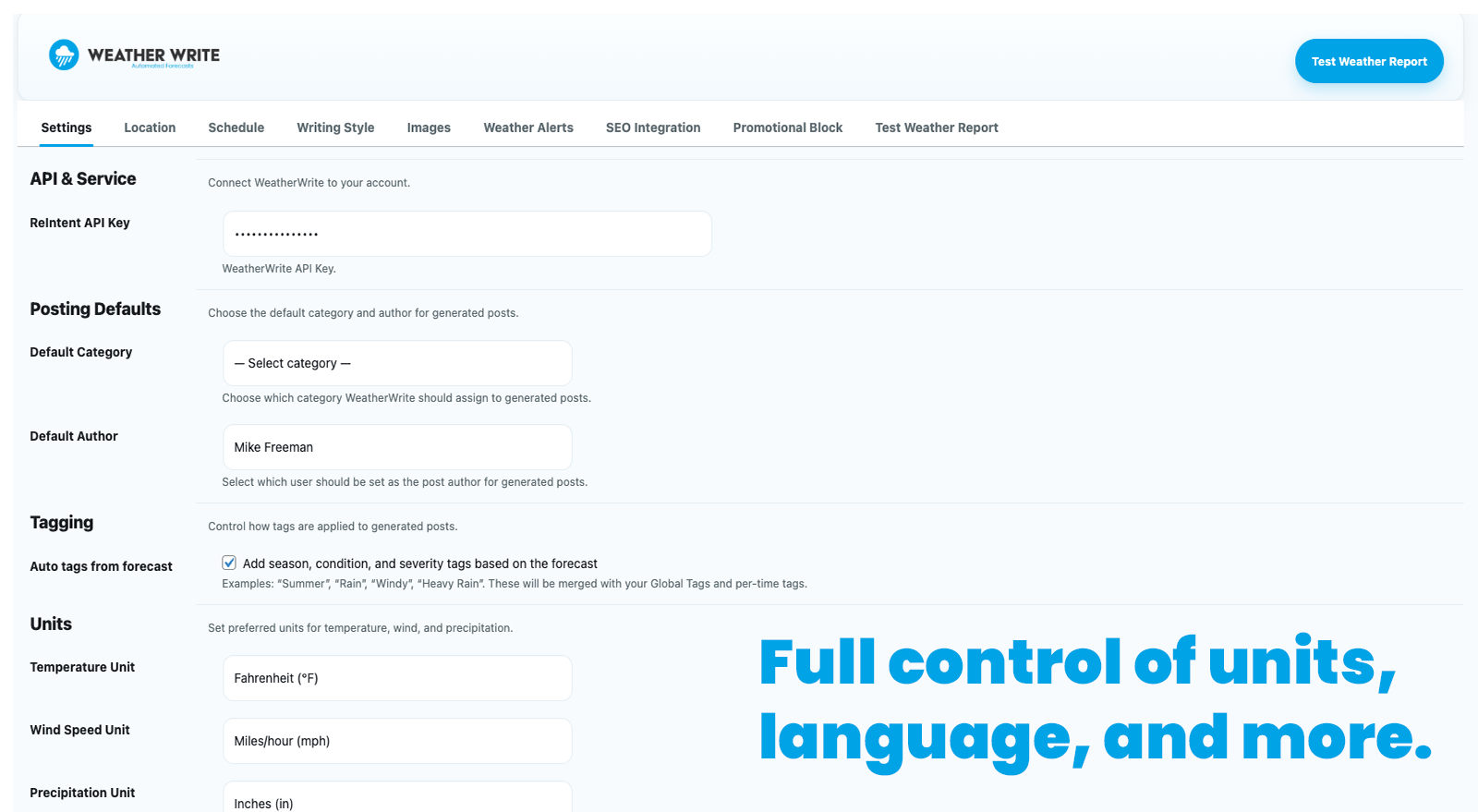
Full control over language, units, and all the other settings. 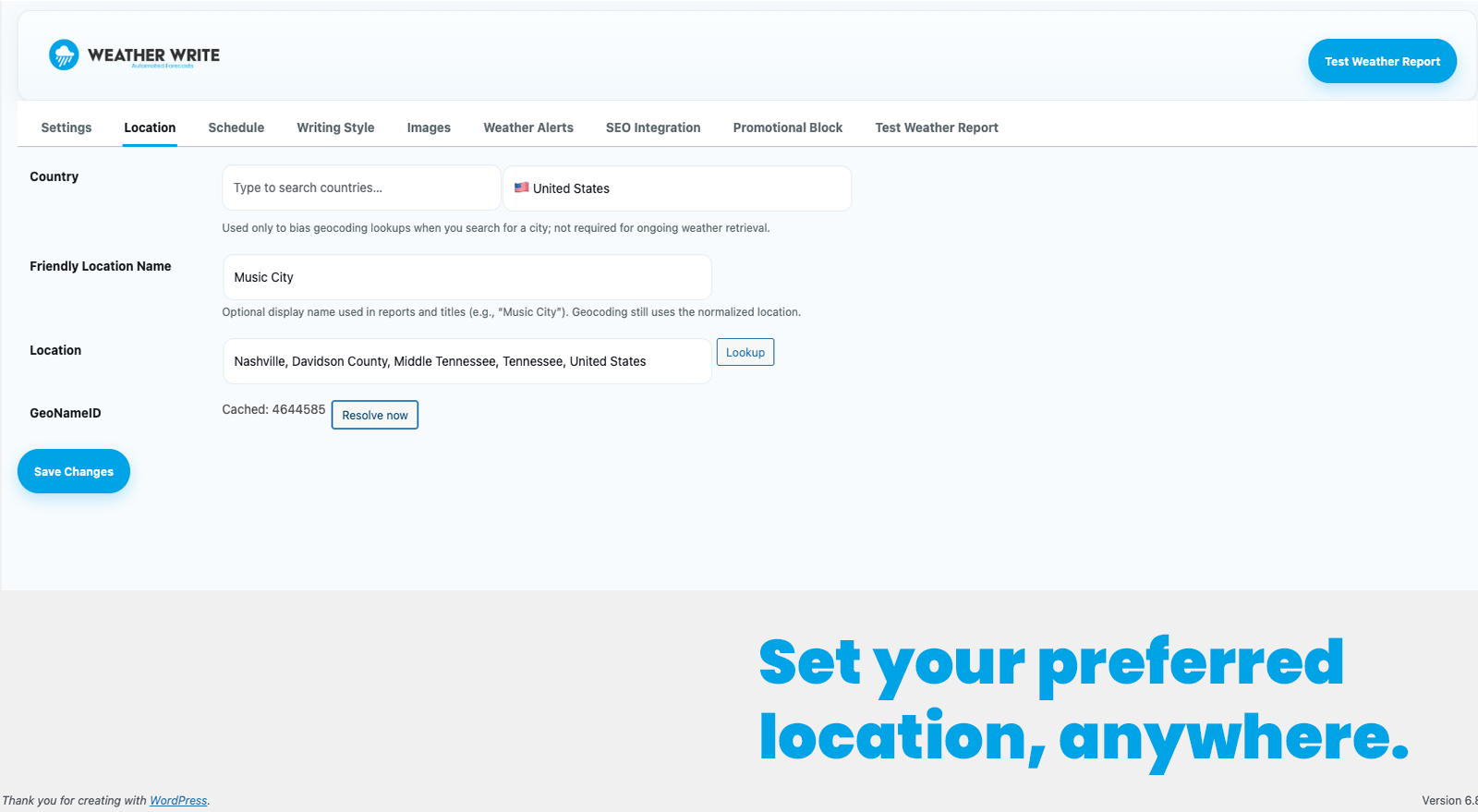
Blocks
This plugin provides 1 block.
- WeatherWrite
Installation
- Upload the
weather-writefolder to the/wp-content/plugins/directory. - Activate the plugin through the ‘Plugins’ screen in WordPress.
- In your WordPress dashboard, go to Settings WeatherWrite to enter your API key and set up scheduling. You’ll also find a link there to obtain your key if you don’t already have one.
FAQ
-
Do I need an API key?
-
ReIntent API key is recommended for real outputs. Without it, the plugin returns a mock output suitable for testing.
-
What weather provider is used?
-
Open-Meteo (free, no API key required).
Reviews

Contributors & Developers
“Weather Write” is open source software. The following people have contributed to this plugin.
Contributors
Translate “Weather Write” into your language.
Interested in development?
Browse the code, check out the SVN repository, or subscribe to the development log by RSS.
Changelog
1.3.17
- CRITICAL FIX: Fixed EventBridge scheduler triggering when auto-posting is disabled
- Scheduler now properly checks auto_enabled setting before creating EventBridge rules
- Sends empty times array to delete all rules when scheduling is disabled
- Removed error notifications when auto-posting is intentionally disabled
- Prevents unnecessary webhook/email alerts for non-error conditions
1.3.16
- CRITICAL FIX: Fixed watchdog false positive alerts caused by timezone mismatch
- Watchdog now correctly uses local timezone when checking for post existence
- Eliminates “missed run (silent failure)” alerts when posts were actually published
- Changed post date query from GMT to site timezone for accurate detection
1.3.15
- ENHANCEMENT: Improved Open-Meteo API reliability with smart retry logic
- First attempt uses 15-second timeout for fast failure detection
- Automatic retry with 25-second timeout on network errors or 5xx server errors
- ENHANCEMENT: Enhanced ReIntent API retry logic to handle all 5xx server errors (not just 504)
- Both APIs now retry on network errors, timeouts, and server errors
- 2-second delay between retry attempts to allow transient issues to resolve
- Significantly reduces API failures during peak hours and service disruptions
- Better error logging for debugging retry attempts
1.3.14
- NEW: AWS EventBridge scheduler integration for enterprise-grade reliability
- Schedules now sync automatically to AWS when saved (zero user configuration)
- Uses existing ReIntent API key for authentication (no additional setup)
- Completely silent and transparent to users
- Maintains backward compatibility with all existing features
- Improved scheduling infrastructure for better reliability
1.3.12
- CRITICAL FIX: Schedule-specific tags now working – time parameter moved to URL query string
- Fixed cron-job.org integration to pass time in URL instead of POST body (which wasn’t being sent)
- Keeps debug logging from 1.3.11 for verification
- Tags like “Morning Weather Report” or “Evening Weather Report” will now be applied correctly
1.3.11
- DEBUG: Added comprehensive logging to trace time parameter and tag lookup
- Identified that cron-job.org was not sending POST body data
- Temporary debug version
1.3.10
- Attempted fix for schedule-specific tags (read from JSON body)
- Did not resolve issue due to cron-job.org not sending POST body
1.3.9
- CRITICAL FIX: Resolved duplicate posts issue caused by narrow watchdog detection window
- Extended deduplication transient from 15 to 60 minutes to prevent delayed retries
- Widened watchdog window from 4 minutes to 10 minutes (accounts for slow generation and clock drift)
- Added actual WordPress post existence check to prevent false positive watchdog alerts
- Improved reliability when API calls are slow or servers have clock differences
1.3.8
- NEW: Weather labels (High, Low, Wind, etc.) now translate to match selected language
- Added Bulgarian translations for all weather detail labels
- Translations include: Today’s Details, 7-Day Forecast, and all weather metrics
- Makes posts fully localized when using non-English languages
1.3.7
- Same fixes as 1.3.6 (re-release to resolve WordPress.org download issue)
- CRITICAL FIX: Fixed syntax error in language validation array
- Fixed Bulgarian language support
1.3.6
- CRITICAL FIX: Fixed syntax error in language validation array that was causing site crashes
- Fixed apostrophe escaping in Na’vi language option
1.3.5
- Same fixes as 1.3.4 (re-release due to WordPress.org caching issue)
- CRITICAL FIX: Fixed timezone bug in slot_time calculation that was preventing the dedupe guard from working
- Added Bulgarian language option
- Auto-clears orphaned WP-Cron events when external cron mode is detected
1.3.4
- CRITICAL FIX: Fixed timezone bug in slot_time calculation that was preventing the dedupe guard from working
- ROOT CAUSE: strtotime() was interpreting HH:MM times as UTC, then wp_date() converted to local time, creating wrong slot_time values
- RESULT: Dedupe guard was using incorrect slot_time (e.g., “03:12:00” instead of “09:12:00”), allowing duplicate posts through
- SOLUTION: Now builds slot_time directly in WordPress timezone by combining today’s date with HH:MM time string
- IMPACT: Dedupe guard now works correctly, eliminating all duplicate posts and reducing API usage by 50%
- BONUS: Also clears any orphaned WP-Cron events when external cron mode is detected (preventive measure)
1.3.3
- SCHEDULER: When an external cron token (WWRT_CRONJOB_API_TOKEN) is configured, external cron is now treated as the sole scheduler
- RELIABILITY: Internal WP-Cron events are no longer scheduled in external-cron mode, preventing double triggers per time slot
- SAFETY NET: Combined with 1.3.2 dedupe, this eliminates structural duplicate runs and extra API usage on sites using cron-job.org
1.3.2
- CRITICAL FIX: Added slot-level deduplication to prevent duplicate scheduled runs for the same time and location
- RELIABILITY: Protects against double posts and double API usage when multiple triggers fire for the same slot
- TECHNICAL: Uses a transient key based on local date, schedule time, and location to short-circuit duplicate runs
1.3.1
- CRITICAL FIX: Fixed timezone bug causing false “missed run” watchdog alerts
- IMPROVEMENT: Watchdog now correctly matches events across all timezones
- ENHANCEMENT: Added time format validation for schedule settings
- UX: Clear error messages when invalid time formats entered (e.g., “6PM” instead of “6:00pm”)
- UX: Auto-converts common time formats (6pm, 6:00am, 18:00, etc.) to standard format
- TECHNICAL: Changed slot_time logging from gmdate() to wp_date() with WordPress timezone
- TECHNICAL: Added support for 8 different time input formats
- RELIABILITY: Eliminates intermittent false alerts when posts were created successfully
- COMPATIBILITY: Fix applies automatically on next scheduled post (no user action required)
1.3.0
- ENHANCEMENT: Added direct REST API endpoint for more reliable cron job execution
- ENHANCEMENT: New /wp-json/weatherwrite/v1/trigger endpoint bypasses WordPress cron system
- IMPROVEMENT: Eliminates “missed run” false alerts caused by wp-cron.php timing issues
- IMPROVEMENT: Direct execution ensures post generation always logs start event
- IMPROVEMENT: Token-based authentication for secure public endpoint
- IMPROVEMENT: Cron-job.org now uses POST method with time parameter in request body
- TECHNICAL: Modified class-rest.php to add handle_trigger() method
- TECHNICAL: Modified class-cronjob.php to use REST API endpoint instead of wp-cron.php
- TECHNICAL: Changed cron job request method from GET to POST (requestMethod: 1)
- UX: Hidden GeoNameID field when Meteoblue embed is disabled (reduces confusion)
- COMPATIBILITY: Maintains backward compatibility with existing cron jobs
- RELIABILITY: Significantly reduces false “watchdog detected missed run” alerts
1.2.9
- CRITICAL FIX: Fixed weather alert boxes not displaying on posts when using Divi Theme Builder
- IMPROVEMENT: Smart conditional checks now detect Divi Theme Builder and bypass strict WordPress conditionals
- COMPATIBILITY: Alert boxes now work with Divi Theme Builder, Elementor, and other page builders
- COMPATIBILITY: Maintains backward compatibility with standard WordPress themes
- TECHNICAL: Modified maybe_prepend_alert_box() to detect et_theme_builder_is_layout_post_type()
- UX: Weather alerts (tornado watches, severe weather warnings, etc.) now display correctly at top of posts
- UX: Alert callout boxes with event details, timing, and source information now visible to readers
1.2.8
- CRITICAL FIX: Resolved CSS leakage affecting other WordPress plugins
- CRITICAL FIX: Added missing return statement in enqueue_admin_assets() preventing CSS from loading globally
- IMPROVEMENT: Scoped all nav-tab-wrapper styles to WeatherWrite pages only
- IMPROVEMENT: Scoped all button.button-primary styles to WeatherWrite pages only
- IMPROVEMENT: Scoped all checkbox/radio input styles to WeatherWrite pages only
- TECHNICAL: Added .toplevel_page_weatherwrite prefix to all global WordPress selectors
- TECHNICAL: CSS now loads exclusively on WeatherWrite admin pages, not across all of WordPress
- UX: Other plugins (SnappyWrite, WooCommerce, Yoast, etc.) no longer affected by WeatherWrite styling
- UX: Eliminated missing logos, altered buttons, and modified tab navigation in other plugins
- COMPATIBILITY: Plugin now follows WordPress best practices for admin CSS scoping
1.2.7
- CRITICAL FIX: Resolved “stops posting” bug where a single failure would prevent all future scheduled posts
- CRITICAL FIX: Resolved “silent failures” bug where failures went undetected and unreported
- IMPROVEMENT: Wrapped run_generation() in try/finally block to guarantee next run is always scheduled
- IMPROVEMENT: Re-enabled smart watchdog notifications that only alert on truly silent failures
- IMPROVEMENT: Added schedule_next_run() helper method for better code organization
- TECHNICAL: Finally block ensures next post is scheduled even when generation fails early
- TECHNICAL: Watchdog checks for immediate alerts before sending to prevent duplicate emails
- TECHNICAL: System now self-heals automatically after transient failures
- UX: Users receive alerts within 2 minutes for silent failures (cron didn’t fire, server issues)
- UX: One failure no longer breaks all future posts – each run is isolated
- RELIABILITY: Plugin continues posting even after API timeouts, network issues, or other failures
1.2.6
- IMPROVEMENT: Added warning note in event modal about time-specific events not appearing in manual test posts
- UX: Yellow warning box clearly explains that events with specific times only appear in scheduled posts
1.2.5
- IMPROVEMENT: Simplified author attribution to “Mike Freeman – WeatherWrite”
- IMPROVEMENT: Removed interactive prompt from deployment script for automated deployments
1.2.4
- NEW FEATURE: Get Holidays – Auto-import public holidays from Nager.Date API for 100+ countries
- NEW FEATURE: AI-generated holiday descriptions using ReIntent API for rich context
- NEW FEATURE: Batch holiday import with real-time progress tracking
- NEW FEATURE: Custom Image column in Events table with thumbnail preview
- NEW FEATURE: Lightbox modal for viewing full-size event images
- IMPROVEMENT: Added country selector directly on Events & Holidays tab
- IMPROVEMENT: Checkbox-based holiday selection with Select All/Deselect All
- IMPROVEMENT: Search, filter, and sort capabilities for events table
- IMPROVEMENT: Event image thumbnails with hover effects and click-to-zoom
- TECHNICAL: Added wwrt_save_holidays_country AJAX handler for country code storage
- TECHNICAL: Added wwrt_generate_holiday_description AJAX handler for AI descriptions
- TECHNICAL: Sequential holiday processing prevents modal closing during batch operations
- TECHNICAL: Lightbox supports ESC key, background click, and X button to close
- UX: Progress log shows status for each holiday (generating saving ✓ added)
- UX: Modal stays open during batch processing with disabled close button
- UX: Event count updates dynamically based on search/filter results
1.2.3
- IMPROVEMENT: Migrated OpenWeather alerts to ReIntent proxy API for simplified authentication
- IMPROVEMENT: Added “Checking for severe weather alerts” progress step to Test Weather Report
- IMPROVEMENT: Alert progress step shows visual status: green checkmark (no alerts), yellow warning (active alerts), red X (errors)
- TECHNICAL: Removed OpenWeather API key requirement – now uses ReIntent API key for all services
- TECHNICAL: Changed from GET to POST request for weather alerts via ReIntent proxy
- TECHNICAL: Progress tracking now supports warning and error states with colored icons
- TECHNICAL: Updated wwrt_progress_step action to accept 4 parameters (step, message, complete, status)
- UX: Test Weather Report now shows 7 progress steps (added alerts between weather and AI)
- UX: Real-time alert status feedback during test runs with specific alert type display
1.2.2
- NEW FEATURE: National Hurricane Center (NHC) integration for Caribbean/Atlantic tropical alerts
- NEW FEATURE: Hurricane and tropical storm warnings now display for locations where OpenWeather lacks coverage
- IMPROVEMENT: Fixed Events & Holidays modal scrolling issue – modal now scrollable on smaller screens
- IMPROVEMENT: Enhanced alert description formatting – cleaned up HTML and limited length for readability
- IMPROVEMENT: Automatic filtering to show only the most relevant alert (not technical bulletins)
- TECHNICAL: New class-nhc.php for NOAA National Hurricane Center RSS feed integration
- TECHNICAL: Alert priority system: OpenWeather NHC Open-Meteo Thresholds
- TECHNICAL: Coverage area: 5°N-50°N, 100°W-20°W (Caribbean, Gulf of Mexico, Atlantic)
- TECHNICAL: 15-minute cache for tropical system updates
- TECHNICAL: Easy disable flag for NHC integration (set $use_nhc = false in class-scheduler.php)
1.2.1
- NEW FEATURE: Real-time Test Weather Report progress tracking with live step-by-step updates
- NEW FEATURE: Event Schedule Time Filtering – events can now target specific scheduled times
- Testing: Added progress hooks to run_generation() for real-time status updates during test runs
- Testing: Test Weather Report now shows 6 progress steps (validate, weather, AI, title, post, image)
- Events: Added schedule times selector in event modal with checkbox grid interface
- Events: Events can now run at specific times (e.g., only 6:00 AM) or all times (default)
- Events: Time normalization handles different formats (6:00, 06:00) for reliable matching
- Events: Backward compatible – existing events without schedule_times run at all times
- Security: Added wp_unslash() to all event AJAX handlers for proper input sanitization
- UX: Simplified progress labels (“Calling AI service” instead of technical details)
- UX: Test progress now uses actual production code for identical post generation
1.2.0
- Image Generation: Improved night photo prompts with explicit darkness and artificial lighting instructions
- Image Generation: Enhanced weather-appropriate people/clothing prompts (umbrellas, raincoats, etc.)
- Image Generation: Fixed race condition bug with atomic locking for concurrent image assignments
- Image Generation: Smoother progress bar animation (150ms updates vs 1s)
- Image Generation: More accurate time estimates in confirmation dialog
- API: Increased ChatGPT timeout from 30s to 60s to handle slow OpenAI responses
- API: Added automatic retry logic for 504 Gateway Timeout errors
- Performance: Sequential image processing (1 at a time) for better UX and reliability
1.1.9
- Fixed: Ensured events.php file is properly included in plugin package
- All Events & Holidays features from 1.1.8 are now fully functional
1.1.8
- NEW FEATURE: Events & Holidays – Configure special dates when weather reports should include context about holidays, events, or local happenings
- Events: Visual calendar date pickers for easy date selection (no more format errors)
- Events: Support for single-day events and multi-day date ranges
- Events: Year wraparound support (e.g., 12/30-01/02 for New Year’s period)
- Events: All events recur annually – set once, works every year
- Events: HTML link support – URLs in event descriptions are automatically converted to clickable links
- Events: Enable/disable toggle for each event without deleting
- Events: Multiple events on the same day are all included in the report
- AI Integration: Events are naturally incorporated into weather reports where relevant
- Post Quality: Fixed issue where AI was generating duplicate titles in post body
- User Experience: Clean, intuitive WordPress-style admin interface for event management
1.1.6
- Logging: Fixed deprecation warnings by replacing all log_event() calls with wwrt_log_and_notify()
- Logging: Removed deprecated log_event() function completely (165+ deprecation notices eliminated)
- Logging: Implemented dynamic status mapping (info, success, warning, failed) instead of hardcoded ‘failed’
- Logging: Start events now stored as ‘info’, success events as ‘success’, watchdog as ‘warning’
- Notifications: Fixed webhooks to respect $email_now parameter (no webhooks for start/success events)
- Notifications: Webhooks now only fire for actual errors, not informational events
- Database: Improved event logging with proper status categorization for better querying
- Code Quality: Cleaner codebase with modern unified logging system throughout
1.1.5
- Notifications: Enhanced error emails to include detailed technical error information
- Notifications: Added “DETAILED ERROR INFORMATION” section showing error codes and messages
- Notifications: Improved weather API error guidance with specific causes (API outage, network issues, geocoding failure, rate limiting)
- Webhooks: Added top-level error_details field for easier access to error information
- Webhooks: Includes error_code, error_message, and location in structured format
- Diagnostics: Makes it easier to identify if errors are from Open-Meteo API issues, network problems, or configuration issues
- User Experience: More actionable error notifications with specific troubleshooting guidance
1.1.4
- Scheduler: CRITICAL FIX – Resolved bug where old scheduled times persisted in WordPress cron after plugin updates
- Scheduler: Implemented aggressive cron cleanup to prevent duplicate posts at old and new times
- Scheduler: Added public clear_all_scheduled_events() method for comprehensive event removal
- Scheduler: Updated “Clear All Times” button to use aggressive cleanup (removes events with arguments)
- Scheduler: Enhanced plugin activation to clear lingering events from previous versions
- Reliability: Prevents phantom post generation from outdated schedule configurations
1.1.3
- Images: MAJOR FIX – Resolved critical race condition bug where generated images were inconsistently assigned to weather groups
- Images: Implemented real-time storage system – images now appear in weather groups immediately as they’re generated
- Images: Added comprehensive image validation with size requirements (512×512px to 2048×2048px, max 10MB)
- Images: Fixed thumbnail click functionality to properly display full-size images in lightbox
- Images: Enhanced UI with improved upload area layout and compact size requirement display
- Images: Updated progress bar and spinners to use consistent blue theme branding
- Images: Eliminated problematic page refresh mechanism that was causing data loss
- Performance: Completely redesigned image generation workflow for 100% reliability
- UX: Added real-time visual feedback with smooth animations and professional styling
1.1.2
- Admin: Fixed duplicate header display issue on all admin tabs – now shows beautiful header only on Images tab
- Admin: Improved header messaging with more engaging copy for image generation
- UI: Enhanced user experience with cleaner, less cluttered admin interface
- Performance: Reduced redundant HTML output across admin settings pages
1.1.1
- Images: Enhanced weather image management with 16:9 aspect ratio thumbnails for professional appearance
- Images: Added “Add New Image” placeholder buttons for easy image addition to weather condition groups
- Images: Implemented click-to-view lightbox for full-size image preview
- Images: Improved thumbnail sizing and layout for better visibility and usability
- UI: Made “Automated Weather Images” header text bold and prominent with enhanced styling
1.0.13
- Fix: Severe weather alert titles now use friendly location name instead of full geocoded location string
1.0.12
- Watchdog: 5-minute cron to detect missed and failed scheduled runs
- Email alerts: configurable recipients (CSV) and grace window
- Admin: inline alerts on Schedule tab with recent issues and a “Clear errors” button
- Scheduler: run logging added for start/success/failed/missed
- i18n: translators comments added, sprintf placeholders for Plugin Check compliance
1.0.11
- Admin (Schedule): Add per-time Delete action for scheduled slots
- Admin: Hardening for nonces and input handling flagged by Plugin Check
- Packaging: housekeeping to exclude dev-only artifacts from release
1.0.10
- Release housekeeping to ensure directory refresh of the latest admin changes
1.0.9
- Admin (Schedule): Show notice when scheduling is enabled but no times are configured
- Admin (Schedule): Add “Clear all times” action with confirmation (resets times/tags, disables auto, clears cron)
1.0.8
- Scheduler: Do not schedule when no exact times are configured (removed 7:00 PM fallback)
1.0.7
- Readme: add video walkthrough link to Description
1.0.6
- Ensure loader SVG is included in release; minor stability/packaging fixes
1.0.5
- Fix: Dynamic asset versioning so admin JS/CSS updates are cache-busted on each release
1.0.4
- UI: Added loading indicator on Test Weather Report with rotating fun status messages and loader SVG
- UI: Improved headline styling and larger loader visual
1.0.3
- Minor documentation refresh
1.0.2
- Settings: Change “ReIntent API Key” label to “API Key” (no option name changes)
1.0.1
- Settings: Show inline notice with signup link when API key is missing
- Readme, screenshots, and plugin assets updated for WordPress.org directory
- Minor text and copy fixes
= 1.0.0 – Initial release: ReIntentAPI integration, Open-Meteo weather, block + shortcode, REST endpoints, WP-Cron auto-posting, admin settings, and caching.