

Description
ShopMagic – email automation is a WooCommerce extension that allows store owners to create automated emails and actions triggered by store and customer events.
The ShopMagic – email automation plugin provides a system for building email automations using events, optional filters, and actions. It can be used to send follow-up emails, transactional notifications, reminders, and internal messages related to WooCommerce orders, customers, and site activity.
ShopMagic – email automation runs entirely inside WordPress and WooCommerce. All data remains in the site database and is not sent to external services unless explicitly configured by the site administrator (for example, through integrations).
The plugin is designed to be extensible and can be enhanced with add-ons or custom code to support additional events, filters, and actions.
Key Features
- AI-powered interface – Create email automations using prompts and reduce setup time.
- Ready-to-use WooCommerce automation recipes – Pre-built email workflows for common WooCommerce scenarios.
- WooCommerce follow-up emails – Automatically send post-purchase emails such as review requests or product recommendations.
- Email automation for WooCommerce order statuses – Trigger emails based on order status changes, including links to products or external review platforms.
- Custom transactional emails for WooCommerce – Create and send customized emails for all order statuses, including pending payment and cancelled orders.
- Support for custom WooCommerce order statuses – Build automations and emails for custom statuses added by other plugins.
- Product-specific email content – Create different email designs and messages depending on the purchased product.
- Welcome emails – Send automated welcome emails for new orders or newly created customer accounts.
- Internal emails and notifications – Send emails to store staff or administrators about selected store events.
- Mailchimp integration – Automatically add customers to Mailchimp lists during checkout.
- Customer lists and segmentation – Create and manage multiple lists for newsletters, promotions, or product announcements.
- GDPR-compliant email lists – Support for opt-in and opt-out lists with unsubscribe links.
- Advanced guest customer handling – View and target customers who placed orders without creating an account.
- Email queue system – Optimized email queue for reliable delivery and store performance.
- Email history and logs – Full visibility into sent emails and executed actions.
- Abandoned cart recovery – Free add-on to recover abandoned WooCommerce carts and lost revenue.
- WooCommerce SMS notifications – Free Twilio integration add-on for sending SMS notifications.
- Cross-sell and related product emails – Promote related or cross-sell products using automated emails.
- UTM parameter support – Add tracking parameters to email links for Google Analytics.
- Reliable email delivery – Use ShopMagic as a WooCommerce email customizer when default emails are not sent correctly.
- Newsletter and reminder automation – Send newsletters, pre- and post-purchase emails, and cart reminders from WordPress.
- Extensible with add-ons – Integrations with Twilio, Gravity Forms, Contact Form 7, Slack, WooCommerce Memberships, Bookings, Subscriptions, and Google Sheets.
How It Works
Automations in ShopMagic – email automation are built using three components:
1. Event
Defines when the automation is triggered.
Examples include:
- Order status change
- New order created
- Customer account creation
2. Filter (optional)
Defines conditions that must be met for the automation to run.
Filters can be used to limit automations to:
- Specific products or categories
- Selected order statuses
- Specific customer data
If no filter is added, the automation runs globally for the selected event.
3. Action
Defines what happens when the event occurs and conditions are met.
Actions can include:
- Sending an email
- Adding a customer to a list
- Triggering an integration
Emails in ShopMagic – email automation can be customized using placeholders that insert dynamic WooCommerce and customer data.
Getting Started
- Install and activate the ShopMagic plugin.
- Create a new automation in WooCommerce Automations.
- Choose an event and add an email action.
- Save the automation — emails will be sent automatically.
A step-by-step guide is available in the documentation and video tutorial.
Documentation
ShopMagic comes with an extensive docs for both store owners and staff as well as developer docs aimed to help with extending ShopMagic with new features.
Help and support
ShopMagic is backed by a friendly and professional support team ready to answer your questions and help you along the way.
We also have an extensive documentation site available. For support requests, please use the official plugin forums at WP.org.
If you’re looking for faster support via email, we encourage you to purchase ShopMagic PRO, which comes with 1-on-1 priority email support.
Is there a PRO version?
Glad you asked.
Core functionalities of ShopMagic are free forever. However, we developed some add-ons which you can use to enhance your eCommerce possibilities:
These are paid add-ons for ShopMagic PRO.
- Delayed Actions – Create post-purchase emails, i.e. with a 1-week delay or anniversary email 365 days after the initial purchase. Delay WooCommerce emails by minutes, hours, days, or weeks.
- Review Requests – Adds review requests with direct links to products purchased for customers to review.
- Personalized Coupons – Adds the ability to create personalized coupon codes for customers and send them automatically.
- Advanced Filters – Ability to segment your customers with advanced filters, for example, order total, product category, payment or shipping method, and more.
- Manual Actions – Manually trigger one-time emails. Suitable for newsletters, product announcements, or any emails you want to send manually.
- WooCommerce Subscriptions Integration – Allows creating automations based on subscription events, such as payments or status changes.
- WooCommerce Memberships Integration – Allows creating automations based on membership events, such as status changes or before expiry.
- WooCommerce Bookings Integration – Let you crate automation based on booking events like status changes or before expiry.
- Gravity Forms – Let you create automation based on user or customer form submission. You may use the forms to gather feedback in WordPress or information from WooCommerce customers and send the data to Google Sheets.
- Post to Slack – allows you and your team to stay up to date with what’s happening in your store right in Slack.
- Webhooks – allows using WooCommerce webhooks to integrate ShopMagic automations with external services or systems via REST API.
- ShopMagic for Flexible Subscriptions – allows creating automations based on Flexible Subscriptions events, such as new subscriptions, status changes, upcoming renewals, trial ending, or subscription expiry, with advanced filters and subscription-specific placeholders.
Upgrade to ShopMagic PRO
Upgrade to ShopMagic PRO now to get all the add-ons with all PRO features in one affordable package and get the priority e-mail support!
Built with developers in mind
Extensible, adaptable, and open source. We made sure that ShopMagic is easy to extend and adapt to the needs of your clients.
The ShopMagic API makes it possible for developers to extend ShopMagic by:
- Creating custom events, filters, actions, and placeholders.
- Creating custom templates for sending emails.
- Integrating with other plugins and web applications.
- Overriding default plugin behavior.
ShopMagic in a nutshell
- WooCommerce email automation plugin for WordPress
- Create automated follow-up and transactional emails
- Customize WooCommerce email templates and content
- Send product-specific and order-based emails
- Support for custom WooCommerce order statuses
- WooCommerce review request and reminder emails
- Cross-sell and related product emails
- Abandoned cart recovery with a free add-on
- Email queue, logs, and automation history
- AutomateWoo alternative for WooCommerce stores
Data use policy
Learn about Use of Data Policy by WP Desk Plugins
Screenshots

Plugin dashboard – create WooCommerce and WordPress email automations. 
Overview of WooCommerce email campaign results and outcomes. 
ShopMagic plugin settings page for marketing automation. 
Manage and activate free add-ons for WooCommerce email automation. 
Add WordPress users and WooCommerce customers to Mailchimp lists. 
Customize WooCommerce emails for marketing and abandoned cart recovery (free add-on). 
Send data from WordPress and WooCommerce to Google Sheets (free add-on). 
Send SMS notifications to WooCommerce customers via Twilio integration (free add-on). 
List of WooCommerce customers and WordPress users for marketing automation. 
Add, import, and filter email marketing campaigns in WooCommerce. 
Ready-to-use email automation templates for WordPress and WooCommerce. 
Edit custom email content using placeholders, events, filters, and actions. 
Example WooCommerce email automation – thank you note with a coupon. 
Email automation workflow with free and PRO add-ons for WordPress and WooCommerce. 
Add subscribers to newsletter lists from WordPress and WooCommerce for free. 
Send automated WordPress newsletters to blog readers. 
Automate follow-up emails for WooCommerce abandoned carts (free add-on). 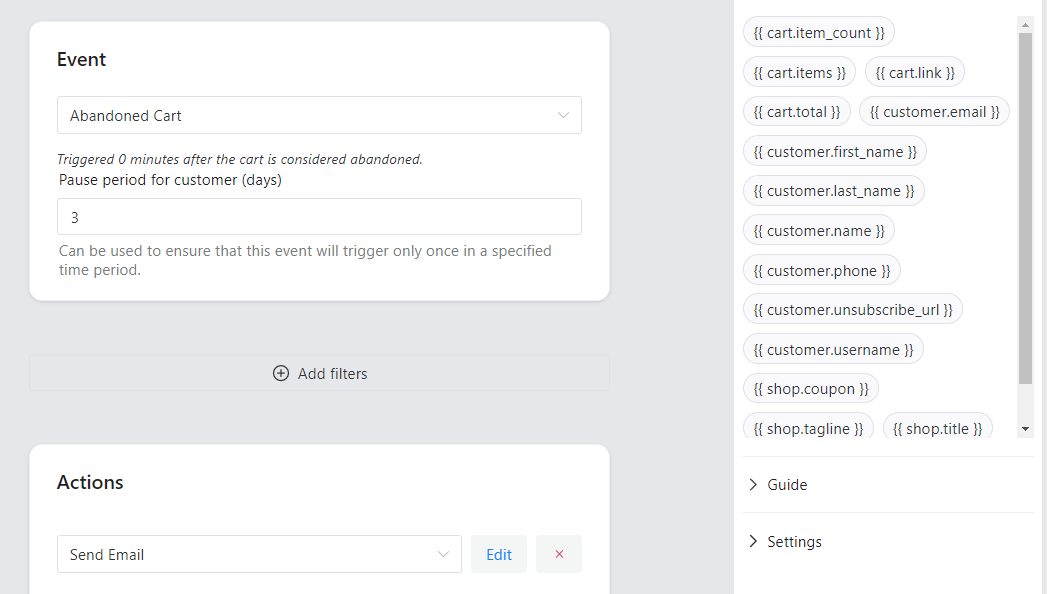
Recover abandoned WooCommerce carts with ShopMagic add-on. 
Send order status change notifications with custom emails in WooCommerce. 
Export WordPress blog readers to Google Sheets and Mailchimp lists (free add-ons). 
Send WooCommerce SMS notifications using Twilio integration (free add-on). 
WooCommerce email automation triggered by order status changes. 
Customize SMS notifications for WooCommerce using ShopMagic and Twilio. 
Send email marketing campaigns triggered by Contact Form 7 submissions (free add-on). 
Send email marketing campaigns triggered by Gravity Forms submissions (PRO add-on). 
Use filters and customer segmentation for WooCommerce email marketing campaigns (some PRO). 
Send follow-up emails, notifications, newsletters, and special offers via WooCommerce. 
Build custom email lists for newsletters and marketing campaigns in WordPress and WooCommerce. 
Add WooCommerce customers to email marketing lists using the free plugin. 
Import and export subscribers for email marketing campaigns. 
Monitor email marketing automation results in WordPress and WooCommerce. 
Check the queue of automated emails awaiting sending. 
Analyze outcomes and statistics of WooCommerce and WordPress marketing automation campaigns. 
Example of WooCommerce abandoned cart email automation results. 
Review logs for emails sent to guest customers. 
Build advanced email marketing automations using ShopMagic PRO features. 
Documentation and guidance for customizing WooCommerce emails and email marketing campaigns.
Installation
- Install either via the WordPress.org plugin directory, or by uploading the files to your server.
- Activate the plugin through the “Plugins” menu in WordPress
- Go to WooCommerce → Automations in your WordPress admin area and add a automation
- Choose an event and an action for automation based on your preferences.
FAQ
-
Is ShopMagic suitable for WooCommerce beginners?
-
Yes. Creating a simple automation, such as a follow-up or welcome email, takes only a few minutes and does not require technical knowledge. Documentation is available if you need additional guidance.
-
Do I need coding skills to use ShopMagic?
-
No. ShopMagic is designed for non-technical users. Automations are created using events, filters, and actions through an intuitive interface.
-
Does ShopMagic work with guest orders?
-
Yes. Automations and emails can be triggered for both registered users and guest customers.
-
Can I send unlimited emails and create unlimited automations?
-
Yes. ShopMagic does not limit the number of automations or emails. All data and emails are handled locally within WordPress.
-
Will ShopMagic slow down my WooCommerce store?
-
No. ShopMagic uses an internal queue system and processes emails in batches to ensure optimal store performance, even for large stores.
-
Can I customize WooCommerce emails with ShopMagic?
-
Yes. ShopMagic allows you to customize and send transactional and follow-up emails beyond the default WooCommerce email capabilities.
-
Does ShopMagic send data to external services?
-
No. By default, all data stays in your WordPress database. Data is shared externally only if you enable optional integrations.
-
Is there a PRO version of ShopMagic?
-
Yes. The core plugin is free. Optional paid add-ons (ShopMagic PRO) provide advanced features such as delayed actions, advanced filters, and additional integrations.
-
Where can I get support?
-
Support is available through the official WordPress.org support forums. Documentation is available on the plugin website.
-
How can I report a security issue?
-
Security issues can be reported through the Patchstack Vulnerability Disclosure Program.
Reviews


Contributors & Developers
“ShopMagic – email automation” is open source software. The following people have contributed to this plugin.
Contributors


“ShopMagic – email automation” has been translated into 5 locales. Thank you to the translators for their contributions.
Translate “ShopMagic – email automation” into your language.
Interested in development?
Browse the code, check out the SVN repository, or subscribe to the development log by RSS.
Changelog
4.8.3 – 2026-04-29
- Added support for WordPress 7.0
- Fixed WooCommerce placeholders in email footer displayed in raw format.
4.8.2 – 2026-04-07
- Added support for WooCommerce 10.7
4.8.1 – 2026-03-07
- Added support for WooCommerce 10.6
4.8.0 – 2026-02-11
- Added new product filters
4.7.7 – 2026-01-26
- Readme update.
4.7.6 – 2026-01-21
- Added support for WooCommerce 10.5
4.7.5 – 2026-01-15
- Improved compatibility with recent PHP versions >= 8.4.
4.7.4 – 2025-12-29
- Readme update.
4.7.3 – 2025-12-15
- Fixed vulnerability in communication preferences update page.