

Description
Ninja Test Email is a comprehensive email testing solution for WordPress that helps you verify your site’s email configuration is working correctly. Whether you’re troubleshooting SMTP issues, testing email deliverability, or monitoring outgoing emails, this plugin provides all the tools you need.
Why Ninja Test Email?
WordPress relies heavily on email functionality for user notifications, password resets, contact forms, and more. If emails aren’t sending properly, your site’s core functionality breaks down. Ninja Test Email gives you instant visibility into your email system with detailed logs, success/failure tracking, and comprehensive statistics.
Who Is This For?
- WordPress administrators troubleshooting email issues
- Developers testing email functionality during development
- Site owners monitoring email deliverability
- Agencies managing multiple WordPress installations
- Anyone who needs to verify SMTP configuration
How It Works
Ninja Test Email integrates seamlessly into WordPress, logging all outgoing emails automatically while providing a dedicated interface for sending test emails. The plugin uses WordPress’s native wp_mail() function, ensuring compatibility with any SMTP plugin you’re already using (WP Mail SMTP, Easy WP SMTP, Post SMTP, etc.).
Technical Features
- Modern React Interface: Built with React 18 and Tailwind CSS for a responsive, fast admin experience
- REST API: Full REST API support for programmatic access to email testing and logs
- Custom Database Table: Efficient email log storage with optimized queries
- Automated Cleanup: Scheduled daily cron job to remove old logs based on retention settings
- Translation Ready: Full internationalization support with 41 translatable strings
- Shortcode Support: Frontend email testing via [ninja-test-email] shortcode
- Search & Filtering: Powerful search across recipient, subject, and email body
- Statistics Dashboard: Visual graphs showing success rates, daily volume, and trends
Features
Email Testing
* Send plain text test emails
* Send HTML test emails with custom formatting
* Validate email addresses before sending
* Customizable subject and message content
* Default templates for quick testing
Email Logging
* Automatic logging of all WordPress emails
* Capture recipient, subject, and message body
* Track success/failure status
* Record timestamps for each email
* Store email content for debugging
Dashboard & Statistics
* Visual success rate graphs
* Total emails sent counter
* Today’s email count
* Weekly email statistics
* Monthly email volume
* Status breakdown (sent vs. failed)
Log Management
* Search across all email fields
* Filter by date, recipient, or status
* Sort by time, recipient, subject, or status
* Paginated results for large datasets
* Individual log deletion
* Bulk log cleanup
Settings & Configuration
* Configurable log retention period
* Automatic cleanup scheduling
* Daily, weekly, or monthly retention options
* REST API health check endpoint
* Cron status monitoring
Developer Features
* REST API endpoints for all functions
* Frontend shortcode [ninja-test-email]
* Custom action hooks
* Namespaced code (NinjaTestEmail)
* Composer autoloading support
* WordPress Coding Standards compliant
Performance & Security
* Optimized database queries with caching
* Prepared SQL statements for security
* Capability checks (manage_options required)
* Nonce verification on all actions
* Input sanitization and output escaping
* ABSPATH security checks
Screenshots
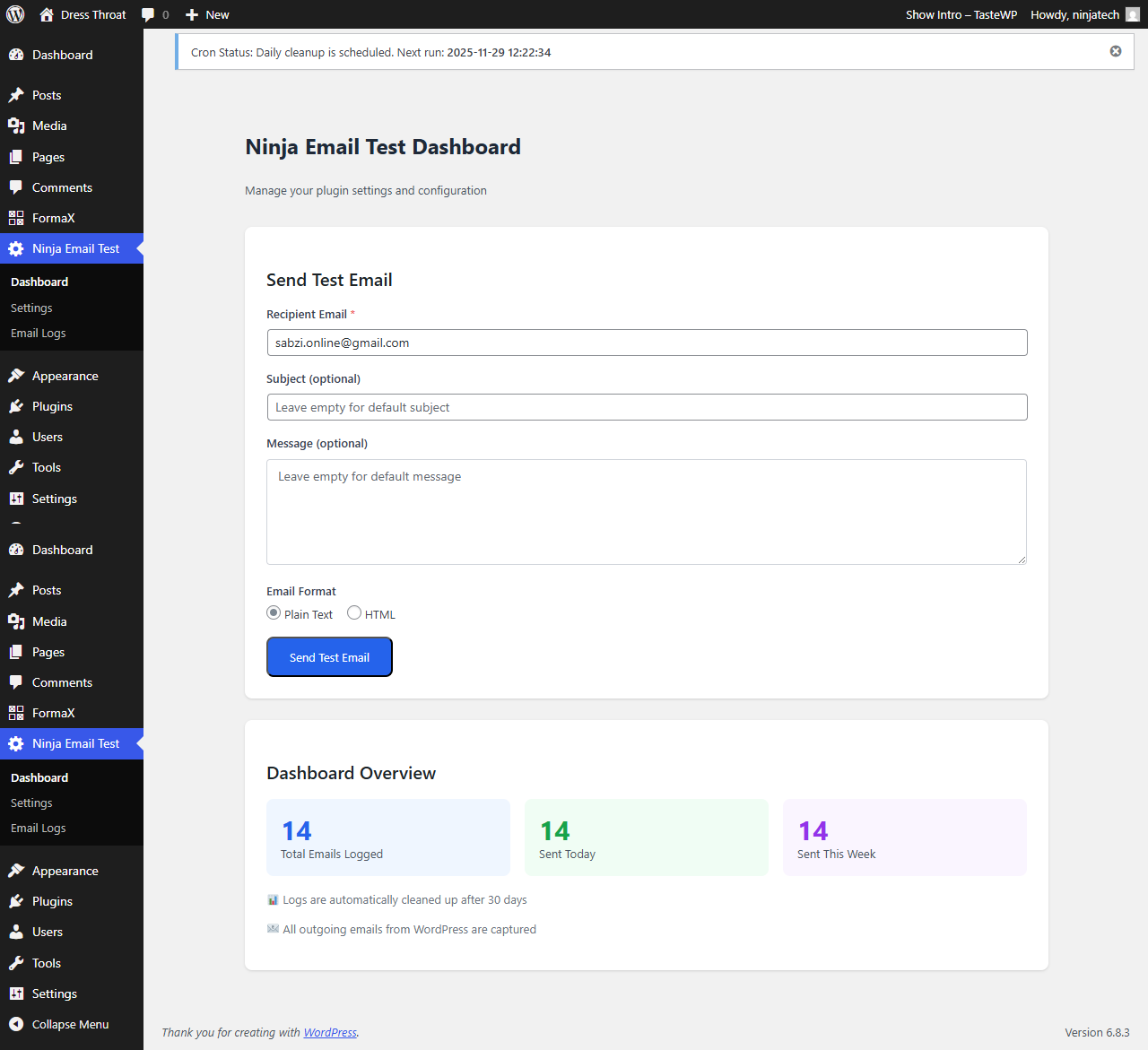
Dashboard – Main dashboard showing email statistics with success rate graphs, total emails sent, and recent activity breakdown 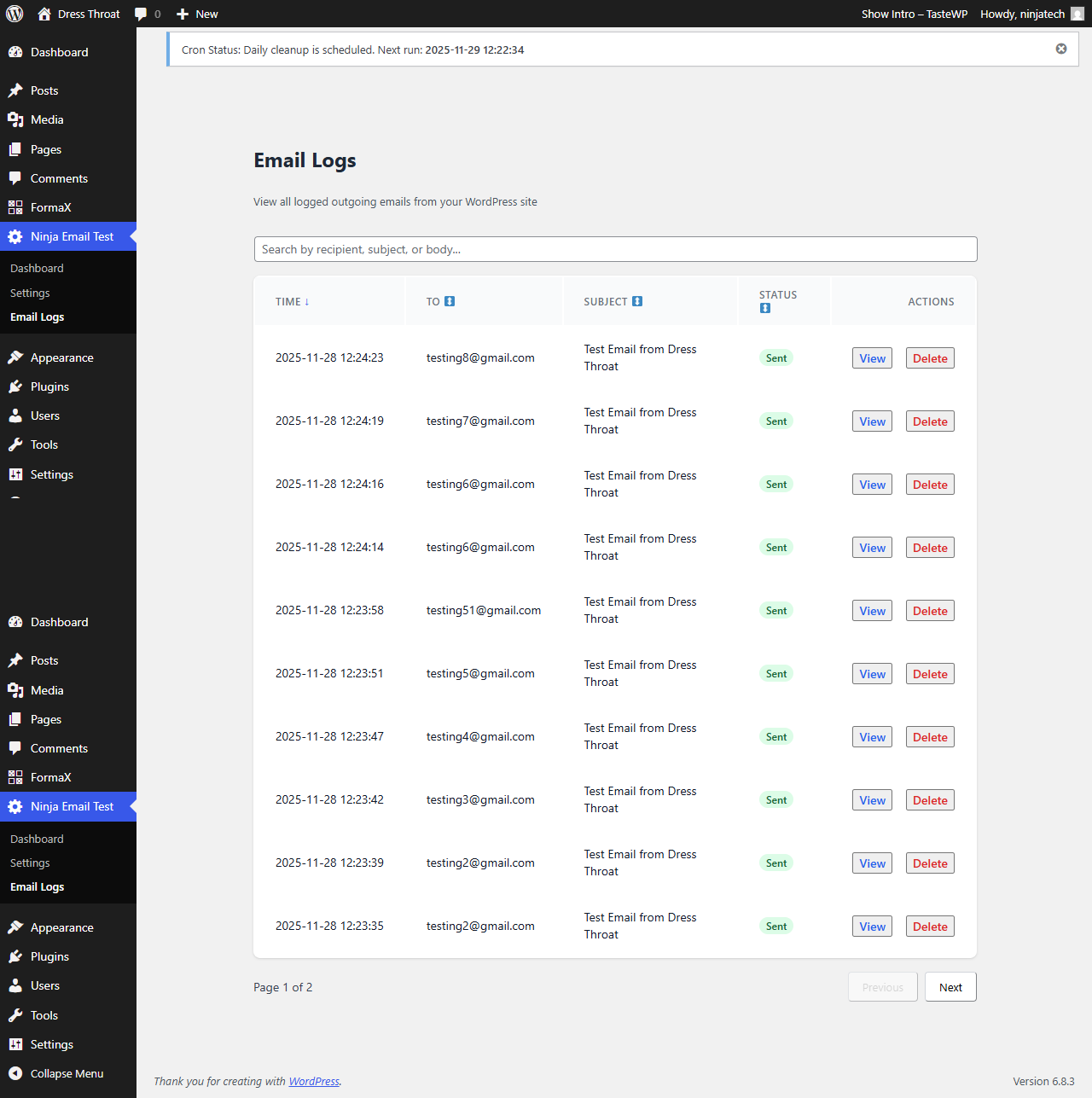
Email Logs – Comprehensive log viewer with search, filtering, sorting, and pagination for all sent emails 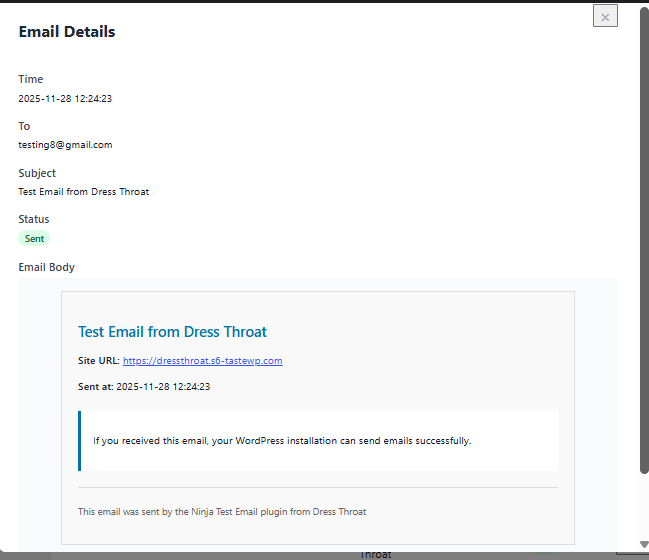
Log Details – Individual email log showing full recipient, subject, body content, timestamp, and delivery status
Installation
Automatic Installation
- Log in to your WordPress dashboard
- Navigate to Plugins > Add New
- Search for “Ninja Test Email”
- Click “Install Now” next to Ninja Test Email
- Click “Activate” after installation completes
- Access the plugin via the “Ninja Email Test” menu in your WordPress admin
Manual Installation
- Download the plugin ZIP file
- Log in to your WordPress dashboard
- Navigate to Plugins > Add New > Upload Plugin
- Choose the downloaded ZIP file
- Click “Install Now”
- Click “Activate Plugin”
- Access the plugin via the “Ninja Email Test” menu
Post-Installation Setup
- Go to Ninja Email Test > Dashboard in your WordPress admin
- The plugin works immediately – no configuration required
- (Optional) Visit Ninja Email Test > Settings to configure log retention
- Send your first test email to verify functionality
Using the Shortcode
Add the email testing interface to any page or post:
[ninja-test-email]
Optional shortcode attributes:
* title="Custom Title" – Change the form heading
* button_text="Send" – Customize the submit button text
REST API Endpoints
The plugin exposes several REST API endpoints under the /wp-json/ninja-test-email/v1/ namespace:
GET /health– API health checkGET /admin/settings– Retrieve settingsPOST /admin/settings– Update settingsPOST /test-email– Send test emailGET /logs– Retrieve email logsGET /logs/stats– Get log statisticsDELETE /logs/{id}– Delete specific log
All admin endpoints require the manage_options capability.
FAQ
-
Does this plugin send emails or just test them?
-
The plugin does both. It automatically logs all emails sent by WordPress (from any plugin or theme) AND provides a dedicated interface for sending test emails to verify your configuration.
-
Will this work with my SMTP plugin?
-
Yes! Ninja Test Email uses WordPress’s native wp_mail() function, so it’s fully compatible with WP Mail SMTP, Easy WP SMTP, Post SMTP, Mailgun, SendGrid, and any other SMTP plugin.
-
How long are email logs stored?
-
By default, logs are kept for 30 days. You can configure this in Settings, choosing retention periods from 7 days to unlimited (never delete). The plugin runs a daily cleanup cron job automatically.
-
Does this slow down my site?
-
No. The plugin uses optimized database queries, caches results where appropriate, and stores logs in a custom table (not post meta). Email logging happens asynchronously and won’t delay email sending.
-
Can I use this on a production site?
-
Absolutely! The plugin is designed for both development and production use. The logging feature helps you monitor email deliverability on live sites, making it easier to catch and fix issues before they affect users.
-
What if my emails aren’t sending?
-
If test emails fail, check these common issues:
1. Verify PHP mail() is enabled on your server
2. Install an SMTP plugin (WP Mail SMTP recommended)
3. Check your email logs for error messages
4. Ensure your hosting allows outbound email
5. Test with different recipient addresses -
Can I export email logs?
-
The current version provides log viewing and search. Export functionality can be added via the REST API – use the
/logsendpoint to retrieve data programmatically. -
Is this plugin translation ready?
-
Yes! The plugin includes complete internationalization support with 41 translatable strings. All user-facing text uses WordPress translation functions and includes translator comments for context.
-
Does this work with Gutenberg?
-
Yes. While the plugin doesn’t provide Gutenberg blocks, it includes a traditional shortcode that works in both the Classic Editor and Gutenberg’s shortcode block.
-
What happens when I deactivate the plugin?
-
Deactivating stops the logging and removes the scheduled cron job. Your existing logs remain in the database. To completely remove all data, use the uninstall feature.
-
Can I delete old logs manually?
-
Yes. You can delete individual logs from the Email Logs page, or configure automatic cleanup in Settings. Bulk deletion via REST API is also supported.
-
What PHP version do I need?
-
PHP 7.4 or higher is required. The plugin uses modern PHP features and follows WordPress coding standards.
Reviews
There are no reviews for this plugin.
Contributors & Developers
“Ninja Test Email” is open source software. The following people have contributed to this plugin.
Contributors
Translate “Ninja Test Email” into your language.
Interested in development?
Browse the code, check out the SVN repository, or subscribe to the development log by RSS.
Changelog
1.1.1
- Fixed email status tracking – failed emails now correctly show “Failed” status instead of “Sent”
- Implemented proper email lifecycle tracking: Pending Sent/Failed
- Added color-coded status badges (red for Failed, green for Sent, yellow for Pending)
- Improved email logger to use WordPress hooks: phpmailer_init, wp_mail, and wp_mail_failed
- Enhanced error message visibility with red background for failed emails
- Updated email logs table and modal to display accurate status with appropriate colors
1.1.0
- Removed the settings page to simplify the plugin interface and reduce redundancy.
- Updated admin navigation and UI to reflect the removal of the settings page.
- Cleaned up unused code and assets related to the settings page.
- Improved overall performance by removing unnecessary settings hooks and handlers.
- Updated the background color for failed emails for better visibility.
- Minor UI/UX refinements across admin pages.
- General code cleanup and maintenance improvements.
1.0.0
- Initial release
- Email testing functionality (plain text and HTML)
- Automatic email logging for all WordPress emails
- Modern React-powered admin interface
- REST API endpoints for programmatic access
- Dashboard with statistics and success rate graphs
- Email log search and filtering
- Configurable log retention and automatic cleanup
- Daily cron job for old log removal
- Settings page for configuration
- Frontend shortcode [ninja-test-email]
- Full internationalization support (41 translatable strings)
- Custom database table for efficient log storage
- Validation and error handling
- WordPress Coding Standards compliance
- Security hardening (prepared statements, capability checks, nonce verification)
- Compatible with all SMTP plugins
- Responsive design with Tailwind CSS
- Email address validation
- Timestamp tracking for all emails
- Status tracking (sent/failed)
- Search across recipient, subject, and body
- Sort by time, recipient, subject, or status
- Paginated log results
- Individual and bulk log deletion
- Health check REST endpoint
- Composer autoloading support
- Namespaced code architecture
- Action and filter hooks for developers