

Description
Make your website faster than ever with TIO’s smart optimization.
Upload your images like you’ve always done before, and we’ll handle the rest. The Image Optimizer compresses your image and converts it to a modern file format. The result is the lightest image possible, without losing the quality.
Why choose our plugin?
The Image Optimizer uses smart optimization parameters tuned specifically for website images. It’s designed to be a simple companion that gives you the perfect image every time. We decide on the perfect balance of size and quality for your uploaded image. TIO automatically converts your new uploads to the best format (including modern formats like WebP and AVIF), applies lossless conversion or uses lossy compression settings that don’t affect the quality.
It’s perfect for small marketing teams who don’t have the time and know-how to optimise images manually and busy agencies who can’t afford the time to do it manually at scale.
We developed TIO to solve our own frustration with image optimizers. As a result, we were able to achieve results up to 35% file size reduction compared to other compressors. Going the extra mile helps ticking off the Google PageSpeed insights image checks, especially those for next-gen image formats.
How it works?
You upload your images as you normally do — one by one or in bulk, either way is fine. You can do it via the WordPress media library and by uploading directly into your pages.
We categorise what’s in the image to apply the right optimization settings. We use suitable compression and file format conversion, as well as remove unnecessary metadata.
As an example, screenshot compression makes sure to not sacrifice text sharpness, while plain illustrations with low colour depth use more aggressive compression since it won’t affect the quality nearly as much.
We optimise the source file, so WordPress thumbnails come pre-optimised as well.
Supported file formats
The only excluded file format is GIF. We support all other file formats that WordPress allows, including HEIC.
Try it for free
TIO allows you to generate one license key with 50 free image credits per website. That’s enough to test a few core pages and measure the impact.
- Get a free license key at theimageoptimizer.com/key
- Paste the key in Settings > TIO Image Optimizer
- Upload images as usual — they are compressed automatically
Credit restoration for peace of mind
Uploaded an image by mistake or we didn’t optimise it to your liking? You can reclaim the credit straight from the WordPress Media Library, subject to our Terms.
And if we notice that your image was already optimal, we won’t charge a credit in the first place — nothing to reclaim there!
External Service Disclosure
This plugin relies on The Image Optimizer API, a third-party service hosted at api.theimageoptimizer.com, to compress images. When you upload an image with auto-compress enabled, the plugin sends the image file and your site URL to this API. The API returns a compressed version of the image, which replaces the original in your media library.
No data is collected or stored beyond what is needed to process the compression request and manage your credit balance.
- Service website: theimageoptimizer.com
- Terms of Service: theimageoptimizer.com/terms
- Privacy Policy: theimageoptimizer.com/privacy
Screenshots

Settings page — connect your site with a license key 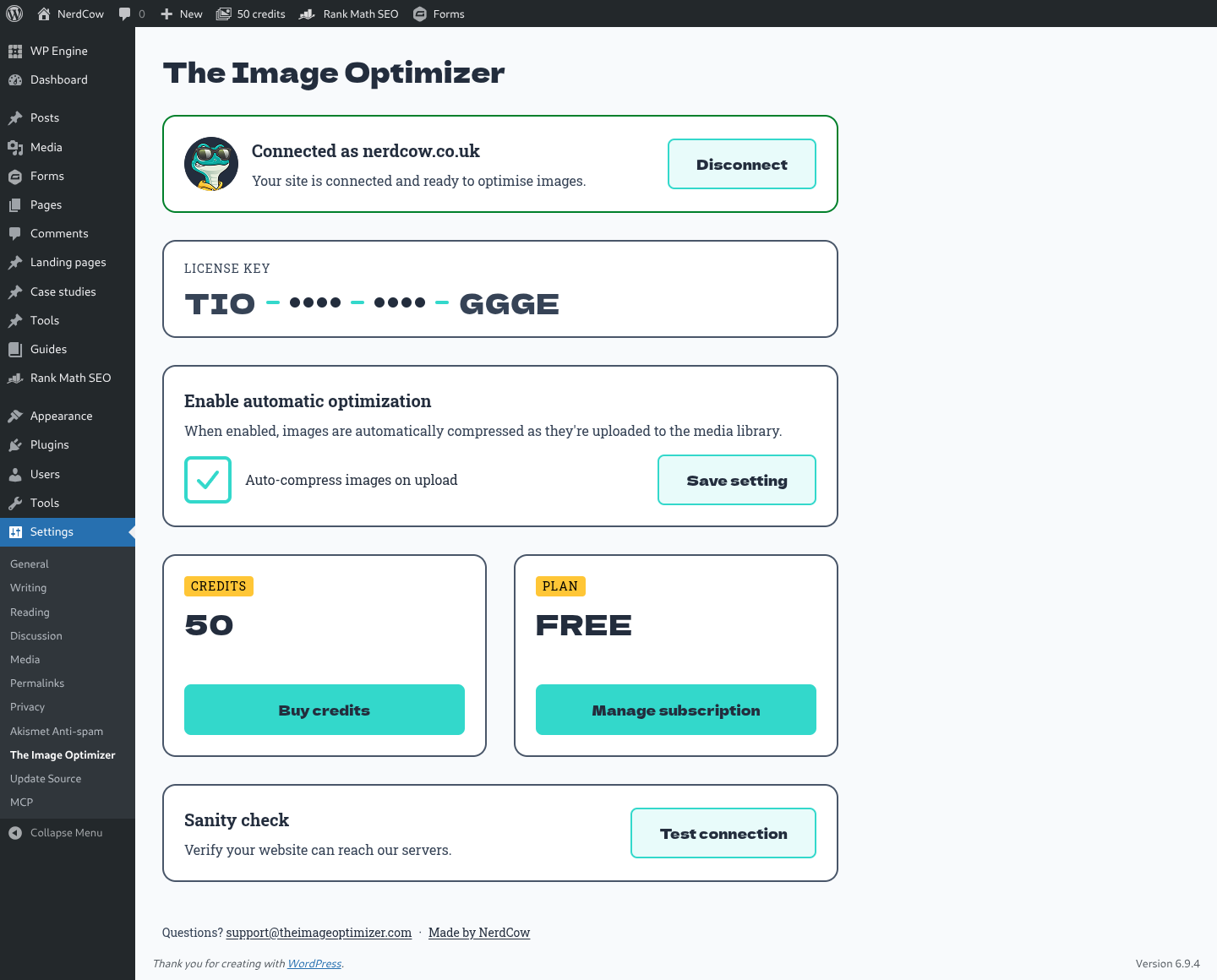
Connected state — view credits, plan, and auto-compress toggle 
Batch upload — images are compressed automatically as they land in the media library 
Batch upload — some originals converted to WebP/AVIF for extra savings 
Illustration example — compression stats on an illustration 
Photo example — compression stats on a photo
Installation
- Upload the
nerdcow-the-image-optimizerfolder to/wp-content/plugins/ - Activate the plugin through the Plugins menu in WordPress
- Go to Settings > TIO Image Optimizer
- Get a free license key at theimageoptimizer.com/key (no account needed)
- Paste your license key and click Connect
- Upload images — they will be compressed automatically
FAQ
-
Do I need an account to use this plugin?
-
No. You only need a license key, which you can get for free at theimageoptimizer.com/key. No login, email, or credit card is required.
-
How many free credits do I get?
-
Every license key comes with 50 free credits. One credit is used per image compressed.
-
What image formats are supported?
-
The plugin supports all image formats that WordPress allows, including JPEG, PNG, WebP, and HEIC. The only excluded format is GIF. Images can also be converted to modern formats like WebP or AVIF for smaller file sizes.
-
Can I compress the existing images?
-
Not yet — bulk compression of existing images is coming in a future release. For now, the plugin only compresses new uploads.
-
Can I undo a compression?
-
No — the original file is overwritten and can’t be recovered. To get the original back, turn off auto-compress and re-upload the image. You can, however, reclaim the credit within 24 hours using the restore button in the media library or Gutenberg sidebar.
-
What data is sent to the API?
-
When an image is compressed, the plugin sends the image file and your site URL to
api.theimageoptimizer.com. No other data is collected. -
Will this slow down my uploads?
-
Compression happens during the upload process and typically adds 1–3 seconds depending on file size. A progress indicator is shown in the media library.
Reviews
There are no reviews for this plugin.
Contributors & Developers
“TIO – The Image Optimizer – Smart Image Compression & Optimization, Built for the Web” is open source software. The following people have contributed to this plugin.
Contributors
Interested in development?
Browse the code, check out the SVN repository, or subscribe to the development log by RSS.
Changelog
1.0.0
- First stable release on WordPress.org
- Renamed plugin slug to
nerdcow-the-image-optimizerfor WP.org directory
0.4.0
- Renamed plugin to “TIO – The Image Optimizer by NerdCow” for WP.org compliance
- Updated all code prefixes to
nctio_/NCTIO_ - Replaced inline styles and scripts with proper wp_enqueue system
- Scoped admin notices to relevant screens only
0.3.0
- Secure site token authentication (replaces plain license key in API calls)
- Automatic migration for existing installs
- Credit restore system with 24-hour window
- Gutenberg sidebar panel with per-image compression stats
- Admin bar credits indicator
- Low credit warning notices
- AJAX-powered settings page
0.2.0
- Added auto-compress toggle
- WebP and AVIF format conversion
- Improved error handling and admin notices
- Credit balance display in settings
0.1.0
- Initial release
- Automatic image compression on upload
- License key activation
- Basic settings page