

Description
IWD Quick Order is the ultimate solution to bridge the gap between your WooCommerce store and WhatsApp. Many customers prefer chatting before buying or want a quick way to order without filling out long checkout forms. This plugin makes that process seamless.
With this plugin, you can add a customizable “Order on WhatsApp” button to your single product pages. You can choose between a Direct Redirect (One-Click) or a Popup Form to collect customer details before sending the order to WhatsApp.
🚀 Key Features
- Two Order Modes:
- Direct Order: Redirects user immediately to WhatsApp with product details.
- Popup Form: Opens a modal to collect Name, Address, Phone, etc., before sending.
- Variable Product Support: Smartly detects selected variations (Color, Size) before allowing the order.
- Global Country Codes: Includes a dropdown with country codes for all countries.
- Smart Delivery Calculation:
- Fixed Delivery Charge.
- Custom Text (e.g., “Delivery Charge will Add”).
- No Delivery Charge option.
- Price Formatting: Automatically handles clean price numbers and supports customizable currency symbol/text positioning (Left/Right).
- Custom Message Template: Create your own WhatsApp message structure using placeholders like
{product_name},{customer_address}, etc. - Design Customization: Change button colors, text, position (Before/After Add to Cart), and toggle the WhatsApp icon.
- AJAX Settings: Smooth settings panel without page reloads.
🛡️ Privacy & Security
We take security seriously. This plugin sanitizes all inputs and uses WordPress nonces for security. No customer data is stored in your database; it is simply passed to WhatsApp for the chat.
About the Developer
This plugin is developed and maintained by Imran WebDev. If you find this plugin useful, please consider giving it a 5-star rating.
Screenshots

General Settings – Configure your WhatsApp number, country code, and order mode. 
Popup Settings – Enable or disable fields like Name, Address, Email for the popup form. 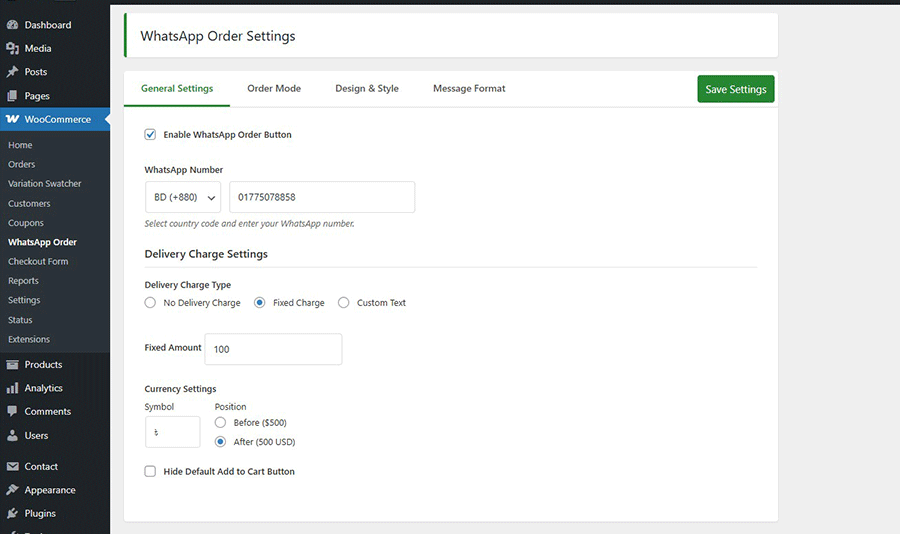
Frontend Button – The “Order on WhatsApp” button on a single product page. 
Popup Form – The customer details form that appears when clicked. 
WhatsApp Message – How the formatted order message looks in WhatsApp. 
Installation
- Upload the
iwd-quick-orderfolder to the/wp-content/plugins/directory. - Activate the plugin through the ‘Plugins’ menu in WordPress.
- Go to WooCommerce > WhatsApp Order to configure your number and settings.
FAQ
-
Does it work with Variable Products?
-
Yes! It forces the user to select options (like Size or Color) before they can click the WhatsApp button.
-
Yes, you can fully customize the button background, text color and Button Label from the “Design & Style” tab.
-
Is the phone number country code required?
-
Yes, you can select your country code from the dropdown list in the settings to ensure the WhatsApp link works globally.
-
Yes, there is an option in the “General Settings” tab to hide the default WooCommerce “Add to Cart” button.
-
Where can I get support or report a bug?
-
You can report bugs in the support forum or contact me directly via my Email.
Reviews
There are no reviews for this plugin.
Contributors & Developers
“IWD Quick Order” is open source software. The following people have contributed to this plugin.
Contributors
Translate “IWD Quick Order” into your language.
Interested in development?
Browse the code, check out the SVN repository, or subscribe to the development log by RSS.
Changelog
1.0.0
- Initial release.
- Added Direct and Popup order modes.
- Added Variable product validation.
- Added comprehensive country code list.
- Added AJAX saving for admin settings.