

Description
EntryDashboard – Forms Entries Manager gives you a powerful way to manage, search, and organize submissions from multiple form plugins in one clean interface.
No more digging through emails or scattered plugin screens. With EntryDashboard, you get a centralized entries hub for popular plugins like WPForms, Contact Form 7, Elementor Forms, and more (with additional integrations coming soon).
Whether you want to search, filter, export, or sync with Google Sheets, EntryDashboard makes it simple to treat form submissions like the valuable leads and data they truly are.
Think of it as your mini-CRM—but directly inside WordPress.
Watch the quick demo to see EntryDashboard in action!
What’s New | Docs | Video Tutorials | Get Help
✨ Why EntryDashboard?
- All Entries, One Dashboard – A unified view for submissions across supported form plugins.
- Mini-CRM Features – Add private notes, star favorites, and keep track of follow-ups.
- Google Sheets Integration – Secure OAuth 2.0 connection, no API keys required.
- Smarter Workflow – Bulk actions, status management, quick-view modals, and more.
- Export Data Easily – Export filtered entries to CSV.
🚀 Free Features
- Centralized entry listing with counts for all supported forms.
- Grouping per form in admin dashbaord
- Clean modal view to display entry details.
- Copy entry easily
- Read/Unread status management.
- Favorite (star) important entries.
- Bulk actions for deleting, marking status, and more.
- Global search and date range filtering.
- Print-friendly entry view.
- Notes & comments on entries (mini-CRM style).
- Google Sheets integration with OAuth 2.0 (manual and auto sync).
- Google Sheet Sync (upto 500 rows) still it will be saved in db and thus resync after upgrade
- Manually Sync individual entry (Click every entry to send in sheet)
- Manually Unsync individual entry (Remove from sheet)
- Live view of connected email for entry sync
- Export to CSV.
🌟 Premium (Pro) Features
- Unlimited Google sheet rows
- Failed entry re-sync to google sheet
- Bulk, Asyn entry sync to google sheet with Action Scheduler
- Export entries to Excel (XLSX) and PDF.
- Advanced reporting and analytics.
- Integrations with Gravity Forms, Ninja Forms, and more.
- Team collaboration tools (assign entries, activity log).
- Extended Google Sheets sync options (conditional sync, multiple sheets).
- Priority support and updates.
Manage all your form entries effortlessly with EntryDashboard Pro – Entries Manager!
Supported Form Plugins
- Works with WPForms (Lite & Pro).
- Works with Contact Form 7.
- Works with Elementor Forms.
- More integrations (like Gravity Forms, Ninja Forms) coming soon.
External services
This plugin utilizes two external services to provide its core features: its own EntryDashboard Backend Service and the Google Sheets API.
1. EntryDashboard Backend Service (backend.entriesmanager.com)
This service acts as a secure intermediary for handling authentication and site features.
What it is used for:
* Secure Authentication Proxy: It helps manage the secure OAuth 2.0 connection and refresh tokens for Google Sheets integration. This prevents highly sensitive tokens from being fully exposed on the WordPress site.
* License/Feature Verification: It is used to verify the status of the EntryDashboard Pro license and enable premium features.
What data is sent and when:
* During initial connection/refresh: Your website’s URL (e.g., https://your-site.com) is sent to the backend service to identify the site requesting tokens or feature verification.
* During Google Sheets setup: An authorization code is temporarily sent to exchange for the secure access tokens.
* No form entry data is sent to this backend service.
Service Provider:
* EntryDashboard (The plugin author)
* Terms of Service: https://entriesmanager.com/terms-of-service/
* Privacy Policy: https://entriesmanager.com/privacy-policy/
2. Google Sheets API (Google LLC)
This service is used to sync your form submission data directly to your designated Google Sheet.
What it does:
* Sends form entry data (like name, email, and submission fields) to your designated Google Sheet when syncing.
* Receives data updates if using bidirectional sync (if applicable).
When data is sent:
* Each time an entry is synced manually or automatically via scheduled sync.
Service Provider:
* Google Sheets API (Google LLC)
* Terms of Service: https://policies.google.com/terms
* Privacy Policy: https://policies.google.com/privacy
User Control:
* Users can choose which forms and which fields are synced.
* User can sync, unsync manually from dashboard.
* Sync can be disabled at any time in the plugin settings.
Third-Party Libraries and Source Code
This plugin includes several third-party libraries that are distributed in minified or compiled format.
In compliance with the WordPress.org Plugin Guidelines, links to their original public source code are provided below:
-
Alpine.js (
alpine.min.js)- Purpose: Provides a lightweight, declarative JavaScript framework for building reactive UI components.
- Source Code: https://github.com/alpinejs/alpine
-
Lottie Player (
lottie-player.js)- Purpose: Renders Lottie animations (JSON-based vector animations) for UI feedback and interactions.
- Source Code: https://github.com/LottieFiles/lottie-player
-
Tailwind CSS (
tailwind.min.jsortailwind.min.css)- Purpose: Utility-first CSS framework used to style the admin UI.
- Source Code: https://github.com/tailwindlabs/tailwindcss
-
Collapse Utility (
collapse.js)- Purpose: Handles simple toggle/accordion interactions in the admin UI.
- Source Code: https://alpinejs.dev/plugins/collapse
The rest of the plugin’s code, including admin.css and admin.js, is maintained in human-readable format and is not obfuscated or minified.
Screenshots

Clean entry listing with filters and search. 
Detailed modal view of a single entry. 
Bulk actions in use. 
Google Sheets OAuth authentication screen. 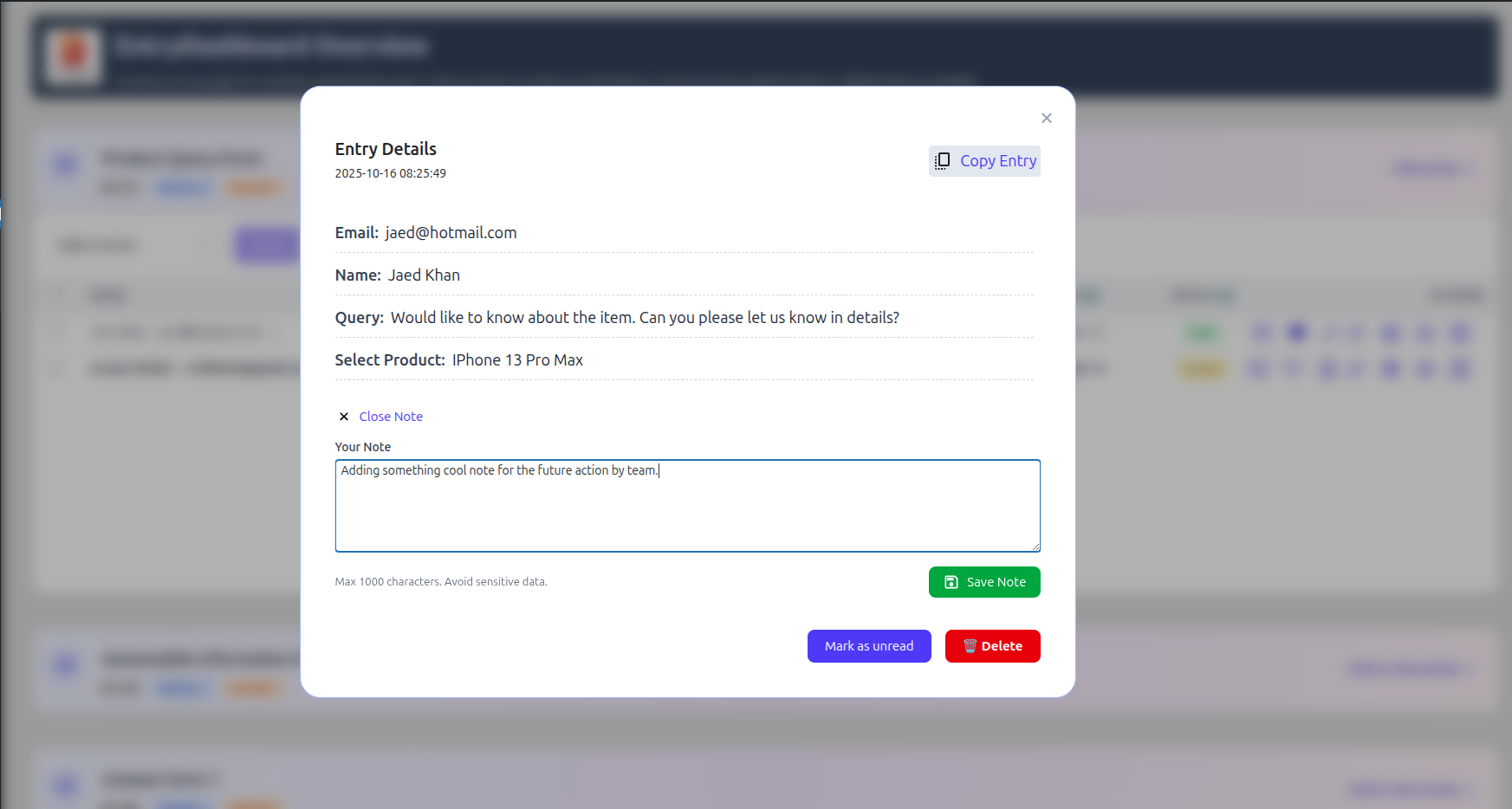
Entry with notes added (mini-CRM functionality). 
Choose which field need to show by default in table. 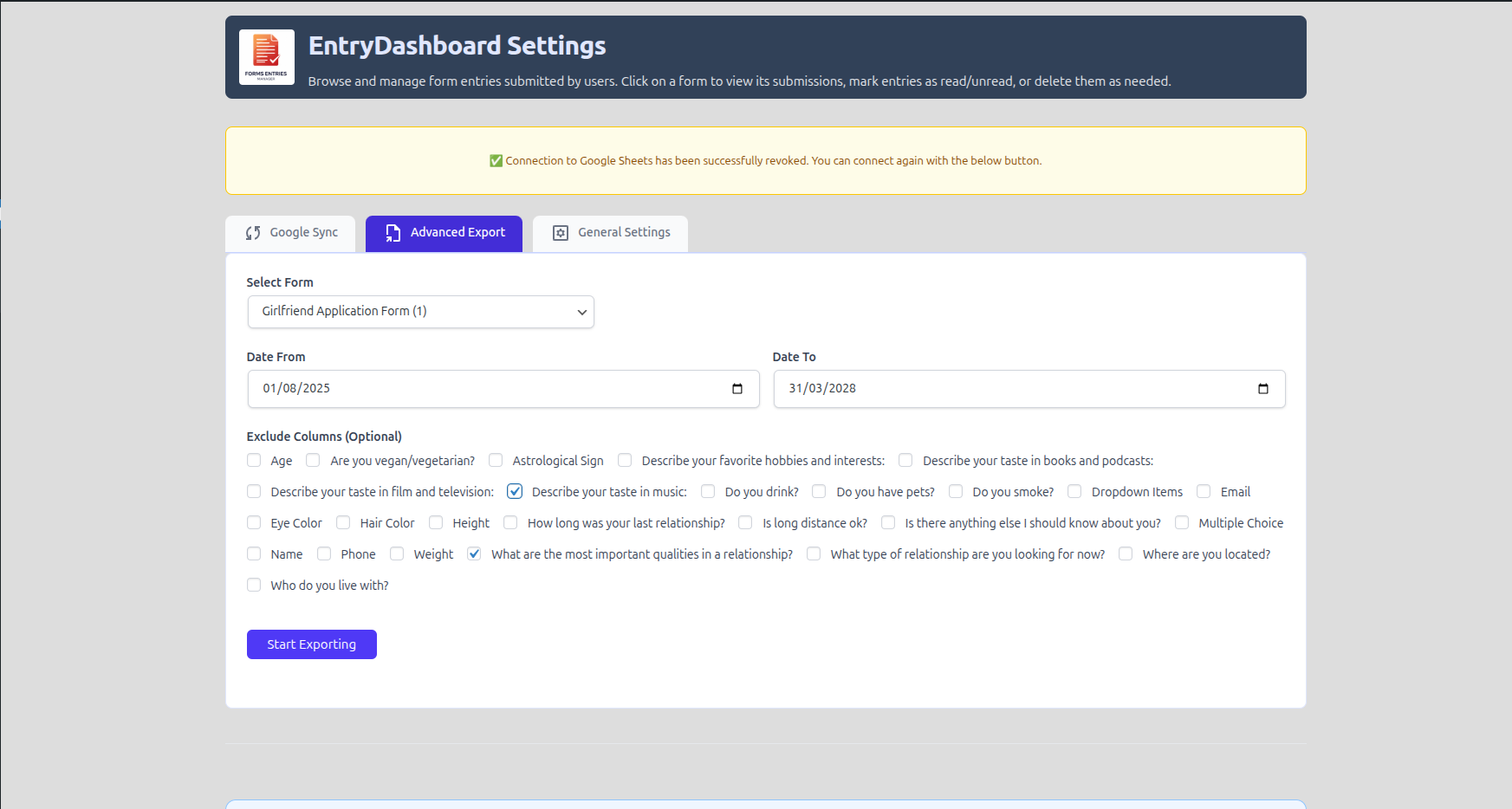
Advanced Export, full control over fields.
Installation
-
From your WordPress dashboard:
- Go to
Plugins > Add New. - Search for “EntryDashboard – Forms Entries Manager”.
- Click
Install NowActivate.
- Go to
-
Manual upload:
- Download the
.zip. - Go to
Plugins > Add NewUpload Plugin. - Upload the
.zipand activate.
- Download the
-
FTP method:
- Upload the
entrydashboardfolder to/wp-content/plugins/. - Activate the plugin via
Pluginsin WordPress.
- Upload the
FAQ
Which forms plugins are supported?
EntryDashboard supports WPForms, Contact Form 7, and Elementor Forms in the free version. The Pro version will also support popular plugins like Gravity Forms and Ninja Forms, giving you more options to manage and sync your entries.
How does WPForms Google Sheet Sync work?
Our plugin uses official Google OAuth 2.0 for secure connection. Once connected, all your WPForms entries can be automatically synced to Google Sheets. Your Google credentials are never stored on your server, and you can revoke access at any time.
Can I export my form entries?
Yes! You can export entries in CSV format from the dashboard. The Pro version will also include Excel and PDF export, making it easy to download, share, or archive your form data.
Does this plugin affect my website speed?
No. EntryDashboard only runs in the WordPress admin dashboard. All heavy tasks, like syncing WPForms to Google Sheets, are handled in the background and won’t slow down your site’s front-end.
Can I mark entries as read/unread?
Absolutely! You can quickly mark entries as read or unread, favorite important submissions, and filter/search through your data instantly — all without leaving your dashboard.
Is there a way to search or filter entries?
Yes. EntryDashboard provides instant search and filter options by name, email, date, or entry ID, helping you quickly find any submission in seconds.
Is it secure to use with my forms?
Yes. EntryDashboard respects WordPress security best practices. All data is stored safely in your database, and sensitive tasks like Google Sheet sync are protected with OAuth authentication.
Do I need a Google API key for syncing?
No. EntryDashboard handles everything using Google OAuth 2.0, so you don’t need to generate or manage your own Google API key. The connection is secure, and you can control access directly from your Google account.
Is there documentation for setting up WPForms Google Sheet Sync?
Yes! We provide a step-by-step setup guide inside the plugin and on our website. You’ll find instructions for connecting your forms, syncing entries to Google Sheets, exporting data, and using advanced features. The documentation is beginner-friendly and ensures you can get started in minutes.
Can I sync multiple forms to separate Google Sheets?
Absolutely. EntryDashboard lets you connect each WPForms form to its own Google Sheet, keeping your data organized and easy to manage.
How often does the plugin sync entries?
The plugin supports real-time or scheduled syncing using WordPress cron jobs.
Is there support if I face issues during setup?
Yes. Our team provides dedicated support through WordPress.org and our website. Whether you’re having trouble connecting Google Sheets or exporting entries, we’re here to help.
Reviews


Contributors & Developers
“EntryDashboard – Database Addon & Sync for WPForms, CF7, Elementor & More” is open source software. The following people have contributed to this plugin.
Contributors

Interested in development?
Browse the code, check out the SVN repository, or subscribe to the development log by RSS.
Changelog
1.0.3
- Improved: Google Connection Tab alignment, description changed
- Featured: Custom Capability Added
- Fixed: Plugin Settings Page link
- Fixed: Review request link
- Fixed: Rest route false positive notice
- Fixed: Browser Console Error
- Fixed: Google Connection Keep Alived
1.0.2
- Resolved all remaining SQL Injection vulnerabilities by enforcing safe $wpdb->prepare() usage across all files (8 incidences total).
- Corrected logic for safely handling dynamic WHERE and SET clauses in bulk actions and data fetching.
- Added required documentation for the use of the external proxy service (backend.entriesmanager.com) in readme.txt.
1.0.1
- Fixed missing and incorrect nonces in admin AJAX/REST requests.
- Improved data sanitization and escaping throughout the plugin.
- Updated translation text domain from
entrydashboardtoentries-manager. - Prefixed all functions, classes, and global variables with
entr_mgr_to avoid conflicts. - Added documentation for third-party libraries (Alpine.js, Tailwind, Lottie Player, Collapse Utility).
- Fixed SQL queries to use
$wpdb->prepare()for safety. - Updated external service documentation (Google Sheets integration usage and API references).
- Ensured all distributed JS/CSS files are in readable format or linked with their public sources.
- Added this changelog and readme updates to comply with WordPress.org Plugin Guidelines.
1.0.0
Welcome to EntryDashboard! A new way to manage your form submissions from WPForms, Contact Form 7, Elementor, and more—all in one place.