

Description
WordPress admin notices and dashboard notifications can quickly become overwhelming. Plugin alerts, theme warnings, update messages, and promotional notices often take up valuable space and disrupt your workflow. Disable Admin Notices gives you full control by letting you hide, remove, or disable admin notices across the entire dashboard.
You can hide all notifications, disable selected notices only, or move everything into a clean compact bar so messages no longer clutter your admin screen. The plugin also lets you disable plugin and theme update notifications, disable WordPress core update alerts, manage which items appear in the admin bar, and even block redirect URLs used by some plugins to show ads or promotional pages.
Whether you want a cleaner dashboard, fewer interruptions, or complete control over WordPress admin notifications, this plugin helps you keep your workspace organized and distraction-free.
Key Features
Disable Admin Notices
– Disable admin notices globally or hide selected notifications only
– Hide dashboard notices and show them in a single compact line
– Option to display all admin notifications in the WordPress admin bar
– Disable plugin update notifications
– Disable WordPress core update notifications
– Access all hidden notices anytime from the plugin dashboard
– Reset or restore hidden notices at any time
Disable Admin Bar Items
– Choose which items appear in the WordPress admin bar
– Hide or remove unnecessary plugin, theme, or tool menu items to reduce clutter
Block Ad Redirects
– Block specific redirect URLs to prevent plugins from sending you to ads or promotional screens
– Avoid unexpected admin redirects when activating or updating plugins
Support
We’re here to help. Feel free to open a new thread on the Support Forum.
Useful Resources
- If you like this plugin, you’re sure to love our other plugins as well.
- Our blog is a great place to learn more about WordPress.
- Get the most out of your website with our helpful WordPress YouTube Tutorials.
Screenshots

Plugin settings 
Access hidden admin notices 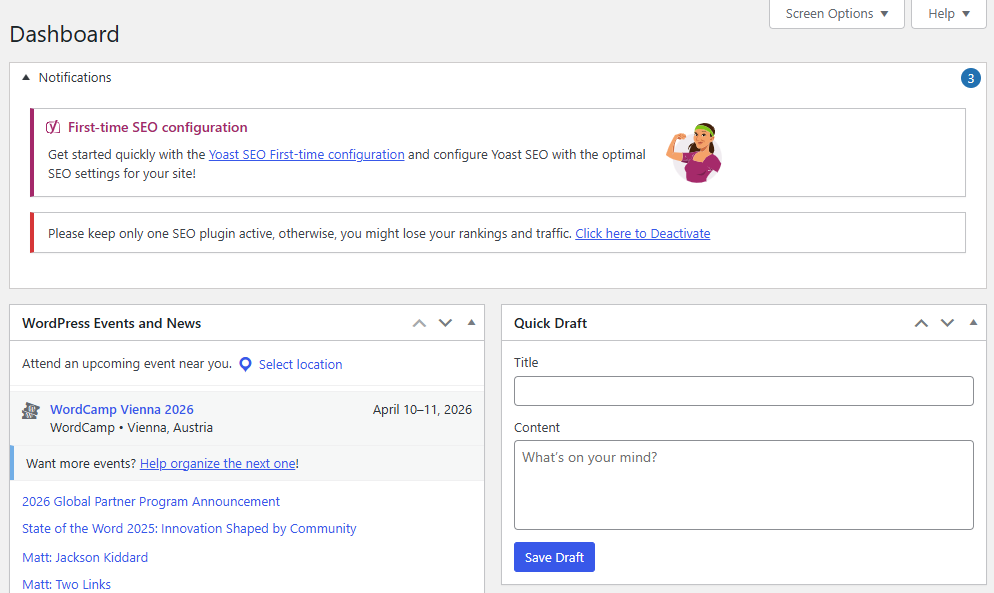
Group all admin notification in a compact panel 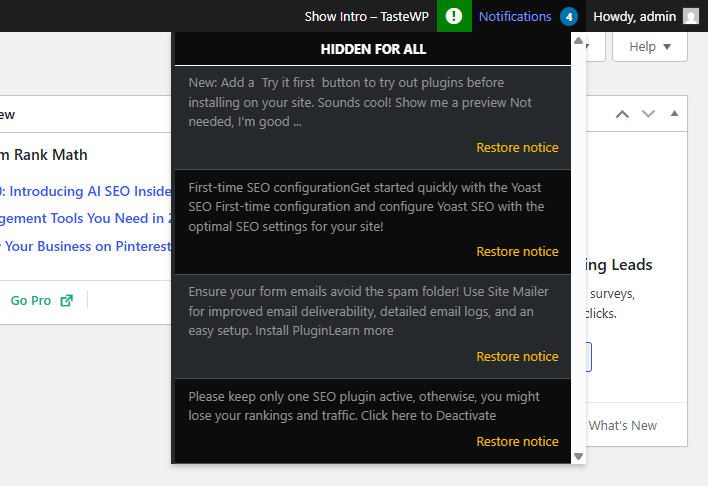
Display notification in the admin bar 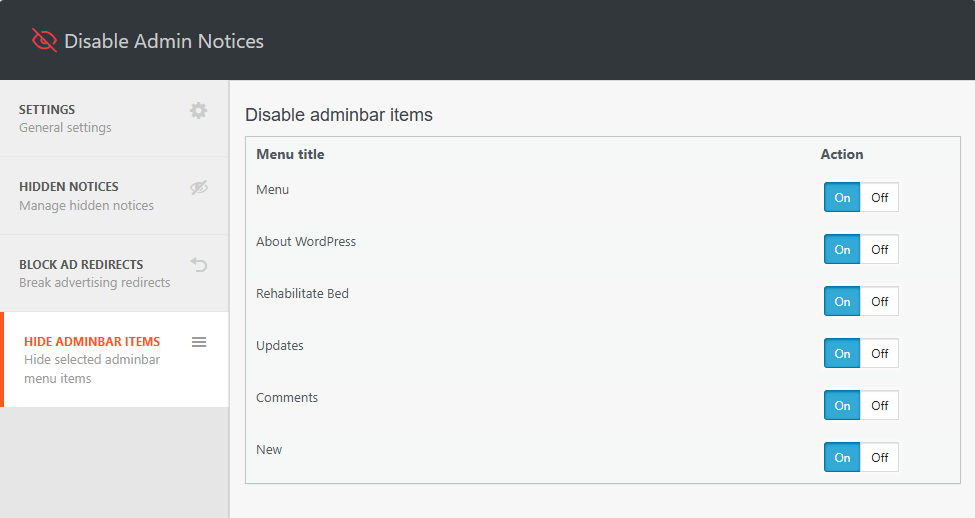
Disable admin bar items
Installation
- In your WordPress admin, go to Plugins > Add New
- In the Search field, type “Disable Admin Notices”
- Under “Disable Admin Notices” by Themeisle, click the Install Now link
- Once the process is complete, click the Activate Plugin link
- Go to Settings Hide admin notices to configure the plugin.
FAQ
-
Will hiding admin notifications affect how plugins or themes work?
-
No. Hiding or disabling admin notices does not affect how plugins or themes function. It only removes or moves the visual notifications they display in the dashboard.
-
You can restore any hidden notice at any time. Go to Settings Hide admin notices Hidden Notices, where you’ll find a list of all notices you have hidden. From there, you can restore individual notices.
-
Will disabling admin notices hide important error messages?
-
No. The plugin only affects standard admin notices and update notifications. Actual error messages and critical WordPress warnings are still shown as normal.
Reviews


Contributors & Developers
“Disable Admin Notices – Hide Dashboard Notifications” is open source software. The following people have contributed to this plugin.
Contributors
“Disable Admin Notices – Hide Dashboard Notifications” has been translated into 10 locales. Thank you to the translators for their contributions.
Translate “Disable Admin Notices – Hide Dashboard Notifications” into your language.
Interested in development?
Browse the code, check out the SVN repository, or subscribe to the development log by RSS.
Changelog
Version 1.4.5 (2026-05-25)
- Updated dependencies
Version 1.4.4 (2026-04-09)
- Updated dependencies
Version 1.4.3 (2026-02-17)
- Enhanced security
Version 1.4.2 (2026-01-13)
- Improved UI and removed tooltip color
- Removed support box and simplified review CTA
- Improved setting page labels
- Fixed broken notices
- Removed all related notifications from appearing
- Updated newsletter
- Updated title, added explanation text, fixed errors with strings
- Enhanced security
Version 1.4.1 (2025-12-16)
- Enhanced security
Version 1.4.0 (2025-11-05)
Disable Admin Notices plugin has been acquired by Themeisle 🎉
We’re happy to announce that Themeisle is now the new owner of Disable Admin Notices. This acquisition will help ensure the plugin’s continued development, better support, and exciting new updates in the future.
Your existing setup will continue to work as usual — no action is required on your part.
1.3.6 (05.12.2024)
- Added: Compatibility with WordPress 6.7
- Fixed: Security issue
1.3.5 (22.03.2024)
- Added: Compatibility with WordPress 6.5
- Added: Compatibility with php 8.3
1.3.4 (22.03.2023)
- Added: Compatibility with WordPress 6.4
- Added: Compatibility with php 8.2
1.3.3 (22.03.2023)
- Fixed: Freemius framework conflict
- Added: Compatibility with WordPress 6.2
1.3.0 (27.05.2022)
- Added: Compatibility with WordPress 6.0
1.2.9 (23.03.2022)
- Added: Compatibility with WordPress 5.9
- Fixed: Minor bugs
1.2.8 (13.01.2022)
- Fixed: compatibility error with plugin WP Fastest Cache
1.2.7 (20.10.2021)
- Added: Compatibility with WordPress 5.8
- Fixed: Minor bugs
= 1.2.6 (04.02.2021)=
* ATTENTION! Now the required PHP version is 7.0 or higher.
= 1.2.5 (03.02.2021)=
* Added: Compatibility with Google SiteKit plugin
= 1.2.4 (16.12.2020)=
* Added: Subscribe widget
* Fixed: Minor bugs
1.2.3
- Fixed: Compatibility with other plugins
- Fixed: Appearance of the list of hidden notifications in the adminbar
- [PRO] Added: Added a page with a list of all hidden notifications with the ability to restore.
- [PRO] Added: Ability to hide notifications for ALL users
- [PRO] Added: Multisite support
1.2.2 (09.08.2020)
- Fixed: It was impossible to hide the notice with an offer to buy a pro version.
- Updated: Improved the accuracy of filters when hiding notifications.
1.2.0 (16.07.2020)
- Fixed: Minor bugs
1.2.0 (10.07.2020)
- Fixed: Fixed some compatibility issues with third-party plugins.
- Added: Premium features
1.1.3 (01.07.2020)
- Removed: Ads notices and dashboard widget
- Fixed: Minor bugs
1.1.2 (23.06.2020)
- Added: Compatibility with WordPress 5.4
- Fixed: Minor bugs
1.1.1
- Added: Compatibility with Learndash
- Added: Compatibility with WordPress 4.2 – 5.x
- Added: Multisite support
- Added: Minor link style (hide notification forever) changes.
1.0.6
- Fixed: compatibility with some plugins and themes
1.0.5
- Fixed: Prefix bug
1.0.4
- Fixed: Compatibility with Clearfy plugin
- ADDED: Plugin options caching to reduce database queries for 90%. Clearfy became lighter and faster.
- ADDED: Compress and cache the plugin core files, to reduce the load on the admin panel
1.0.3
- Added a new feature: To restore hidden admin notices individually
- Fixed: Core bugs
1.0.2
- Updated styles for the “Hide notification forever” link
- Compatibility with plugins from webcraftic is updated
1.0.0
- Plugin release