

Description
CodingBunny Image Optimizer is a powerful and easy-to-use image optimization plugin for WordPress. It helps you improve your site’s performance by optimizing images, converting them to the WebP format, and resizing them automatically upon upload.
Features
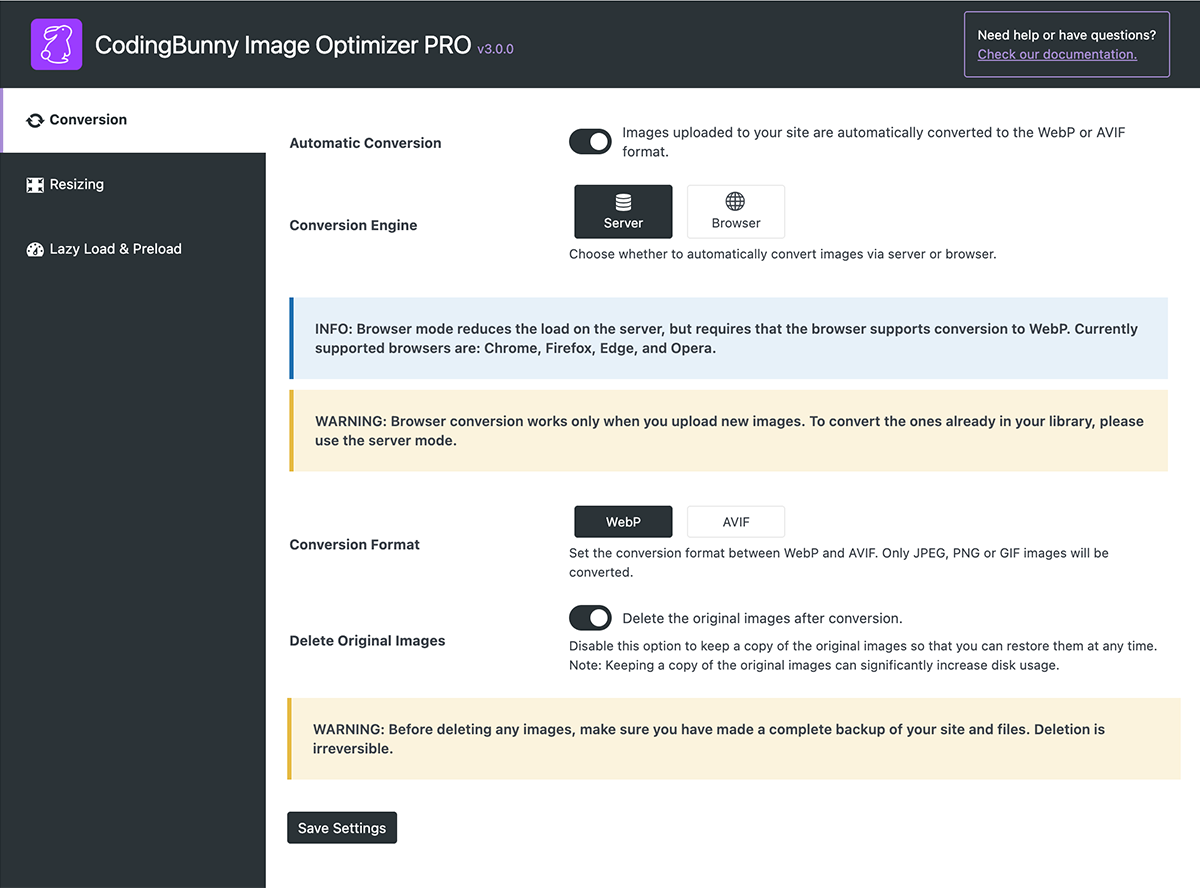
- New conversion method via browser to avoid using server resources.
- Automatic image optimization upon upload.
- Conversion to WebP and AVIF format.
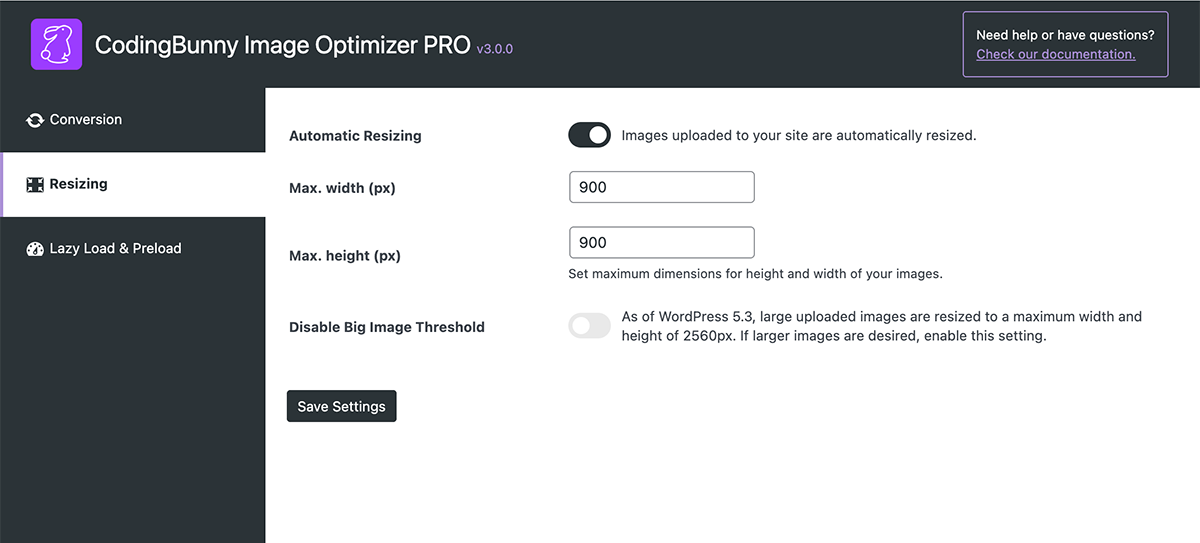
- Automatic image resizing.
- Option to delete original images after conversion.
- Disable WordPress default big image threshold.
- Preload critical image (LCP) for better Core Web Vitals scores.
- Lazy loading: images load only when visible to the user.
PRO Features
- Option to set WebP and AVIF quality conversion
- Disable WordPress unused image thumbnails: WordPress generates multiple thumbnails for each uploaded image. Choose which of these thumbnails you want to include when the images are optimized.
- Bulk image optimisation: this option allows you to simultaneously optimize all or several selected images in the library.
- Fix image attachments: fix all image attachments in the media library.
- Unused images cleaner: this option identifies unused images within the site.
- Duplicate images cleaner: this option identifies duplicate images within the media library.
- Watermark: add a watermark to your images to protect them (now also supports text watermark).
- Orphan Thumbnails cleaner: find and delete orphaned thumbnail files.
- Cleaning Product Images: delete images associated with the WooCommerce product when it is deleted.
- Alternative Text generator: automatically generates the ALT attribute for images.
- Remove Metadata: automatically remove unnecessary metadata from images (requires Imagick).
- Image Protector (add-on): advanced system for protecting against unauthorized copying and downloading of images.
- Image Organizer (add-on): organize your images by assigning custom categories.
Screenshots


Installation
The plugin is simple to install:
- Download coding-bunny-image-optimizer-lite.zip
- Unzip
- Upload coding-bunny-image-optimizer directory to your /wp-content/plugins directory
- Go to the plugin menu page and activate the plugin
FAQ
-
How do I enable automatic image conversion?
-
Go to the plugin settings page and check the ‘Enable Conversion’ option.
-
Can I keep the original images after conversion?
-
Yes, you can. Simply uncheck the ‘Delete Original Images’ option in the plugin settings.
-
How do I set the maximum dimensions for image resizing?
-
You can set the maximum width and height for image resizing in the plugin settings.
Reviews

Contributors & Developers
“CodingBunny Image Optimizer LITE” is open source software. The following people have contributed to this plugin.
Contributors
Translate “CodingBunny Image Optimizer LITE” into your language.
Interested in development?
Browse the code, check out the SVN repository, or subscribe to the development log by RSS.
Changelog
3.0.0: 2026-01-12
- New: Added a “Dashboard” page to monitor the status of images.
- New: Added an “Account” page to manage licenses and addons. Replaces the old “Manage License” and “Addons” pages (PRO).
- New: Added “Force Re-Optimization” to reconvert images already in WebP or AVIF formats (PRO).
- Improvement: General UI improvements.
- Improvement: General improvements to “Bulk Image Optimization”, now faster and more secure (PRO).
- Improvement: General improvements to “Fix Image Attachments”, now faster and more accurate (PRO).
- Improvement: General improvements to “Alternative Text”, now faster and more secure (PRO).
- Improvement: General improvements to “Lazy Load & Preload”, now faster and more secure.
- Fix: Fixed an issue with assigning loading=”lazy” and fetchpriority=”high”.
2.6.3: 2025-11-12
- Improvement: Refactored admin modules and optimized image processing/attachment lookups for better performance and maintainability.
- Improvement: Implemented caching and query optimizations to reduce database load.
- Fix: Enhanced error handling, data validation, and WordPress standards compliance/security in image processing.
2.6.2: 2025-11-07
- Improvement: Updated the CSS style of the tables.
2.6.1: 2025-11-04
- Improvement: Improved assignment of Lazy Load and Preload Critical Images attributes.
2.6.0: 2025-10-28
- New: The Watermark and Clean features are now available in the Image Watermarker and Image Cleaner add-ons.
2.5.1: 2025-10-08
- Fix: Fixed error in the JS of the Fix Image Attachments feature.
2.5.0: 2025-10-01
- New: “Fix Image Attachments” for Media Library corrections (PRO).
- New: “Duplicate Image Scanner” to detect duplicates (PRO).
- New: “Alt Text” column with generator in Media Library (PRO).
- New: SKU variable in Alt Text Generator for product images (PRO).
- Improvement: UX improvements for bulk optimization (PRO).
- Fix: SVG image handling.
- Fix: AVIF conversion bug.
- Fix: Watermarking AVIF images (PRO).
2.4.0: 2025-09-22
- New: Automatic deletion of images with posts/pages (PRO).
- New: “Optimize Selected Images” in Media Library Grid (PRO).
- New: Addons management page (PRO).
- Fix: Alt Text generator formatting (PRO).
2.3.1: 2025-09-04
- Fix: Update system modified (automatic update removed) (PRO).
- Fix: Convert method settings (FREE).
2.3.0: 2025-09-03
- New: Missing Images finder for links without files (PRO).
- Improvement: Watermark Preview (PRO).
2.2.0: 2025-09-01
- New: WebP via browser conversion.
- New: Watermark Preview (PRO).
- New: Watermark padding option (PRO).
2.1.0: 2025-08-28
- New: Alt Text Template (PRO).
- New: Force Overwrite Alt Text (PRO).
2.0.0: 2025-08-25
- New: Text Watermark (PRO).
- New: Orphan Thumbnails cleaner (PRO).
- New: WooCommerce product images auto-cleanup (PRO).
- New: Preload Critical Image for Core Web Vitals.
- New: Lazy Loading Images.
- New: Automatic ALT Text generator (PRO).
- New: Remove Metadata (Imagick) (PRO).
- Improvement: Detection of Unused Images.
- Improvement: Code improvements.
1.6.4: 2025-06-26
- Fix: Image resizing for near-threshold cases.
1.6.3: 2025-06-13
- Improvement: Enable/Disable logs.
- Improvement: Manual image stats update to avoid slowdowns.
1.6.2: 2025-05-29
- Fix: Watermark JavaScript (PRO).
1.6.1: 2025-05-05
- Improvement: Better log messages.
- Fix: Original image deletion bugs.
1.6.0: 2025-04-30
- New: “Logs” and export.
- New: System Information page replaces “Image Stats”.
- Improvement: Bulk conversion process (PRO).
- Improvement: Only delete original files after successful conversion.
- Improvement: New version detection improvements (PRO).
- Improvement: Unified “Image Batch Size” in bulk optimizations (PRO).
1.5.3: 2025-04-17
- Fix: Settings save bug.
1.5.2: 2025-04-16
- Improvement: Automatic updates support (PRO).
1.5.1: 2025-04-11
- Fix: Thumbnail creation (PRO).
1.5.0: 2025-04-04
- New: Disable right-click options.
- New: Custom watermark application (PRO).
- New: Image batch selection for bulk ops (PRO).
- Improvement: Improved performance.
- Improvement: New license management (PRO).
1.4.5: 2025-03-17
- Fix: Unused Images Finder with specific configs (PRO).
1.4.4: 2025-02-20
- New: HEIC image format support (WordPress 6.7+, ImageMagick 7+).
1.4.3: 2025-02-09
- Improvement: Code improvements.
1.4.2: 2025-01-17
- Fix: “Image Stats” widget removal for dashboard performance.
- Fix: Minor bugs.
1.4.1: 2025-01-15
- Fix: PHP errors for archived images.
1.4.0: 2025-01-06
- New: “Unused Images Finder” beta.
- New: “Big Image Threshold”.
- New: Quality conversion presets (PRO).
- New: Enable/disable “Unused Images Finder” and “Bulk Image Optimizer” toolbars (PRO).
- New: “Images Stats” dashboard widget.
- New: System Info panel.
- Improvement: French, German, Spanish languages (PRO).
- Improvement: Finalize “Unused Images Finder” (PRO).
- Improvement: Code security/performance.
- Improvement: UI updates.
- Improvement: PHP 8.4 compatibility.
- Fix: Progress bar in “Bulk Image Optimizer” removed (PRO).
1.3.0: 2024-12-11
- New: “Unused Images Finder” beta (PRO).
1.2.3: 2024-11-30
- Improvement: Thai language support (PRO).
- General code improvement.
- Fix: Bulk Resize translation (PRO).
1.2.2: 2024-11-13
- Fix: Prevent unwanted image enlargement with Imagick.
1.2.1: 2024-11-11
- New: Conversion status bar (PRO).
- Improvement: Safety improvements.
1.2.0: 2024-11-08
- New: Conversion quality setting (PRO).
- New: Convert-all-library-images button (PRO).
- Improvement: Intermediate sizes removed after conversion (PRO).
- Fix: Bulk optimization resizing when disabled (PRO).
1.1.0: 2024-01-30
- New: Bulk optimization for library (PRO).
- Improvement: Interface style.
1.0.0: 2024-10-18
- Initial Release