

Description
Brikpanel replaces the default WooCommerce admin with a clean, fast, data-driven dashboard — built for store owners who want real insights without paying for expensive SaaS tools.
Track sales, monitor live visitors, analyze conversion journeys, and export custom reports — all from your WordPress admin. No external accounts, no monthly fees.
Who is Brikpanel for?
- Store owners who want clear WooCommerce sales reports without spreadsheets
- Agencies handing off stores to clients who need a simple, modern admin
- Developers tired of the default WooCommerce dashboard clutter
Dashboard & Analytics
- Real-Time Sales Dashboard — revenue, orders, AOV, refunds at a glance
- Live Visitors Widget — see who is browsing your store right now
- Conversion Journey Tracking — understand user behavior before purchase
- Most Viewed Pages — discover your highest-traffic content
- Most Added-to-Cart Products — identify top-performing products
- Best-Selling Products Report — instant revenue breakdown
Reporting & Data
- Custom WooCommerce Reports — daily sales, product, cart, and customer data
- WooCommerce Sales Report — filterable, exportable, detailed
- Product Sales Report — per-product performance tracking
- Cart Reports — abandoned cart insights
- CSV Export — get your data out anytime
Admin Experience
- Modern Admin UI — Shopify-inspired clean design, no code needed
- Blazing-Fast Order Search — Cmd/Ctrl + K instant search
- Responsive Layout — desktop, tablet, mobile
- Modern Sidebar & Navigation — decluttered, focused on store tasks
- Translation-Ready — .pot file included
What makes Brikpanel different?
Unlike Metorik, Triple Whale, or other analytics SaaS tools that charge $25-300/month, Brikpanel runs entirely inside your WordPress admin. Your data stays on your server. No external dependencies, no recurring fees.
Compared to other admin theme plugins like Dashify or UiPress, Brikpanel goes beyond styling — it adds real analytics, conversion tracking, and reporting that those plugins don’t offer.
Screenshots

Advanced Dashboard Metrics — Live insights on sales, visitors, conversion rates, and top products in one view. 
Quick Order Search — Find orders instantly with Cmd/Ctrl + K keyboard shortcut. 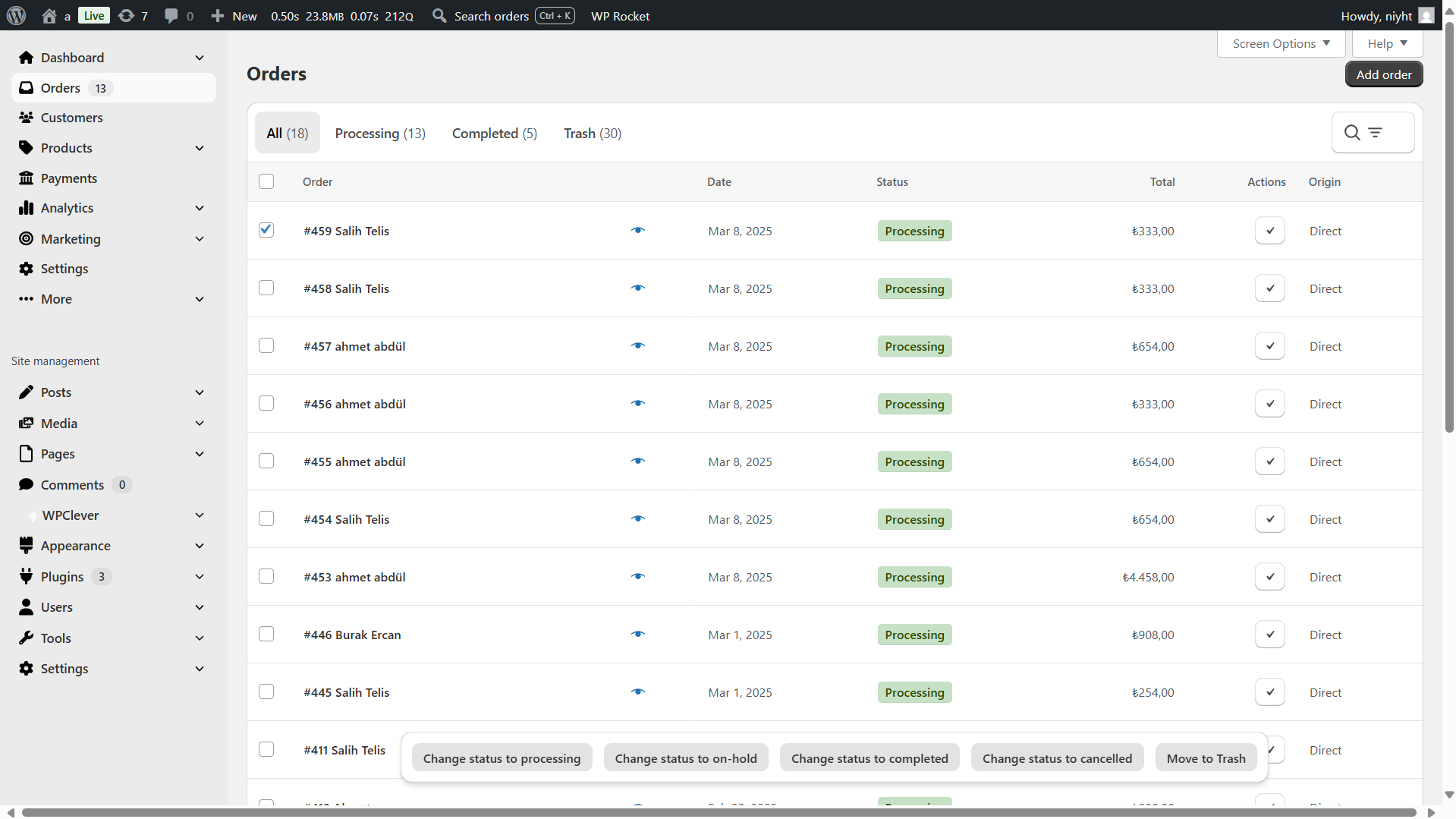
Redesigned Orders Page — More visual, filterable, and faster to navigate. 
Shopify-Style Admin — Clean, modern UI inspired by leading ecommerce platforms.
Installation
- Upload the plugin files to
/wp-content/plugins/brikpanelor install via Plugins > Add New > Upload. - Activate through the Plugins menu.
- Navigate to Brikpanel > Settings and enable the modules you need.
FAQ
-
Is Brikpanel really free?
-
Yes, completely free. All features included, no premium tier, no feature locks.
-
Is Brikpanel a free alternative to Metorik or Triple Whale?
-
Yes. Brikpanel provides WooCommerce analytics, sales reports, and conversion tracking similar to paid SaaS tools like Metorik ($25-300/month) or Triple Whale ($129+/month) — but completely free and self-hosted. Your data stays on your server with no external dependencies.
-
Will Brikpanel slow down my store?
-
No. Brikpanel only loads in the admin panel. It has zero impact on your storefront speed or customer experience.
-
Does it work with my theme and other plugins?
-
Yes. Brikpanel is compatible with any WooCommerce theme and works alongside popular plugins including Admin Menu Editor, Slider Revolution, and HPOS-enabled stores.
-
Can I customize which widgets appear?
-
Yes. Use the Screen Options button in the upper right corner to show/hide any dashboard widget.
-
How is this different from WooCommerce’s built-in analytics?
-
WooCommerce’s default analytics are slow, limited, and lack real-time data. Brikpanel provides live visitor tracking, conversion journey analysis, and much faster reporting — features that WooCommerce doesn’t offer out of the box.
Reviews


Contributors & Developers
“Brikpanel — WooCommerce Dashboard, Reports & Analytics” is open source software. The following people have contributed to this plugin.
Contributors
Translate “Brikpanel — WooCommerce Dashboard, Reports & Analytics” into your language.
Interested in development?
Browse the code, check out the SVN repository, or subscribe to the development log by RSS.
Changelog
1.4.6 (2025-03-01)
- Improvement: Simplified licensing — all features now completely free
1.4.1 (2025-02-15)
- Bug fix: Yesterday date range calculation corrected in dashboard widgets
1.3.5 (2025-01-20)
- Bug fix: Order conversion rate calculation accuracy improved
1.3.4 (2025-01-10)
- New feature: Added new dashboard widgets for enhanced store insights
1.3.3 (2024-12-15)
- Bug fix: Order count display corrected for filtered views
1.3.2 (2024-12-01)
- Bug fix: Resolved Slider Revolution CSS color conflict
1.2.9 (2024-11-15)
- Bug fix: Resolved compatibility issues on stores without HPOS enabled
1.2.6 (2024-11-01)
- Bug fix: Product category addition issue resolved
1.2.3 (2024-10-15)
- Improvement: Full translation support added with .pot file
1.2.2 (2024-10-01)
- Bug fix: Admin Menu Editor compatibility restored
1.2.0 (2024-09-15)
- Improvement: WooCommerce 9.4 compatibility
- Improvement: Redesigned UI with enhanced navigation
- Bug fix: Various minor fixes