
Accessibility plugins for WordPress are effective at automating much of the time-consuming work involved in checking a website for accessibility, such as verifying and adjusting color contrast, adjusting layouts, adding focus rings, improving keyboard navigation, and more. However, even the best WordPress Accessibility Plugins tend to overlook the critical tasks of
- fixing non-discernible links
- managing missing alt tags
- simplifying the installation of popular accessibility overlays.
That’s where our WordPress Accessibility Plugin Helper comes in. Think of it as an easy assistant to help you fill the ADA compliance gaps most other accessibility plugins overlook, helping keep your site user-friendly and WCAG-aligned with far less effort.
Fixing Non-Discernible Links with the WordPress Accessibility Plugin Helper
One of the most common accessibility issues is the use of vague link text, such as “Click here,” “Read more,” or “Learn more.” For people using screen readers, these links are identical, leaving the user with no clue about where the link leads or what the destination content is about.
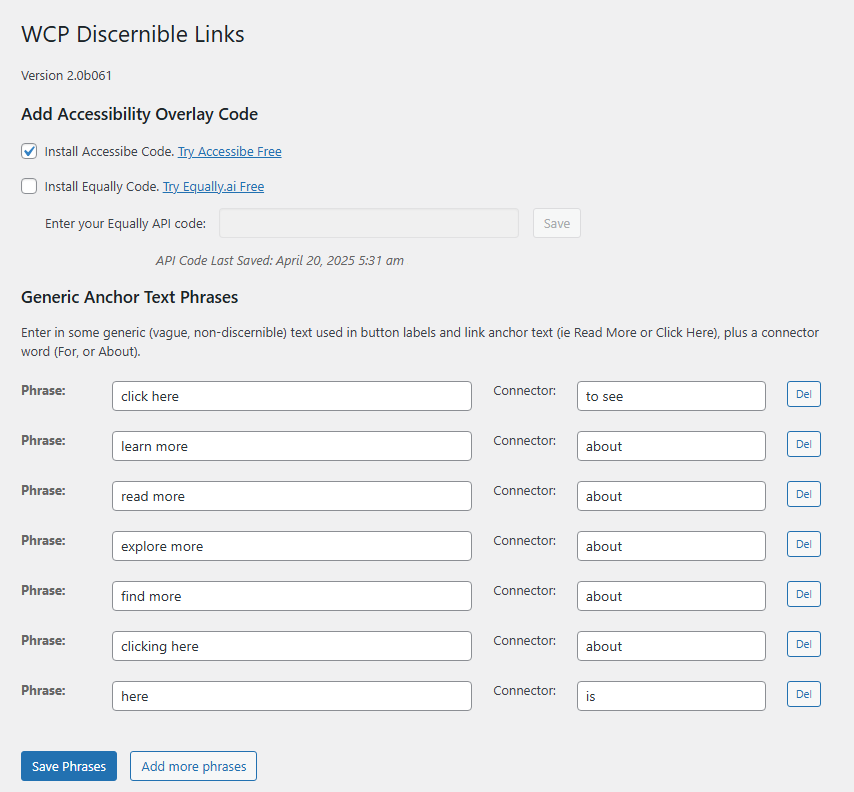
The WordPress Accessibility Plugin Helper solves this automatically. The plugin scans your site for generic anchor text and generates meaningful ARIA labels using connector phrases and the linked page’s title. For example with the WordPress Accessibility Plugin Helper…
- Instead of “Read more,” a screen reader will announce “Read more about our services.”
- Instead of “Click here,” users will hear “Click here to see pricing.”
The result? Non-discernible links finally make sense in context, creating a smoother experience for visitors who rely on assistive technology, such as screen readers, and enhancing your website accessibility by meeting WCAG 2.2 Success Criterion 2.4.4.
Managing Missing Alt Tags
Accessibility guidelines require that all images (except for decorative images) on your site include an alt tag that describes the image content for vision-impaired visitors. However, determining which images are missing alt tags is more challenging than it should be since most accessibility plugins require you to check images one at a time, wasting valuable time.
However, the Web Compliance Pro WordPress Accessibility Plugin Helper adds a crisp, clean interface to the Media Library, enabling users to view the Alt Tag status of all website images simultaneously. And, with list and filter views, you can easily find images with missing alt tags and update them in bulk.

Future updates will also allow you to mark decorative images as “no alt text required,” keeping your site lean and compliant, and aligned with WCAG 2.2 Success Criterion 1.1.1. This powerful capability saves content teams hours and ensures site visuals remain accessible to all visitors.
Easy Accessibility Overlay Integration
Are you already using an accessibility overlay, such as AccessiBe or Equally.ai, or considering adding one? The Web Compliance Pro WordPress Accessibility Plugin Helper makes setting up these tools painless. With one click, you can install your preferred overlay code directly into your site. Equally.ai integration requires an API key, but once you get that from Equally, it’s a one-click installation with our plugin.
This WordPress Accessibility Plugin Helper feature provides flexibility in choosing an overlay and one-click installation, allowing you to enhance your site’s accessibility in seconds without adding extra complexity.

Why Choose the WordPress Accessibility Plugin Helper?
The Web Compliance Pro WordPress Accessibility Plugin Helper enables faster and more reliable accessibility fixes to help you make your site ADA compliant more quickly and easily. With the WordPress Accessibility Plugin Helper, you get:
- Targeted fixes for issues that other plugins don’t include, such as fixing non-discernible links.
- Time-saving automation for managing missing alt tags.
- Overlay compatibility with leading plugin providers.
- Performance-friendly design that won’t slow down your site.
- Support for popular page builders like Elementor, Beaver Builder, and Gutenberg.
No plugin can guarantee perfect accessibility, but the WordPress Accessibility Plugin Helper makes the Accessibility Plugin you are already using even better by helping you tackle some of the most overlooked problems quickly and reliably.
WordPress Accessibility Plugin Helper Pricing
The WordPress Accessibility Plugin Helper is free. There are no premium or pro versions, and nothing to pay for.