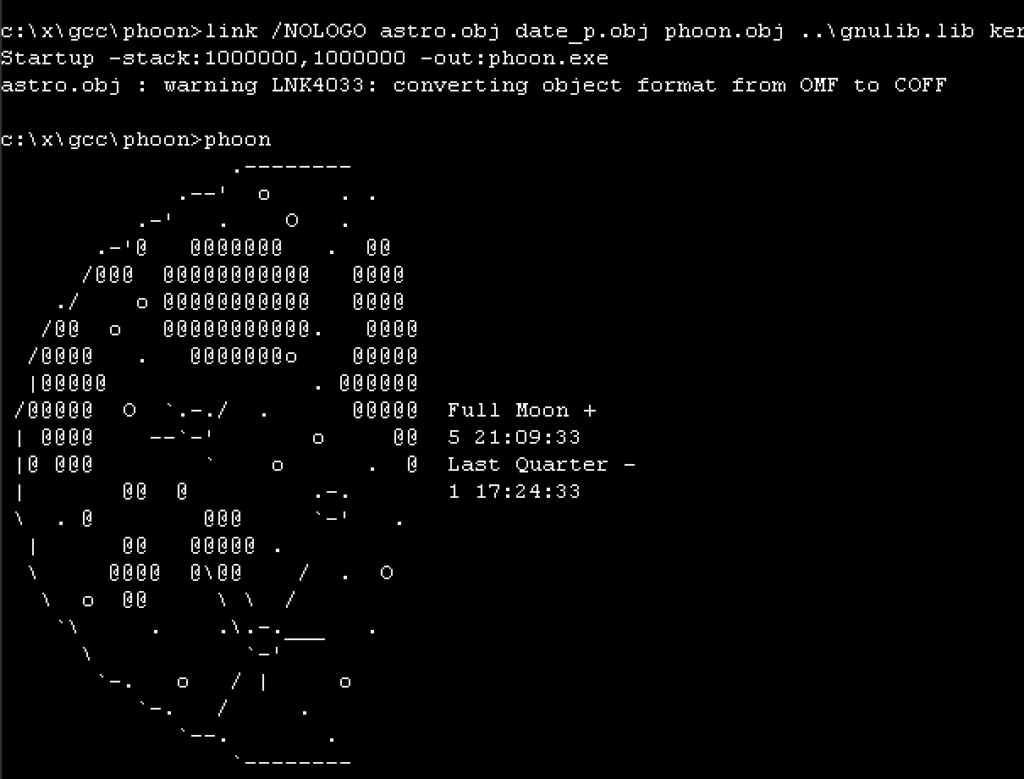
Oh sure I’ve done this ages ago, getting GCC 1.40 to compile with old Microsoft C compilers, and then target Win32, it’s not that ‘special’. But I thought I’d try to get them to build with MASM so I could just distribute this with an assembler. Spelling out the joke of some assembly required.
Although I wasn’t going to target/host OS/2 I was ideally going straight to Win32, the MASM 6.11 assembler couldn’t assemble the MSVC 1.0 / MSC/386 8.0 compiler’s assembly output, I needed to use the MASM 7 from Visual C++ 2003; namely:
Microsoft (R) Macro Assembler Version 7.10.3077 Copyright (C) Microsoft Corporation. All rights reserved.
MASM 6.11 was having issues with pushing OFFSET’s ie:
push OFFSET _obstack
when they were defined as:
COMM _obstack:BYTE:024H
Chat GPT to the rescue knowing that later MASM’s will just handle it just fine. And it was right! I know AI gets a bad rep, but surprisingly (or not when you think about what it’s been trained on), it’s got some great insight to some old things like seemingly common software tools, and old environments.
I didn’t bother trying to use Microsoft C/386 6.0 & MASM386 5.1 to see if it’ll handle CC1, as that seems to be a bit extreme. and I wanted this to run on semi modern Win32 stuff. More so that there isn’t a 64bit SMP aware OS/2 with a modern web browser. Kind of sad to be honese, but it’s 2026, and here we are.
I as always stick to the Xenix GAS port that outputs 386 OMF objects that earlier linker’s can happily auto-convert to coff and use on Win32. One day I feel I should ask why they were cross compiling NT/i386 from OS/2 1.21 instead of using Xenix?! Must have been some fundamental NTOS/2 thing I suppose.
Long story there was that the Xenix GAS emits an ancient 386 OMF format that for unknown reaons the older Microsoft Linkers happily accept and auto convert into COFF, the file format of the future (Future being 1988). I guess for better. or worse we never got NT/ELF. Oh and speaking of further weird, the IBM version of their LINK386 doesn’t like the Xenix 386 OMF. Bummer.
One thing I found out is that the MASM v7 doesn’t output COFF by default, rather it’s 386 OMF! you need to add the /coff flag to force it to be more Win32 friendly. Kind of unexpected behaviour.
I tried to make this simple as, clone the repo and run ‘build.cmd’ it’ll link up GCC and then build the test programs, and clean up after itself.
I’d tried to emit assembly for the Xenix GAS, but for some reason it’s struggling with floating point. I’m not sure, I tried using chat gpt to debug but it get’s confused on how this whole bizzare tool chain is working. I guess I can’t blame it.
Sorry it’s been a while, been feeling ‘life’ lately. I had some i7 project as a kicker for a retro Windows 10 build thing to do but watchign the RAM crissis unfold and well life… I just got feeling like it’s so irrelevant who’d care. That and it’s insane watching $1.11 worth of DDR3 RAM now selling for $30++ …. and more and more chip manufacturers are exiting. So it felt like maybe go back and do more with less. Even a low end machine can assemble this in seconds!
I wanted to share something special, a friend of mine, Will, has been so busy working on this project and I wanted to share it here for everyone here first.
This is pretty technical, but still interesting deep look into one of Microsoft’s early 32bit/386 based programs that would go on to revolutionize the world, Windows/386! It brought the v86 virtual machine to normal people wrapped up in a nice GUI.
By Will Klees (CaptainWillStarblazer)
INTRODUCTION
I’m CaptainWillStarblazer, an author who has previously been featured on VirtuallyFun for my work on EmuWOW, which enabled running Win32 apps compiled for the MIPS and Alpha AXP architectures to run on x86 computers. While I was born in the 21st century, I have a keen interest in the computers of the past, particularly in the history of Microsoft. The foundations for the breakout success of Windows 3.0, 3.1, and 9x were laid with Windows/386, but until recently, the inner-workings of Windows/386 have not been well understood, and beyond the very high-level, exactly how it works have been considered an opaque black box, not ventured into with books (official or otherwise) like its successors. No longer.
FOREWORD
Before I begin, I would like to acknowledge that all of my work here was informed by the research of the late, great Geoff Chappell, who has many in-depth pages on this topic as well as many others that laid the groundwork for this post. His contributions to the scene are immeasurable, and I, along with many of you, stand on the shoulders of giants like him. It is unfortunate that up to this point, Windows/386 has not faced much reverse-engineering work (especially in comparison to the better-documented Windows 3.x and 95), but for the first time, it is being examined.
ARCHITECTURE OF WINDOWS/386
Windows/386 Loader (WIN386.EXE)
The structure of Windows/386 is broadly similar to later versions of Windows running in enhanced mode. The journey begins with WIN386.EXE, which is a standard MZ EXE. WIN386 first performs some checks to make sure that your machine can run Windows/386 (you have enough memory, the right version of DOS, you have an 80386, defending against early buggy 386 steppings, etc.), among them being whether your computer is currently executing in Virtual-8086 Mode. If you are, then that means that another piece of protected-mode software is already controlling the computer. From there, it checks if Windows/386 is already running, and if so, displays an error message. From there, it checks if the resident protected-mode software is a memory manager that it recognizes (either Compaq’s CEMM or Microsoft’s EMM386), and if so, uses the GEMMIS (Global EMM Import Specification) API to suck out all of the EMS mapping page tables from the LIMulator and then switch back into real-mode. If it doesn’t recognize the protected-mode software, it at this point throws another error message.
This check for early buggy 386 steppings was retained by Microsoft even into Windows 8.1, surprisingly enough. The system can also check for 386 chips with bad 32-bit multiplication, though it only warns the user of potential issues, it doesn’t fail to run like if you are running a Model 1 Stepping 0 chip.
[photo of the code checking for the buggy 386]
Finally, it begins loading the Virtual DOS Machine Manager (VDMM) into memory from the file WIN386.386. This file is not an OS/2 Linear Executable like the 386 files from later versions of Windows (that format did not yet exist), rather it is the 32-bit x.out executable format from Xenix-386 (thank you, Michal Necasek!), which makes sense as it was the only 32-bit executable format that Microsoft would have a linker for at the time (and interoperated well with Microsoft’s OMF-based tools, such as MASM). Among the features of this format is that it contains a rather-lengthy symbol table. Not only does this aid reverse-engineering, however, it’s also a key part of the loading process. The WIN386.EXE loader will populate parts of the loaded image with important data using these symbols.
Virtual DOS Machine Manager and Virtual Device Drivers (WIN386.386)
WIN386.386 contains a statically-linked binary image of the VDMM itself as well of all of the virtual device drivers. Disassembling the source code of Windows/386 was an interesting exercise. On my repo, I have a partial disassembly of EGA.3EX, the WIN386.EXE loader for the EGA version of WIN386.386, which is a standard MS-DOS executable and as such easily examined by reverse-engineering tools. However, the 32-bit x.out format used by Windows/386 is not readily supported by any reverse-engineering tools that I am aware of. While it would be possible to write an Ida or Ghidra plugin, I figured the simplest solution was to convert it to a more standard executable format that could be understood; COFF. After extracting the 16-bit entry stub into a small flat binary to be disassembled on its own, the COFF file could finally be opened (in reality, tools didn’t seem to like the COFF file very much, so I had to use GNU objcopy to convert it to ELF so that tools would like it) and examined.
[photo of the conversion program][objdump or dumpbin examining the resulting COFF image]
WIN386.386 starts execution in real-mode with a short stub that prepares the Global Descriptor Table, loads the page directory, switches into protected-mode, and does a far jump to the 32-bit entry point. At this point, it starts WIN86.COM (loaded by WIN386.EXE) to start a real-mode copy of Windows in the first VM, otherwise known as the “System VM”.
Two valuable resources for examining the code of Windows/386 have turned out to be the source code for MEMM (Microsoft Expanded Memory Manager, better known by its final name EMM386) from the MS-DOS 4.0 repository, and the Windows 3.0 DDK sample VxDs. It is obvious from comparing the Windows/386 disassembly to portions of the MEMM source code that portions of MEMM, both for EMS emulation and for the V86 monitor in particular, were simply lifted wholesale into Windows/386, and code comments even make reference to this. Amusingly, MEMM was assembled using the MASM 4.00 assembler which has poor support for the 80386, so copious amounts of macros are used to add in 386 instructions. Perhaps the most interesting EMM386-related finding, however, was that parts of EMM386 were written in C. This seemed obvious given the leading underscore and __cdecl-style calling convention in several Windows/386 functions, but examining the code finds it to be true.
[emm386 c & 32-bit corresponding asm]
Based on my examination, it appears that if you took the EMM386 C code and compiled it for a 32-bit flat model (EMM386’s code was compiled for a 16:16 far pointer model), you’d get the assembly in Windows/386. This is interesting because Windows/386 was previously thought to be written entirely in assembly, and the Microsoft 386 C compiler was in its infancy when Windows/386 was being written. It’s not entirely unbelievable, however, since Xenix-386, the earliest known user of the compiler, came out around the same time as Windows/386.
The other handy reference while disassembling Windows/386 has actually been the Windows 3.0 DDK. Since the VDMM contains all of the virtual device drivers statically linked into it, and many of Windows 3.0’s virtual device drivers can trace their beginnings to Windows/386, there’s often a strong correspondence. Many APIs have changed, however, including how VxDs call each other. In Windows/386, it’s just a simple call, while their status as separate modules in Windows 3.0 requires a VxDCall; a special interrupt that causes the VMM to transfer control to another VxD.
[comparing between a Windows 3.0 VxD and a Windows 2.03 VxD]
Examination of the MapLinear function finds that the memory map for Windows/386 2.xx is essentially identical to Windows 3.0. The first 4MB is the private per-VM arena (so chosen as it allows a task-switch to be as simple as altering the first PDE in the page directory, rather than having to switch page directories), then the 4-20MB range identity-maps the first 16MB of physical memory, and the VDMM is loaded at the 20MB mark.
As a quick example of one of the code paths in Windows/386, when Windows/386 needs to return an entry point to a client application (such as through the INT 2FH AX=1602H API), it needs some way to cause a client calling that entry point in Virtual 8086 Mode to trap into protected mode. As documented by Raymond Chen, they found that the quickest way to do this was via the invalid opcode fault, and the invalid opcode they chose for this was 63H, or ARPL. As part of a mechanism that is still in place in Windows 95, when a VM executes an ARPL instruction, it’ll trap into the VDMM, vectoring through the IDT to vm_trap06.
[photo of the IDT][photo of vm_trap06]
From there, it determines if the fault came from a VM or not. If not, it executes the Windows/386 error handler, but if it did, it calls into VmFault. VmFault looks up the faulting opcode through a table and invokes the appropriate handler for it. The appropriate handler for ARPL is called Patch_Fault. From there, it determines what kind of call this is, and if you’re lucky, it’ll end up in TS_VMDA_Call, which is described in the next section.
[photo of VmFault][photo of Patch_Fault]
The System VM – Windows 2 and WINOLDAP
The code running inside of the system VM is almost identical to a standard real-mode Windows 2.xx install, with one exception: WINOLDAP. Responsible for executing MS-DOS (“old”) applications, WINOLDAP is totally different in Windows/386 (and as such, not functional if you try to load WIN86.COM directly from real-mode on its own, which otherwise provides a perfectly workable real-mode Windows experience), making heavy use of 386 instructions and of the “Virtual DOS Applications” (VDA, otherwise known as VMDOSAPP) API (accessed via INT 2FH AX=1601H in Windows/386 2.03 and 2.11) which is made available exclusively to the system VM, allowing WINOLDAP to control the execution of other virtual machines.
[photos of the dispatch tables and routines for VDA]
[example app using VDA]
While the details of this API certainly changed for Windows 3.0 and for later versions, WINOLDAP continued to work in fundamentally the same way, with the DOS application running in the System VM (intended to be Windows) being uniquely privileged to control operations in other virtual machines. Given that many people have figured out how to make Windows/386 start applications other than Windows itself (such as COMMAND.COM), this means that nothing would stop a sufficiently enterprising developer from developing a text-based MS-DOS application that leveraged this API to provide multitasking. In fact, this is likely how Raymond Chen’s “character-mode task switcher” functioned. WINOLDAP is worthy of further examination to determine exactly how it works, and perhaps to develop a multitasking MS-DOS. Obviously, this API, intended to have only Windows as a client, is totally undocumented other than by myself and Geoff Chappell, but further work could reveal its secrets.
In addition to the VDA API, Windows/386 also provided a much more limited API to callers in other virtual machines (accessed via INT 2FH AX=1602H), that appears to still be available in Windows 3.0 and is primarily responsible for networking.
For most of my experimentation, I actually sidestepped booting Windows altogether so that I could run my own code in the System VM. This is fairly simple; all you need to do is copy COMMAND.COM over WIN86.COM, then start WIN386, and viola! You’re running COMMAND.COM in Virtual 8086 Mode! Probably the most notable change is that if you didn’t already have any LIM EMS memory, you do now.
LOST WINDOWS/386 DDK
While no DDK for Windows/386 2.xx has been located, hints have been scattered for its existence. Most notably, the Windows 3.0 386 Virtual Device Adaptation Guide provides guidance on the differences between Windows/386 2.xx and Windows 3.0, and how to port virtual display drivers from one to the other, suggesting that Microsoft did provide tools to enable third-party developers to write Windows/386 virtual device drivers. It’s not difficult to imagine what this DDK would have looked like. Likely distributed alongside the regular Windows/286 real-mode DDK, the Windows/386-specific portions would include the 32-bit capable MASM5, along with early versions of MAPSYM32, WDEB386, and the Xenix x.out ld link editor. Very likely, Microsoft provided sample code for each of the VxDs included with Windows/386 (including the CGA, EGA, and Hercules VDDs), as well as a precompiled OMF object containing the VDMM itself, and then one would link everything together.
It bears repeating that the documentation on porting virtual device drivers from Windows/386 2.xx to Windows 3.0 was limited solely to virtual display drivers. The only other references to Windows/386 2.xx in the Virtual Device Adaptation Guide discuss the Windows/386 API callable by DOS applications running in a DOS box (many device drivers and applications, including network stacks, were Windows/386 aware). This could mean that other types of drivers could be more easily reassembled for Windows 3.0 without documentation, but I doubt it. As it stands, most of the virtual device drivers included in Windows/386 were fairly generic; the COM port, timer, PIC, keyboard, and other such devices work almost identically in every PC-compatible computer. On the other hand, the display driver is the one major component that Windows would need to interact with and that would significantly change between different types of machines. Additionally, due to the statically-linked nature of Windows/386 at this point, having more than one VxD as the variable factor could balloon into a smorgasbord of different combinations of drivers statically linked into the WIN386.386 image. As such, it stands to reason that the only driver built by third-parties (though no such driver has yet been located) is a virtual display driver. This lines up with Microsoft’s own distribution of Windows/386, as the disks include separate 386 files for each supported display (the appropriate file being copied for your machine based on your selection during setup) and a matching 3EX file that gets copied to become the WIN386.EXE loader, and display drivers (also including their own complete Windows/386 images, obviously based on customizing the EGA/VGA VDD) have been found for other display adapters as well. This is compounded by the fact that during SETUP (including for real-mode Windows), the 16-bit display driver is statically linked into the Windows kernel (in other words, you can only load a display driver during SETUP) for the “fast-boot” configuration (though this can be disabled for a “slow-boot” on debug versions, more similar to how Windows 3.0 and above boot). A lot of reading between the lines is needed here, but it does seem that the only customization Microsoft intended was for OEMs to provide their own virtual display drivers.
BREAKING INTO WINDOWS/386
In absence of the Windows/386 DDK and its associated debugger, options are fairly limited as to peeking into the internals of Windows/386 while it is active. Promise was initially found in WIN386.EXE making a call to INT 68H (the WDEB386 real-mode interface, also used by the Deb386 debugger developed for EMM386 that no doubt was the immediate ancestor of WDEB386, as well as by compatible debuggers such as SoftICE) with AH=43H (D386_Identify, typically the first call made when initializing a program that uses WDEB386), no doubt trying to call out to its version of WDEB386, if present. However, the version of WDEB386 from Windows 3.1 only partially worked. While a CTRL-C could break into WDEB386 at any time, it could only trace through Virtual 8086 Mode code (always breaking at an ARPL VM-86 breakpoint), and whenever you tried to resume execution using the G command, Windows/386 would exit.
As a result, I had to improvise my own debugger, which required me to gain the ability to execute my own 32-bit code within Windows/386, which has never before been achieved. I immediately decided to adopt a similar approach to WDEB386; leave the debugger behind in conventional memory before Windows/386 starts up, and then have it call into me, so I quickly set about writing a small TSR. The TSR hooked INT 69H with a routine called Intrude that would patch the IDT of Windows/386 (found via traversing the image symbol table) to point to my own code for interrupt vector 0 (the divide exception handler). That way, whenever a divide exception occurred, it would vector into my own code.
The next question you may be wondering about is how I got Windows/386 to invoke an INT 69H in the first place? The answer lies in the real-mode initialization stub of WIN386.386; the part that switches into protected-mode. Examine the listing below:
Enable_A20:
01B7 803EBD00F8 CMP BYTE PTR [Computer_Type],0F8H ; Check for fast A20 support
01BC 7707 JA Enable_A20_Slow
01BE E492 IN AL,92H ; Fast A20 enable
01C0 0C02 OR AL,2 ; Set bit 1 (A20 line control)
01C2 E692 OUT 92H,AL ; Output back to port 92H
01C4 C3 RET
Enable_A20_Slow:
01C5 B4DF MOV AH,0DFH
01C7 EB12 JMP Set_A20
By the time Enable_A20 is called, which checks the computer type from the BIOS, most of the data structures needed to enter Windows/386 have already been set up, so I patched Windows/386 to simply remove Fast A20 support and always use the slow code, putting an INT 69H in the slack space. In other words, it replaces the instruction at TEXT16:01B7 with an INT 69H (CD 69). Since the original instruction is 5 bytes long, the remaining three are padded with NOP (90). The instruction at TEXT16:01BC is then altered to be an unconditional jump (EB) to always invoke the slow A20 line control. Since the loaded object is always at offset 400H in the file, and the offsets appear to be the same for all versions of Windows/386 on all devices, the changes are:
5B7: 80 -> CD
5B8: 3E -> 69
5B9: BD -> 90
5BA: 00 -> 90
5BB: F8 -> 90
5BC: 77 -> EB
The trouble at this point was that, while my program did work, it left the protected-mode code sitting in conventional memory, and part of the System VM’s inherited address space and thus subject to corruption. As a result, I wanted to move it up into extended memory, out of the reach of any pesky DOS programs. My first thought was to use XMS memory through HIMEM.SYS, which was introduced with Windows/386 2.11 to facilitate access to the HMA for Windows. Unfortunately, while this did sort of work, it turns out that Windows/386 (which if you’ll recall was initially designed before XMS or HIMEM.SYS) does not respect XMS allocations made before Windows loads, and thus considers them part of its extended memory pool (a fact I was taught by the fact that it corrupts the first two DWORDs of every 64K memory block starting after the HMA as part of its memory test). It is also important to realize that Windows/386 2.11 does not provide virtual XMS services to any client VMs (though Windows 3.0 and later versions do), except for HMA access to the System VM only (Windows/286 2.11 also used the HMA on 80286 and above systems, hence the “286” name, though it otherwise worked fine on XT-class machines, and since Windows/386 ran Windows/286 in the System VM, it made sense to also support the HMA there).
As a result, I used the “expand-down” memory allocation method of determining the amount of installed extended memory using INT 15H AH=88H, and then hooking that interrupt to report 132K less memory than there was before, and using the last 132K of extended memory for my own purposes. Since INT 15H AH=88H can report up to 64MB of installed extended memory, while INT 15H AH=87H to copy into extended memory only supports up to 16MB, I had to write my own routines to copy into extended memory by switching into protected-mode and then back. As a result, W386DBG has to be loaded before any memory manager that places the machine into Virtual 8086 Mode, such as EMM386, or anything that allocates XMS memory (not that any such programs are likely to be used alongside Windows/386, as just as I stated earlier, the XMS memory would be corrupted).
As you can see, if you cause a divide exception in DEBUG.COM, it’ll print out “W386DBG” in the upper-right of the screen and then hang the computer. This won’t work for a software INT 0, because software interrupts from Virtual 8086 Mode vector through the GPF handler.
[photo of the program launching][photo of the hang with the VBox debugger showing where we hung]
Note that while we lack any debug version of the VDMM (along with any symbols that it may contain or debug messages it may output), the VDMM itself does as stated earlier have a considerable symbol table, and we have debug versions of Windows 2 as part of its DDK, which were meant to be used with SYMDEB and include symbols, so at least we can have full debugging capabilities for the 16-bit components of Windows, simply by loading debug Windows 2 into the System VM, as no doubt one was intended to do when developing device drivers for Windows/386. Obviously, W386DBG is not yet a functional debugger, but it has gained the ability to grab control from Windows/386, which is perhaps the most important part.
INTO THE FUTURE WITH WINDOWS VERSION 3.0
Lately, I have become interested in turning my attention to the Windows 3.0 version 14 debug release that shipped to ISVs in early 1989. As one would expect, it shows many similarities to Windows 2.xx, but is already well on the way to becoming the Windows 3.0 that we know.
Notably, the WIN386.386 file is now gone, having been merged into WIN386.EXE as with the final version of Windows 3.0, meaning that the same DOS executable both loads the VMM and contains it. However, the VMM itself (pointed to by the e_lfanew field in the MZ header) is not an OS/2 2.0 Cruiser Linear Executable like the final version (or, more properly, the W3 format which contains multiple LE VxDs within it), but rather another bespoke format with a “W386” signature that I have not yet torn into yet. All of the VxDs are still statically linked at this point, but the symbol file is showing movement toward the VMM we know from Windows 3.0.
I haven’t disassembled all of the real-mode entry portion of WIN386 yet (this will allow me to fully understand the file format), but an interesting piece of code new to this build checks to make sure not only that the DOS major version is at least 3 (3 being the minimum DOS version) but also less than 10, as 10 is the major DOS version reported by OS/2 1.x’s 3xBox, making Windows/386 3.0.14 OS/2-aware (and avoidant).
One piece of Windows 3.0-related history that was recently discovered was the manual for Murray Sargent’s Scroll-Screen-Tracer debugger. The debugger is far too rich in features to begin to go over them, but among its incredible DOS-extending features include support for debugging applications in Virtual 8086 Mode (a la SoftICE), debugging Windows, and debugging regular MS-DOS applications running in the 80286’s Protected Mode, much as was described in “Saving Windows from the OS/2 Bulldozer”.
Interestingly, the DOS extender provided by WIN386, along with PKERNEL.EXE (the protected-mode Windows kernel) seem to have more in common with the 80286 DOS extender, DOSX.EXE, from Windows 3.0, along with the 80286 standard mode kernel, KRNL286.EXE, than they do with the enhanced mode counterparts.
For example, like in the final version of Windows 3.0, DOSX (in this case, WIN386) switches into protected-mode before loading PKERNEL/KRNL286, giving it the unique distinction of being an MZ executable that starts in protected-mode, using a stub to start executing the NE portion of the file. By contrast, in Windows 3.1 (and 3.0 enhanced mode), the DOS extender switches back into real / Virtual 8086 Mode before loading the kernel, which then uses DPMI to switch into protected-mode.
Along with translation for DOS API services, according to Michal Necasek of the OS/2 Museum, WIN386 appears to provide some sort of selector management interface via INT 31H that could be considered a sort of proto-DPMI. Disassembling both WIN386 and PKERNEL promises to be an interesting exercise. Not much is known about the early history of DPMI, but the first sign of it outside of Microsoft appears to date to Fall 1989:
I will never forget how startled I was when I encountered the DOS-Protected Mode Interface (DPMI) in its primordial form for the first time. I was sitting in a Microsoft OS/2 2.0 ISV seminar in the Fall of 1989, with my mind only about half-engaged during an uninspiring session about OS/2 2.0’s Multiple Virtual DOS Machines (MVDMs), when the speaker mentioned in passing that OS/2 2.0 would support a new interface for the execution of DOS Extender applications. This casual remark focused my mind remarkably…
After the speaker finished, I went up to him and asked for more information, explaining that his mystery interface was about to have a severe impact on a book project near and dear to my heart. In a couple of hours, the Microsoftie returned with a thick document entitled “DOS Protected Mode Interface Specification, Version 0.04” still warm from the Xerox machine and generously garnished with “CONFIDENTIAL” warning messages. I suspect I made a most amusing spectacle, as I flipped through the pages with my eyes bulging out and my jaw dropping to the floor. The document I had been handed was nothing less than the functional specification of a protected-mode version of MS-DOS!
Microsoft originally defined the DPMI in two layers: a set of low-level functions for interrupt management, mode switching, and extended memory management; and a higher-level interface that provided access to MS-DOS, ROM BIOS, and mouse driver functionality via protected-mode execution of Int 21H, Int 10H, Int 33H, and so on. The higher-level DPMI functions were implemented, of course, in terms of the lower-level DPMI functions and the extant real-mode DOS and ROM BIOS interface.
Ray Duncan, Extending DOS, 2d ed., 1992, pp. 433-438
Obviously, by this point, Microsoft, who was still heavily invested in OS/2, planned to implement DPMI into OS/2 2.0, though they would not do so for about a year afterwards. Desiring crossover with the protected-mode DOS apps that would run on Windows (most crucially, Windows itself) was no doubt a desire for the OS/2 development team. I was surprised to learn that DPMI was already by this point mature enough to have even a preliminary specification released. Moreover, Microsoft went on to, at the behest of DOS Extender vendors, such as Phar Lap and Rational Systems, excise from the DPMI specification all of the higher-level DOS Extender components, and “DPMI 0.9” was born, containing only the low-level building blocks of a DOS Extender. As Andrew Schulman went on to say, the DOS Extender portions of DPMI ended up being split off into their own document:
Microsoft has an internal document (“MS-DOS API Extensions for DPMI Hosts,” October 31, 1990) that devotes about 30 pages to the Windows 3.0 DOS extenders… For example, the 1990 document discusses the 32-bit DOS extender provided by DOSMGR. The DOS file read and write calls (INT 21h functions 3Fh and 40h) have the count register (ECX) extended to 32-bits, allowing 32-bit programs to perform DOS file I/O of more than 64K at a time.
Andrew Schulman, Unauthorized Windows 95, 1994, pp. 151-52
On the PCjs website, Version 0.04 from March 1991 of the MS-DOS API Extensions for DPMI Hosts can be found, and it is obviously quite a preliminary document. What it seems is that DPMI was designed simply to expose the Windows DOS Extender (used by the Windows kernel) to other DOS protected-mode software. DPMI sits on the AH=16H Windows/386 part of the INT 2FH multiplex (W386_Int_Multiplex), with the “Get Protected Mode Switch Entry Point” API from DPMI even being documented as part of INT2FAPI.INC from the Windows 3.0 DDK as W386_Get_PM_Switch_Addr. The “Get Selector to Base of LDT” API from the MS-DOS API Extensions document is even part of INT2FAPI.INC as W386_Get_LDT_Base_Sel. DPMI was defined as an interface for protected-mode DOS software to interface with the Windows (and OS/2) DOS Extenders, and ultimately a subset of the Windows DOS Extender API got standardized and duplicated by other vendors; in effect, DPMI hosts implement a genericized version of the Windows DOS Extender.
Originally with all the buildup of compilers & GCC ports to OS/2, I had a small goal of getting Sarien running on OS/2. I did have it running on both a 286 & 386 DOS Extender, so the code should work fine, right?
To recap, years ago I had done a QuakeWorld port to OS/2 using the full screen VIO mode, a legacy hangover from 16bit OS/2. It works GREAT on the released 2.00 GA version. I went through the motion of getting the thunking from 32bit mode to 16bit mode, to find out that it doesn’t exist in the betas!
No VIO access from 32bit
So that meant I was going to have to break down and do something with Presentation Manager.
So the first thing I needed was a program I could basically uplift into what I needed, and I found it through FastGPI.
Donald Graft’s FastGPI
While it was originally built with GCC, I had rebuilt it using Visual C++ 2003 for the math, and the Windows NT 1991 compiler for the front-end. As you can see it works just fine. While I’m not a graphical programmer by any stretch, the source did have some promise in that it creates a bitmap in memory, alters it a runtime, and blits (fast binary copy) it to the Display window. Just what I need!
  for (y = 0; y < NUM_MASSES_Y; y++)
  {
    for (x = 0; x < NUM_MASSES_X; x++)
    {
      disp_val = ((int) current[x][y] + 16);
      if (disp_val > 32) disp_val = 32;
      else if (disp_val < 0) disp_val = 0;
      Bitmap[y*NUM_MASSES_X+x] = RGBmap[disp_val];
    }
  }
It goes through the X/Y coordinate plane of the calculated values, and stores them as an RGB mapping into the bitmap. Seems simple enough right?
  DosRequestMutexSem(hmtxLock, SEM_INDEFINITE_WAIT);

  /* This is the key to the speed. Instead of doing a GPI call to set the
     color and a GPI call to set the pixel for EACH pixel, we get by
     with only two GPI calls. */
  GpiSetBitmapBits(hpsMemory, 0L, (LONG) (NUM_MASSES_Y-2), &Bitmap[0], pbmi);
  GpiBitBlt(hps, hpsMemory, 3L, aptl, ROP_SRCCOPY, BBO_AND);

  DosReleaseMutexSem(hmtxLock);
It then locks the screen memory, and then sets up the copy & uses the magical GpiBitBlt to copy it to the video memory, then releases the lock. This all looks like something I can totally use!
I then have it call the old ‘main’ procedure form Sarien as a thread, and have it source the image from the Sarien temporary screen buffer
And WOW it did something! I of course, have no keyboard, so can’t hit enter, and I screwed up the coordinates. I turned off the keyboard read, flipped the X/Y and was greeted with this!
Welcome to OS/2 where the memory is the total opposite of what you expect.
And it’s backwards. And upside down. But it clearly is rendering into FastGPI’s gray palette! I have to admit I was really shocked it was running! At this point there is no timer, so it runs at full speed (I’m using Qemu 0.80 which is very fast) and even if there was keyboard input it’d be totally unplayable in this reversed/reversed state.
The first thing to do is to flip the display. I tried messing with how the bitmap was stored, but it had no effect. Instead, I had to think about how to draw it backwards in RAM.
  {
    for (x = 0; x < NUM_MASSES_X; x++)
    {
      disp_val = ((int) screen_buffer[y*NUM_MASSES_X+x] );	//+ 16);
      if (disp_val > 32) disp_val = 32;
      else if (disp_val < 0) disp_val = 0;
      Bitmap[((NUM_MASSES_Y-y)*(NUM_MASSES_X))-(NUM_MASSES_X-x)] = RGBmap[disp_val];
    }
  }
Running in the correct orientation
Now comes the next fun part, colour.
I had made the decision that since I want to target as many of the OS/2 2.0 betas as possible they will be running at best in 16 colour mode, so I’ll stick to the CGA 4 colour modes. So the first thing I need is to find out what the RGB values CGA can display.
So now it’s looking right but there is no timer so on modern machines via emulation it runs at warp speed. And that’s where OS/2 shows its origins is that it’s timer ticks about every 32ms, so having a high resolution timer is basically out of the question. There may have been options later one, but those most definitively will not be an option for early betas. I thought I could do a simple thread that counts and sleeps, as hooking events and alarms again suffer from the 32ms tick resolution problem so maybe a sleeping thread is good enough.
And it crashed. Turns out that I wasn’t doing the threads correctly and was blowing their stack. And somehow the linker definition file from FastGPI kept sneaking back in, lowering the stack as well.
The next big challenge came of course from the keyboard. And I really struggled here as finding solid documentation on how to do this is not easy to come by. Both Bing/google want to suggest articles about OS/2 and why it failed (hint it’s the PS/2 model 60), but nothing much on actually being useful about it.
Eventually through a lot of trial and error, well a lot of errors I had worked uppon this:
    case WM_CHAR:
      if (SHORT1FROMMP(parm1) & KC_KEYUP)
        break;
pm_keypress=1;
      switch (SHORT1FROMMP(parm1))
      {
      	case VK_LEFT:
	key_from=KEY_LEFT;
	break;
	case VK_RIGHT:
	key_from=KEY_RIGHT;
	break;
	case VK_UP:
	key_from=KEY_UP;
	break;
	case VK_DOWN:
	key_from=KEY_DOWN;
	break;

	case KC_VIRTUALKEY:
	default:
	key_from=SHORT1FROMMP(parm2);
	break;
      }
I had cheated and just introduced 2 new variables, key_from, pm_keypress to signal a key had been pressed and which key it was. I had issues mapping certain keys so it was easier to just manually map the VK_ mapping from OS/2 into the KEY_ for Sarien. So it triggers only on single key down events, and handles only one at a time. So for fast typers this sucks, but I didn’t want to introduce more mutexes, more locking and queues or DIY circular buffers. I’m at the KISS stage still.
I’m not sure why it was dropping letters, I would hit ‘d’ all I wanted and it never showed up. I then recompiled the entire thing and with the arrow keys now mapped I could actually move!
Roger walks for the first time!
And just like that, Roger Wilco now walks.
From there I added the savegame fixes I did for the 286/386 versions, along with trying to not paint every frame with a simple frame skip and…
Sarien for OS/2 running at 16Mhz
And it’s basically unplayable on my PS/2 model 80. Even with the 32bit XGA-2 video card.
I had to give it a shot under 86Box, to try the CGA/EGA versions:
CGA
It’s weird how the image distorts! Although the black and white mapping seems to work fine.
Sarien on EGA
I should also point out that the CGA/EGA versions are running on OS/2 2.0 Beta 6.123, which currently is the oldest beta I can get a-hold of. So at the least I did reach my goal of having a 32bit version for early OS/2.
I would imagine it running okay on any type of Pentium system, however. So, what would the advantage of this, vs just running the original game in a dos box? Well, it is a native 32bit app. This is the future that was being sold to us back in 1990. I’m sure the native assembly that Sierra used was far more efficient and would have made more sense to just be a full screened 16bit VIO application.
So how long did it take to get from there to here? Shockingly not that much time, — 02/20/2024 6:02 PM for running FastGPI, to — 02/20/2024 10:56 PM For the first image being displayed in Presentation Manager, and finally — 02/21/2024 10:39 PM to when I was first able to walk. As you can see, that is NOT a lot of time. Granted I have a substantially faster machine today than what I’d have in 1990 (I didn’t get a 286 until late 91? early 92?), compiling Sarien on the PS/2 takes 30-40 minutes and that’s with the ultra-fast BlueSCSI, compared to even using MS-DOS Player I can get a build in about a minute without even compiling in parallel.
I think the best way to distribute this is in object form, so I’ve created both a zip & disk image containing the source & objects, so you can link natively on your machine, just copy the contents of the floppy somewhere and just run ‘build.cmd’ which will invoke the system linker, LINK386 to do it’s job. I have put both the libc & os2386 libraries on the disk so it should just work about everywhere. Or it did for me!
So that’s my quick story over the last few days working on & off on this simple port of Sarien to OS/2 Presentation Manager. As always, I want to give thanks to my Patrons!
So, with a renewed interest in OS/2 betas, I’d been getting stuff into the direction of doing some full screen video. I’d copied and pasted stuff before and gotten QuakeWorld running, and I was looking forward to this challenge. The whole thing hinges on the VIO calls in OS/2 like VioScrLock, VioGetPhysBuf, VioScrUnLock etc etc. I found a nifty sample program Q59837 which shows how to map into the MDA card’s text RAM and clear it.
It’s a 16bit program, but first I got it to run on EMX with just a few minor changes, like removing far pointers. Great. But I wanted to build it with my cl386 experiments and that went off the edge. First there are some very slick macros, and Microsoft C just can’t deal with them. Fine I’ll use GCC. Then I had to get emximpl working so I could build an import library for VIO calls. I exported the assembly from GCC, and mangled it enough to where I could link it with the old Microsoft linker, and things were looking good! I could clear the video buffer on OS/2 2.00 GA.
Now why was it working? What is a THUNK? Well it turns out in the early OS/2 2.0 development, they were going to cut loose all the funky text mode video, keyboard & mouse support and go all in on the graphical Presentation Manager.
Presentation Manager from OS/2 6.605
Instead, they were going to leave that old stuff in the past, and 16bit only for keeping some backwards compatibility. And the only way a 32bit program can use those old 16bit API’s for video/keyboard/mouse (etc) is to call from 32bit mode into 16bit mode, then copy that data out of 16bit mode into 32bit mode. This round trip is called thunking, and well this sets up where it all goes wrong.
Then I tried one of the earlier PM looking betas 6.605, and quickly it crashed!
SYS2070:
Well this was weird. Obviously, I wanted to display help
Explanation:
This ended up being a long winded way of saying that there is missing calls from DOSCALL1.DLL. Looking through all the EMX thunking code, I came to the low level assembly, that actually implemented the thunking.
EXTRN   DosFlatToSel:PROC
EXTRN   DosSelToFlat:PROC
After looking at the doscalls import library, sure enough they just don’t exist. I did the most unspeakable thing and looked at the online help for guidance:
No VIO
So it turns out that in the early beta phase, there was no support for any of the 16bit IO from 32bit mode. There was no thunking at all. You were actually expected to use Presentation Manager.
YUCK
For anyone crazy enough to care, I uploaded this onto github Q59837-mono
It did work on the GA however so I guess I’m still on track there.
From cracyc and roytam’s fork, I have incorporated a correction. These include file access using FCB and fixing exceptions around the FPU of the MAME version of the i386 core. In addition, the DAA/DAS/AAA/AAS/AAM/AAD instructions of the MAME version of the i386 core have been modified based on the DOSBox implementation. With the Pentium 4 version, the testi386.exe is the same as the real thing.
The I386 core of NP21/W has been updated to equivalent to ver0.86 rev92 beta2. Also, fixed the build time warning so that it does not appear.
Improved checking when accessing environment variables, referencing incorrect environment tables. Recent builds have resolved an issue that prevented testi386.exe from working. Improved the efficiency of memory access handling. Basic memory, extended memory, and reserved areas (such as VRAM) can be accessed in that order with a small number of conditional branches. The processing speed may be slightly increased.
I don’t want to complain or anything, I’m very thankful for the tool. It’s just so amazing.
but on my Windows 10 install I have so many issues relating to the font/screen changes, that I just made an incredibly lame fork, and commented out those changes, msdos-player_. I stumbled onto the issue by accident by redirecting stdout/stderr, and compiling stuff ran fine, but as soon as it started to mess with the console it’d just crash.
No console changes, no crashes.
OK so you can run some basic stuff like compilers, but what about ORACLE?!
Oracle 5!
I did have to subst a drive, as I didn’t feel like dealing with paths and stuff, I had extracted it from oracle-51c-qemu, and modified the autoexec & config.ora and yeah, using the 386 or better emulation it just worked! Sadly there is no network part of the install, although there is a SDK so I guess there ought to be a way to proxy queries.
OK, but how about something even more complicated?! NETWARE!
Netware 3.12 on MS-DOS Player
Obviously there is no ISA MFM/IDE disks in MS-DOS Player, but the server loaded!
Needless to say this update is just GREAT!
I’d say try the one hosted on Takeda’s site! It’ll almost certainly work fine for you. Otherwise I guess try mine. Or not.
Because I hate myself, I tried to get the Microsoft OS/2 Beta 2 SDK’s C compiler building simple stuff for text mode NT. Because, why not?!
Since the object files won’t link, we have to go in with assembly. And that of course doesn’t directly assemble, but it just needs a little hand holding:
Microsoft (R) Program Maintenance Utility   Version 1.40
Copyright (c) Microsoft Corp 1988-93. All rights reserved.

        cl386 /Ih /Ox /Zi /c /Fadhyrst.a dhyrst.c
Microsoft (R) Microsoft 386 C Compiler. Version 1.00.075
Copyright (c) Microsoft Corp 1984-1989. All rights reserved.

dhyrst.c
        wsl sed -e 's/FLAT://g' dhyrst.a > dhyrst.a1
        wsl sed -e "s/DQ\t[0-9a-f]*r/&XMMMMMMX/g" dhyrst.a1  | wsl sed -e "s/rXMMMMMMX/H/g" > dhyrst.asm
        ml /c dhyrst.asm
Microsoft (R) Macro Assembler Version 6.11
Copyright (C) Microsoft Corp 1981-1993.  All rights reserved.

 Assembling: dhyrst.asm
        del dhyrst.a dhyrst.a1 dhyrst.asm
        link -debug:full -out:dhyrst.exe dhyrst.obj libc.lib
Microsoft (R) 32-Bit Executable Linker Version 1.00
Copyright (C) Microsoft Corp 1992-93. All rights reserved.
I use sed to remove the FLAT: directives which makes everything upset. Also there is some weird confusion on how to pad float constants and encode them.
MASM 6.11 is very update with this. I just padded it with more zeros, but it just hung. I suspect DQ isn’t the right size? I’m not 386 MASM junkie. I’m at least getting the assembler to shut-up but it doesn’t work right. I’ll have to look more into it.
Xenix 386 also includes an earlier version of Microsoft C / 386, and it formats the float like this:
So I had thought maybe if I replace the ‘r’ with a ‘H’ that might be enough? The only annoying thing about the Xenix compiler is that it was K&R so I spent a few minutes porting phoon to K&R, dumped the assembly and came up with this sed string to find the pattern, mark it, and replace it (Im not that good at this stuff)
wsl sed -e "s/DQ\t[0-9a-f]r/&XMMMMMMX/g" $.a1 \
| wsl sed -e "s/rXMMMMMMX/H/g" > $*.asm
While it compiles with no issues, and runs, it just hangs. I tried the transplanted Xenix assembly and it just hangs as well. Clearly there is something to do with how to use floats.
I then looked at whetstone, and after building it noticed this is the output compiling with Visual C++ 8.0
Great they look nothing alike. So something it totally broken. I guess the real question is, does it even work on OS/2?
Since I should post the NMAKE Makefile so I can remember how it can do custom steps so I can edit the intermediary files. Isn’t C fun?!
INC = /Ih
OPT = /Ox
DEBUG = /Zi
CC = cl386

OBJ = dhyrst.obj

.c.obj:
	$(CC) $(INC) $(OPT) $(DEBUG) /c /Fa$*.a $*.c
	wsl sed -e 's/FLAT://g' $*.a > $*.a1
	wsl sed -e "s/DQ\t[0-9a-f]*r/&XMMMMMMX/g" $*.a1 \
	| wsl sed -e "s/rXMMMMMMX/H/g" > $*.asm
	ml /c $*.asm
	del $*.a $*.a1 $*.asm

dhyrst.exe: $(OBJ)
        link -debug:full -out:dhyrst.exe $(OBJ) libc.lib

clean:
        del $(OBJ)
        del dhyrst.exe
        del *.asm *.a *.a1
As you can see, I’m using /Ox or maximum speed! So how does it compare?
Dhrystone(1.1) time for 180000000 passes = 20
This machine benchmarks at 9000000 dhrystones/second
And for the heck of it, how does Visual C++ 1.0’s performance compare?
Dhrystone(1.1) time for 180000000 passes = 7
This machine benchmarks at 25714285 dhrystones/second
That’s right the 1989 compiler is 35% the speed of the 1993 compiler. wow. Also it turns out that MASM 6.11 actually can (mostly) assemble the output of this ancient compiler. It’s nice when something kind of work. I can also add that the Infocom ’87 interpreter works as well.
I had a small twitter account, and I tried not to get dragged into anything that would just be basically wasting my time. Just stay focused and on topic. FINE. I just wanted to see if anyone ever saw it, if it was even worth the effort of doing WIP’s as I didn’t want to make it super annoying.
I logged on to post a fun update that I’d finally gotten a Phar Lap 386 version 4.1 app to do something halfway useful, the sairen AGI interpreter up and running in the most basic sense.
Talking about DOS Extenders is spammy and manipulation!
I don’t get what triggered it, but oh well there was a ‘have a review’ and yeah that was fine. Great. So I’m unlocked so I go ahead and post with the forbidden topic, as I’m clearly dumb, and forgetting that Twitter is for hate mobs & posting pictures of food, and cat pictures.
The Sairen AGI interpreter built with Watcom 386/7.0 & Phar Lap 386 4.1
So yes, that was a line too far, and now that’s it.
Now some of you may think, if you buy ‘the plan’ you’ll no doubt be exempt from the heavy hands of Twitter
3 squids a month
But I already was and had been for a while.
Your account is suspended
So that’s the end of that. I guess it’s all too confusing for a boomer like me.
Cancel me, cancel you
So needless to say I cancelled Twitter as well. Kind of sneaky they didn’t auto-cancel taking money.
So yeah, with that out of the way, let’s continue into DOS Extender land. I added just enough 386 magic, onto github: neozeed/sarien286. Yes I see now it really was a poorly named repo. Such is life.
There is 3 main things for porting old programs where they take care of all the logic, it’s going to be File I/O, Screen I/O, and timers. Luckily this time it was easier than I recalled.
Over on usenet (google groups link) Chris Giese shared this great summary on direct memory access from various methods:
/* 32-bit Watcom C with CauseWay DOS extender */
int main(void) {
char *screen = (char *)0xA0000;
initMode13();
*screen = 1;
return 0;
}

/* 32-bit Watcom C with DOS/4GW extender
(*** This code is untested ***) */
int main(void) {
char *screen = (char *)0xA0000;
initMode13();
*screen = 1;
return 0;
}

/* 32-bit Watcom C with PharLap DOS extender
(*** This code is untested ***) */
#include <dos.h> /* MK_FP() */
#define PHARLAP_CONVMEM_SEL 0x34
int main(void) {
char far *screen = (char far *)MK_FP(PHARLAP_CONVMEM_SEL, 0xA0000);
initMode13();
*screen = 1;
return 0;
}

/* 16-bit Watcom C (real mode) */
#include <dos.h> /* MK_FP() */
int main(void) {
char far *screen = (char far *)MK_FP(0xA000, 0);
initMode13();
*screen = 1;
return 0;
}
It is missing the Phar Lap 286 method:
/* Get PM pointer to text screen */
  DosMapRealSeg(0xb800,4000,&rseg);
  textptr=MAKEP(rseg,0);
But it’s very useful to have around as documentation is scarce.
Which brings me to this (again?)
Phar Lap 386|Dos-Extender 4.1
Years ago, I had managed to score a documentation set, and a CD-ROM with a burnt installed copy of the extender. I didn’t know if it was complete, but of course these things are so incredibly rare I jumped on the chance to get it!
2011!
Unfortunately, I didn’t feel right breaking the books apart, and scanning them, then add in some bad life choices on my part, and I ended up losing the books. Fast forward *years* later and Foone uploaded a document set on archive.org. GREAT! As far as I can tell the only difference in what I had is that I’ve got a different serial number. Thankfully I was smart enough to at lest email myself a copy of the CD-ROM contents! And this whole thing did inspire me to gut and upload the Phar Lap TNT 6.0 that I had also managed to acquire.
Although unlocking the video RAM wasn’t too bad, once I knew what to do, the other thing is to hook the clock for a timer. ISR’s are always hell, but at least this is a very simple one:
The methodology is almost always the same, as always, it’s the particular incantation.
So yeah, it’s super simple, but the 8086/80286 calling down to DOS/BIOS from protected mode via the int86 just had to be changed to int386, and some of the register structs being redefined. I’m not sure why but the video/isr code compiled with version 7 of Watcom, but crashes. I think its more drift in the headers, as the findfirst/findnext/assert calls are lacking from Watcom 7, so I just cheated and linked with Watcom 10. This led to another strange thing where the stdio _iob structure was undefined. In Watcom 10 it became __iob, so I just updated the 7 headers, and that actually worked. I had to include some of the findfirst/next structures into the fileglob.c file but it now builds and links fine.
Another thing to do differently when using Watcom 7, is that it doesn’t include a linker, rather you need to use 386LINK. Generating the response file, as there is so many objects didn’t turn out too hard once I realized that by default everything is treated as an object.
Another fun thing is that you can tell the linker to use the program ‘stub386.exe’ so that it will run ‘run386’ on it’s own, making your program feel more standalone. From the documentation:
386 | LINK has the ability to bind the stub loader program, STUB386.EXE, to
the front of an application .EXP file. The resulting .EXE file can be run by
typing the file name, just like a real mode DOS program. The stub loader
program searches the execution PATH for RUN386.EXE (the

386 | DOS-Extender executable) and loads it; 386 | DOS-Extender then loads
the application .EXP file following the stub loader in the bound .EXE file.


To autobind STUB386.EXE to an application .EXP file and create a bound
executable, specify STUB386.EXE as one of the input object files on the
command line.
So that means I can just use the following as my linker response file.
One interesting observation is that the 386 extender is actually smaller than the 286 one. And being able to compile with full optimisations it is significantly faster.
16bit on the left, 32bit on the right.
I ran both the prior 16bit protected mode version (on the left), and 32bit version (on the right), on the same IBM PS/2 80386DX 16Mhz machine. You can see how the 32bit version is significantly faster!.
I really should profile the code, and have it load all the resources into RAM, it does seem to be loading and unloading stuff, which considering were in protected mode, we should use all ram, or push the VMM386 subsystem to page, and not do direct file swapping, like it’s the 1970s.
It’s not mine, rather it’s Asianometry‘s. It’s a nice overview of the rise of Unix. I’d recommend checking it out, it’s pretty good. And of course, as I’m referenced!
Years ago I had tried to make these old OS’s accessible to the masses with a simple windows installer where you could click & run these ancient artifacts. Say 4.2BSD.
Installing should be pretty straight forward, I just put the license as a click through and accept defaults.
Starting BSD via ‘RUN BSD42’ and the emulator will fire up, and being up a console program (Tera Term) giving you the console access. Windows will probably warn you that it requested network access. This will allow you to access the VAX over the network, including being able to telnet into the VAX via ‘Attach a PTY’ which will spawn another Tera Term, prompting you to login.
telnettting into the VAX
You can login as root, there is no password, and now you are up and running your virtual VAX with 4.2BSD!
All the items
I converted many of the old documents into PDF’s so you may want to start with the Beginners guide to Unix. I thought this was a great way to bring a complex system to the masses, but I’m not sure if I succeded.
776 downloads
As it sits now, since 2007 it’s had 776 downloads. I’d never really gotten any feedback so I’d hoped it got at least a few people launched into the bewildering world of ancient Unix. Of course I tried to make many more packages but I’d been unsure if any of them went anywhere. It’s why I found these videos so interesting as at least the image artifacts got used for something!
But in the off hand, maybe this can encourage some Unix curious into a larger world.
When the AXP64 build tools for Windows 2000 were discovered back in May 2023, there was a crucial problem. Not only was it difficult to test the compiled applications since you needed an exotic and rare DEC Alpha machine running a leaked version of Windows, it was also difficult to even compile the programs, since you needed the same DEC Alpha machine to run the compiler; there was no cross-compiler.
As a result, I began writing a program conceptually similar to WOW64 on Itanium (or WX86, or FX-32), only in reverse, to allow RISC Win32 programs to run on x86.
The PE/COFF file format is surprisingly simple once you get the hang of it, so loading a basic Win32 EXE that I assembled with NASM was pretty simple – just map the appropriate sections to the appropriate areas, fix up import tables, and start executing.
To start, I wrote a basic 386 emulator core. To complement it, I wrote my own set of Windows NT system DLLs (USER32, KERNEL32, GDI32) that execute inside of the emulator and then use an interrupt to signal a system call which is trapped by the emulator and thunked up to execute the API call on the host.
For example, up above, you can see that the emulated app calls MessageBoxA inside of the emulated USER32, which puts 0 in EAX (the API call number for MessageBoxA) and then does the syscall interrupt (int 0x80 in my case), which causes the emulator to grab the arguments off of the stack and call MessageBoxA.
To ease communication between the host’s Win32 environment and the emulated Win32 environment, I ran the emulated CPU inside of the host’s memory space, which means that to run applications written for a 32-bit version of Windows NT, you need a 32-bit version of win32emu (or a 64-bit version with /LARGEADDRESSAWARE:NO passed to the linker) to avoid pointer truncation issues, to prevent Windows from mapping memory addresses inaccessible by the emulated CPU.
To get “real” apps working, a lot of single-stepping through the CRT was required, but eventually I did get Reversi – one of the basic Win32 SDK samples – to work, albeit with some bugs at first. Calling a window procedure essentially requires a thunk in reverse, so I inserted a thunk window procedure on the host side that calls the emulated window procedure and returns the result.
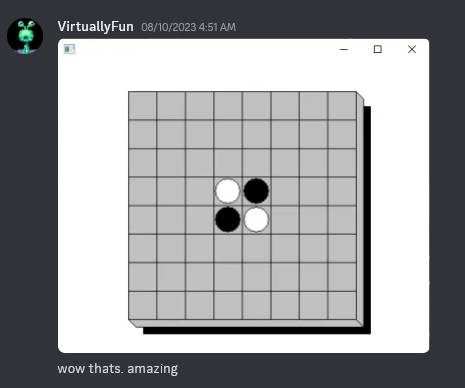
It’s amazing, it’s reversi!
After this, I got to work on getting more complicated applications to work. Several failed due to lack of floating-point support, some failed due to unsupported DLLs, but I was able to get FreeCell and WinMine to work (with some bugs) after adding SHELL32. I was able to run the real SHELL32.DLL from Windows NT 3.51 under this environment.
FreecellMinesweeper
One might wonder why I put all this work into running x86 programs on x86, but the reason is that there’s the most information about, and I’m most proficient with, Windows on the 386. Not only does Windows on other CPUs use other CPUs, but also there’s different calling conventions and a lot of other stuff I didn’t want to mess with at first. But this was at least a proof-of-concept to build a framework where I could swap the CPU core for an emulator for MIPS or PPC or Alpha or whatever I wanted and get stuff running.
Astute readers might be wondering why I didn’t take the approach taken by WOW64. For those who don’t know, most system DLLs on WOW64 are the same as those in 32-bit Windows, the only ones that are different are ones with system call stubs that call down to the kernel (NTDLL, GDI32, and USER32, the first of which calls to NTOSKRNL and the latter two calling to WIN32K.SYS). WOW64 instead calls a function with a system call dispatch number, which does essentially the same thing. The reason for this is that the system call numbers are undocumented and change between versions of Windows. WOW64, being an integrated component of Windows, can stay up to date. If I took this approach, I’d either have to stay locked to one emulated set of DLLs (i.e. from NT 4.0) and use their system call numbers on the emulated side, or write my own emulated DLLs and stick to a fixed set of numbers, but either way I’d somehow have to map them to whatever syscall numbers are being used on the host.
As I went on, I should probably also mention that what I said earlier about loading Win32 apps being easy was wrong. Loading a PE image is pretty straightforward, but once you get into populating the TEB and PEB (many of whose fields are undocumented), it quickly gets gnarly, and my PEB emulation is incomplete.
Adding MIPS support wasn’t too much of a hassle, since the MIPS ISA (ignoring delay slots, which gave me no shortage of trouble) is pretty clean and writing an emulator wasn’t difficult. The VirtuallyFun Discord pointed me to Embedded Visual C++ 4.0, which was invaluable to me during development, since it included a MIPS assembler and disassembler, which I haven’t seen elsewhere. After writing a set of MIPS thunk DLLs and doing some more debugging, I finally got Reversi working.
There’s still some DLL relocation/rebasing issues, but Reversi is finally working in this homebrewed WOW!
I’d encourage someone to write a CPU module for the DEC Alpha AXP (or even PowerPC if anyone for some reason wants that). The API isn’t too complicated, and the i386 emulator is available for reference to see how the CPU emulator interfaces with the Win32 thunking side. An Alpha backend for the thunk compiler can definitely be written without too much trouble. Obviously, the AXP presents the challenge that fewer people are familiar with its instruction set than MIPS or 386, but this approach does free one from having to emulate all of the intricate hardware connections in actual Alpha applications while still running applications designed for it, and I’ve heard the Alpha is actually quite nice and clean. MAME’s Digital Alpha core could be a good place to start, but it’ll need some adaptation to work in this codebase. Remember that while being a 64-bit CPU with 64-bit registers and operations, the Alpha still runs Windows with 32-bit pointers, so it should run in a 32-bit address space (i.e. pass /LARGEADDRESSAWARE:NO to the linker).
Theoretically, recompiling the application to support the full address space should enable emulation of AXP64 applications, since the Alpha’s 64-bit pointers will allow it to address the host’s 64-bit address space, but I’m not sure if my emulator is totally 64-bit clean, or if the AXP64’s calling convention is materially different from that on the AXP32 in such a way that would require substantial changes. In either case, most of the code should still be transferable.
I also want to get more “useful” applications running, like development tools (i.e. the MSVC command line utilities – CL, MAKE, LINK, etc.) and CMD. Most of that probably involves implementing more thunks and potentially fixing CPU bugs.
This project is obviously still in a quite early stage, but I’m hoping to see it grow and become something useful for those in the hobby.