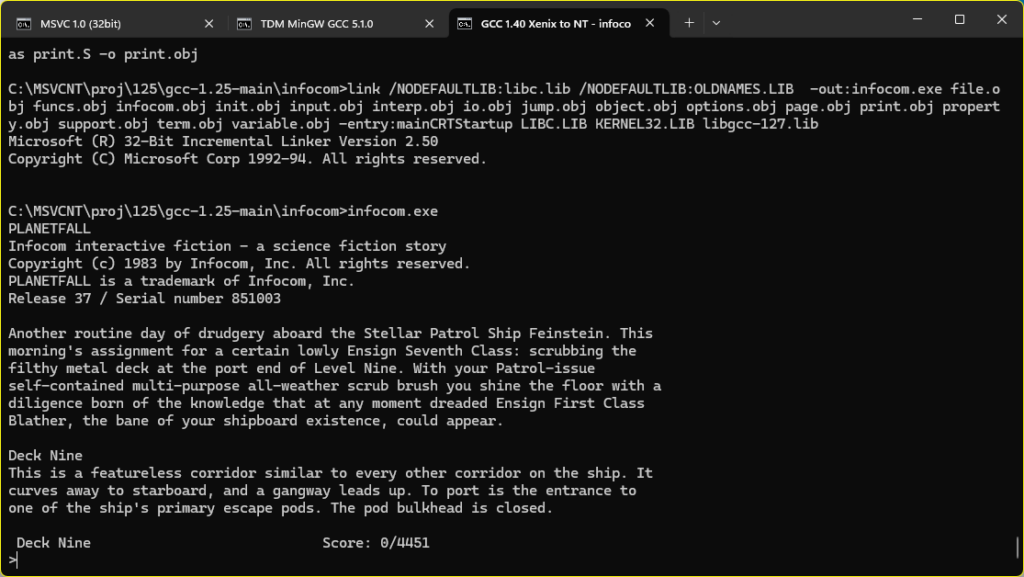
Oh sure I’ve done this ages ago, getting GCC 1.40 to compile with old Microsoft C compilers, and then target Win32, it’s not that ‘special’. But I thought I’d try to get them to build with MASM so I could just distribute this with an assembler. Spelling out the joke of some assembly required.
Although I wasn’t going to target/host OS/2 I was ideally going straight to Win32, the MASM 6.11 assembler couldn’t assemble the MSVC 1.0 / MSC/386 8.0 compiler’s assembly output, I needed to use the MASM 7 from Visual C++ 2003; namely:
Microsoft (R) Macro Assembler Version 7.10.3077 Copyright (C) Microsoft Corporation. All rights reserved.
MASM 6.11 was having issues with pushing OFFSET’s ie:
push OFFSET _obstack
when they were defined as:
COMM _obstack:BYTE:024H
Chat GPT to the rescue knowing that later MASM’s will just handle it just fine. And it was right! I know AI gets a bad rep, but surprisingly (or not when you think about what it’s been trained on), it’s got some great insight to some old things like seemingly common software tools, and old environments.
I didn’t bother trying to use Microsoft C/386 6.0 & MASM386 5.1 to see if it’ll handle CC1, as that seems to be a bit extreme. and I wanted this to run on semi modern Win32 stuff. More so that there isn’t a 64bit SMP aware OS/2 with a modern web browser. Kind of sad to be honese, but it’s 2026, and here we are.
I as always stick to the Xenix GAS port that outputs 386 OMF objects that earlier linker’s can happily auto-convert to coff and use on Win32. One day I feel I should ask why they were cross compiling NT/i386 from OS/2 1.21 instead of using Xenix?! Must have been some fundamental NTOS/2 thing I suppose.
Long story there was that the Xenix GAS emits an ancient 386 OMF format that for unknown reaons the older Microsoft Linkers happily accept and auto convert into COFF, the file format of the future (Future being 1988). I guess for better. or worse we never got NT/ELF. Oh and speaking of further weird, the IBM version of their LINK386 doesn’t like the Xenix 386 OMF. Bummer.
One thing I found out is that the MASM v7 doesn’t output COFF by default, rather it’s 386 OMF! you need to add the /coff flag to force it to be more Win32 friendly. Kind of unexpected behaviour.
I tried to make this simple as, clone the repo and run ‘build.cmd’ it’ll link up GCC and then build the test programs, and clean up after itself.
I’d tried to emit assembly for the Xenix GAS, but for some reason it’s struggling with floating point. I’m not sure, I tried using chat gpt to debug but it get’s confused on how this whole bizzare tool chain is working. I guess I can’t blame it.
Sorry it’s been a while, been feeling ‘life’ lately. I had some i7 project as a kicker for a retro Windows 10 build thing to do but watchign the RAM crissis unfold and well life… I just got feeling like it’s so irrelevant who’d care. That and it’s insane watching $1.11 worth of DDR3 RAM now selling for $30++ …. and more and more chip manufacturers are exiting. So it felt like maybe go back and do more with less. Even a low end machine can assemble this in seconds!
I’d always seen on Windows that Qemu built with GCC 3.4.5 was not only faster, but more stable than GCC 4.x when regarding version 0.10 (I’m not even going to entertain later versions, as this is about old software).
I’ll have to post more, but I’ve basically learned nothing from all my other Pentium 4 / i915 chipset disasters, and now have my 8th system up and running!
by default it has GCC 4.0.0 for i386, and a GCC 3.x for PowerPC building. Natrually, with assumption in hand, how do you build GCC 3 for Intel?
Thankfully, the question was asked on Mac OS X Hints a few decades ago:
And it was saved in the wayback machine, because, preserving the past is hard.
The steps are pretty simple:
$ tar -zxf gcc_os-1819.tar.gz

3. Fix a line that causes it to not compile: in the file gcc_os-1819/gcc/gcc.c, on line 5883, change the line to look like this:

(char ) v[q - vt] = 0;

4. Make a build directory and run configure. I installed my compiler in /opt/gcc3, and I only built the C compiler. This would not work for building C++ or Cocoa applications.
$ mkdir build
$ cd build
$ ../gcc_os-1819/configure --prefix=/opt/gcc3 --enable-languages=c
Which was great except where on earth am I going to find this old GCC?
For the 2-3 people who will be interested in this kind of thing 20 years from now I went ahead and did the single patch, and built binaries and put them on github over at gcc_os-1819_Marklar.
For testing, I’m using a VMDK with MS-DOS 5.00 no config.sys and DooM v1.1 running the timedemo both with no sound. (gametics/realtics)*35=fps. and in this case, demo1 of DooM v1.1 is 1077 gameticks.
GCC 3.5     gcc version 3.5.0 20041003 (Apple Computer, Inc. build 3506)
GCC 4.0     gcc version 4.0.0 (Apple Computer, Inc. build 5026)
no draw (ticks)
GCC 3.5       6/7/7
GCC 4.0       6/7/6
draw-16bit screen depth (ticks)
GCC 3.5       1074/1074/1077
GCC 4.0       948/947/949
And now for the bad news, it turns out that GCC 4.0 is just slightly faster than GCC 3.3
I couldn’t believe it either.
For anyone that cares, DOSbox SVN builds more or less okay on Tiger with some small fix to the MIDI compatibility code (#ifdef stuff, the MIDI works fine!) and it’s timings are for no draw
DOSBox 566/560/565
and drawing on a 32bit screen (16bit is incompatible)
DOSBox 22/26/25
The takeaway is that the CPU is much faster on Qemu, but screen rendering is much faster with DOSBox. DOSBox uses SDL, so let’s go one further, and rebuild Qemu with SDL instead of it’s Cocoa support! So how we doing in the tick department?
GCC 3.5       1005/999/1000
GCC 4.0       885/886/882
The real killer would of course be trying a newer version of GCC. Which I tried several, but Apple had done something really strange to them, where they product self-modifying code by default. And the assembler in 10.4.1 can’t handle that.
unknown section attribute: self_modifying_code
No really, it’s a thing!
Obviously, I updated my cc-tools to 622.9, and guess what?
I tried :
gcc-5247
gcc-5250
gcc-5370
All give the following:
Illegal instruction
Is this some DTK Pentium 4 thing? Or a Tiger 10.4.1 thing?
verbose output for the curious:
Viglen:~/tmp2 jsteve$ gcc -v hi.c -o hi
Using built-in specs.
Target: i686-apple-darwin8.1.0
Configured with: ../gcc-5247/configure --prefix=/opt/gcc-5247 --enable-languages=c
Thread model: posix
gcc version 4.0.1 (Apple Computer, Inc. build 5247)
 /opt/gcc-5247/libexec/gcc/i686-apple-darwin8.1.0/4.0.1/cc1 -quiet -v -D__DYNAMIC__ hi.c -fPIC -quiet -dumpbase hi.c -auxbase hi -version -o /var/tmp//ccq5CJ5D.s
ignoring nonexistent directory "/opt/gcc-5247/lib/gcc/i686-apple-darwin8.1.0/4.0.1/../../../../i686-apple-darwin8.1.0/include"
#include "..." search starts here:
#include <...> search starts here:
 /usr/local/include
 /opt/gcc-5247/include
 /opt/gcc-5247/lib/gcc/i686-apple-darwin8.1.0/4.0.1/include
 /usr/include
 /System/Library/Frameworks
 /Library/Frameworks
End of search list.
GNU C version 4.0.1 (Apple Computer, Inc. build 5247) (i686-apple-darwin8.1.0)
        compiled by GNU C version 4.0.0 (Apple Computer, Inc. build 5026).
GGC heuristics: --param ggc-min-expand=100 --param ggc-min-heapsize=131072
Compiler executable checksum: 8944321fb1b2a413196eb995bbfd7ab0
hi.c: In function 'main':
hi.c:3: warning: return type of 'main' is not 'int'
 as -arch i386 -force_cpusubtype_ALL -o /var/tmp//ccFyDIlr.o /var/tmp//ccq5CJ5D.s
 /opt/gcc-5247/libexec/gcc/i686-apple-darwin8.1.0/4.0.1/collect2 -dynamic -arch i386 -weak_reference_mismatches non-weak -o hi -lcrt1.o /opt/gcc-5247/lib/gcc/i686-apple-darwin8.1.0/4.0.1/crt2.o -L/opt/gcc-5247/lib/gcc/i686-apple-darwin8.1.0/4.0.1 -L/opt/gcc-5247/lib/gcc/i686-apple-darwin8.1.0/4.0.1/../../.. /var/tmp//ccFyDIlr.o -lgcc -lSystem
Viglen:~/tmp2 jsteve$ ./hi
Illegal instruction
I’m not entirely sure.
I need a Snow Leopard machine.
Also DosBox SVN wasn’t too hard to build, and runs great.
So, with some really minor hacking, and my port of GCC 1.40 to OS/2, I was shockingly up and running in no time! I should add again that I do kind of enjoy the much older GCC since it was capable of being built with ‘vendor’ tools, in this case the December 1991 Windows NT pre-release C compiler.
I didn’t bother ‘fixing’ the timing code, as honestly it doesn’t matter, running this on my PS/2 Model 60 with the SLC50 upgrade card is incredibly slow.
Seriously, this is me running the llama for 3 hours!
At best it’s about a word every two minutes, getting this far was over 3 hours of runtime.
I have a feeling much like MP3, where the ideas are significantly older than when they found mainstream success, there is a lesson here to the impatient ones, that just because something doesn’t work today, or seem incredibly unwieldy, it doesn’t mean decades later it’ll be incredibly popular.
For anyone wondering, I also built one that uses the TNT extender, and it seems to require 4MB of RAM. Absolute beast of a 32bit machine for 1987, but here we are.
Yes, it’s from 1981. I’m that old to remember this.
Getting NT ready
The first thing I wanted was to install the Pre-Release onto a HPFS disk. I’ve uploaded this over on archive.org (Windows NT December 1991 prepped for Qemu). I took the CD-ROM image, removed all the MIPS stuff, built a boot floppy, and setup the paths so that the floppy can boot onto the secondary hard disk to a ‘full’ version of NT. This lets me format the C: drive as HPFS, and then do a selective install of Windows NT to ensure that that the software tools (compiler) are installed.
I use a specially patched vintage QEMU build, qemu-0.14.0.7z which kind of makes it ‘easier’, along with the needed disk images in dec-1991-prepped.7z
This will bring up the boot selection menu. The default option is fine, you can just hit enter.
boot NT from D:
NT will load up and you now have to login as the SYSTEM user. We need the advanced permissions to format the hard disk.
Login as ‘system’
From the desktop we first format the C: drive as HPFS. I made icons for all this stuff to try to make it as easy as possible.
You’ll get asked to confirm you want to do this, and give the disk a creative name.
And with the disk formatted it’s time to start the setup process.
Who are you?
And what slick account do you want? It doesn’t matter tbh.
I’m going to do a custom install as the NIC’s aren’t supported, and even if they were it’s just NetBEUI anyways.
And select your hardware platform. NT basically only supports this config, so it doesn’t matter.
The default target drive is our C drive, which we had just formatted to HPFS.
Next, I unchecked everything only leaving the MS Tools
It’ll offer the samples & help files. I always install them as I eventually need examples of stuff to steal, and to learn that including <windows.h> won’t work right unless you manually define a -Di386 on the command line. I’m saving you this pain right now up front.
Files will copy, and on a modern machine this takes seconds.
And there we go!
And Windows NT is installed.
Yay.
I put in a ‘CAD’ feature in this Qemu hitting control+alt+d will send the familiar pattern, and after a few times NT will reboot. We are pretty much done with NT for the moment, but congrats you’ve installed the December 1991 Pre-release onto a HPFS disk for those sweet long long file names!
Going over the strategy:
I’ve already built GCC 1.40 for NT, so what is the rest of the stuff needed to build Linux? It’s a quick checklist but here goes, in no specific order:
GCC 1.40
bin86
binutils
gas 1.38
bison
unzip
zip
Luckily as part of building on Windows 10 using MinGW, I had fixed the weird file issues as MS-DOS/Windows NT/OS2 handle text/binary files, as we went through with how Github mangled MS-DOS 4.00.
The primary reason I wanted a working zip/unzip was to deal with long file names, and to auto convert text files. And this ended up being an incredible waste of time trying to get the ‘old’s code on the Info-Zip page.
Info-Zip’s old downloads. Version 5 only!
I’m sure like everything else, the old versions are removed as they probably suffer from some catastrophic security issue with overflows. The issue I ran into is that the version 5 stuff uses so many features of shipping NT, to even 2000 that it was going to be a LOT of work to get this far. The quicker & easier path as always turned out to be a time machine.
Thankfully, since I had made a copy of the UTZOO archives, I was able to fish out, both version 3.1 from the archives. Also known as “Portable UnZIP 3.1”, parts 1/2/3. I also found version 4.1 as well. And people wonder why you want to save these ‘huge’ data sets. If the lawyers could have their way, they would obliterate all history.
I spent a lot of time messing with Makefiles, as linking & object conversion on old NT is a big deal, and not the kind of thing you want to do more than once. Another big pain is that large files become delete only. I don’t know what the deal with notepad is, but I could remove text, but not change or add. I solved that by wrapping a number of things by including it in another file with some #define work to go around it. Needless to say, that sucked.
One thing that constantly threw issues is that this version of Windows doesn’t handle Unix style signals. I removed all the signal catch/throw stuff, and the binaries ran fine. Why on earth does ‘strip’ need signals is beyond me, but it runs fine without them!
On Windows I just unzip the bin.zip file and leave source.0.zip intact into a directly say something like temp. Then I can use a cool feature of Qemu where it can mount a directory as a read-only FAT disk. This saves a lot of time!
Will drop to the bootloader. Hit enter to login, and you’ll be at the desktop. Hit enter again, and open a command prompt.
open the command prompt
By default, the Numlock is messing with the arrow keys (I think it’s mapping to the old 83 key keyboard no matter what?) Hit num-lock and your arrow keys should kind of work. It’s a great time saver.
copy the binaries to \bin & get ready to unzip
I copied the binaries & the ygcc.cmd file into the \bin directory, created a \proj directory and get ready to unzip all the source code. For some reason this version of unzip doesn’t understand the zip compression, so it’s just storing instead, much like TAR. It’s not that involved but unzip with the -d flag so it creates directories as needed.
unzipped
This will let us keep long file names. HPFS is case insensitive, but it also preserves the case, so don’t worry about the names being all weird. It doesn’t matter.
One thing worth mentioning is that even though the C pre-processor does compile it just hangs when trying to run it. I’m not sure what is wrong exactly, but it’s just not worth fighting. Instead, I had the better idea, of using the Microsoft C compiler to pre-process the source. Apparently, this is how they originally built Windows NT, pre-processing on OS/2, then uploading the pre-processed files to a SUN workstation with the i860 compiler and downloading the objects to be converted & linked. Wow that must have been tedious!
I created a CMD file ‘ygcc.cmd’ to run the cl386 pre-processor, call CC1 & GAS and clean up afterwards.
Before you can build Linux, you need to create both a \tmp & \temp directory. Also the include files need to be copied to the \include directory to make the pre-processor happier.
I’ve tried to make this as simple as possible there is a ‘blind.cmd’ file which I built that’ll manually compile Linux. There is no error checking.
And saving everyone the excitement here is an animation of the build process
Actually compiling Linuxcompiled!
And there we go! All compiled!
From there it’s a matter of copying the Image file out of the VM, I used the boot floppy and 7zip’s ability to extract FAT images, and then boot up Qemu using the Image file as a ‘floppy’ as back in the day we used to rawrite these to floppy disks.
One of the things that always annoyed me about DooM is the fixed point math. It relies on a 64bit data type, which many 32bit platform just lack. Namely the FixedMul & FixedDiv.
fixed_t FixedMul
( fixed_t a,
fixed_t b )
{
return ((long long) a * (long long) b) >> FRACBITS;
}
They are generally re-written into assembly, at least for the i386 getting around the whole 64bit on a 32bit platform.
So that’d always been the ‘catch’ when porting Doom is that you either need a ‘long long’ data type, or the custom assembly or you basically are out of luck.
I know I’m a weird person, but I do like going backwards in terms of software, while most people want latest GCC 14 targeting old machines or some other hack, I prefer the opposite, trying to get the oldest stuff running on something new(er). In this case, it’s GCC 1.27.
While much of the old GCC history is lost, I did my best to collect as many versions as I could find here, along with doing patches in reverse to ‘reconstruct’ many old versions. The results are on archive.org. And what is significant from this, is the first version of GCC with i386 support appears in version 1.27.
From the internals-1 file we can find out that we all have William Schelter to thank for doing the bulk of the 386 port of GCC.
William Schelter did most of the work on the Intel 80386 support.
Internals-1 – gcc 1.27
With the first commit being on May 29th, 1988:
Sun May 29 00:20:23 1988 Richard Stallman (rms at sugar-bombs.ai.mit.edu)
...
	* tm-att386.h: New file.
GCC 1.25
The first GCC with i386 parts is 1.25, however it tends to emit the instruction movsbl, which GAS doesn’t like. Comparing the output to GCC 1.40 reveals this:
-	movsbl -12(%ebp),%ax
+	movsbw -12(%ebp),%ax
It’s trivial enough to change to a movsbw, but there are some other issues going on, and even the Infocom ’87 interpreter won’t fully build & run. The files input.c & print.c have to be built with a later version of GCC, in this case I used GCC 1.40.
8&% compiled with GCC 1.25!
However when using the old XenixNT build thing I did, I do get a runnable EXE!
GCC 1.25 targeting DJGPP v1
I added the BSD targeting files from 1.27 allowing it to generate the needed underscores in the right places, as 1.25 by default only supports AT&T syntax. I guess the best way to illustrate it is to compile the compiler twice, once as the AT&T compiler, and the next being the BSD compiler, and compare their output:
cc1-att.exe hi.cpp -quiet -dumpbase hi.c -version -o hi-att.s
GNU C version 1.25 (80386, ATT syntax) compiled by GNU C version 4.8.1.

.text
.LC0:
        .byte 0x31,0x2e,0x32,0x35,0x0
.LC1:
        .byte 0x68,0x65,0x6c,0x6c,0x6f,0x20,0x66,0x72,0x6f,0x6d
        .byte 0x20,0x25,0x73,0xa,0x0
        .align 2
.globl main
main:
        pushl %ebp
        movl %esp,%ebp
        pushl $.LC0
        pushl $.LC1
        call printf
.L1:
        leave
        ret
And then looking at the BSD syntax:
cc1-bsd.exe hi.cpp -quiet -dumpbase hi.c -version -o hi-bsd.s
GNU C version 1.25 (80386, BSD syntax) compiled by GNU C version 4.8.1.

        .file   "hi.c"
.text
LC0:
        .byte 0x31,0x2e,0x32,0x35,0x0
LC1:
        .byte 0x68,0x65,0x6c,0x6c,0x6f,0x20,0x66,0x72,0x6f,0x6d
        .byte 0x20,0x25,0x73,0xa,0x0
        .align 1
.globl _main
_main:
        pushl %ebp
        movl %esp,%ebp
        pushl $LC0
        pushl $LC1
        call _printf
L1:
        leave
        ret
As you can see main: becomes _main:, just as labels (LC0/LC1) have a prepended, while in BSD they do not. There are no doubt countless other nuanced differences, but for the assembler & operating system to match you want these to align. Thankfully calling conventions are mostly the same per processor so you can add the underscores to the AT&T target and get something that’ll run, not only on DJGPP but also Win32, as MinGW32 uses BSD syntax at its heart!
C:\xdjgpp.v1\src\26>gcc hi-bsd.s -o hi.exe

C:\xdjgpp.v1\src\26>wsl file hi.exe
hi.exe: PE32 executable (console) Intel 80386, for MS Windows

C:\xdjgpp.v1\src\26>hi
hello from 1.25
Not that we really need to go all the way and have GCC 1.25 running on anything much, although at the same time it’s kind of fun!
Reaching out for help
The oldest & most robust GCC is 1.27, and I’d been able to use that to build DooM before, but the caveat is of course the fixed point math. I’d asked smarter people than I years ago about this problem, and basically was told to figure it out for myself. After all its ‘trivial’. But alas, I’m not smart. What I would do is build the fixed point math with GCC and try to re-work that into other compilers, although again for platforms without GCC or the target CPU lacking the 64bit data type is well.. fatal.
But AI, sadly for it, is compelled to help. So I just went ahead and asked and got a surprising result!
Sydney strikes back!
It’s very C++ like but it’s trivial enough to make it into old C.
Sydney’s fixed-point guess
Well on the one hand it does actually load up and play. But the controls go wild and I’m pulled into the intersection of these boxes, and unable to move. And as I rotate the floor and walls clip in and out. It’s very weird.
Not knowing anything about anything, I saw this ‘guard’ on the fixed division and tried to add that to the multiply:
After thinking about it on and off, asking for more help and going nowhere, I just gave up. It’s something beyond my skill, and apparently the AI as well. Until I had one of those moments in a dream where I had somehow told myself I bet the integers are not unsigned, and obviously fixed-point math needs all the bits, and it’s such a trivial fix, that even I should have figured it out.
I woke up at 4am and fired up the computer to see if it did anything. I was surprised to see that yes, in fact the integers were signed. I added the one key word, and recompiled using GCC 2.2:
Now with unsigned integers
And it RAN! I tried GCC 1.39, and too ran! I then made sure there was no assembly modules being called accidentally, and then re-built with GCC 1.27, and yeah, it runs!
Armed with a simple port of DooM to Win32, I went ahead and put in the fixed-point solution, and used Visual C++ 1.10 aka Microsoft C/C++ 8.0 to build DooM, and yes it works there too!
In the end I guarded it around a long long type, as I’m sure it’s much more faster, but for those without the types or any assembly skill, here is the solution:
/* Fixme. __USE_C_FIXED__ or something. */
fixed_t
FixedMul
( fixed_t a,
fixed_t b )
{
#ifdef HAVE_LONG_LONG
return ((long long) a * (long long) b) >> FRACBITS;
#else
unsigned int ah,al,bh,bl,result;
ah = (a >> FRACBITS);
al = (a & (FRACUNIT-1));
bh = (b >> FRACBITS);
bl = (b & (FRACUNIT-1));
/* Multiply the parts separately */
result = (ah * bh) << FRACBITS; /* High*High */
result += ah * bl; /* High*Low */
result += al * bh; /* Low*High */
/* Low*Low part doesn't need to be calculated because it doesn't contribute to the result after shifting
// Shift right by FRACBITS to get the fixed-point result */
result += (al * bl) >> FRACBITS;
return (fixed_t)result;
#endif
}
/* */
/* FixedDiv, C version. */
/* */
fixed_t
FixedDiv2
( fixed_t a,
fixed_t b )
{
#ifdef HAVE_LONG_LONG
long long c;
c = ((long long)a<<16) / ((long long)b);
return (fixed_t) c;
#else
double c;
c = ((double)a) / ((double)b) * FRACUNIT;
if (c >= 2147483648.0 || c < -2147483648.0)
I_Error("FixedDiv: divide by zero");
return (fixed_t) c;
#endif
}
fixed_t
FixedDiv
( fixed_t a,
fixed_t b )
{
	if ( (abs(a)>>14) >= abs(b))
		return (a^b)<0 ? MININT : MAXINT;
return FixedDiv2 (a,b);
}
I haven’t tested it on Big Endian machines yet. I’ve updated my terrible DooM engine port, along with Doom-New for DOS. Additionally, I’ve been able to confirm it works with Watcom 9-OpenWatcom 2. It might even work with 7 & 8 but I haven’t tried.
So, with a renewed interest in OS/2 betas, I’d been getting stuff into the direction of doing some full screen video. I’d copied and pasted stuff before and gotten QuakeWorld running, and I was looking forward to this challenge. The whole thing hinges on the VIO calls in OS/2 like VioScrLock, VioGetPhysBuf, VioScrUnLock etc etc. I found a nifty sample program Q59837 which shows how to map into the MDA card’s text RAM and clear it.
It’s a 16bit program, but first I got it to run on EMX with just a few minor changes, like removing far pointers. Great. But I wanted to build it with my cl386 experiments and that went off the edge. First there are some very slick macros, and Microsoft C just can’t deal with them. Fine I’ll use GCC. Then I had to get emximpl working so I could build an import library for VIO calls. I exported the assembly from GCC, and mangled it enough to where I could link it with the old Microsoft linker, and things were looking good! I could clear the video buffer on OS/2 2.00 GA.
Now why was it working? What is a THUNK? Well it turns out in the early OS/2 2.0 development, they were going to cut loose all the funky text mode video, keyboard & mouse support and go all in on the graphical Presentation Manager.
Presentation Manager from OS/2 6.605
Instead, they were going to leave that old stuff in the past, and 16bit only for keeping some backwards compatibility. And the only way a 32bit program can use those old 16bit API’s for video/keyboard/mouse (etc) is to call from 32bit mode into 16bit mode, then copy that data out of 16bit mode into 32bit mode. This round trip is called thunking, and well this sets up where it all goes wrong.
Then I tried one of the earlier PM looking betas 6.605, and quickly it crashed!
SYS2070:
Well this was weird. Obviously, I wanted to display help
Explanation:
This ended up being a long winded way of saying that there is missing calls from DOSCALL1.DLL. Looking through all the EMX thunking code, I came to the low level assembly, that actually implemented the thunking.
EXTRN   DosFlatToSel:PROC
EXTRN   DosSelToFlat:PROC
After looking at the doscalls import library, sure enough they just don’t exist. I did the most unspeakable thing and looked at the online help for guidance:
No VIO
So it turns out that in the early beta phase, there was no support for any of the 16bit IO from 32bit mode. There was no thunking at all. You were actually expected to use Presentation Manager.
YUCK
For anyone crazy enough to care, I uploaded this onto github Q59837-mono
It did work on the GA however so I guess I’m still on track there.
I know what you are going to think, that it was already done, and it was called EMX. Or was it GCC/2? Well sure but what if you are not running the GA (General availability) version of OS/2. For example, years ago I had managed to get Citrix Multiuser 2.0, and it’s not at the GA level. All that is available is some ancient beta version of Microsoft C 5.2 from 1989?!
A little while back I had worked on getting GCC to build and run on the FPU enabled versions of Windows NT from 1991. I had mentioned that it turns out thanks to the Xenix assembler, that GCC had been basically available the entire time Windows NT had been available, but lamented that since the OS/2 compiler is 16/32bit, the 5.2 compiler couldn’t handle compiling GCC without blowing it’s heap. 16bit issues in a 64bit world.
However after doing some research on all the early cl386 compilers I could get my hands on, including the Windows NT Pre-release ones, I’d noticed that if I built CC1.EXE (the actual compiler) first for Win32, then rebuilt those object files with the December NT Pre-release compiler, that some versions of LINK386 from the OS/2 2.1 DDK would actually link with them. And sure enough it worked!
First life of GCC on OS/2
I have to admit I was pretty amazed, I had managed to ‘cross compile’ GCC using quite the tool chain.
First the compiler from the December NT Pre-release CD-ROM is shipped as a 16bit OS/2 compiler, but I’m using Windows 11. First I use the MS-DOS player with a quick fix from crazyc to allow Phar Lap 286|Dos Extender to run, which provides a basic enough OS/2 emulation to allow the compiler to run under ‘dos’. The linker on the DDK suffers the same fate as far as it also being 16bit. However the combination of MS-DOS player & Phar Lap gets stuff working! The only weird catch is that the 386 emulator causes strange floating point related crashes, while the 286 or 486 emulators work fine.
Now targeting OS/2 or running on OS/2 isn’t all that new, but building it from a Microsoft C compiler is. And now of course you’ll ask yourself, who cares? why is it interesting?
Well, the vast majority of the GCC ports to OS/2 don’t support the OMF object file binary standard, instead they used the much outdated a.out format, and rely on tools to convert the objects if needed. Additionally, they have DLL dependencies, and other startup issues with things needing to be setup. And of course they rely on a binary standard that is ‘GA’. *HOWEVER* by using a Microsoft compiler, I have OMF object files that the OS/2 built in system linker LINK386 can understand. So in plain English I can just relink the compiler and it’ll run on a new ‘version’ of unsupported OS/2.
I made a diskette image with my objects & a linker script and in a few moments I had it running!
GCC running on OS/2 2.00 6.123
The substantial thing here is that the binary format for OS/2 changed twice, and each release introduced changes that broke binary compatibility, in an effort to force people onto the new tools. So there is no way that the old ‘LE’ format would ever work. And you can see it’s running! In addition I could take the same object files, and copy them to my Citrix server, and likewise it was just a matter of linking, and it too now has GCC!
Converting a.out to OMF via emxomf
One annoying thing is that the LINK386 that ships with OS/2 2.00 GA doesn’t like the output of the Xenix assembler, so I built the a.out traditional assembler, and the emxomf tool to convert the a.out to OMF, and that worked well.
I still have much to mess with, including the pre-processor & main ‘gcc’ program. I have not built anything beyond a trivial program, so there is indeed much more work to be done before I can even try anything challenging. Some programs like emxomf have portions in the debug support that require the ‘long long’ type, which obviously Microsoft compilers from 1989-1991 don’t have, so I’ll have to re-build them with GCC.
Not that I can imagine anyone wanting to try but I’ve uploaded some disks with the objects. Copy them to a hard drive, and run the ‘build.cmd’ command and it’ll link to a native freestanding executable.
I’ll explain it more with a post later, along with going over all the versions of cl386 I’ve acquired, over the years in more of a part 2: Targeting OS/2 with Visual Studio 2003!
This is going to be a bit convoluted but here goes.. GCC isn’t a monolithic compiler, instead it’s various parts are separate programs. This lets us tackle it one part at a time. And/Or bypass a lot of it until I want to tackle it.
Flow of GCC
I’m sure many people have explained this far better than I ever could but in C you write source files (obviously), the pre-processor reads those and ‘header’ files that describe interfaces to libraries, other objects, various macros and definitions (magical numbers) and the pre-processor will read those files, and do simple macro expansion and test insert/replacements to generate a single .i file at the end of it’s run.
The C compiler (cc1) now reads that single .i file and translates it into native assembly. This allows for ‘mid/high level’ aspects of C to be machine independent (portable) but now will be written into a very system dependant assembly file, the single .S file. One thing of note is that so far everything is text files. You can edit the assembly file as you would any document, or even further ‘process’ it if needed/wanted.
The assembler ax386 (GAS) will then read the single assembly file and write a a binary object file hi.OBJ. There typically isn’t all that much to be said about assemblers although fancier ones allow for really strong Macro capabilities like Microsoft MASM.
From here on, it’s all binary objects!
The linker then takes your object files, and links them together with other system objects and system libraries into an executable, in this case. Linkers can build all kinds of other things, but for now we’re just pretending its static C compilation like it’s the 1970’s.
At it’s heart GCC processes text files.
The first part in this insane experiment, is to build GCC 1.40 with Microsoft Visual C++ 1.0. Surprisingly it didn’t take an insane amount of messing with stuff, and I got an executable! But everything it compiled failed to assemble. Looking at this fragment, even if you don’t know i386 assembly you might spot the error:
main:
        pushl %ebp
        a b,c
        pushl %esi
        pushl %ebx
Yeah, it’s the “a b,c” part. Those are NOT valid i386 opcodes!
Just because it compiled didn’t mean it actually worked.
I used MinGW to build the same source, same Makefile, and I got a working executable. Annoyed I started compiling random files with Microsoft C, and finally found the file that broke it all, it turned out to be insn-output.c needing to be compiled with the “/D__STDC__” flags. A quick modification of the Makefile and now I have a working CC1!
Okay, great, it’s well known back in the early dangerous ages of the 1980’s/1990’s that everyone wasn’t running Linux, nor were binary distributions of GCC that far spread, rather I think to re-enforce the source was available it was expected that you’d use your system compiler. Systems like DJGPP/EMX take the path of binding a.out object files into something that MS-DOS can run via a dos extender, or the bind utility to allow you to run the a.out on OS/2. What I wan’t to do is verify that in fact Windows NT was a viable host for GCC back in the public pre-releases of 1991.
I’m sticking with the December build 239 version as it has working floating point. Something that GCC has intrinsic support of, and I don’t feel like trying to work out emulation.
The next step is to try to build it with the family mode-OS/2 version of the C compiler, which of course lead to the real issue of this 16bit hosted cross compiler:
        cl386 /u /Od /Ic:\MSVC32S\C386\INCLUDE /I. /Iconfig /c combine.c
Microsoft (R) Microsoft 386 C Compiler. Version 1.00.075
Copyright (c) Microsoft Corp 1984-1989. All rights reserved.

combine.c
combine.c(1734) : fatal error C1002: compiler is out of heap space in Pass 2
NMAKE : fatal error U1077: 'C:\WINDOWS\system32\cmd.exe' : return code '0x2'
Stop.
Very frustrating. I tried mixing and matching from Visual C++ 1.0 & this old compiler, and while it did compile, it doesn’t run. does it mean anything?!
GCC 1.40 compiled by Microsoft 386 C Compiler. Version 1.00.075
I should point out that this should be an expected working configuration as GCC does build on Xenix using the 32bit Microsoft C 5.1/386 compiler. Furthered again that Xenix and these 1991 versions of NT use the same 32bit OMF object format. And expanding on the Xenixnt experiment using the Xenix’ified GAS assembler with old Visual C++ includes & libraries to produce a possible retro-early port of GCC to NT, the next move is to bulid GAS on NT.
Xenix GAS 1.38 compiled by by Microsoft 386 C Compiler. Version 1.00.075
GAS gave me some weird issues with ctype.h where it runs fine with the one from Visual C++ 1.0 but the OS/2 & NT pre-release both fail. However the old Pre-release compiler cannot deal with the much newer ctype include file. So after much hammering I amputated whatever was bothering it, and it’s just enough to build & run. Great!
Going back to the phases, I used a simple hello world program:
void main() {
 printf("Hello World!\n");
}
While not being a good program, it doesn’t include stdio.h, nor does it return anything. It’s terrible. But in this case it allows me to be lazy and sidestep the pre-processor cpp.exe. This way I can just directly run it through cc1 and get my assembler file hi.S
Next I pass it to ax386 (GAS) and get the resulting object file hi.OBJ
And finally link it with link.exe in this case.
Hello World from GCC 1.40 on NT!
And with all the drama I’ve now compiled a simple hello world program on Windows NT.
If it were 1991, I would hollow out gcc.c so it doesn’t use signals or forks to invoke the needed phases, and of course build the pre-processor. In addition, libgcc needs to be compiled to allow for floating point operations to work correctly. None of which is impossible, although I’m not sure it’s all that needed as it isn’t 1991.
phoon
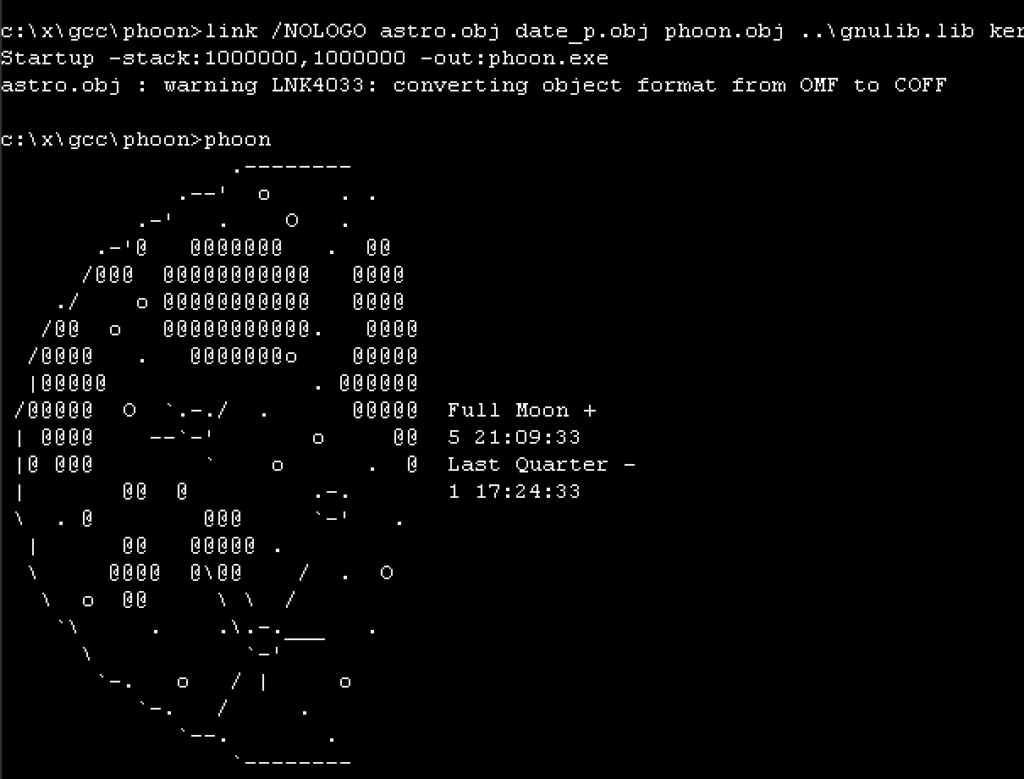
With a little bit more work, I got the floating point support to compile, which relies on both a working ‘native’ compiler, and a working GCC to compile the 2nd half. I usually use phoon, or Phases of the Moon, to test floating point, and as you can see, it’s working!
I’m not sure if there was a 32bit version of Microsoft C/386 available for Microsoft OS/2 2.00 betas. Also, I don’t know if the Microsoft link386 for OS/2 can also link Xenix 386 object files? Would it have been possible to bootstrap GCC/GAS on Microsoft OS/2 2.00? I really don’t know, and as of this writing no versions of the old Microsoft OS/2 2.00 betas have surfaced.
** update from the future, turns out that I found a way to convince the cl386 compilers from the NT Pre-Releases in 1991 to re-build an existing GCC that was built for NT. The catch is the linker, LINK386 of course, as the format was constantly changing. However the object files are fine, and I was able to just copy them over on diskette and re-link the compiler. It even ran. It’s not tested at all, so it turns out the 1989 compiler wasn’t good enough, but the 1991 was.
GCC 1.40 on OS/2 2.00 beta 6.123
It’s interesting to me to see that even before GCC 2.6, that vintage versions from 1991 would compile and run directly on Windows NT.
I’m not sure if I covered the Windows NT 3.1 build 196 before. First the most obvious is that as of this moment it’s the earliest version of Windows NT available.
So let’s do some obligatory scratch of the surface. Like all the other 1991 pre-releases there really is just a text mode setup install script. Choosing the lesser amount of pain, I went with a MS-DOS hosted install. However, using MS-DOS 6.22 resulted in a broken dual boot system. But we live in the era of virtual machines, so it really doesn’t matter. I’m using Qemu 0.14-rc2, something that is ‘era correct’ for when the first avalanche broke on early Windows NT pre-releases. I’ve had issues with more modern versions of Qemu, and I felt that if we’re using vintage software may as well go in all the way.
The boot loader identifies itself as being 1990 vintage. Pretty sure it doesn’t mean anything, but we haven’t been blessed with the “blue screen” of ARC yet.
The login screen and desktop have a very strong Windows 3.1 beta feel to them. And that would land this where it was, Windows was such a big seller that Maritz had been trying to convince Gates & Balmer to ‘switch to the Windows horse’ in the spring/summer of 1990, culminating in Gate’s July decision to walk away from NT/OS2 and rebrand the new OS as Windows NT. Oddly enough it was Balmer who was in favour of OS/2 & IBM. (Showstopper 89-90)
At first glance the opening window isn’t all that interesting. It’s just very. Windows.
Rest assured Reversi, of course made the this Win32 cut. And it’s full of weird easter eggs, oddly enough in the OS/2 surviving bits.
type OS2LDR.DOS
OS2LDR 01.00.01
by KeithMo 01/08/91
On the Discord there had been a big discussion about early NT executable formats, and the whole COFF vs ECOFF vs PE/PEI. I had tried to hunt down the specific version of GCC I used ages to to build a so called Dec Alpha GCC cross compiler, but the short version is that it didn’t work as we don’t have any assembler/linker for anything GNU targets. There had been a cygwin port andanOpenNT on Alpha, but all that is lost to the winds, minus what few scraps I had saved. I did try building some cross tools to elf hoping to just objcopy out the data and get linkable objects, but that didn’t work either.
So I though this was a perfect opportunity to take a look at this early pre-release version of NT, and although I do know that you have to convert your objects into something the ‘COFF’ linker will accept:
And I never really paid that much attention to the object files. I do know that you can link them with Link386 for OS/2, but the NT object files themselves report:
wsl file SIMPLE.OBJ
SIMPLE.OBJ: Intel 80386 COFF object file, not stripped, 4 sections, symbol offset=0x102, 20 symbols, created Thu Jun  1 14:13:50 2023, 1st section name ".text"
Well, now that is interesting. And of course the COFF thing reminded me of Xenix! And sure enough ages ago I had found the source to a modified version of GNU GAS that outputs COFF. Once more again this is an indication that all 386 roads in Microsoft really did originate with Xenix. It’s too bad there never was a Windows/386 on Xenix/386. What an incredible OS that would have been! There must be some incredible stories from the tool teams that worked on Microsoft C/386 along with other projects. Oddly enough they never get anywhere near as much exposure as Office or OS.
Now this is fun, but nothing takes in these ancient COFF objects, do they? I tried to run LINK 1.0 from Win32s SDK and surprisingly it didn’t complain about the object, rather, it auto converted it in memory:
Microsoft (R) 32-Bit Executable Linker Version 1.00
Copyright (C) Microsoft Corp 1992-93. All rights reserved.

SIMPLE.OBJ : warning LNK4016: unresolved external symbol "__chkstk"
LINK : warning LNK4016: unresolved external symbol "_mainCRTStartup"
SIMPLE.OBJ : warning LNK4016: unresolved external symbol "_printf"
SIMPLE.exe : error LNK1120: 3 unresolved externals
Does this mean that if I give it some libraries it will actually link?
LINK.EXE SIMPLE.OBJ /SUBSYSTEM:CONSOLE /MACHINE:i386 -entry:mainCRTStartup -out:simple.exe libc.lib kernel32.lib
Microsoft (R) 32-Bit Executable Linker Version 1.00
Copyright (C) Microsoft Corp 1992-93. All rights reserved.


C:\temp\nt196\x\dec\x>simple
Win32, it's happenin'!
This was. VERY unexpected.
So I had this crazy idea, what if the Xenix assembler could in fact build objects that are also compaible in this manner? I used the a.out GCC / Linux porting tools I had built so I could compile Linux on Windows NT using the vintage tools as a starting point. I guess I should also add that when people always say ‘use newer version of THING’ this is how you miss out on old stuff like this. If I had been obsessed with using modern tools and modern operating systems, I’d have missed out on this Xenix filled window.
I took the gcc driver & the cc1 compiler from 1.40 and the c pre-processor from 2.5.8 as it can understand C++ comments. First I manually compiled the ‘simple’ example to assembly:
gcc -v -nostdinc -I/xenixnt/h -S SIMPLE.c -O simple.S
gcc version 1.40
 cpp -nostdinc -v -I/xenixnt/h -undef -D__GNUC__ -Dunix -Di386 -D__unix__ -D__i386__ -D__OPTIMIZE__ SIMPLE.c C:/Users/jsteve/AppData/Local/Temp/cca2_048.cpp
GNU CPP version 2.5.8 (80386, BSD syntax)
#include "..." search starts here:
#include <...> search starts here:
 /xenixnt/h
End of search list.
 cc1 C:/Users/jsteve/AppData/Local/Temp/cca2_048.cpp -quiet -dumpbase SIMPLE.c -O -version -o SIMPLE.s
GNU C version 1.40 (80386, BSD syntax) compiled by GNU C version 5.1.0.
default target switches: -m80387
 cpp -nostdinc -v -I/xenixnt/h -undef -D__GNUC__ -$ -Dunix -Di386 -D__unix__ -D__i386__ -D__OPTIMIZE__ simple.S C:/Users/jsteve/AppData/Local/Temp/cca2_048.s
GNU CPP version 2.5.8 (80386, BSD syntax)
#include "..." search starts here:
#include <...> search starts here:
 /xenixnt/h
End of search list.
C:\temp\nt196\files\MSTOOLS\SAMPLES\SIMPLE>ax386 SIMPLE.s -o SIMPLE.obj

C:\temp\nt196\files\MSTOOLS\SAMPLES\SIMPLE>wsl file SIMPLE.obj
SIMPLE.obj: 8086 relocatable (Microsoft), "SIMPLE.c", 1st record data length 10, 2nd record type 0x88, 2nd record data length 11
Not quite the same. But it does closer resemble the output from the OS/2 bound versions of the Pre-Rease compilers:
file EMPTY.OBJ
EMPTY.OBJ: 8086 relocatable (Microsoft), "empty.c", 1st record data length 9, 2nd record type 0x88, 2nd record data length 7
So will it link?!
C:\temp\nt196\files\MSTOOLS\SAMPLES\SIMPLE>LINK.EXE SIMPLE.OBJ /SUBSYSTEM:CONSOLE /MACHINE:i386 -entry:mainCRTStartup -out:simple.exe libc.lib kernel32.lib
Microsoft (R) 32-Bit Incremental Linker Version 2.50
Copyright (C) Microsoft Corp 1992-94. All rights reserved.

SIMPLE.OBJ : warning LNK4033: converting object format from OMF to COFF

C:\temp\nt196\files\MSTOOLS\SAMPLES\SIMPLE>simple
Win32, it's happenin'!
Well now this is interesting! LONG before MinGW, or the GCC port to Windows NT, it turns out that in fact GCC could target Windows NT the entire time!
So the next thing to do is something not as trivial, like phoon.
I setup some quick script to pre-process, compile, assemble and then try to link, but as this one uses floating point, disaster struck:
Now ages ago while messgin with old GCC & DooM I also had weird math calls not working. In the end I ended up extracting them from libgcc builds, so I thought I’d try the libgcc built during the GCC 2.6.3 on NT adventure.
link /NODEFAULTLIB:libc.lib /NODEFAULTLIB:OLDNAMES.LIB -out:phoon.exe astro.obj date_p.obj phoon.obj -entry:mainCRTStartup libgcc1.lib LIBC.LIB KERNEL32.LIB
Microsoft (R) 32-Bit Incremental Linker Version 2.50
Copyright (C) Microsoft Corp 1992-94. All rights reserved.
And of course:
To try to make the steps make a little more sense, and to allow for some higher level of automation I made a Makefile:
I’m sure there is better ways to do this, but it breaks the compile up to it’s individual parts:
Run the pre-processor to allow // in the comments, C++ hadn’t been the default thing back when GCC 1.40 was a thing. Also path it to the headers, in this case I’m using the ones from NT 196. Trying to link with the 196 libraries gave me this:
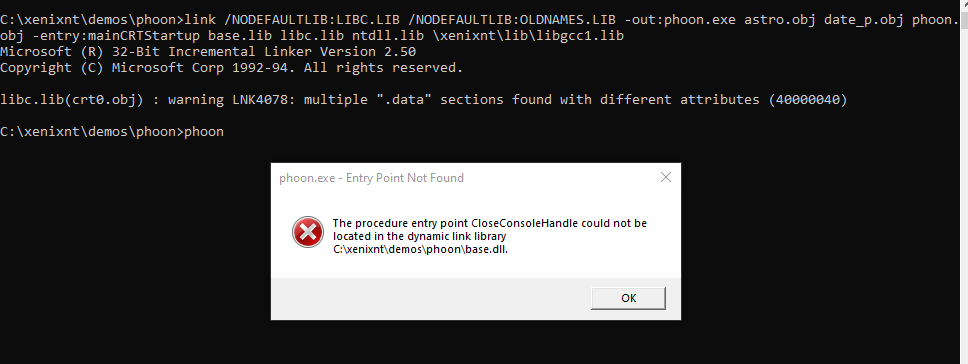
C:\xenixnt\demos\phoon>link /NODEFAULTLIB:LIBC.LIB /NODEFAULTLIB:OLDNAMES.LIB -out:phoon.exe astro.obj date_p.obj phoon.obj -entry:mainCRTStartup base.lib wincrt.lib ntdll.lib \xenixnt\lib\libgcc1.lib
Microsoft (R) 32-Bit Incremental Linker Version 2.50
Copyright (C) Microsoft Corp 1992-94. All rights reserved.

wincrt.lib(maincrt0.obj) : warning LNK4078: multiple ".data" sections found with different attributes (40000040)
astro.obj : error LNK2001: unresolved external symbol "_asin"
astro.obj : error LNK2001: unresolved external symbol "_atan"
astro.obj : error LNK2001: unresolved external symbol "_atan2"
phoon.obj : error LNK2001: unresolved external symbol "_cos"
astro.obj : error LNK2001: unresolved external symbol "_cos"
astro.obj : error LNK2001: unresolved external symbol "_floor"
astro.obj : error LNK2001: unresolved external symbol "_sin"
phoon.obj : error LNK2001: unresolved external symbol "_sqrt"
astro.obj : error LNK2001: unresolved external symbol "_sqrt"
astro.obj : error LNK2001: unresolved external symbol "_tan"
phoon.exe : error LNK1120: 8 unresolved externals
Which is not surprising as there is no FPU/Floating point math support in 196. I tried the December 1991 Pre-Release, but it failed for other reasons:
I did copy over BASE.DLL BASERTL.DLL CSR.DLL DBGDLL.DLL as it wanted, but despite the symbol being in the DLL it didn’t load.
So that’s why I’m using the libraries from the Win32s SDK.
Okay, so far now we have GCC 1.40 compiling to an old Xenix GAS assembler, and linking with Microsoft link from Visual C++ 1.0/2.0 era. The next step is to see if we can just link the objects under 196, and get a running EXE!
I have this tiny fibonacci example program, so with it compiled & assembled by GCC & GAS, I did the final link under 196, and YES it runs!
Possible things to do? GCC should be able to build itself, so it should be possible to build GCC and link that on 196 or December 1991, and get a native version of GCC on NT. The other possibility is to get newer versions of GCC (cc1 drop in replacements) to build for Xenix and / or OS/2. Obviously this Xenix linker is the gateway to older 386 Microsoft based products!