

Mô tả
Your WordPress site is probably losing search traffic right now. Not because your content is bad, but because the technical details search engines use to rank pages are broken, missing, or ignored. Most site owners never find out until the damage is done.
SEOWorkerAI finds those problems and fixes them automatically, across every page and post, on a schedule, without you needing to become an SEO expert.
Who It’s For
Site owners, bloggers, consultants, and agencies who want more search traffic without spending hours in SEO dashboards. If you have ever thought “I know my SEO needs work but I do not know where to start”, this is built for you.
What It Does
SEOWorkerAI scans your site, identifies the issues quietly suppressing your rankings, and applies fixes across your pages and posts. Every change is reviewable before it goes live. Nothing changes on your site without your knowledge.
Specifically, it handles:
Meta titles and descriptions. Written and applied across your site to earn more clicks from search results.
JSON-LD schema. Fixed and kept complete so search engines understand your content correctly.
Image alt text. Filled in across pages and posts, including the ones you forgot about years ago.
On-page content signals. Surfaced and addressed so pages perform closer to their actual potential.
Content briefs. Research-backed article ideas with audience pain points and draft outlines so you always know what to write next.
You Stay in Control
Every recommended fix lands in your Changes Center first. You review it, approve it, skip it, or revert it. There is an option to apply changes automatically if you prefer fully hands-off operation, but it is off by default. You decide.
Improvements that need a human, like connecting Google Analytics, go to the Action Center so nothing falls through the cracks.
Your site’s front end is completely untouched. No external scripts, no added CSS, no impact on page speed.
Get Started Free
Every site gets a free initial audit, including automatic improvements applied to up to 200 pages and posts. No credit card required.
Free: 1 site, up to 200 pages or posts, 1 content brief
Starter: $60 per month or $500 per year. 1 site, 1,000 pages or posts, 150 content briefs per month
Growth: $100 per month or $1,000 per year. 3 sites, 10,000 pages or posts, 450 content briefs per month
Quick Overview
- Install and activate the plugin
- Connect Google Search Console and Google Analytics
- Run your free audit
- Review changes in the Changes Center and act on items in the Action Center
- Let the system keep improving your site while you focus on everything else
Your Data, Your Control
SEOWorkerAI is transparent about what it sends and when. During registration, your site details are shared with the service so audits can run. Google data, if you connect it, is used only to power your recommendations and is never used to train AI models. You can revoke all access at any time.
Full details are in the External Services section below.
How It Works
- Activate the plugin.
- Go to the SEOWorkerAI settings page in wp-admin.
- Click Connect to dashboard to register your site. This is always a manual step — nothing is registered automatically on activation.
- Optionally connect Google Search Console and Google Analytics.
- Run your free initial audit.
- Review recommended changes in the Changes Center, act on items in the Action Center, and explore ideas in Content Briefs.
What the Plugin Adds to WordPress
- Settings tab — manage your connection, Google integrations, billing, and automation preferences
- Changes Center — review, approve, or skip SEO changes recommended by the audit
- Action Center — view improvements that need your manual attention
- Content Briefs tab — browse article ideas, audience pain points, interesting angles, and a draft article for inspiration
- Plugin tables and option storage for connection state, sync data, and action history
What Is Never Automatic
- Your site is not registered when the plugin is activated
- Google access is not requested without your action
- No changes are applied to your site without your knowledge
- No external scripts, styles, or assets are loaded on your site’s front end
External Services
This plugin connects to external services to deliver its features. Here is exactly what is sent, when, and why.
1. SEOWorkerAI (app.seoworkerai.com)
This is the core service that powers the plugin.
Used for: site registration, ownership verification, billing, SEO audit, change sync, action sync, content brief sync, and multi-site dashboard management.
Data sent and when:
- During registration (started manually by an admin from the settings page): your site URL, WordPress version, timezone, site type, admin email, site description, preferred tone and style, selected locations, and your site’s SEO settings. The plugin also sends your WordPress user list — including each user’s name, email address, WordPress role, and avatar URL — so the SEOWorkerAI dashboard can show who has access to manage the connected site. This is disclosed to you before registration begins.
- During audit and sync operations (triggered manually or on a schedule you control): site identifiers, recommended change payloads, execution results, revert status, and operational logs.
- During content brief sync: your site identifier and authorization token.
The SEOWorkerAI service uses third-party AI providers to power features such as content brief generation, SEO recommendations, audit analysis, and action workflows. When these features run, data from your connected accounts — including data from Google Search Console or Google Analytics if you have connected them — may be included as input to these AI providers.
AI providers currently used by SEOWorkerAI:
- Google Gemini (Google LLC) — https://policies.google.com/privacy
- OpenAI (GPT models) — https://openai.com/privacy
- Anthropic (Claude models) — https://www.anthropic.com/legal/privacy
These providers act as processors on behalf of SEOWorkerAI. Data sent to them is used only to fulfill the specific feature you requested. Not all providers may be active simultaneously. Google-connected data is not used to train AI models. Each provider’s API terms prohibit training on submitted data.
Service information:
– Terms of Service: https://seoworkerai.com/en/terms-and-conditions/
– Privacy Policy: https://seoworkerai.com/en/privacy-policy/
2. Google (via SEOWorkerAI)
Used for: connecting Google Search Console and Google Analytics to enrich your SEO analysis.
Data sent and when:
- When you start the Google connection from the settings page, the plugin sends the requested OAuth permission scopes and a return URL to the SEOWorkerAI service, which handles the OAuth flow with Google on your behalf.
- After the connection is complete, the result and connected-property status are returned to your WordPress site so the settings screen reflects the current state.
- If Google Search Console is connected, SEOWorkerAI may access property identifiers, search performance data, query summaries, page performance data, and indexing metadata to surface SEO opportunities and power audit recommendations.
- If Google Analytics is connected, SEOWorkerAI may access read-only traffic, engagement, and landing-page data to add performance context to audits and content briefs.
Google service information:
– Terms of Service: https://policies.google.com/terms
– Privacy Policy: https://policies.google.com/privacy
You can revoke Google access at any time from the plugin settings page or directly from your Google account at https://myaccount.google.com/permissions.
Ảnh màn hình

Settings overview with site connection, Google integrations, strategy settings, and automation controls. 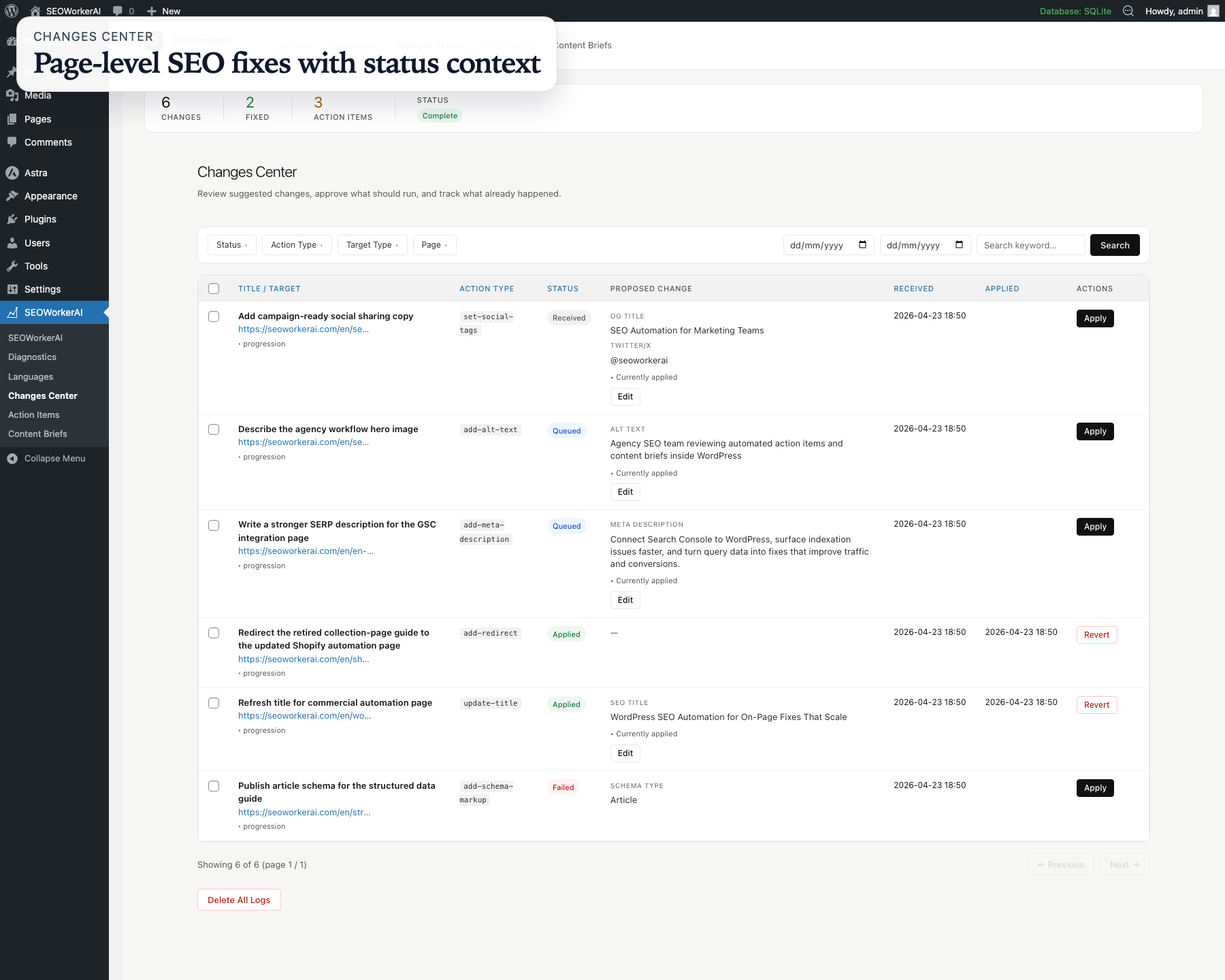
Changes Center with queued, applied, and failed SEO updates tied to specific WordPress pages. 
Action Items showing realistic blockers such as metadata review, schema prerequisites, and social-profile tasks. 
Content Briefs queue with keyword opportunities, assignment state, and search-intent context. 
Content Brief detail view with outline, audience framing, and writing guidance.
Cài đặt
- Upload the plugin folder to
/wp-content/plugins/. - Activate the plugin through the Plugins screen in wp-admin.
- Go to the SEOWorkerAI settings page.
- Click Connect to dashboard to register your site.
- Optionally connect Google Search Console and Google Analytics.
- Run your free audit and start reviewing changes.
Hỏi đáp
-
Does the plugin work without a SEOWorkerAI account?
-
No. You need an active account at seoworkerai.com for the plugin to do anything useful. Registration, audits, change sync, and billing all run through the SEOWorkerAI service.
-
Is the initial audit really free?
-
Yes. Every site gets a free initial audit that can automatically apply improvements to up to 200 pages and posts. Ongoing automation beyond that requires a paid plan.
-
Will the plugin make changes to my site without telling me?
-
No. By default, every recommended change is shown to you in the Changes Center before anything is applied. There is an option to turn on automatic application, but it is off by default and you control it.
-
Does the plugin register my site automatically when I activate it?
-
No. Registration is always started manually by an admin from the settings page. Nothing is sent to our service on activation.
-
What is the Action Center?
-
Some SEO improvements cannot be applied automatically and need a person to take action — for example, connecting Google Analytics to your site. Those items appear in the Action Center so you can handle them at your own pace.
-
What are Content Briefs?
-
Content Briefs give you research-backed article ideas for your site. Each brief can include suggested angles, audience pain points gathered from forums and online discussions, and a draft article to use as inspiration when writing.
-
What data does the plugin send about my users?
-
During site registration, the plugin sends a list of your WordPress users — including each person’s name, email address, WordPress role, and avatar URL — to the SEOWorkerAI dashboard. This lets you and your team manage which users have access to the connected site from the dashboard. This disclosure appears on the settings page before you register.
-
Does the SEOWorkerAI service use AI providers?
-
Yes. The SEOWorkerAI service uses third-party AI providers — including Google Gemini, OpenAI, Anthropic, and xAI — to power features like content brief generation, audit analysis, and SEO recommendations. Data from your connected site and Google accounts may be sent to these providers to fulfill those features. This is described in detail in the External Services section above and in the SEOWorkerAI privacy policy at https://seoworkerai.com/en/privacy-policy/
-
Is my Google data used to train AI models?
-
No. Google-connected data is not used to train any AI or machine learning models. Each AI provider SEOWorkerAI works with operates under API terms that prohibit training on submitted data.
-
Does the plugin affect my site’s speed or front-end performance?
-
No. The plugin does not load any JavaScript, CSS, fonts, or images from external sources on your site’s front end. Your visitors are not affected.
-
Can I connect Google Search Console and Google Analytics?
-
Yes. You can connect both from the settings page. The OAuth flow is handled by SEOWorkerAI on behalf of Google.
-
Can I connect multiple sites?
-
Yes. The Growth plan supports up to 3 connected sites managed from your SEOWorkerAI dashboard. This is useful for agencies and consultants managing multiple client sites.
-
Can I undo a change after it has been applied?
-
Many changes can be reverted. Revert status is tracked per change in the Changes Center. Whether a specific change can be reversed depends on its type, and you can check that from the review screen.
-
Can I use this plugin on a client’s site?
-
Yes. If your plan allows, you can connect multiple sites to a shared SEOWorkerAI account, which makes it straightforward to manage SEO across several client sites from one dashboard.
-
Is this plugin affiliated with Google?
-
No. The plugin and SEOWorkerAI service are independent of Google LLC.
-
How do I revoke Google access?
-
You can disconnect Google Search Console or Google Analytics from the plugin settings page at any time. You can also revoke access directly from your Google account at https://myaccount.google.com/permissions.
Đánh giá
Không có đánh giá nào cho plugin này.
Người đóng góp & Lập trình viên
“SEOWorkerAI: Your Automated SEO Specialist, Running 24/7” là mã nguồn mở. Những người sau đã đóng góp vào plugin này.
Những người đóng góp
Dịch “SEOWorkerAI: Your Automated SEO Specialist, Running 24/7” sang ngôn ngữ của bạn.
Muốn tham gia phát triển?
Duyệt code, check out SVN repository, hoặc theo dõi nhật ký phát triển qua RSS.
Nhật ký thay đổi
2.8.8
- Tightened the WordPress readme short description so the store listing renders cleanly.
2.8.7
- Reframed the public plugin positioning around a 24/7 automated SEO specialist experience.
- Refreshed the opening readme copy to match the updated value proposition and release message.
2.8.6
- Reframed the public plugin positioning around a 24/7 automated AI SEO specialist experience.
- Refreshed the opening readme copy to match the new value proposition and release message.
2.8.5
- Simplified onboarding and fixed language prefix detection across registration and site profile syncing.
- Tightened redirect runtime status handling so connector health checks stay accurate.
2.8.4
- Normalize the stored company ID from synced company context so the settings screen stays aligned after company rehomes or invitation accepts.
2.8.3
- Published the WordPress.org banner, plugin icon, and admin screenshots so the store listing reflects the actual product experience.
- Hardened the release pipeline to validate and ship the required WordPress.org assets with every tagged release.
- Kept the screenshot captions aligned with the uploaded admin views for a clearer store presentation.
2.8.2
- Replaced the WordPress.org screenshots with realistic admin views that show the plugin workflow instead of the public homepage.
- Added a proper
Screenshotssection to the readme so the directory captions match the uploaded assets.
2.8.1
- Default incomplete strategy settings to a
0domain rating so new and existing installs can connect without a manual save step.
2.8
- Added homepage inventory deduplication so the connector no longer reports the homepage twice and initial audits can complete without manual cleanup.
2.0.0
- Initial public release of SEOWorkerAI.